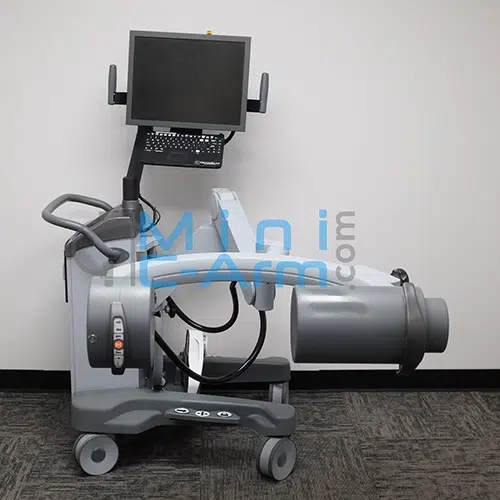
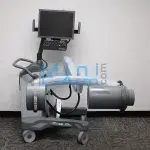
The Orthoscan HD is a fully digital, PACS-ready mini C-arm designed specifically for extremity imaging. Its 18.2-inch arc depth is 36% greater than competing mini C-arms, and its 41-inch vertical range is the widest in the Orthoscan family, giving surgeons the working space and positioning flexibility that standard mini C-arms cannot provide. A 50-micron focal spot and auto-adjusting image processing deliver consistent image quality across patient sizes and hardware density.
The President of Minicarm.com is a co-founder of Orthoscan and maintain the largest independent inventory of factory-level Orthoscan HD parts in the country. Every certified-refurbished Orthoscan HD ships with OEM parts, professional calibration, and a nationwide service network.
Available for sale, lease, or rent nationwide.
1 (800) 643-2998
Faster Case Turnover with Less Repositioning
Reduce setup time between cases with easier patient positioning and faster transitions from shoulder to knee imaging. Keep procedures moving with fewer workflow interruptions.
Native DICOM 3.0 export to PACS, USB, and printer, with optional wireless communication module.
Hosted by: Christopher Bacon, Co-Founder of Orthoscan and President of Minicarm.com
Welcome to Minicarm.com. Today we're going to take a look at the Orthoscan HD.
To turn it on, press the green power button. It takes about a minute or so for it to boot up, so in the meantime we'll show the articulation of the C-arm.
Here's our orbital rotation.
Wig-wag.
Imaging
Now that we're ready to image, let's grab our handy hand phantom here. When we want an image, hold the button for approximately two to three seconds for the image to brighten up and then settle back a little bit, then let go.
You can also use a foot pedal. In between imaging, wait approximately a second so the machine has time to process the image.
That's where you're going to get your best imaging from.
X-Ray Controls
These are the two pad controls for the Orthoscan HD. The orange button is your X-ray button. As mentioned, you want to hold it down for two to three seconds to get a good, clear image.
From here you can also rotate counterclockwise and clockwise, change your technique up and down, tag your image and untag it, and print or save from that button.
Up here is your laser button, which gives you laser crosshairs that are approximately in the middle of the image.
Keyboard Functions
Here are all your keyboard functions on your Orthoscan HD.
You can rotate counterclockwise or clockwise, decrease or increase your dose, and go back into auto mode. Up here you can access three different zoom settings. You can also flip the image, negate, and change your still/motion settings, which is basically your noise control. You can change your edge; we usually keep it on low.
You can also hit the save all button, and then every time you let off the foot switch it will save the image. You can also record in a cine loop, print, save, and access patient information.
Hit escape to exit, and here's your recall screen. The patient information screen is where you can enter your prefix, family name, first name, middle name, suffix, birth date, sex, patient ID, scheduled date, physician, procedure, procedure ID, and user preferences. You can also access your work list by clicking on the Get Work List tab, then press Accept to go to the imaging screen.
In the recall screen, you can choose cases to send to PACS or save to a USB stick. Select a case by opening it, press Enter, and then press Print or USB Save. You can also thumb through images using the left and right arrow keys.
Shutting Down
When you finish using the machine, you will want to shut it off and unplug it. To shut it off, press the green button and wait for the fans to shut down. This allows Windows to shut down properly. Then unplug it from the wall. We recommend this in case of electrical disturbances, to protect the machine.
This has been an overview of the Orthoscan HD. For sales or service, please give us a call at 800-643-2998 or send us an email at info@Minicarm.com. Thank you.
The Orthoscan HD is the mini C-arm of choice for practices that need extended vertical range and arc depth for shoulder, knee, and OR-grade extremity work. Common applications include:
The President of Minicarm.com is a co-founder of Orthoscan and maintain the largest independent inventory of factory-level Orthoscan HD parts in the country. No other service organization has this depth of HD-specific expertise, parts availability, and refurbishment capability. 85% of issues are resolved through 24/7 phone and video support. When on-site service is needed, certified Orthoscan-trained technicians respond within 24 to 48 hours in most U.S. metro areas.
| Model | Detector | Resolution | Best For |
|---|---|---|---|
| Orthoscan HD | 6/4-inch image intensifier | 1k x 1k | Extremity Imaging |
| Orthoscan UC | 6/4-inch image intensifier | 1k x 1k | In-office extremity, compact footprint |
| Orthoscan FD | 6x4-inch flat detector | 2k x 1.5k | Surgical extremity, sterile field |
| Orthoscan FD Pulse | 6/6-inch flat detector | 1.5k x 1.5k | Lowest dose, pulsed fluoroscopy |
| Orthoscan Mobile DI | 6x4-inch flat detector | 2k x 1.5k | Portable (35 lb) |
Need a full datasheet? Request the Orthoscan HD service manual.
Mini C-Arm Rentals are available for surge coverage, clinical trials, and case-by-case projects. Monthly rental rates start in the low four figures depending on rental length.
Estimate monthly revenue and break-even timeline using our Clinical Reimbursement Calculator
Review our Mini C-Arm Buyer’s Guide
Learn more about financing options.
Please share your contact information and details about your needs, and one of our medical imaging experts will get in touch with you shortly. Not ready to buy yet or have questions?
The President of Minicarm.com is a co-founder of Orthoscan and are the only independent source for factory-level Orthoscan HD parts, service, and refurbishment in the United States.
Both the Orthoscan HD and Orthoscan FD are used for surgical extremity imaging, but they serve different workflows. The HD focuses on extended vertical range (41 inches) and arc depth (18.2 inches) for beach-chair shoulder imaging and standing-knee positioning. The FD focuses on surgical workflow with a 6x4-inch flat detector at 2k x 1.5k resolution and a thin sterile-field housing that sits directly on the OR table. The HD is the positioning-focused diagnostic mini C-arm; the FD is the flat-detector surgical OR mini C-arm.
Certified-refurbished Orthoscan HD pricing starts as low as $20,000 and typically runs up to $30,000 depending on year of manufacture, hours of use, included accessories, and warranty tier. Call (800) 643-2998 for an exact quote.
Yes. The Orthoscan HD has 41 inches of vertical range and an 18.2-inch arc depth specifically designed for shoulder positioning and standing-knee imaging. This extended vertical range is one of the primary reasons orthopedic and sports medicine practices choose the HD over other mini C-arms.
Both the HD and UC use a 6/4-inch image intensifier at 1k x 1k resolution. The key difference is vertical range and arc depth. The HD has 41 inches of vertical travel and an 18.2-inch arc depth designed for beach-chair and standing-knee cases. The UC is the most compact mini C-arm in the Orthoscan lineup, built for in-office extremity work where footprint matters more than vertical range.