

工作空间的好处
工作区是让网页井井有条、简化浏览的好方法。

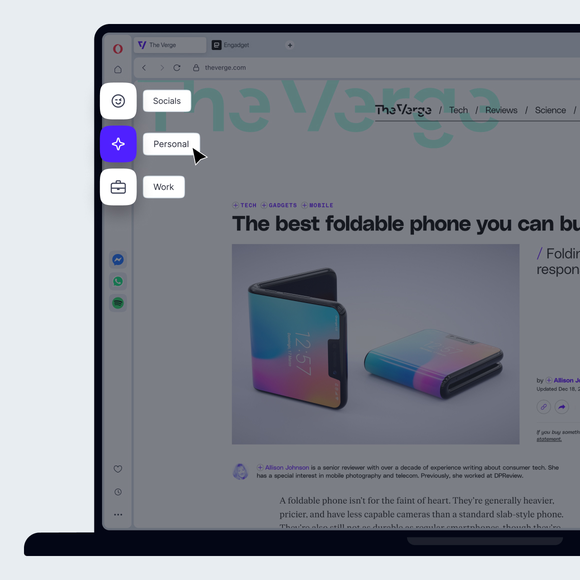


使用单独的自定义工作区整理浏览器
工作区的效率
We all get a little over-ambitious with tabs sometimes, opening so many that we lose track of what we’re doing. Then the problems start. The text on tabs is hidden, so we can’t find the tab we’re looking for. Multiple loading tabs slow down the browser. Tabs are forgotten, never to be seen again, and what we were working on to begin with gets lost among the cacophony of open tabs.
This is why Opera has created workspaces, which allows users to organize tabs and keep them in distinct groups. You can create a separate tab group for work (aptly named), a research project, shopping, trip planning - whatever is relevant to you - minimizing the number of tabs in your window and compartmentalizing your projects. Use an existing group or create a new group of workspace tabs as needed.
Workspaces exist as customizable icons on the top of your sidebar, so you can switch between them quickly and easily. This smooth transition not only puts an end to awkward managing, searching through, and reordering tabs, but also helps you focus on what you’re doing.
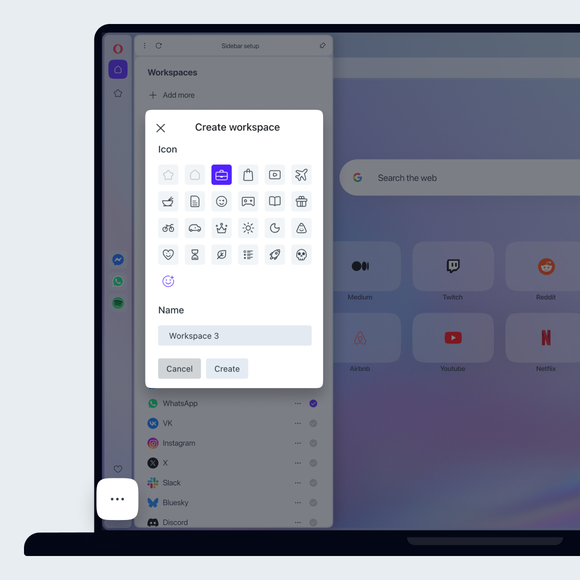
在侧边栏设置面板中管理工作区
要管理您的工作区,请从侧边栏底部的三点菜单打开侧边栏设置面板,默认情况下该功能已启用。在这里,你可以轻松创建、自定义、隐藏或删除标签组,还可以管理 Opera 浏览器中的其他实用工具和功能。
易于使用
工作区的更多选项在选项卡菜单中,例如将选项卡(或一组选项卡)移动到另一个工作区。右键单击打开的标签页即可使用标签页菜单。选项卡选项,如重新加载所有选项卡或高亮显示重复的选项卡,只能在活动窗口的选项卡组中使用。同样,可视化标签循环器(Ctrl+Tab)可显示当前工作区中的标签,让你可以继续专注于手头的工作。与 Opera 的所有功能一样,工作区功能是一种提高生活质量的浏览器工具,能大大改善你的工作、娱乐和日常浏览。
您值得拥有更好的浏览器