What G2 users dislike about Filevine:
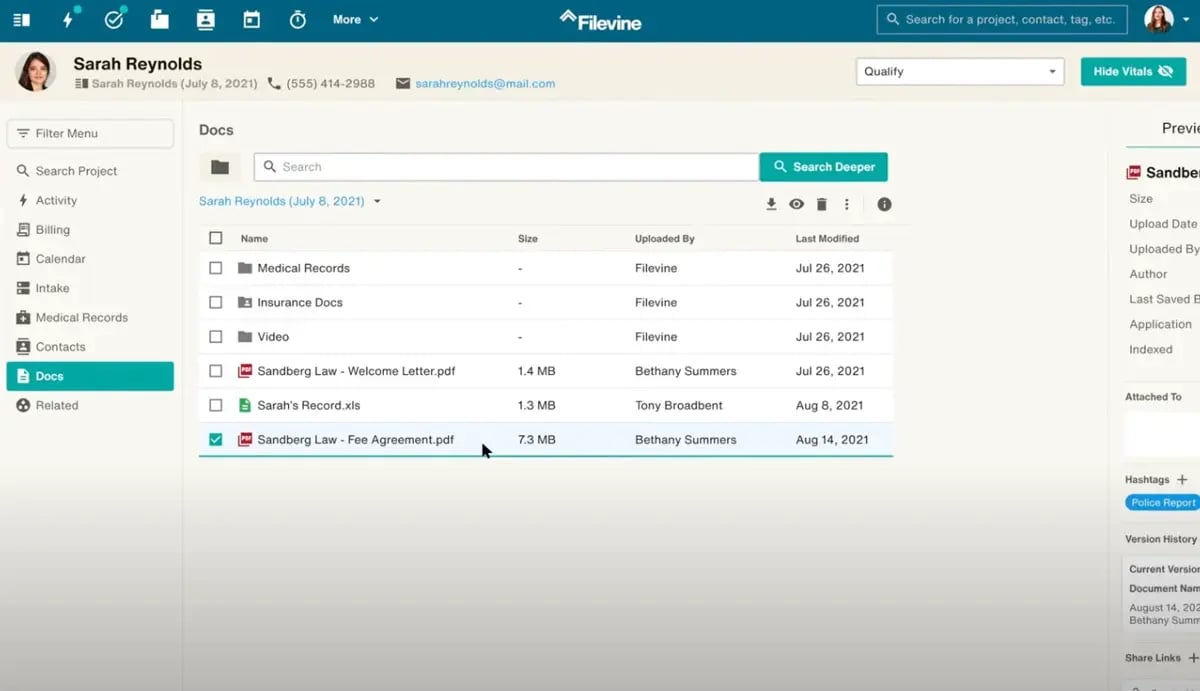
"Accessing clients in the address book. For example, when you try to look up a client in the address book or the 'Search for Project' section, if you misspell the client name, even by one letter, it will pull up a list of irrelevant names, names that aren't even close to what I type in. I find this odd and extremely inefficient."
- Filevine Review, Olivia B, Intake Department Coordinator.
3. Assembly Neos: Best cloud-based case management platform
Neos seems to be a modern reimagining of Needles, a legacy case management system that many law firms relied on for years. While Needles was reliable, it wasn’t cloud-based, which is where Neos comes in, offering the same capabilities but with the benefits of cloud technology.
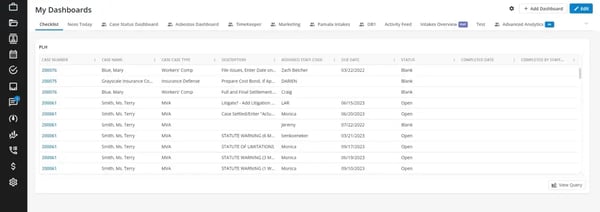
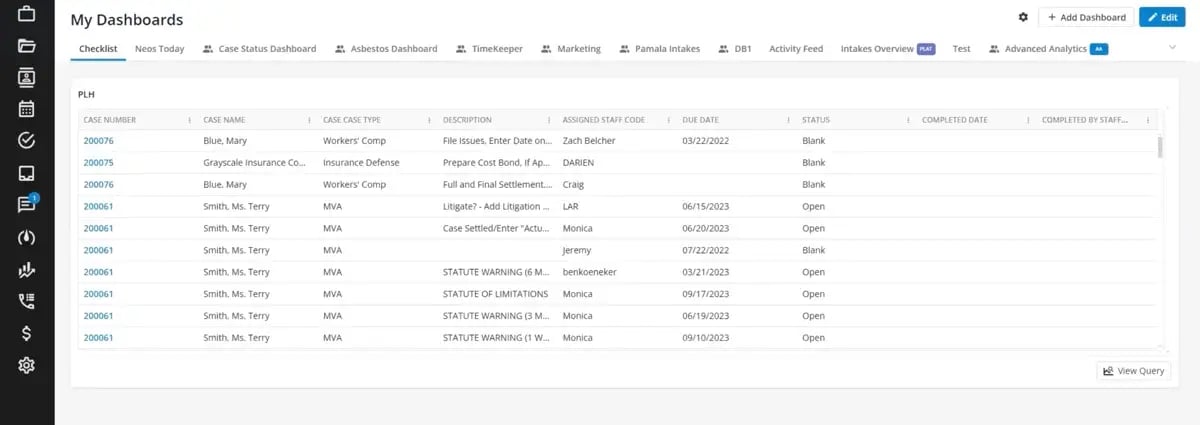
One standout feature that I’ve noticed is how smooth Neos feels compared to traditional systems. Users often point out that the navigation is intuitive, and the workflows are logically structured, making it easy to find what you need. I frequently see G2 reviewers highlight the left-hand menu as a helpful touch, ensuring everything is within reach without having to dig through layers of menus.
Another aspect that stands out is Neos’ customer support. I’ve come across positive feedback from many users who mention that the support team is responsive and helpful when they need assistance. This seems to be a crucial factor for law firms, as solid customer support can really make or break a firm’s experience with a new system.
Neos’ reporting and analytics capabilities get a lot of attention from G2 users. If you are asking, “Which vendor offers the best reporting for case outcomes?” Assembly Neos might be the answer. Unlike some legal case management tools that only provide basic reports, Neos allows firms to customize their reporting with its advanced search feature, enabling them to track the metrics that matter most to their practice. This flexibility is frequently called out as one of its biggest strengths.
That said, some reviewers mention performance issues, particularly slower load times when handling a large volume of cases. While this can occasionally affect quick access to information, users still value the platform’s overall reporting depth and customization once data is retrieved.
Another point raised in reviews relates to bugs and glitches. A few users report occasional errors that interrupt workflows, especially during high-priority tasks. Even so, most agree these issues are not constant and that Neos’ modern design and automation features help offset them.
Neos also has a bit of a learning curve in the beginning. Several reviewers note it can take time to become fully comfortable with the system, particularly for those expecting an immediately seamless experience. Still, once onboarded, many highlight how intuitive the workflows become and how much efficiency it adds to daily operations.
Overall, Neos stands out as a strong option for firms seeking a modern, customizable case management system. For those moving from Needles to a cloud-based solution, Neos is consistently recommended as a solid upgrade based on G2 feedback.
What I like about Assembly Neos:
- From what I’ve gathered, Neos’ intuitive navigation is highly appreciated, as users find it easy to move through cases, documents, and tasks without needing a manual, making the workflow seamless.
- I’ve noticed that Neos offers flexibility in tracking metrics, allowing firms to focus on the metrics that matter most to their cases and operations. The real-time analytics feature is frequently highlighted as a major advantage.
What G2 users like about Assembly Neos:
"I like that it allows me to do detailed notes and includes tasks that I am able to complete. Personal injury cases include a variety of tasks that must be completed in a timely manner. This helps me to stay on top of everything I have to do, including record requests, letters of representation, and following up with adjusters, providers, and clients.
The ease of use makes it easy to stay organized, on track, and manage all of the tasks I have to complete. I use it daily, and it is easy to integrate my notes, emails, phone calls, and whatever else I need to add to the file. By checking my checklist, I can make sure to implement all of the necessary steps when managing my cases. Plus, customer support is a breeze as I can always get in touch with someone if I have issues."
- Assembly Neos Review, Kristen P, Paralegal.
What I dislike about Assembly Neos:
- From what I’ve seen in G2 user feedback, lag, crashes, and unexpected bugs are common issues, especially after updates, and users have mentioned that waiting for the system to catch up can be frustrating during casework.
- Based on G2 feedback, the learning curve can be steep for new users, particularly for firms switching over from Needles or another case management system, even though the platform is user-friendly once you get the hang of it.
What G2 users dislike about Assembly Neos:
"Mobile application is not available, hope they will release mobile application of HelloFax. So, instead of sending phone-scanned files to the computer, I can directly fax them via mobile."
- Assembly Neos Review, Stella N.
4. MyCase: Best case management system for solo and small firms
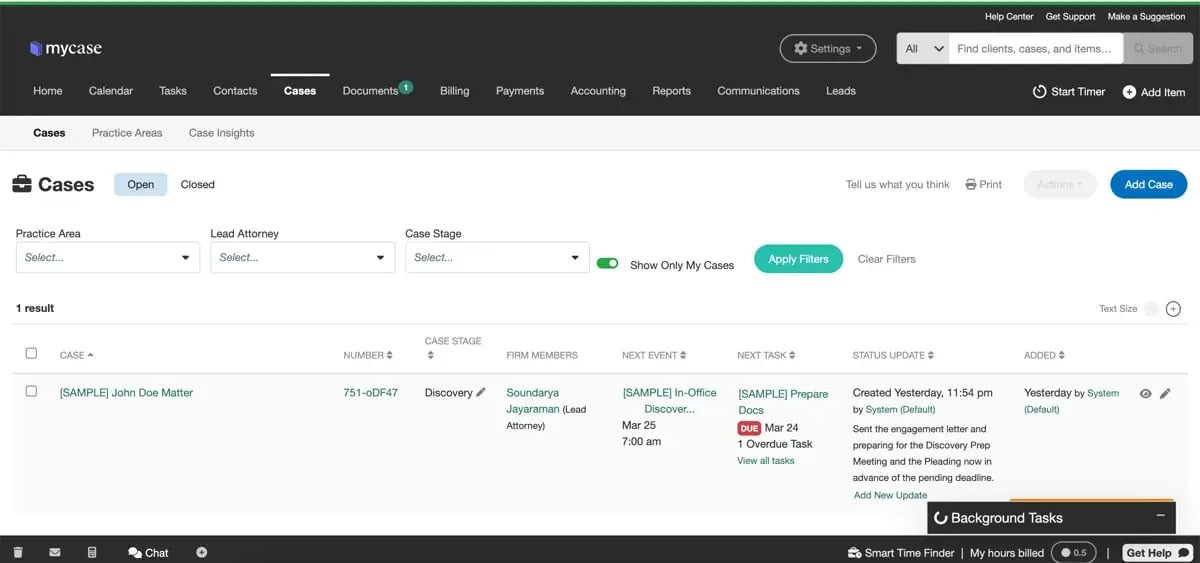
MyCase is a popular choice for legal professionals because it strikes a balance between simplicity and functionality. It’s designed to streamline case management, billing, and client communication without overwhelming users with unnecessary complexity. Many users seem to appreciate that it doesn’t try to be an all-in-one, enterprise-level solution, which can be a relief for firms that need a straightforward tool without a steep learning curve.
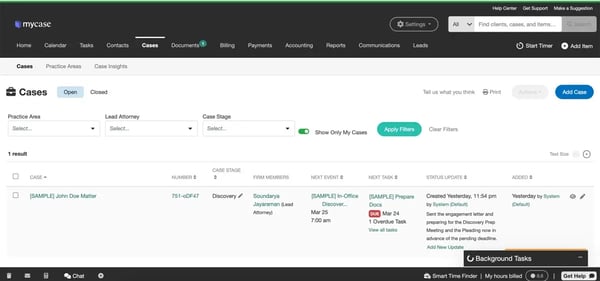
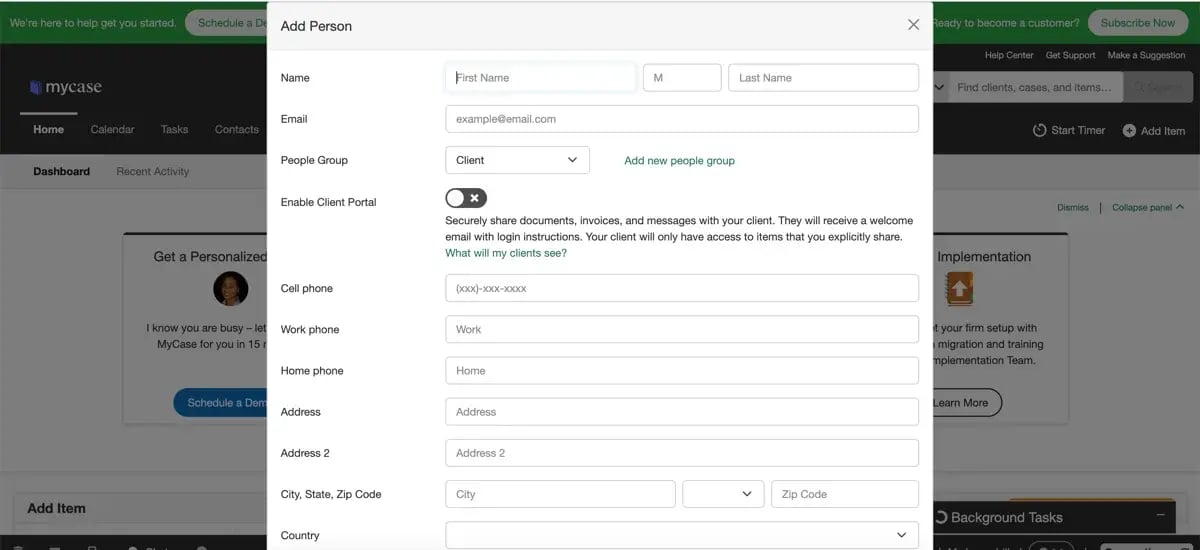
MyCase’s user interface is frequently praised by G2 reviewers for how intuitive it is. It is positioned squarely for small practices, and that’s wise — 85% of small law firms report spending $10,000 or less annually on software. From adding contacts and cases to setting up workflows and tasks, everything feels streamlined. I’ve noticed that users often mention how easy it is to communicate securely with clients, which seems to be a key benefit for law firms looking for a user-friendly case management solution.
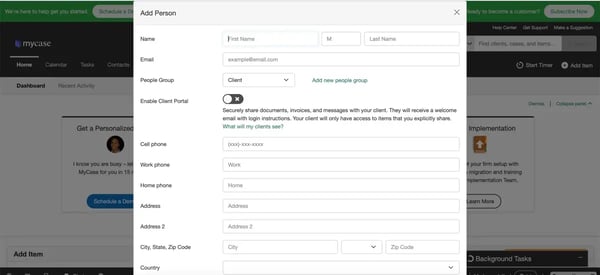
One feature I see getting a lot of positive attention is the built-in conflict check when adding new cases. Many legal professionals note that this is a valuable function, as it helps avoid potential ethical issues before they start working on a case. It’s a small feature, but based on user feedback, it appears to be a significant selling point.
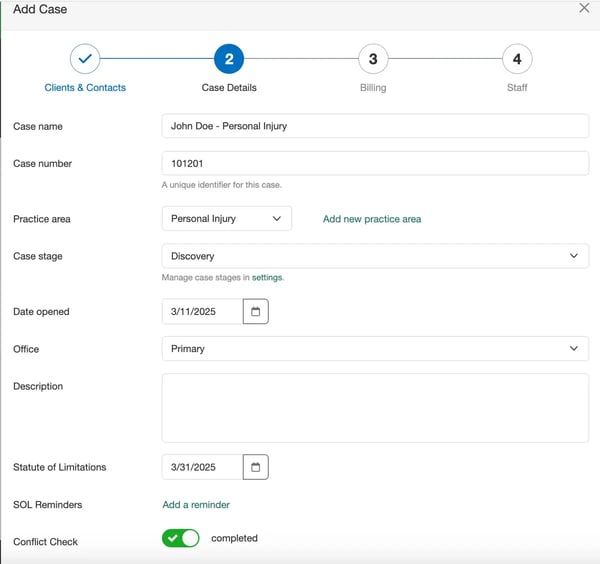
Something else that stands out in reviews is MyCase’s client communication features. G2 users consistently highlight how the built-in client portal and secure messaging improve communication, making it easier to stay in touch with clients. Additionally, the integration with LawPay at no extra cost is frequently mentioned as an added advantage, which seems to be appreciated by users handling client payments.
MyCase is often highlighted as a solid choice for small to mid-sized firms with 2 to 50 practitioners. Many users value its streamlined approach to billing, client communication, and case management, offering essential functionality without the complexity or cost of larger platforms.
That said, email integration is one of the areas that reviewers mention most often. Some users note that syncing emails and calendars can be inconsistent, which makes task management and scheduling less seamless than expected. Still, many firms continue to find MyCase effective overall, especially when used alongside other communication tools.
Billing and accounting features also come up in feedback. A few users find these capabilities slightly more complex than they’d like, particularly when generating itemized bills or tracking invoices. While this requires extra steps for some, reviewers generally agree that once workflows are set up, the system reliably supports billing and client payments.
Overall, based on the feedback I’ve reviewed, MyCase offers strong value for small firms seeking a cost-effective solution. Its 10-day free trial also gives practices the chance to test the platform before committing. If you are asking, “Which case management system is most cost-effective for small practices?” MyCase might be the answer.
What I like about MyCase:
- From what I’ve seen, setting up cases, adding contacts, and tracking tasks in this tool feels straightforward, with no steep learning curve, making it easy for users to get started without extensive training.
- A feature that stands out for many is the client portal, where clients can check case updates, send messages, and pay invoices, streamlining communication and reducing the need for constant emails or phone calls.
What G2 users like about MyCase:
"What attracted me to MyCase about 10 years ago was the Client Portal. I loved that my clients could check on case status without having to speak to me. Then I discovered that MyCase was easy to use & comprehensive. Along the way, I made suggestions to MyCase on how to improve their offerings & to my surprise, they were quickly implemented. And they still try to stay ahead of the curve."
- MyCase Review, Joseph F, Senior Attorney.
What I dislike about MyCase:
- I’ve noticed that some G2 users mention that syncing with email providers isn’t always seamless, which can be frustrating when trying to manage emails and calendars effectively.
- Based on G2 user feedback, while invoicing and payments work well, many users find the accounting features difficult to understand and navigate, which seems to be a common source of frustration.
What G2 users dislike about MyCase:
"The email integration is not very helpful, needing constant manual review."
- MyCase Review, Mariana P, Paralegal.
5. CASEpeer: Best for personal injury law firms
CASEpeer seems to be a top choice for personal injury (PI) firms, and it’s easy to see why. From what I’ve gathered, users appreciate that it’s built specifically for PI case management, so there’s no need to spend hours setting up custom fields, templates, or workflows like you might with other legal case management systems. It’s ready to use out of the box, which I’ve seen users praise for saving time and effort.
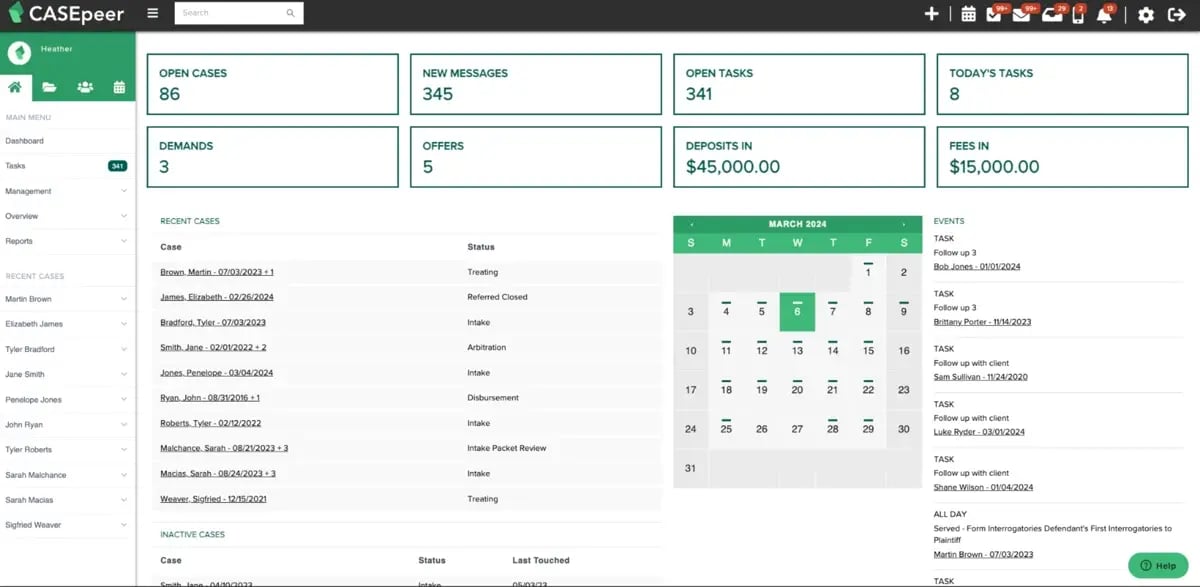
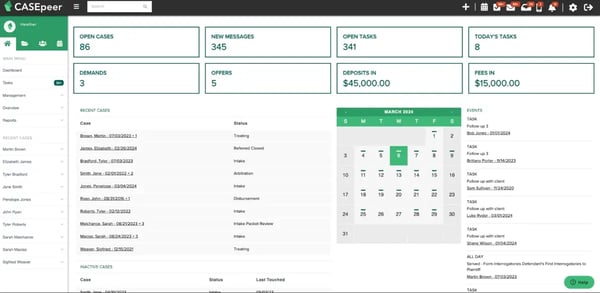
I’ve noticed that the dashboard gets a lot of attention, with many users mentioning how it gives a quick and clear snapshot of their caseload. You can easily see open cases, tasks, settlement demands, and deposits — all the key things you need when managing high-volume PI claims. A consistent theme in reviews is that CASEpeer is really focused on the needs of PI firms, making it easier to stay organized without any unnecessary complexity.
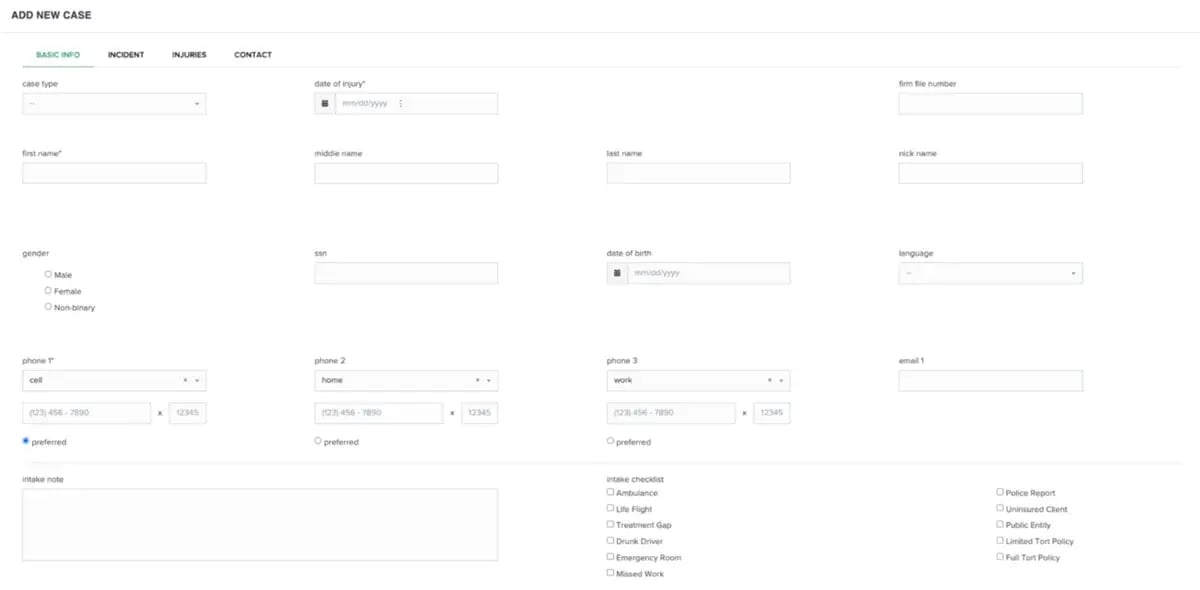
One feature I’ve seen getting a lot of praise is the intake process. Many users highlight how thorough it is, ensuring that all the necessary client information is captured from the start. This seems to be especially beneficial for firms that rely on workflows and case milestones, as CASEpeer keeps everything in check.
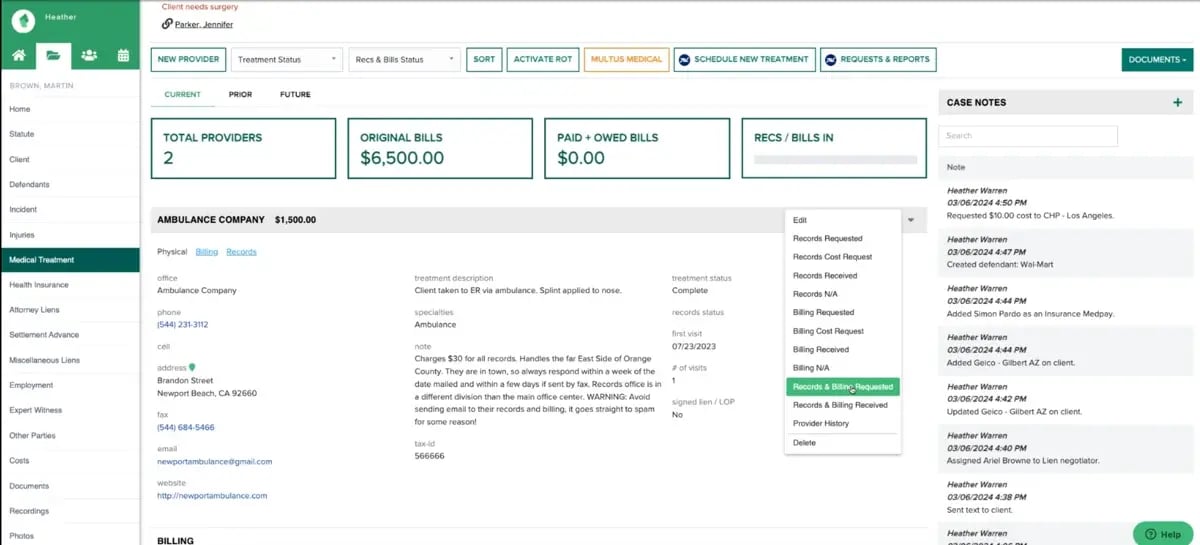
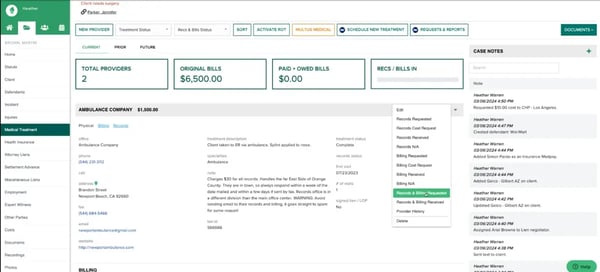
From my review of user feedback, I also noticed that medical records and lien tracking are another feature that stands out. Instead of relying on spreadsheets or emails, users appreciate that all the relevant information is housed directly in the system, making it easier to track and follow up on outstanding records and expenses. This seems like a huge benefit for firms that deal with complex PI cases.
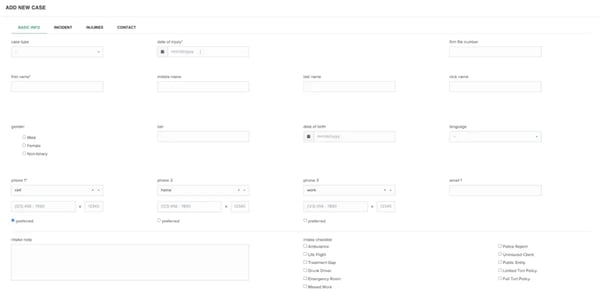
CASEpeer is often praised by personal injury firms for how well it organizes cases, manages medical records, and streamlines settlements in a workflow-driven system. Many users highlight its structured approach as one of its biggest strengths.
That said, some reviewers mention that the interface can feel a bit rigid. Because it follows a predefined structure, customization options are somewhat limited, especially for firms handling a wider variety of cases. Still, users in the personal injury space consistently find that this structure works to their advantage, helping standardize processes and reduce errors.
Integration capabilities also come up in feedback. CASEpeer offers the essential integrations most firms need, but some reviewers note that third-party compatibility could be more robust. Even so, it works smoothly within its niche, and for firms already using LawPay, CASEpeer and MyCase (both owned by AffiniPay) provide seamless payment processing integration.
Overall, if you’re running a PI firm, CASEpeer could be a great fit. Based on user feedback, it shines in its ability to keep casework organized and efficient, making it a strong option for practices focused on personal injury law.
What I like about CASEpeer:
- I love the fact that it’s built specifically for personal injury firms means I don’t have to spend hours customizing it to fit the PI workflow. Everything from medical treatment tracking to settlement offers is already baked in
- I find the dashboard clean, and it is easy to see where cases stand at a glance. Open tasks, client messages, and even financials like deposits and fees are all in one place, which keeps things moving.
What G2 users like about CASEpeer:
"I like the fact that they have drilled down a PI case to its finest details so that no stone is left unturned"
- CASEpeer Review, Rex M, Small legal firm.
What I dislike about CASEpeer:
- Based on my research, if your firm handles other practice areas alongside personal injury, you might find yourself wishing for more customization options. G2 reviewers mention the same, noting that CASEpeer’s features are highly structured for personal injury but less flexible for mixed practices.
- I wish the integrations were a bit more effortless. CASEpeer covers the basics, but if you’re looking for great compatibility with third-party tools, you might run into some limitations. On G2, users echo this, pointing out that while core integrations work, broader compatibility could be improved.
What G2 users dislike about CASEpeer:
"We wish there was more flexibility in some of the categories. For instance, it has set topics for notes, and it would be much better for us if we could create our own topics as there are certain topics missing - i.e., Medical Bills. Also, we've struggled with certain Integrations such as Quickbooks."
- CASEpeer Review, Verified G2 user in legal services.
6. Litify: Best enterprise legal platform for scalability
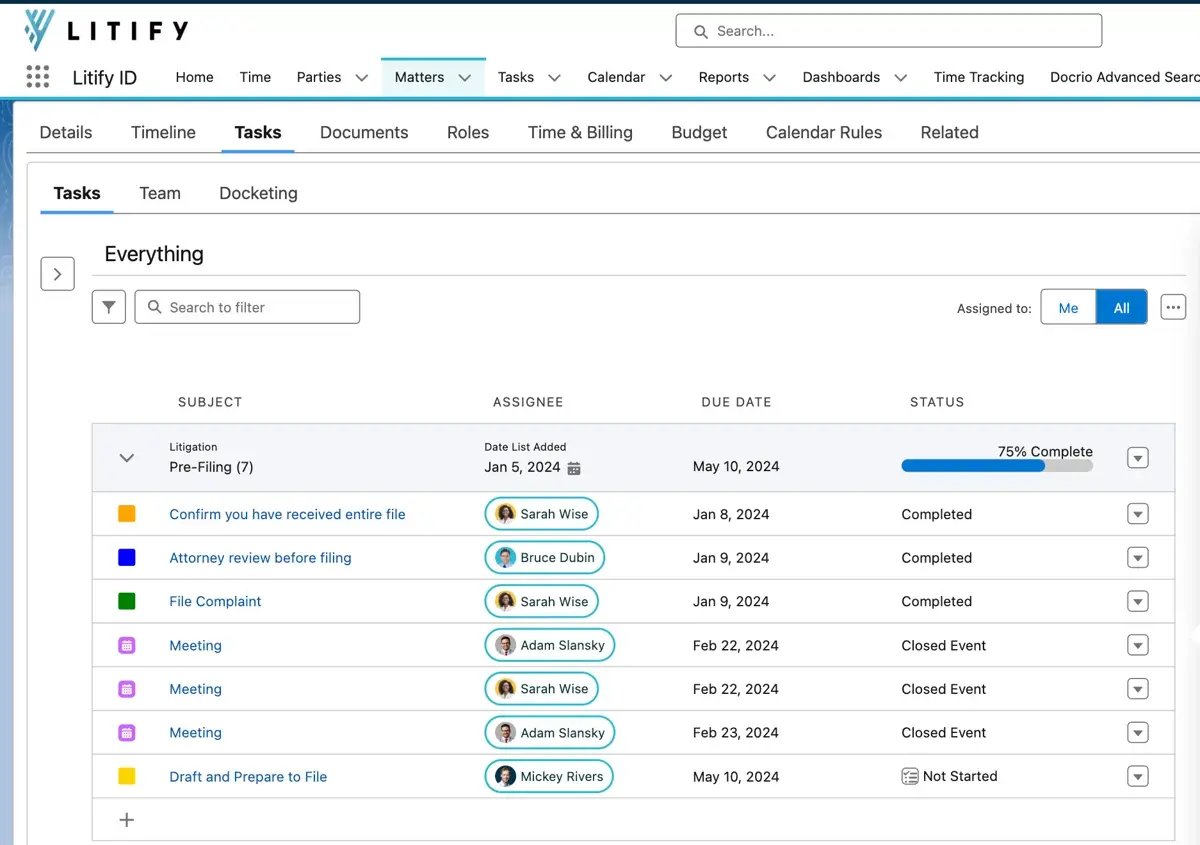
Litify is not a typical legal case management software I've seen. It’s built on Salesforce, which means it’s packed with enterprise-level CRM features, automation, and reporting tools that many law firms don’t usually get access to. If you are asking, “What is the top case management software for large law firms?” Litify might be the answer.
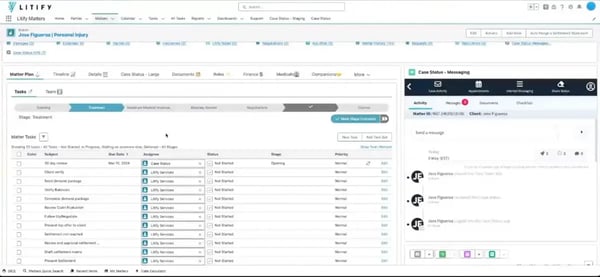
From my research, Litify is one of the few platforms that delivers customization for different legal practices, be it personal injury, insurance defense, immigration, claims litigation and bankruptcy law firms or corporate legal for enterprises.
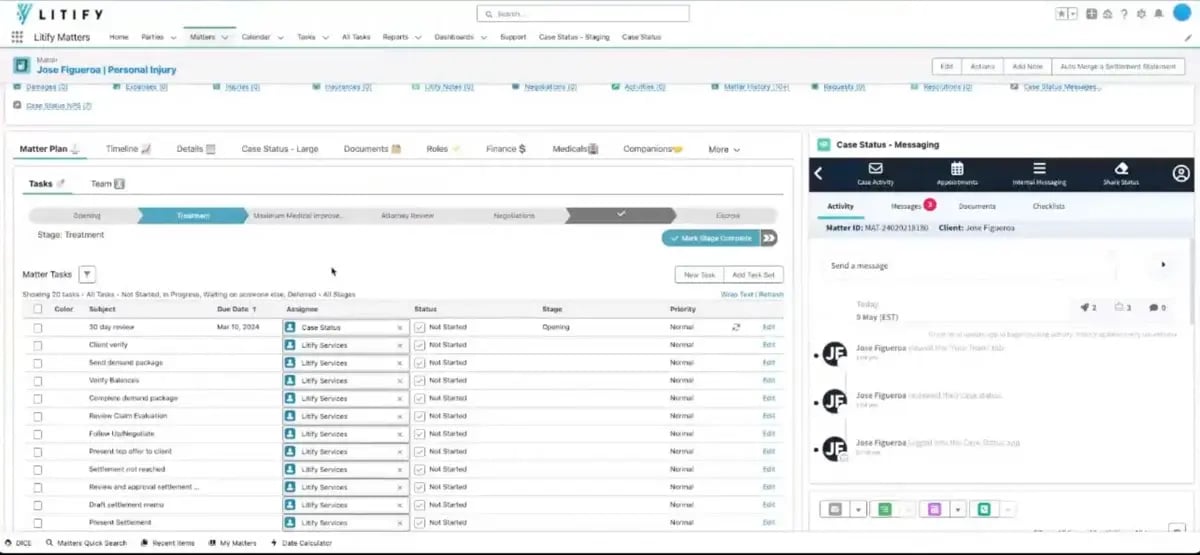
During my product tour, I was impressed by how well-structured everything was. Starting with detailed intake forms and automated workflows that effortlessly move cases from emails to clients for eSignature to billing and matter management, everything felt streamlined, reducing the need for manual follow-ups.
What really stood out to me was the real-time analytics, which gave insight into case quality and high-priority matters, helping firms quickly identify urgent cases and allocate resources where they’re needed most.
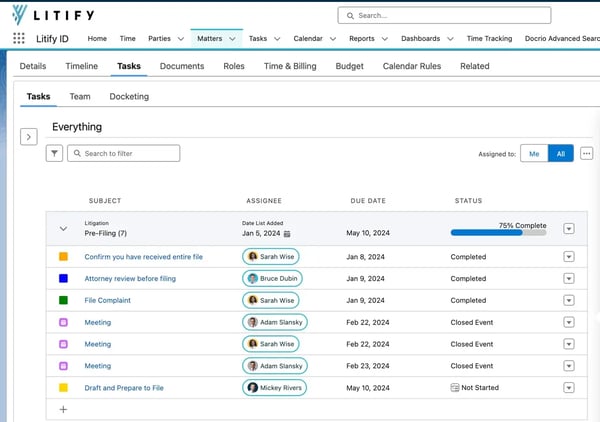
Another standout for me was the power of reporting and analytics. Litify lets you track case progress, firm performance, and financials in detail.
Litify stands out for its scalability and depth, offering powerful reporting, automation, and customization capabilities. Many large and growing firms highlight how it supports complex workflows and provides the flexibility to adapt as their needs evolve.
That said, Litify is not an out-of-the-box solution. Because it’s built on Salesforce, the setup process can take time and feel more involved, particularly for firms without prior Salesforce experience. The upside is that this foundation gives firms the ability to configure the system exactly the way they want, making it highly adaptable once implemented.
Some reviewers also mention that the learning curve is steeper than with more straightforward case management tools. Given the platform’s extensive functionality, this makes sense, and many note that with proper onboarding, teams are able to unlock significant long-term value.
Overall, Litify is a great choice for large, growing firms that want a powerful, scalable system with deep reporting and automation. For enterprises managing corporate legal matters, it’s also worth considering — especially if Salesforce is already part of your tech stack.
What I like about Litify:
- From what I’ve seen, Litify’s customization options are highly valued, allowing firms to tailor workflows to their specific needs, whether in personal injury, insurance defense, or corporate legal, unlike other tools that impose rigid workflows.
- Many users appreciate the real-time visibility of case quality and high-priority matters, with data-driven insights alongside case management helping them stay proactive rather than reactive.
What G2 users like about Litify:
"Litify is a great business and case management tool. It allows customization so that you can manage your cases in the way that is important to you. All of the available automation make things consistent and easy. The smallest details are now completed seamlessly. As a manager, the reports and dashboards help to make my job a lot easier, too."
- Litify Review, Nicole K, Office Manager/Paralegal.
What I dislike about Litify:
- From what I’ve observed, onboarding and configuring Litify to suit specific needs takes time, making it something that can’t be immediately used without a setup period. G2 reviewers share similar feedback, noting that implementation can feel lengthy before firms see full value.
- I’ve noticed that getting comfortable with the system requires time and training, as its extensive features and customization options may require firms to undergo thorough training to fully leverage its capabilities. On G2, users often mention the same, pointing out a steep learning curve despite Litify’s powerful customization.
What G2 users dislike about Litify:
"It takes a lot to implement, so be prepared to invest time and resources."
- Litify Review, Emery W, CEO.
AI has come to legal tech too. Explore the best AI legal assistant software that can help with tasks ranging from research and document generation to insights and analytics.
7. Smokeball: Best for small firms needing time tracking and document automation
If you're a small or mid-sized law firm, Smokeball is one of those tools that can help streamline your day-to-day operations and make things feel less chaotic. From what I've seen, it's built to help firms keep cases, documents, and billing organized — all while automatically tracking your time in the background, so you don't have to constantly stop and log every email or phone call.
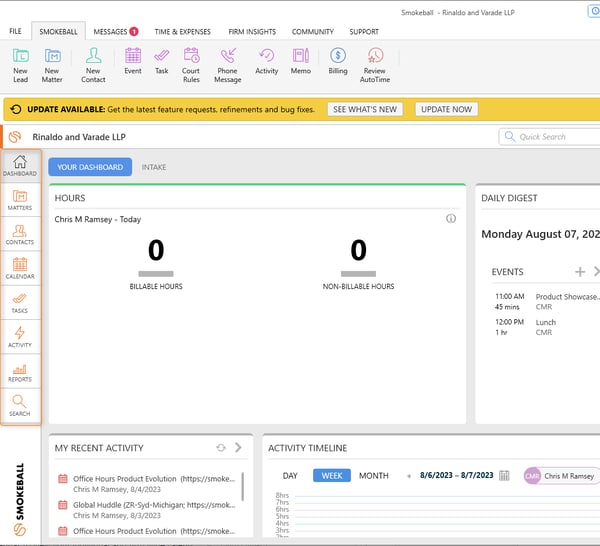
One feature that caught my attention is the automatic time tracking with AutoTime. A lot of platforms require you to manually track your hours or rely on a timer, but Smokeball does it seamlessly in the background. This is a huge win for firms that bill by the hour, as it eliminates the need for constantly remembering to track time. For me, this is a big convenience factor, especially when it comes to ensuring that no billable time slips through the cracks.
Another thing I really liked about Smokeball is its document automation. With over 20,000 legal form templates ready to go, it can automatically pull in relevant data for each matter. If you are asking, “Which platform offers the fastest document management tools?” Smokeball might be the answer. This level of efficiency is a game-changer, particularly for firms handling high-volume cases, as it saves a ton of time. And the integrations? They're solid. In addition to that, customer support has a strong reputation, which isn’t always guaranteed with legal case management tools.
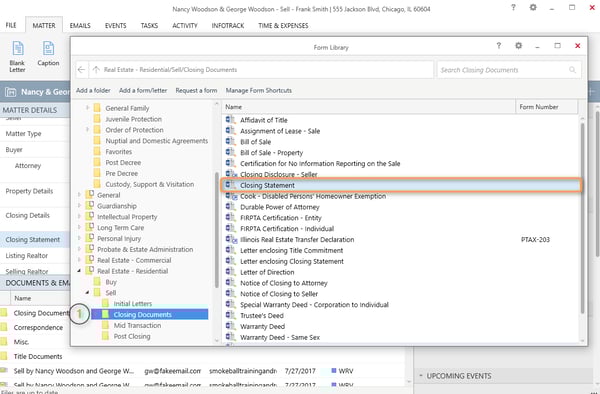
Smokeball is often praised for helping firms capture more billable hours without adding extra work. Many users highlight how it streamlines billing and case management while keeping everything organized in one place.
That said, some reviewers mention that billing features could be expanded further. While the platform covers the basics well, adding advanced options such as split billing would make it even stronger for firms with more complex invoicing needs. Still, users agree that the existing tools are reliable for day-to-day billing and client management.
I also came across feedback about the learning curve. Smokeball is generally considered easy to use, but a few features take some time to get comfortable with, particularly for those transitioning from another system. Even so, once users adjust, they find the platform runs smoothly and the transition becomes much easier.
All in all, Smokeball stands out as a solid choice for firms looking to stay organized and improve billing efficiency. For practices that want to maximize billable hours while simplifying workflows, it’s definitely worth considering.
What I like about Smokeball:
- From what I’ve seen, Smokeball’s automatic billable hour tracking is a standout feature, tracking hours in the background without needing to manually start and stop a timer, which many users find convenient.
- I’ve heard a lot of positive feedback about Smokeball’s responsive support team, with users highlighting how quickly they resolve issues, which is a big plus when help is needed urgently.
What G2 users like about Smokeball:
"I love that Smokeball is always updating. We have been using them for 8 years or so, and it has gone from a simple cloud-based document sharing and work production software to integrating much more and basically all aspects of our practice, including billing, ordering titles, and court filings. I also live how responsive and helpful their customer service is, when i have an issue I do not hesitate to contact them and I know it will be resolved timely (if not right away)."
- Smokeball Review, Jenny G, Partner.
What I dislike about Smokeball:
- From what I’ve seen, while Smokeball excels at tracking billable time, some users mention challenges with billing and invoicing and are looking for further improvements in those areas. On G2, reviewers echo this, pointing out that invoicing features could be more streamlined.
- I’ve noticed that while Smokeball is well-designed, there’s a bit of a learning curve, which isn’t a deal breaker, but something users suggest considering before implementation. G2 users share similar feedback, noting that while the platform is intuitive overall, it still takes some time to get fully comfortable.
What G2 users dislike about Smokeball:
"I do not like that they haven't added a split billing option for when the invoice needs to be split between parties, such as GAL clients. Also, it's a minor thing, but although Smokeball does integrate with Word, it does not have the autocorrect feature, and some of the formatting options available in all parts of Smokeball, such as the memos area (where we do keep a lot of our notes). We would love to see that added."
- Smokeball review, Mandy L, Office Manager.
8. Legistify: Best case management solution for in-house legal teams
Legistify isn't your traditional legal case management software — it's designed more for in-house legal teams and enterprises. If you're part of a law firm, I'd suggest skipping this one and moving on to the next option. However, if you work for a company that needs a tool to track litigation, manage contracts, and keep tabs on legal matters, Legistify could be exactly what you're looking for.
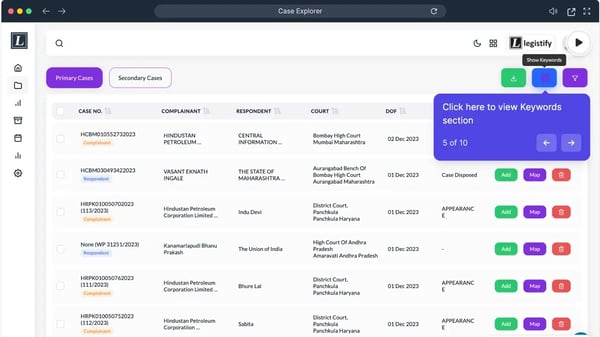
What stood out to me is the ability to track litigation across multiple locations and generate reports. It gives you a single source of truth for all legal matters, which is incredibly valuable for companies that frequently deal with disputes or regulatory oversight. I found the dashboards for contract management, litigation tracking, and intellectual property management to be well-organized, providing a quick overview of active cases, pending contracts, and upcoming deadlines — all in one place. If you are asking, “What legal case management software supports multi-office operations?” Legistify might be the answer.
A feature I really appreciated was the contract management system. Rather than digging through emails or shared drives to find the latest contract version, everything is neatly stored in one central location. You can easily access key details like renewal dates, obligations, and associated risks. For companies dealing with high volumes of contracts, this feature can save a lot of time and help reduce legal exposure from missing important deadlines or working with outdated agreements.
That said, there are a few technical points to keep in mind. Some users mention occasional bugs, slower load times, or glitches that can interrupt workflows. Another area of feedback relates to OTP-based authentication — while it adds security, it can feel inconvenient when quick access is needed. Still, many note that once inside, the system runs reliably and provides strong functionality for contract and compliance management.
Despite these considerations, Legistify appears to be a solid choice for large companies with in-house legal teams, particularly those needing to manage litigation, contracts, and compliance across multiple areas. If your organization fits that bill, it’s certainly worth exploring.
What I like about Legistify:
- From what I’ve seen, Legistify’s case tracking is a standout feature, allowing users to track cases, court dates, deadlines, and progress all in one place, which enterprise legal teams find highly beneficial.
- I’ve noticed that contract management is centralized, making it easy to track renewal dates, obligations, and key details, which eliminates much of the usual back-and-forth and streamlines the process.
What G2 users like about Legistify:
"Legal case tracking and the real-time alerts have been handled easily through the Litigation Management tool. We have been using the tool for a while now, and the way we get alerts from the tool on our cases is what we like the best. also, for the real-time updates, we can always reach out to the team."
- Legistify Review, Sujata D, Legal Manager.
What I dislike about Legistify:
- I’ve noticed that some G2 users mention bugs, slow load times, and glitches, which can disrupt workflows, especially when dealing with critical legal data, leading to frustration.
- Based on G2 user feedback, while security is important, some users report issues with the repeated OTP-based login, making it harder to access the system quickly when urgent tasks need to be completed.
What G2 users dislike about Legistify:
"Although my team and I thoroughly enjoy the tool, at times, there have been occasional reports from users of technical glitches, which can potentially disrupt the litigation process. The tech team is working on improving this."
- Legistify Review, Murali Krishna N, Head of Legal Company Secretary.
9. SmartAdvocate: Best litigation management software for high-volume practices
From what I saw, SmartAdvocate is one of those legal case management systems that packs a lot of power under the hood, but it does take some getting used to.
Originally designed for personal injury and mass tort litigation firms, SmartAdvocate has clearly expanded its reach. Now, I see it being used by a wide variety of litigation firms that need structured case tracking, document management, and workflow automation.
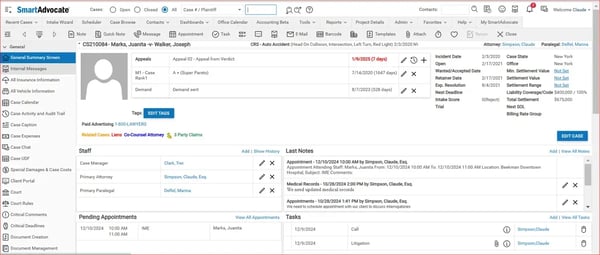
One thing that really stood out to me was its document management. If you've ever struggled with keeping case files organized or trying to find the latest version of a document, SmartAdvocate has you covered. It centralizes everything, making it easily accessible, which is a lifesaver when juggling multiple cases.
The case tracking and workflow management features in SmartAdvocate are solid. They help keep tasks organized, assign reminders, and ensure workflows are structured — exactly what’s needed when handling high volumes of litigation cases. Many reviewers note that this keeps things moving forward without important tasks slipping through the cracks.
That said, there are some points to consider. The biggest one I noticed from reviewers is the learning curve. SmartAdvocate is highly feature-rich and customizable, which pays off long-term, but it can feel a bit overwhelming in the beginning. Still, with proper training and time, users often find it becomes a powerful tool for managing cases efficiently.
Some users also mention occasional slow loading times, though this doesn’t seem to be a widespread issue. For the most part, reviewers highlight that SmartAdvocate runs smoothly once set up.
Overall, I’d say SmartAdvocate is a strong choice for firms that need structured case management, solid document organization, and reliable customer support — especially for personal injury or mass tort practices. While it may take a little time to get comfortable with it, the long-term benefits make it a worthwhile investment.
What I like about SmartAdvocate:
- From what I’ve seen, SmartAdvocate’s design is tailored for litigation, particularly for personal injury and mass tort firms, with case tracking and workflow automation helping users manage high caseloads efficiently.
- I’ve noticed that case file management is seamless with SmartAdvocate, as everything is centralized, well-organized, and easy to access, making it a big help when handling large volumes of litigation documents.
What G2 users like about SmartAdvocate:
"I have worked with this software for a few years. I must say that I am so thankful for its existence. I can't even imagine how firms work without it. There are so many things that I like, from the reports to the case management system, SOL tracking, saved Documents, and the list is endless."
- SmartAdvocate Review, Hemily F, Paralegal.
What I dislike about SmartAdvocate:
- From what I’ve observed, SmartAdvocate has a learning curve, and users need time to get fully comfortable with its features, so it’s not something you can instantly master. On G2, reviewers echo this, often noting that while the platform is powerful, onboarding takes time.
- I’ve noticed that while lag and slow load times aren’t a dealbreaker, some users mention occasional delays, which can be something to keep in mind even though it generally runs fine. G2 users have flagged the same, pointing out performance slowdowns as an occasional drawback.
What G2 users dislike about SmartAdvocate:
"Not as intuitive as it could be, would appreciate simplicity."
- SmartAdvocate Review, Alex D, Paralegal.
If you’re still exploring options, NeoDeluxe, PracticePanther, eIMMIGRATION by Cerenade, and Provakil are also worth considering, depending on your firm’s specific needs.

Frequently asked questions on legal case management software
1. What is legal case management software?
Legal case management software is a specialized tool designed to help law firms, attorneys, and legal professionals manage cases, client data, documents, billing, and communications in one centralized platform. It streamlines administrative tasks, improves collaboration, and enhances productivity.
2. What software provides the most advanced client communication features?
MyCase and Clio stand out with secure client portals, integrated messaging, and real-time updates. These tools simplify communication and reduce reliance on email.
3. What platform offers the best integration with legal research tools?
Clio integrates smoothly with research platforms and productivity tools, making it easy to connect case data with legal research, billing, and document workflows.
4. Which vendor provides the most secure cloud-based case management?
Clio and Smokeball are frequently highlighted for strong security, offering encryption, role-based access, and compliance with ABA, GDPR, and HIPAA standards.
5. What is the top case management software for large law firms?
Litify, built on Salesforce, is a top choice for large firms needing scalability, workflow automation, and enterprise-grade analytics across multiple practice areas.
6. How does legal practice management software differ from legal case management software?
While both solutions help legal professionals manage their work, legal practice management software covers a broader scope, including firm-wide operations like accounting, marketing, and client intake. In contrast, legal case management software focuses specifically on case-related tasks like document management and scheduling though most software today includes functionalities of both.
7. What are the benefits of using legal case management software?
Benefits of using a legal case management solution, be it for a law firm or solo practitioners include:
- Increased productivity and organization
- Reduced administrative workload
- Better client communication and case tracking
- Improved billing accuracy and financial management
- Compliance with legal industry regulations
8. What features should I look for in legal case management software?
Key features to consider include:
- Case and document management
- Time tracking and billing
- Calendar and task management
- Client and contact management
- Secure client communication
- Integrations with email and other legal tools
- Compliance and security features
9. What is the best legal case management software for small firms?
For small firms, the best options include Clio, MyCase, and PracticePanther. These solutions offer affordable pricing, essential features, and scalability as the firm grows.
10. Do solo lawyers need case management software?
Yes, solo practitioners can benefit from law practice management software like Clio or MyCase, which help automate repetitive tasks, manage client communications, and keep track of deadlines efficiently.
11. Are there free legal case management software options available?
Some legal case management tools offer free trials or limited free plans, but most comprehensive solutions require a paid subscription to access advanced features.
Case closed, verdict passed!
If I have to share something that I learned while researching the best legal case management software, it’s that the "best" software is entirely subjective. It’s about how well a platform fits into the way your firm actually works.
Some platforms shine in automation, while others prioritize client management, billing, or document organization. But even the best software won’t run your firm for you. It’s all about how you configure it, how well your team adopts it, and whether it actually solves your biggest pain points. There will be some frustrations, maybe a clunky interface, a missing feature, or a steeper learning curve than expected. But the goal is to find the software that makes your day-to-day easier, not more frustrating.
If you’re on the fence, start with a free trial, evaluate the workflows, and see if it actually makes your job smoother. Because let’s be honest: no software is perfect, but the right one can make a big difference in how efficiently your firm operates.
Want the best of the best? Discover the top legal software based on G2 user reviews and ratings.