[go: up one dir, main page]

This is the Trace Id: 77b48f2a9ffa7aa27b1be6bf2552d3a9
跳到主要內容
Azure

知識採礦

從您的所有內容中發掘潛在深入解析。

什麼是知識採礦?

知識採礦是人工智慧 (AI) 中的新興專業領域,能夠綜合運用多項智慧型服務,從大量資訊中快速學習。知識採礦可讓組織大規模地深入了解並輕鬆探索資訊、發掘隱藏的深入解析,以及找出關聯性與模式。

說明新的語意搜尋功能如何了解使用者意圖,以及如何根據內容為使用者排序最相關的搜尋結果

Azure Kubernetes Service (AKS)

透過專用連接器,從 Azure 來源 (例如 Azure Blob 儲存體、Azure 表格儲存體、Azure SQL Database 與 Azure Cosmos DB) 以及數百個協力廠商來源擷取內容。

從 PDF、Microsoft Word、PowerPoint 與 CSV 等格式的檔案擷取文字內容。請參閱支援格式的完整清單。

邊走上樓梯邊使用平板電腦和筆的人。

應用程式服務

能夠處理各種文件類型與格式,包括影像、音訊檔案、表單、網頁與 Office 文件,不需花費建置與管理個別 AI 服務的成本,也不具複雜度。

使用像是影像分類、臉部辨識、語言偵測與關鍵片語擷取等認知技能,擴充對內容的了解能力。這些作業可讓您在搜尋索引中產生在來源中原本無法使用的新欄位。

資料服務

整合可以使用任何自選語言或架構建置的自訂模型或分類器。使用預先設定的搜尋或透過分析工具與商務應用程式來探索深入解析。

為您的獨特案例使用自訂分析器進行補強、叫用模糊搜尋查詢、新增內容相關搜尋或設定加權的參數。

返回索引標籤

知識採礦的運作方式

透過協調各種 AI 功能,知識採礦可提供增強的體驗,讓組織能夠更快地從本來無法利用的內容中取得深入解析。知識採礦分為三個階段:擷取、擴充與探索。

步驟 1

使用連至第一方與協力廠商資料存放區的連接器,從某一範圍的來源中擷取內容。

擷取結構化和非結構化資料

步驟 2

使用 AI 功能擴充內容,使您能夠擷取資訊、找出模式並加深了解。

使用所有模型 (包括視覺、語言、語音、決策和搜尋) 擴充內容

步驟 3

透過搜尋、Bot、現有的商務應用程式和資料視覺效果,來探索新索引資料。
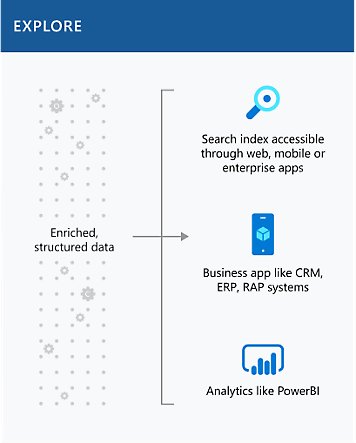
透過搜尋、商務應用程式與分析來探索已擴充的結構化資料

深入了解知識採礦產品與服務

Azure 認知搜尋

使用唯一具有內建 AI 功能的雲端搜尋服務來識別及探索相關內容。

Azure AI 服務

利用認知功能來擴展對各種內容類型的了解。

Azure Machine Learning

套用機器學習模型作為自訂技能,滿足特定需求 (例如產業專屬規定)。

Azure Bot Services

設計互動式體驗,讓使用者可以透過 Bot 介面從資料擷取資訊。

深入了解範例解決方案架構

內容研究

當組織交辦員工檢閱與研究技術資料時,一頁又一頁地閱讀密密麻麻的文字會非常枯燥乏味。知識採礦可協助員工快速檢閱這些密密麻麻的資料。

稽核、風險與合規性管理

開發人員可以使用知識採礦,協助律師從探索文件中快速找出重要實體,並為文件中的重要想法加上旗標。

商務程序管理

在投標競爭相當激烈的產業中,或是當問題的診斷必須快速或近乎即時的時候,公司可以使用知識採礦來避免會造成重大損失的錯誤。

客戶支援與意見反應分析

對於許多公司而言,客戶支援不僅成本高昂,而且沒有效率。知識採礦可協助客戶支援團隊大規模地快速找出正確的回答,解決客戶的疑問,或評估客戶情緒狀況。

數位資產管理

有鑑於每天建立的非結構化資料量非常多,許多公司在運用或查找檔案中的資訊時都遭遇困難。透過搜尋索引進行知識採礦,可讓終端客戶和員工輕鬆又快速地找出所需的資訊。

案例管理

許多公司會為多個行業打造產品,因此與不同廠商和買家往來的商機就會成倍增加。知識採礦可協助組織詳查數千頁的來源,以建立準確的出價。

客戶運用知識採礦的成就斐然

這家全球工程公司使用知識採礦建立了更準確的投標企劃案,省下人工編譯的時間。

在工作網站上的 Howden 員工,正看向城市天際線
返回索引標籤

開始建置知識採礦解決方案

開始免費使用
#chatEngagement { color: #fff; background-color: #006abb; border: 1px solid #0078d4; border-radius: 4px; display: inline-block; font-size: 14px; font-weight: 600; padding: 10px 16px; } #chatEngagement:hover, #chatEngagement:active { text-decoration: underline; } #chatDisengagement { color: #0062ad; display: inline-block; font-size: 14px; font-weight: 600; padding-right: 1em; position: relative; text-decoration: none; border: none; background-color: transparent; } #chatEngagement:focus { outline: 1px solid #fff; outline-offset: -4px; text-decoration: underline; } #chatDisengagement:after { background-image: url("data:image/svg+xml,%3Csvg viewBox='0 0 12 12' fill='none' xmlns='http://www.w3.org/2000/svg'%3E%3Cpath d='M4 1L9 6L4 11' stroke='%230062ad'/%3E%3C/svg%3E"); content: ' '; height: 12px; width: 12px; display: inline-flex; vertical-align: middle; margin-left: .2em; transition: all .2s ease-in-out; position: absolute; bottom: -6px; background-color: transparent; } #chatDisengagement:focus { outline-offset: 10px; } #lp-iframe-container { border: 0; bottom: 0; box-shadow: 0 5px 15px 0 #00000033; height: 500px; left: auto !important; min-width: 300px; max-width: 350px; padding: 0; position: fixed; right: 0; top: auto !important; z-index: 1031; } #iFrame { height: 100%; width: 100%; border: 0; } #proactive-chat-dialog { position: fixed; z-index: 10400; bottom: -24px; right: 11px; } #proactive-chat-dialog .chatContainer { min-width: 272px; height: 277px; color: #000; line-height: 0; position: relative; border: 0 !important; background-repeat: no-repeat !important; background-color: #fff !important; margin: auto; padding: 12px; background-size: contain !important; box-shadow: 0 2.8px 2.2px rgba(0, 0, 0, 0.034), 0 6.7px 5.3px rgba(0, 0, 0, 0.048), 0 12.5px 10px rgba(0, 0, 0, 0.06), 0 22.3px 17.9px rgba(0, 0, 0, 0.072), 0 41.8px 33.4px rgba(0, 0, 0, 0.086), 0 100px 80px rgba(0, 0, 0, 0.12); } #proactive-chat-dialog .chatContainer .chat-cta { text-align: center; font-size: 24px; font-weight: 600; position: relative; top: 160px; } #proactive-chat-dialog .chatContainer .chat-buttons { position: relative; top: 185px; width: 100%; display: flex; gap: 1em; justify-content: center; flex-direction: column; } #proactive-chat-dialog .chatContainer .chat-buttons .arrow-link { width: auto; margin: auto; } #proactive-chat-dialog .chatContainer .chat-buttons .arrow-link:after { bottom: -6px; } @media only screen and (min-width: 33.75em) { #proactive-chat-dialog .chatContainer .chat-buttons { top: 200px; flex-direction: row; } } </style> <div id="proactive-chat-dialog" class="proactive-chat-hidden"> <div class="chatContainer" style="background: url('{{module.bg-img-src}}') no-repeat top left" > <div class="chat-cta">{{module.heading}}</div> <div class="chat-buttons"> <button type="button" id="chatEngagement" aria-label="{{chat-engagement.aria-label}}" class="button button--primary01 lp-chatnow" data-lp-event="click" data-bi-id="expand-chat" data-bi-an="chat" data-bi-chtid="azure chat 1" data-bi-chtnm="live person proactive chat" data-bi-bhvr="16" data-bi-tn="button button--primary01 lp-chatnow" > {{chat-engagement.btn-txt}} </button> <button type="button" id="chatDisengagement" aria-label="{{chat-disengagement.aria-label}}" class="arrow-link lp-nothanks" data-lp-event="close" data-bi-id="collapse-chat" data-bi-an="chat" data-bi-chtid="azure chat 1" data-bi-chtnm="live person proactive chat" data-bi-tn="arrow-link lp-nothanks" > {{chat-disengagement.btn-txt}} </button> </div> </div> </div> '/>