Microsoft Word: Edit Documents
In-app purchases
4.7star
15.9M reviewsinfo
1B+
Downloads

PEGI 3
info


About this app
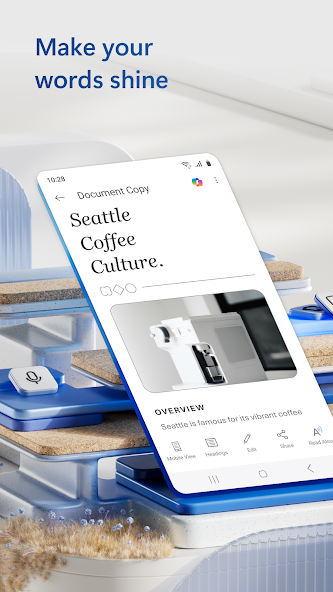
Create, edit, read and share documents on your mobile device with the same power and familiarity you rely on from your PC.
Write CVs, letters, assignments, notes or creative work on the go. Convert between Word and PDF, collaborate with others and access your files from anywhere. With easy to use editing tools and a built in document viewer, Word makes mobile writing simple and efficient.
Choose from templates for CVs, newsletters, brochures and more to jump start any project. Whether you're a student, blogger, journalist or project manager, Word moves with you.
Create Documents
• Get started quickly with modern templates for letters, CVs, scripts, proposals, invoices and more
• Use rich formatting and layout tools to express your ideas clearly
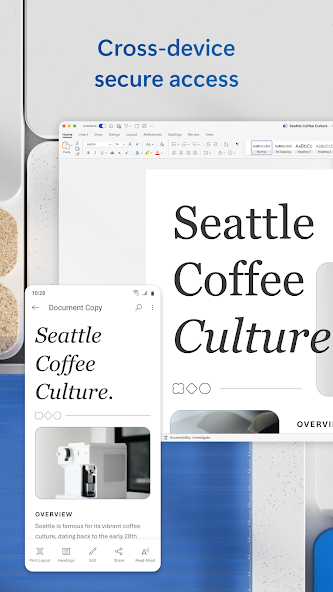
• Keep your documents looking great on any device
Read, Write and Edit Anywhere
• Edit long documents with familiar writing and formatting tools
• Open attachments and view documents with the built in reader
• Convert PDFs to Word for easy editing
Collaborate and Share
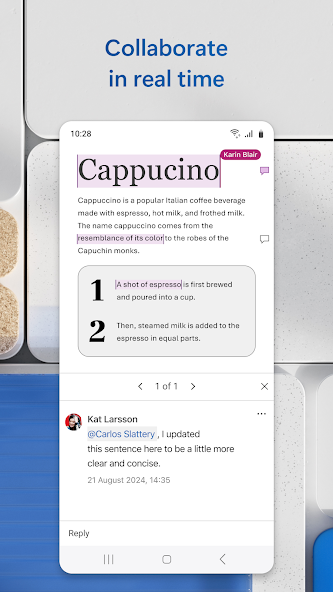
• Comment alongside text to share feedback
• Work with others in real-time and track changes to text and layout
• Use version history to view or restore earlier drafts
Simplified Sharing
• Invite others to edit or view with a few taps
• Manage permissions and see who’s in the document
• Copy content into an email with formatting intact or attach your files directly
AI Assistance with Copilot*
• Draft CVs, polish proposals and organise ideas in seconds
• Summarise, refine and automatically format content
• Get intelligent suggestions that make your writing clear and impactful
Requirements
• 1 GB RAM or higher
*Unlock the full Microsoft 365 experience with a qualifying Microsoft 365 subscription for your phone, tablet, PC or Mac.
Microsoft 365 subscriptions purchased in app are billed to your Play Store account and renew automatically unless disabled in account settings. Subscriptions cannot be cancelled during the active period.
This app may be provided by Microsoft or a third party publisher and is subject to its own privacy statement and terms. Data may be transferred to or stored in the United States or other regions where Microsoft or its service providers operate.
EULA: http://aka.ms/eula
Write CVs, letters, assignments, notes or creative work on the go. Convert between Word and PDF, collaborate with others and access your files from anywhere. With easy to use editing tools and a built in document viewer, Word makes mobile writing simple and efficient.
Choose from templates for CVs, newsletters, brochures and more to jump start any project. Whether you're a student, blogger, journalist or project manager, Word moves with you.
Create Documents
• Get started quickly with modern templates for letters, CVs, scripts, proposals, invoices and more
• Use rich formatting and layout tools to express your ideas clearly
• Keep your documents looking great on any device
Read, Write and Edit Anywhere
• Edit long documents with familiar writing and formatting tools
• Open attachments and view documents with the built in reader
• Convert PDFs to Word for easy editing
Collaborate and Share
• Comment alongside text to share feedback
• Work with others in real-time and track changes to text and layout
• Use version history to view or restore earlier drafts
Simplified Sharing
• Invite others to edit or view with a few taps
• Manage permissions and see who’s in the document
• Copy content into an email with formatting intact or attach your files directly
AI Assistance with Copilot*
• Draft CVs, polish proposals and organise ideas in seconds
• Summarise, refine and automatically format content
• Get intelligent suggestions that make your writing clear and impactful
Requirements
• 1 GB RAM or higher
*Unlock the full Microsoft 365 experience with a qualifying Microsoft 365 subscription for your phone, tablet, PC or Mac.
Microsoft 365 subscriptions purchased in app are billed to your Play Store account and renew automatically unless disabled in account settings. Subscriptions cannot be cancelled during the active period.
This app may be provided by Microsoft or a third party publisher and is subject to its own privacy statement and terms. Data may be transferred to or stored in the United States or other regions where Microsoft or its service providers operate.
EULA: http://aka.ms/eula
Updated on
Events & offers

Safety starts with understanding how developers collect and share your data. Data privacy and security practices may vary based on your use, region, and age. The developer provided this information and may update it over time.


Ratings and reviews
4.7
15M reviews

Bee Bee
- Flag inappropriate
February 11, 2026
I have used Word on PCs for years but the mobile version of this program is absolutely awful. Easy to delete things , no range of print sizes . Ludicrous gaps appearing all over the place. Changes appearance of existing files . Cannot deal with large files. Slow and irritating to use.
84 people found this review helpful

Nicole Sweet
- Flag inappropriate
September 9, 2025
I was in the middle of editing a document that was already saved. I have autosave on and I had been working on it for a couple of days. I opened the file and was editing, when I got a text from a friend. With the app and the document still open, I switched to my messenger app to text them back and then switched back to MS Word. It closed my file and brought me back to my list of files. My file was no longer there. In fact, any files from the whole week...gone. I can't trust this app now.
724 people found this review helpful

Tyken Grayne
- Flag inappropriate
- Show review history
July 15, 2025
usually my go-to word processor, but it's been so garbage lately. other reviews mentioned how it can sometimes merge words and jump the cursor to a completely different section of the doc while writing, and it's extremely annoying. now it's crashing constantly, and the auto-save isn't consistent enough to catch everything. very frustrating trying to do anything when I have to save just about every sentence or risk losing what I've written.
469 people found this review helpful
What’s new
Thank you for using Word.
We regularly release updates to the app, which include great new features, as well as improvements for speed and reliability.
Did you know that with a Microsoft 365 subscription, you can unlock the full power of Office across all of your devices? Find special offers in the app.
We regularly release updates to the app, which include great new features, as well as improvements for speed and reliability.
Did you know that with a Microsoft 365 subscription, you can unlock the full power of Office across all of your devices? Find special offers in the app.
App support
About the developer
Microsoft Corporation
Appservices@microsoft.com
1 Microsoft Way
Redmond, WA 98052
United States
+1 800-642-7676