Discord - Talk, Play, Hang Out
In-app purchases

4.5star
6.73M reviewsinfo
500M+
Downloads

Parental guidance
info



About this app
Discord is designed for gaming and great for just chilling with friends or building a community. Customize your own space and gather your friends to talk while playing your favorite games, or just hang out.
GROUP CHAT THAT’S ALL FUN & GAMES
∙ Discord is great for playing games and chilling with friends, or even building a worldwide community. Customize your own space to talk, play, and hang out in.
MAKE YOUR GROUP CHATS MORE FUN
∙ Create custom emoji, stickers, soundboard effects, and more to add your personality to voice, video, or text chat. Set your avatar, a custom status, and write your own profile to show up in chat your way.
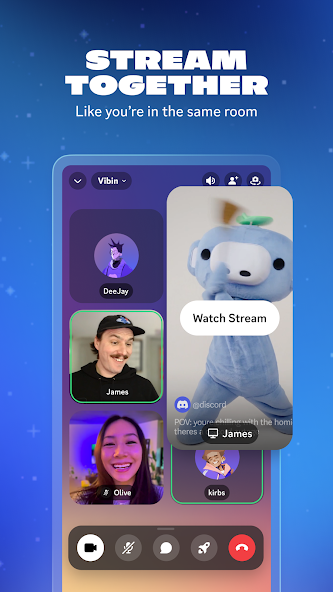
STREAM LIKE YOU’RE IN THE SAME ROOM
∙ High-quality and low-latency streaming makes it feel like you're hanging out on the couch with friends while playing a game, watching shows, looking at photos, or idk doing homework or something.
HOP IN WHEN YOU’RE FREE, NO NEED TO CALL
∙ Easily hop in and out of voice or text chats without having to call or invite anyone, so you can chat with your friends before, during, and after your game session.
SEE WHO’S AROUND TO CHILL
∙ See who’s around, playing games, or just hanging out. For supported games, you can see what modes or characters your friends are playing and directly join up.
ALWAYS HAVE SOMETHING TO DO TOGETHER
∙ Watch videos, play built-in games, listen to music, or just scroll together and spam memes. Seamlessly text, call, video chat, and play games, all in one group chat.
WHEREVER YOU GAME, HANG OUT HERE
∙ On your PC, phone, or console, you can still hang out on Discord. Easily switch between devices and use tools to manage multiple group chats with friends.
GROUP CHAT THAT’S ALL FUN & GAMES
∙ Discord is great for playing games and chilling with friends, or even building a worldwide community. Customize your own space to talk, play, and hang out in.
MAKE YOUR GROUP CHATS MORE FUN
∙ Create custom emoji, stickers, soundboard effects, and more to add your personality to voice, video, or text chat. Set your avatar, a custom status, and write your own profile to show up in chat your way.
STREAM LIKE YOU’RE IN THE SAME ROOM
∙ High-quality and low-latency streaming makes it feel like you're hanging out on the couch with friends while playing a game, watching shows, looking at photos, or idk doing homework or something.
HOP IN WHEN YOU’RE FREE, NO NEED TO CALL
∙ Easily hop in and out of voice or text chats without having to call or invite anyone, so you can chat with your friends before, during, and after your game session.
SEE WHO’S AROUND TO CHILL
∙ See who’s around, playing games, or just hanging out. For supported games, you can see what modes or characters your friends are playing and directly join up.
ALWAYS HAVE SOMETHING TO DO TOGETHER
∙ Watch videos, play built-in games, listen to music, or just scroll together and spam memes. Seamlessly text, call, video chat, and play games, all in one group chat.
WHEREVER YOU GAME, HANG OUT HERE
∙ On your PC, phone, or console, you can still hang out on Discord. Easily switch between devices and use tools to manage multiple group chats with friends.
Updated on
Safety starts with understanding how developers collect and share your data. Data privacy and security practices may vary based on your use, region, and age. The developer provided this information and may update it over time.


Ratings and reviews
4.5
6.38M reviews

Allison Ducker
- Flag inappropriate
February 15, 2026
The app sometimes freezes, or won't show anything at all from a channel for no apparent reason; this can last for hours. And soon they'll want me to give them ID to prove I'm an adult when they already had a data breach for 70k IDs that they already have. In sum: often doesn't work, wants to harvest more of my data, data breaches. No thanks.
314 people found this review helpful

Moth
- Flag inappropriate
- Show review history
March 18, 2026
Discord was fine before the 2023 UI update, but now it's full of bugs. All the files on my SD card are out of order, which is just one of many bugs. Also, why are video quests only 200 orbs now? I don't have a console to play 15 minutes of a game ti get just 700 orbs. Video quests are the only way I can get avatar decorations. Please make at least some video quests 700 orbs again.
5,528 people found this review helpful
Discord Inc.
October 2, 2025
Thanks for sharing your thoughts on our mobile redesign. We recommend checking out our Help Center for details on the new interface: support.discord.com/hc/articles/12654190110999. If you need further assistance, our support team is here: dis.gd/contact.

Shaun B
- Flag inappropriate
February 20, 2026
With all the ID verification stuff they're threatening, I've already cancelled my Nitro, but even the company seems to want me gone. I updated the app, suddenly, voice calls with video don't work. I try to see my friend's screen as we play remotely, and it keeps minimizing and disappearing. I had to load an older version through a third party installer just to use the service without problem. Looking for alternatives, Discord does not care about its client base.
241 people found this review helpful
What’s new
We’ve been hard at work making Discord better for you. This includes bug fixes and performance enhancements. For more detailed information, go to your profile in the app and scroll down to “What’s New”.
App support
About the developer
Discord Inc.
support@discordapp.com
444 De Haro St Ste 200
San Francisco, CA 94107
United States
+1 888-594-0085