This week in KDE: Bugfixing Plasma 5.24

Well, I know I said Plasma 5.24 was a smooth release, and it mostly has been! But nonetheless all of you have found various bugs afflicting your varied and diverse use cases, and we’ve been working hard to fix them this week. Some very important multi-monitor fixes and long-term improvements also landed which should be welcome for people with often-docked laptops.

15-Minute Bugs Resolved

Current number of bugs: 80, down from 83. Current list of bugs

You will no longer see an unnecessary “Connection Activated” notification right after you log in (me: Nate Graham, Plasma 5.24.2)

Mappings of desktops and panels in multi-screen setups should now be much more robust since invalid screen entries won’t be added to it under certain circumstances anymore (Plasma 5.24.3, Marco Martin)

Fixed one of the most common cases of Plasma crashing on launch in the Plasma Wayland session when you have a multi-monitor setup (Marco Martin, Plasma 5.25)

New Features

Skanpage now lets you share scanned documents (including multi-page PDFs) using the standard KDE sharing system (Alexander Stippich, Skanpage 22.04). If you haven’t checked out Skanpage yet, give it a whirl. It’s really nice!

You can now change your user avatar to be a plain abstract “user” icon in front of a colored background of your choice (Jan Blackquill, Plasma 5.25):

Added a bunch of new web search queries (Thiago Sueto, Frameworks 5.92). If you don’t know about KRunner’s web search capabilities, you can learn about it here!

Bugfixes & Performance Improvements

Using Ark to extract Zip archives with empty folders no longer causes those folders to have their “last accessed” dates set to sometime in the future (Albert Astals Cid, Ark 21.12.3)

Ark can now successfully create multi-part 7zip archives whose individual parts are each under 1Mb (Max Brazhnikov, Ark 21.12.3)

Kate once again always jumps to the previously-open tab when the current tab is closed (Waqar Ahmed, Kate 22.04)

Dolphin’s main view now handles right-to-left languages properly (Jan Blackquill, Dolphin 22.04)

Fixed a visual glitch in Dolphin’s main view that could be triggered by zooming (Eugene Popov, Dolphin 22.04)

In the Plasma Wayland session, fixed one of the ways that KWin could crash when you enable a disabled external monitor (Xaver Hugl, Plasma 5.24.2)

System Settings no longer sometimes crashes when you change a monitor’s refresh rate (Marek Beleščiak, Plasma 5.24.2)

Fixed one of the ways that Plasma could crash when undocking a docked laptop (Aleix Pol Gonzalez, Plasma 5.24.2)

Fixed another way your panel could disappear when screens are added, removed, or wake up from sleep (Marco Martin, Plasma 5.24.2)

Deleting a non-active user in System Settings’ Users page no longer causes the UI to break (Nicolas Fella, Plasma 5.24.2)

When using Panel Spacer applets to center another applet on a panel, it no longer flickers and wobbles around when one of the applets on the other side of either of the spacers changes in size (Martin Seher, Plasma 5.24.2)

The Virtual Desktop Pager applet no longer lets app icons visually overflow the space they are contained within when used on a short panel, and now shows window outlines correctly when you’re using Qt scaling on X11 (Fushan Wen, Plasma 5.24.2)

Fixed a big recent regression in multi-monitor+multi-GPU setups in the Plasma Wayland session (Xaver Hugl, Plasma 5.24.3)

Right-clicking on a System Tray app icon no longer causes the right-clicked app to get activated when left-clicking other Task Manager items (Ismael Asensio, Plasma 5.24.3)

You can once again apply changes to System Settings’ Touchpad page (Fabian Vogt, Plasma 5.24.3)

The plasma_session process no longer leaks a bunch of memory (David Edmundson, Plasma 5.24.3)

Adjusting the backlight of your screen now always works when using certain types of multi-GPU systems (Xingang Li, Plasma 5.24.3)

Discover no longer occasionally displays app or firmware text styling incorrectly (Tobias Fella, Plasma 5.24.3)

File dialogs are now faster to open when their initial view is a network location (Kai Uwe Broulik, Plasma 5.24.3)

System Settings’ Firewall page no longer always tells you that the default policy is “Allow” regardless of what the system’s actual default policy is (Lucas Biaggi, Plasma 5.25)

In the Plasma Wayland session, launching DBus-activatable GTK3 apps now works (Nicolas Fella, Frameworks 5.92)

User Interface Improvements

Elisa’s playlist has been mostly rewritten to use standard Kirigami components which fixes multiple bugs such as touch scrolling being broken and rearranging playlist songs being unreliable, halves the number of lines of code, simplifies the implementation, and improves the presentation (Tranter Madi, Elisa 22.04):

Kate’s quick search bar (invoked with Ctrl+F) no longer replaces the status bar while it’s visible (Waqar Ahmed, Kate 22.04)

Added tooltips and exhaustive expanded help text to Gwenview’s “Fit” and “Show Thumbnails” buttons (Felix Ernst, Gwenview 22.04)

Your name no longer gets elided on the login screen when it’s more than about 11 characters long and there is more than one user account on the system (me: Nate Graham, Plasma 5.24.3)

When you’re using offline updates, and an offline update has failed to complete, and Discover shows you a notification with the option to “Repair System”, clicking on that button now provides you some feedback about what it’s doing, and also tells you when the repair operation succeeds or fails ( Aleix Pol Gonzalez, Plasma 5.25)

Discover now shows a message in the app when you are running an old unsupported version of your distro, and bugs you to upgrade (Aleix Pol Gonzalez, Plasma 5.25)

Breeze-themed tab bars now have better contrast with dark color schemes (Jan Blackquill, Plasma 5.25):

Kirigami FormLayout section headers are now bold, to make them visually stand out from the content in their sections (me: Nate Graham, Frameworks 5.92):

…And everything else

This blog only covers the tip of the iceberg! Tons of KDE apps whose development I don’t have time to follow aren’t represented here, and I also don’t mention backend refactoring, improved test coverage, and other changes that are generally not user-facing. If you’re hungry for more, check out https://planet.kde.org, where you can find more news from other KDE contributors.

How You Can Help

Please consider donating to UNICEF or another reputable relief organization working to provide humanitarian aid right now in Ukraine, where several prominent KDE contributors live–not to mention 43 million other people who have suddenly found themselves in a warzone. When the world is on fire, always be a helper.

If you’re a developer, check out our 15-Minute Bug Initiative. Working on these issues makes a big difference quickly!

Otherwise, have a look at https://community.kde.org/Get_Involved to discover ways to be part of a project that really matters. Each contributor makes a huge difference in KDE; you are not a number or a cog in a machine! You don’t have to already be a programmer, either. I wasn’t when I got started. Try it, you’ll like it! We don’t bite!

Finally, consider making a tax-deductible donation to the KDE e.V. foundation.

It’s normal and it works

I read a comment on Phoronix recently that reminded me why I love KDE Plasma:

“KDE is normal and it works”

We can ignore the argument to which this is a response, and forgive alcade for confusing the name of the community with the desktop environment. Regardless, “KDE is normal and it works” is in a nutshell what I think makes KDE Plasma such a unique and shining point of light in the FOSS world.

Plasma uses a normal, familiar layout: Panel on the bottom with an app launcher, pinned apps, system tray, and clock; desktop icons; visible buttons that mostly have text labels; minimize/maximize/close buttons on windows. You know, normal stuff. You can change everything, but it starts out normal, unlike other desktop environment projects that are explicitly abnormal–being controversially opinionated about matters of design or having an unusual component layout. This is fine! Their departures from what’s normal may in fact be better, and their developers and users they certainly think so. But tons of people out there don’t want “may be better”, they want “normal.” And that’s fine too. Our software is for them.

And KDE Plasma works. It has its bugs, but it is basically a solid and reliable piece of technology that isn’t missing major features, either because of a lack of resources or because design decisions preclude supporting them. It is not a hobbyist science project missing key functionality that might break entirely. It doesn’t re-invent itself every year or two and become something different that might stop meeting your needs or tastes. It has actionable plans for adapting to industry changes surrounding it that are actively being carried out; it is not on a path to become obsolete or a technical dead end. No, it’s just it’s an imperfect and boring piece of infrastructure you can nonetheless rely on.

I think the world needs something with those characteristics, and and that’s why I like it and work on it.

This week in KDE: Oh so many things

While we work on Plasma 5.24 bugs (and you can see many of them fixed below), we’ve also started to work on many improvements for Plasma 5.25 and KDE apps! Check it out:

15-Minute Bugs Resolved

Current number of bugs: 82, down from 83. Current list of bugs

You can once again launch apps from the Application Launcher’s “History” and “Frequently Used” pages (Oleg Solovyov, Plasma 5.24.1)

In the Plasma Wayland session, moving a window to another virtual desktop or activity using a keyboard shortcut or the relevant Pager applet no longer leaves a semi-transparent non-interactive ghost version of it visible in its former location (Vlad Zahorodnii, Plasma 5.24.1)

Setting a battery charge limit on your laptop no longer causes the System Tray Battery and Brightness icon to stay visible once the battery is considered by the kernel to be fully charged (me: Nate Graham, Plasma 5.24.1)

New Features

Kate now has an interactive path-based navigation bar that shows you the folder hierarchy of the currently open document and allows you to switch it out for another one (Waqar Ahmed, Kate 22.04):

Color schemes can now be optionally configured to apply your accent color to window titlebars or even the entire header area, and the “Breeze Classic” color scheme now uses this feature (Dominic Hayes, Plasma 5.25):

Note that this giant blue header appearance in Breeze Light is non-default; you would have to enable the new “Apply accent color to titlebar” option for Breeze Light for make it use the accent color like this. But it does show what’s possible!

Bugfixes & Performance Improvements

Dolphin’s view no longer exhibits visual bugs when zooming in and out (Eugene Popov, Dolphin 22.04)

The “Keep these changes?” dialog in System Settings’ Display Configuration page is once again displayed properly, so you can actually change your display settings again (Xuetian Weng, Plasma 5.24.1)

System Settings no longer crashes when you press the Escape key on System Settings’ Display Configuration page (Nicolas Fella, Plasma 5.24.1)

In the Plasma Wayland session, KWin no longer sometimes crashes when you drag something from Firefox running in XWayland mode to the desktop (David Redondo, Plasma 5.24.1)

In the Plasma Wayland session, tapping an input field with a stylus once again causes the virtual keyboard to appear as expected (Aleix Pol Gonzalez, Plasma 5.24.1)

Right-clicking on legacy app-specific System Tray icons to show a context menu once again works if you happen to not have the libappindicator library installed (Claudio Holo, Plasma 5.24.1)

In the Plasma Wayland session, the Task Manager now correctly shows which apps are running on certain systems (e.g. Gentoo systems) where it was broken before (John Zimmerman, Plasma 5.24.1)

Apps that inappropriately set QT_QPA_PLATFORM=wayland internally can now be successfully launched from the Overview effect (Nicolas Fella, Plasma 5.24.1)

In the Plasma Wayland session, when a native Wayland app is launches with its window maximized, its titlebar “Maximize/Restore” button now visually shows the correct state (Vlad Zahorodnii, Plasma 5.24.1)

In the Plasma X11 session, toggling a window’s the “Show Borders” functionality no longer makes it smaller (Vlad Zahorodnii, Plasma 5.24.1)

Plasma now lets you set a maximum charge level for hardware that supports setting a maximum charge level but not a minimum charge level before starting to charge (Méven Car, Plasma 5.24.1)

KRunner’s Web Shortcuts and Browser Favorites runners now work in the Overview effect (Nicolas Fella, Plasma 5.24.1)

Title/Header text in menus no longer gets cut off in cases where it would be longer than the text of any of the other menu items (Albert Astals Cid, Plasma 5.24.2)

In the Plasma Wayland session, fixed one of the ways that the virtual keyboard could fail to appear as expected despite being set up correctly (Aleix Pol Gonzalez, Plasma 5.24.2)

In the Plasma X11 session, when you set the Overview effect to appear when you press the Meta key, it can no longer inappropriately be triggered from the Lock screen (David Edmundson, Plasma 5.24.2)

Plasma no longer sometimes crashes when you copy certain text to the clipboard (David Edmundson, Frameworks 5.92)

Installing OBS Studio from Spectacle’s “install a screen recorder” feature now works (Aleix Pol Gonzalez, Frameworks 5.92)

Kirigami apps that use side drawers no longer eat mouse events on the sides of the window, which means that in particular, their right-most scrollbars now work properly (Tranter Madi, Frameworks 5.92)

Fixed a memory leak in KDE apps that use the Solid framework (Méven Car, Frameworks 5.92)

User Interface Improvements

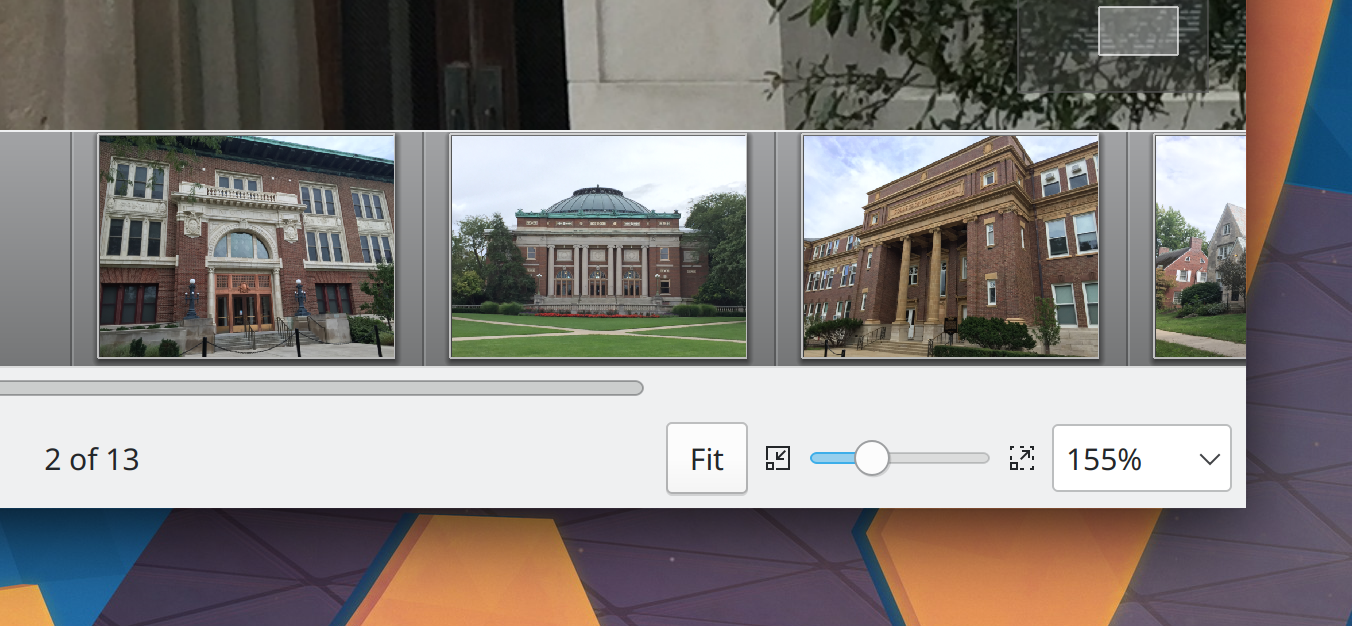
Gwenview once again has a “Fit” button on its status bar (Felix Ernst, Gwenview 22.04):

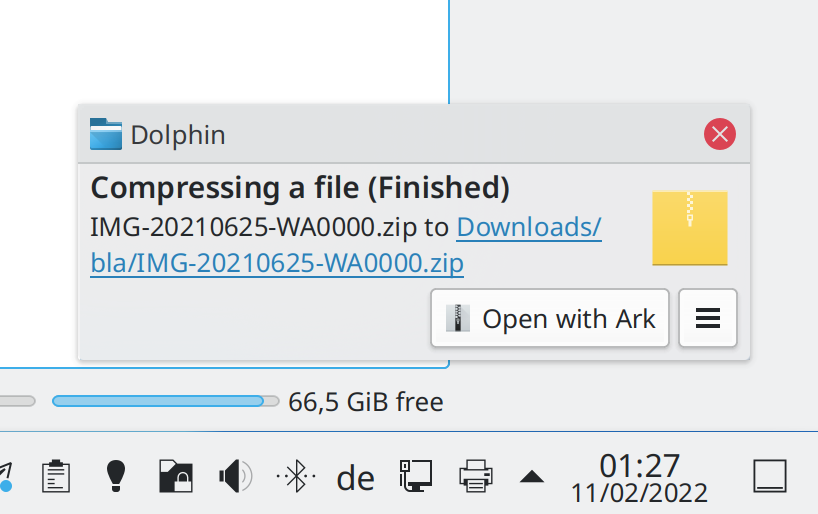
The notifications that Ark sends when a compress job is finished are now fancier and more useful (Nicolas Fella, Ark 22.04):

Spectacle’s dark overlay in Rectangular Region mode is now darker (me: Nate Graham, Spectacle 22.04):

The Show Desktop applet now has an indicator line that appears when the desktop is being shown just like the Minimize All applet has, and the Minimize All applet’s line now touches the panel edge irrespective of its internal margins (me: Nate Graham, Plasma 5.24.2)

Card/tile views in Breeze-themes GTK apps now look much better (Jan Blackquill, Plasma 5.25)

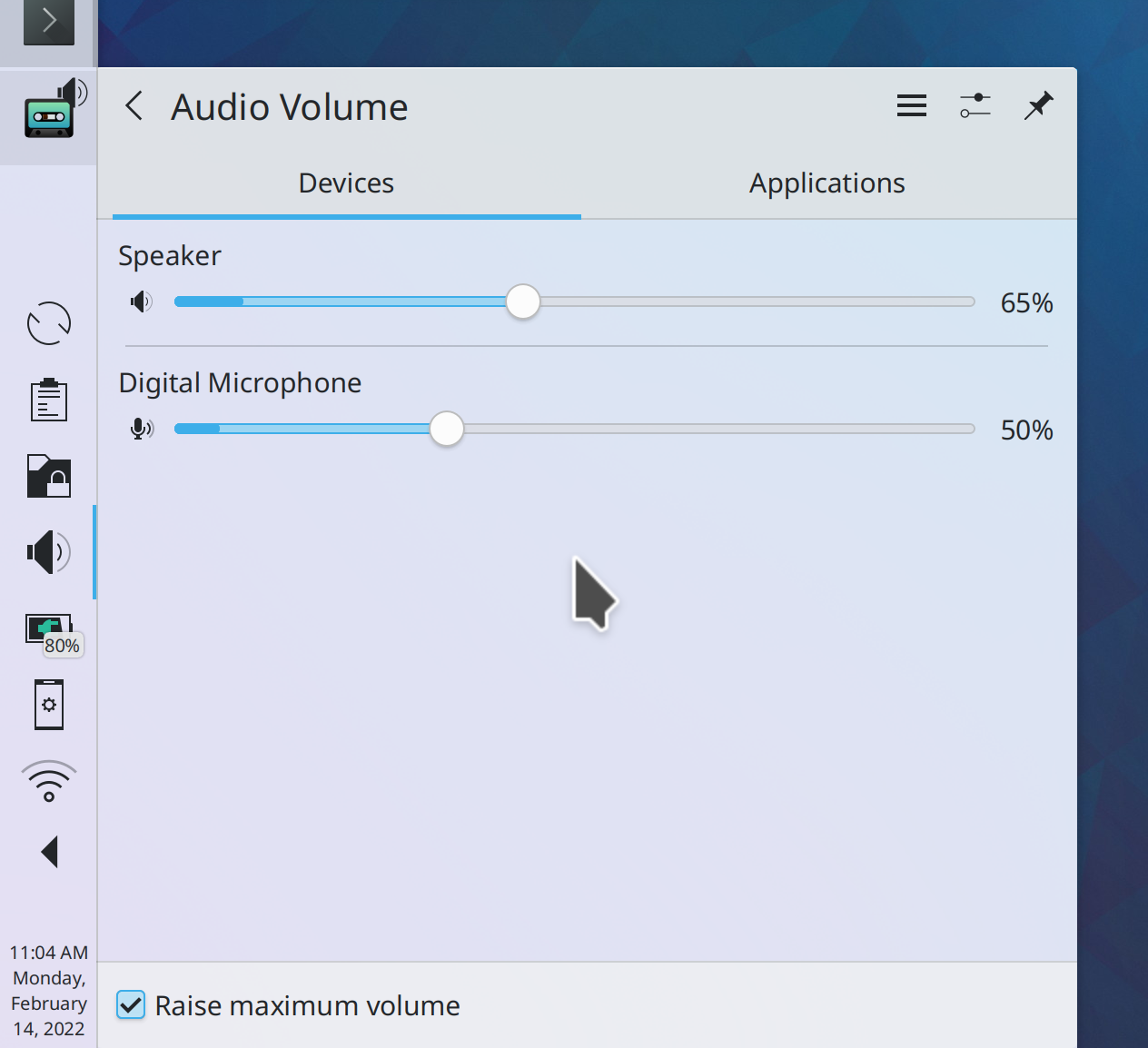
Audio volume loudness/recording level indicators now look much better (Light Yagami, Plasma 5.25):

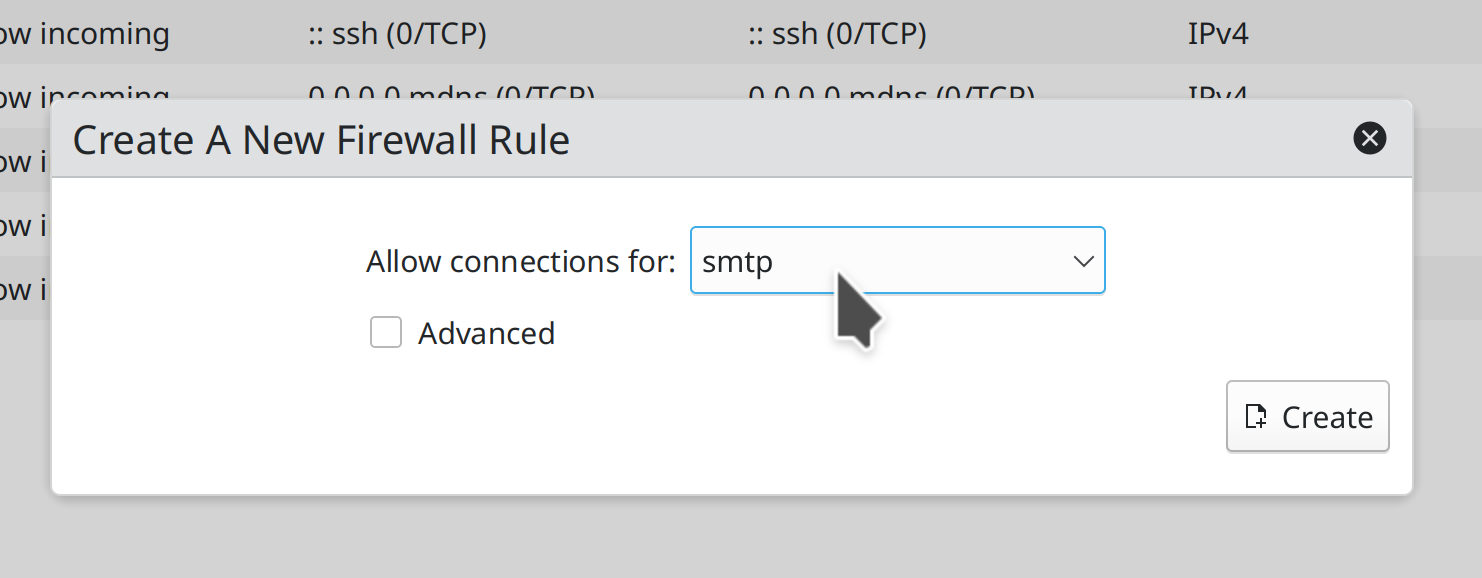
System Settings’ Firewall page now uses a simplified rule entry UI by default so you don’t need to know port numbers and all that mumbo-jumbo–but if you want to, you can show all the fiddly advanced controls (Lucas Biaggi and me: Nate Graham, Plasma 5.25)

Yes, I know this is an explicit “basic/advanced” view that would seem to violate https://community.kde.org/Get_Involved/Design/Lessons_Learned#Basic.2Fadvanced_modes. Well, every rule has an exception!

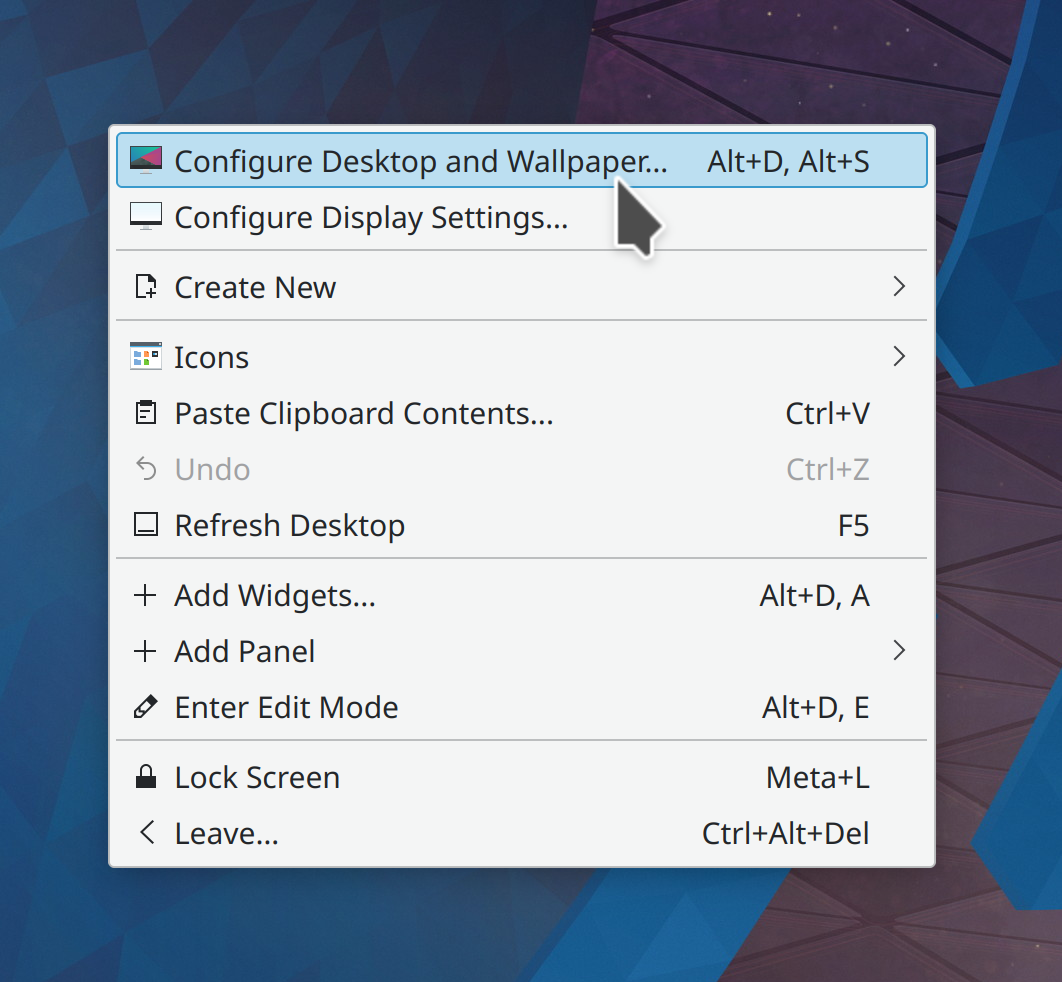
Breeze-themed menus in Qt and GTK apps now have a little outer margin, which is not only pretty, but it also solves an ancient usability bug with the top item being too easy to accidentally activate (Jan Blackquill, Plasma 5.25):

Breeze-themed menus in Qt apps that are taller than the screen height (OMG) now scroll vertically instead of expanding horizontally into more columns (Jan Blackquill, Plasma 5.25). This Bugzilla ticket was old enough to drink alcohol in many countries!

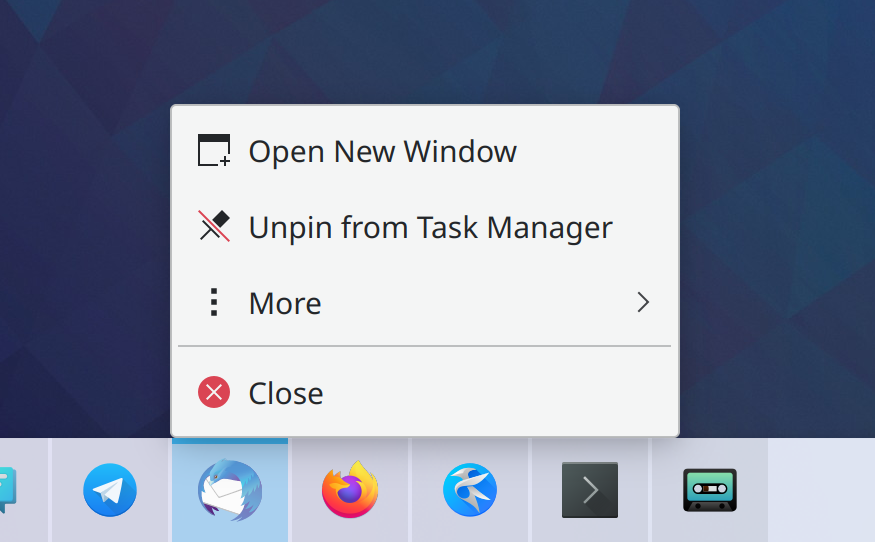
You can now tap-and-hold on Task Manager tasks to show a context menu, making their menus accessible on a touchscreen (me: Nate Graham, Plasma 5.25):

And the menu items also become tall so you can easily touch them!

The notification shown when you try to use a VPN whose supporting software hasn’t been installed is now more helpful and comprehensible and sticks around until you explicitly dismiss it (Nicolas Fella, Plasma 5.25)

To improve the discoverability of KCommandBar, every KDE app’s “Help” menu now has a “Find Action” item that will activate it when clicked (Waqar Ahmed, Frameworks 5.92):

Clicking on the “Custom” accent color option to show a color picker dialog now opens the dialog showing the current accent color, if one was already set (Yari Polla, Plasma 5.25)

…And everything else

This blog only covers the tip of the iceberg! Tons of KDE apps whose development I don’t have time to follow aren’t represented here, and I also don’t mention backend refactoring, improved test coverage, and other changes that are generally not user-facing. If you’re hungry for more, check out https://planet.kde.org, where you can find more news from other KDE contributors.

How You Can Help

If you’re a developer, check out our 15-Minute Bug Initiative. Working on these issues makes a big difference quickly!

Otherwise, have a look at https://community.kde.org/Get_Involved to discover ways to be part of a project that really matters. Each contributor makes a huge difference in KDE; you are not a number or a cog in a machine! You don’t have to already be a programmer, either. I wasn’t when I got started. Try it, you’ll like it! We don’t bite!

Finally, consider making a tax-deductible donation to the KDE e.V. foundation.

This week in KDE: A smooth release of Plasma 5.24

Plasma 5.24 was released a few days ago, and so far it’s been the smoothest release in memory. There have been a few regressions, but fewer than other recent releases. I’m sure all of you who have experienced new issues will speak up in the comments, of course. 🙂 But overall it has gone quite well!

15-Minute Bugs Resolved

Current number of bugs: 83, same as last week. Current list of bugs

In the Plasma Wayland session, panels no longer sometimes randomly freeze especially right after login (Vlad Zahorodnii, as soon as your distro updates their KDE Qt patch collection to include this patch)

Closing your laptop lid when an external monitor plugged in no longer causes the computer to inappropriately go to sleep when the setting to disable this has been used (Somebody awesome, Plasma 5.24)

New Features

Konsole now supports Sixel, allowing it to display .sixel images right inside the window (Matan Ziv-Av, Konsole 22.04)

Konsole now has a new plugin that stores saved commands and pieces of text for you (Tao Guo, Konsole 22.04)

Bugfixes & Performance Improvements

When using Kate’s feature to stash and restore unsaved changes to open files when closing the app, those changes are now actually saved as expected rather than being silently destroyed if you happen to quit the app using the “Quit” action or Ctrl+Q keyboard shortcut instead of clicking on the window’s close button (Waqar Ahmed, Kate 21.12.3)

Canceling an in-progress archive job now automatically deletes the temporary file that was being created (Méven Car, Ark 22.04)

Konsole’s text re-flow feature now works for lines of text that have no whitespace or newline characters at all (Luis Javier Merino Morán, Konsole 22.04)

System Settings no longer crashes when the active color scheme doesn’t exist on disk for some reason; now it falls back to Breeze Light (the default color scheme) and doesn’t crash (Nicolas Fella, Plasma 5.24.1)

In the Plasma Wayland session, Plasma no longer always crashes when you screencast in certain circumstances (David Edmundson, Plasma 5.24.1)

In the Plasma Wayland session, using custom splash screens once again works (Linus Dierheimer, Plasma 5.24.1)

The Scale effect is once again configurable (Alexander Lohnau, Plasma 5.24.1)

Links to System Settings pages added to the desktop using the “Add to Desktop” context menu item in Kickoff once again actually appear on the Desktop as expected (Alexander Lohnau, Plasma 5.24.1)

Certain types of large buttons with text no longer make their text half-invisible when they’re focused with the keyboard (Ingo Klöcker, Plasma 5.24.1)

Info Center’s “Devices” page once again works as expected if the command-line lspci program lives in /sbin/, /usr/sbin, or /usr/local/sbin on your computer (Fabian Vogt, Plasma 5.24.1)

Dragging desktop files over a Sticky Note applet no longer makes the files temporarily disappear (Severin von Wnuck, Plasma 5.24.1)

In the Plasma X11 session, the cursor no longer disappears while using the “Zoom” effect (Vlad Zahorodnii, Plasma 5.24.1)

The Fall Apart effect once again works and no longer interacts strangely with the Overview effect (Vlad Zahorodnii, Plasma 5.24.1)

In the Plasma Wayland session, fixed one way that tooltips could be mis-positioned (Vlad Zahorodnii, Plasma 5.24.1)

The Overview effect no longer inappropriately shows minimized windows in the desktop thumbnails for moment before immediately hiding them again (Vlad Zahorodnii, Plasma 5.24.1)

When using certain 3rd-party window decoration themes, quick-tiling a maximized window no longer unexpectedly de-maximizes the window instead of quick-tiling it (Vlad Zahorodnii, Plasma 5.24.1)

System Settings is now faster to launch, especially when using the legacy Icons View mode (Fushan Wen, Plasma 5.24.1)

Dolphin no longer crashes when you close its “Create New File” file dialog in a remote location (Nicolas Fella, Frameworks 5.92)

Fixed a memory leak when canceling in-process move/copy archive (etc) jobs (David Faure, Frameworks 5.92)

Scrollable views with text in QtQuick-based software no longer exhibit visual glitches with text being cut off or squished at the top or bottom when the view is scrolled very slowly a pixel at a time (Noah Davis, Frameworks 5.92)

Font changes now take effect instantly in QtQuick-based apps (Nicolas Fella, Frameworks 5.92)

Buttons in System Tray applets that open Info Center pages now work if you don’t happen to have Info Center installed; they instead open the requested page in a separate window (me: Nate Graham, Frameworks 5.92)

All QtQuick-based apps now use slightly fewer CPU resources (Aleix Pol Gonzalez, Frameworks 5.92)

User Interface Improvements

When an app is installed more than once from different sources (e.g. one version from distro repos, and another version from Flatpak), The context menu for that app in Kickoff no longer has multiple entries saying, “Uninstall or manage add-ons” (Alexander Lohnau, Plasma 5.24.1)

Searching for apps that are not yet installed no longer returns duplicate entries for matched apps that are available from multiple sources (Alexander Lohnau, Plasma 5.24.1)

In the Overview effect, apps’ selection highlight effects now disappear when you start to drag them (Vlad Zahorodnii, Plasma 5.24.1)

System Settings’ Quick Settings page has received some UI polish for the alignment and spacing of its elements and the clarity of its labels (me: Nate Graham, Plasma 5.25):

Kate, KDevelop, and other KTextEditor-based apps now do a much better job of differentiating files opened in tabs that have the same filename (Waqar Ahmed, Frameworks 5.92):

Dragging a file or folder over an item in the Places panel now causes that location to be opened and displayed in the main view so you can drag the thing into a folder inside it. And if the Places panel item you dragged over was an unmounted disk, it is now automatically mounted first! (Kai Uwe Broulik, Frameworks 5.92)

Errors in the open/save dialogs are now shown inline as in Dolphin, rather than with a separate dialog window (Kai Uwe Broulik, Frameworks 5.92)

…And everything else

Keep in mind that this blog only covers the tip of the iceberg! Tons of KDE apps whose development I don’t have time to follow aren’t represented here, and I also don’t mention backend refactoring, improved test coverage, and other changes that are generally not user-facing. If you’re hungry for more, check out https://planet.kde.org/, where you can find blog posts by other KDE contributors detailing the work they’re doing.

How You Can Help

If you’re a developer, check out our 15-Minute Bug Initiative. Working on these issues makes a big difference quickly!

Otherwise, have a look at https://community.kde.org/Get_Involved to discover ways to be part of a project that really matters. Each contributor makes a huge difference in KDE; you are not a number or a cog in a machine! You don’t have to already be a programmer, either. I wasn’t when I got started. Try it, you’ll like it! We don’t bite!

Finally, consider making a tax-deductible donation to the KDE e.V. foundation.

This week in KDE: Discover redesign has begun

We have put the finishing touches on Plasma 5.24 and started to work on 5.25 stuff, with two big improvements already merged: keyboard navigation for Panels, and the start of Discover’s UI redesign! Check those out below:

15-Minute Bugs Resolved

Current number of bugs: 83, same as last week. Current list of bugs

Plasma, Discover, and many other apps no longer sometimes always crash on launch when you’ve turned on User Feedback sharing (Aleix Pol Gonzalez, KUserFeedback 1.1.0)

Changing user properties in the System Settings’ accounts page once again works if you happen to have version 22.04.64 or newer of the AccountsService package (Jan Blackquill, Plasma 5.24)

Discover no longer sometimes randomly freezes when you’re looking at an app’s details (Aleix Pol Gonzalez, Plasma 5.24.1)

Other Bugfixes & Performance Improvements

Gwenview is once again able to open RAW files, at the cost of sometimes being unable to open files that have the wrong filename extension. A patch that fixed that but broke RAW support was reverted (me: Nate Graham, Gwenview 22.12.2)

Dolphin no longer crashes when you cancel an archiving job in the middle that was initiated from one of Dolphin’s context menu “Compress” items (Méven Car, Ark 21.12.3)

When browsing an FTP server in Dolphin, opening files once again opens them in the correct app rather than your web browser (Nicolas Fella, Dolphin 21.12.3)

In the Plasma Wayland session, Kate no longer flashes when you hit Ctrl+S to save your changes (Christoph Cullmann, Kate 22.04)

The NOAA Picture of the Day wallpaper now works again (Fushan Wen, Plasma 5.24)

In the Plasma Wayland session, dragging-and-dropping various things to XWayland apps no longer sometimes makes them stop accepting clicks until the system is restarted (David Redondo, Plasma 5.24)

Spectacle’s Rectangular Region overlay now appears above all full screen windows, not just some of them (Vlad Zahorodnii, Plasma 5.24)

Network and System information display in System Monitor now always works every time you open it after logging in, not just sometimes only working the first time you open it (Arjen Hiemstra, Plasma 5.24)

System Monitor bar chart bars no longer disappear when you make the chart really narrow (Arjen Hiemstra, Plasma 5.24)

When dragging-and-dropping items onto the desktop, now all of them are placed at the dragged location, rather than only one of them being placed there there and all the other ones being placed after other icons (Severin Von Wnuck, Plasma 5.24)

Discover no longer crashes when you install or uninstall more than one Flatpak apps at once (Aleix Pol Gonzalez, Plasma 5.24)

Discover now shows the correct size for very very large packages (Jonas Knarbakk, Discover 5.24)

In the Plasma X11 session, using 30-bit color now works (Xaver Hugl, Plasma 5.24)

The System Tray’s popup now has the correct background color when the widget is located on the desktop rather than on a panel (Ivan Tkachenko, Plasma 5.24.1)

System Monitor CPU sensors can no longer ever briefly display negative values (Arjen Hiemstra, Plasma 5.24.1)

Discover’s screenshots popup is no longer overlapped by the sidebar after you resize the window to be small and then big again (Ismael Asensio, Plasma 5.24.1)

The Battery & Brightness applet no longer inappropriately shows the “Low Battery” icon when the only batteries present are from external wireless devices with an adequate charge level (Aleix Pol Gonzalez, Plasma 5.25)

KIO no longer inappropriately tries and fails to handle non-file-based URLs registered to apps (e.g. tg:// for Telegram or mailto:// for your email client) when the apps advertise that they accept URLs (Nicolas Fella, Frameworks 5.91)

KWin’s keyboard shortcuts (e.g. Alt+Tab) no longer sometimes break after KWin is restarted (Vlad Zahorodnii, Frameworks 5.91)

QtQuick-based apps are now slightly faster to load and run just in a general sense (Nicolas Fella, Frameworks 5.91)

When using a dark color scheme, the Breeze icon for the KDE Plasma logo no longer partially disappears at large sizes (Gabriel Karlsson, Frameworks 5.91)

Fixed a couple of inconsistencies and glitches in various Breeze folder and mimetype icons (Gabriel Karlsson, Frameworks 5.91)

User Interface Improvements

You can now drag tabs from one Kate to another (Waqar Ahmed, Kate 22.04)

Okular’s Bookmarks sidebar page now has an improved UI, with buttons that have text and an “Add Bookmark” context menu item (me: Nate Graham, Okular 22.04):

Dolphin’s Information Panel now shows “Dimensions” by default instead of separate “Image width” and “Image height” fields (Méven Car, Dolphin 22.04)

When compressing multiple files from Dolphin’s context menu, the menu now tells you the name of the resulting archive (Fushan Wen, Ark 22.04)

You can now find Konsole by searching for “cmd” or “command prompt” (Someone going by the pseudonym “M B”, Konsole 22.04)

When searching for System Settings pages, exact title matches are now weighted much more heavily (Alexander Lohnau, Plasma 5.24)

You can no longer use Discover to uninstall itself (me: Nate Graham, Plasma 5.24)

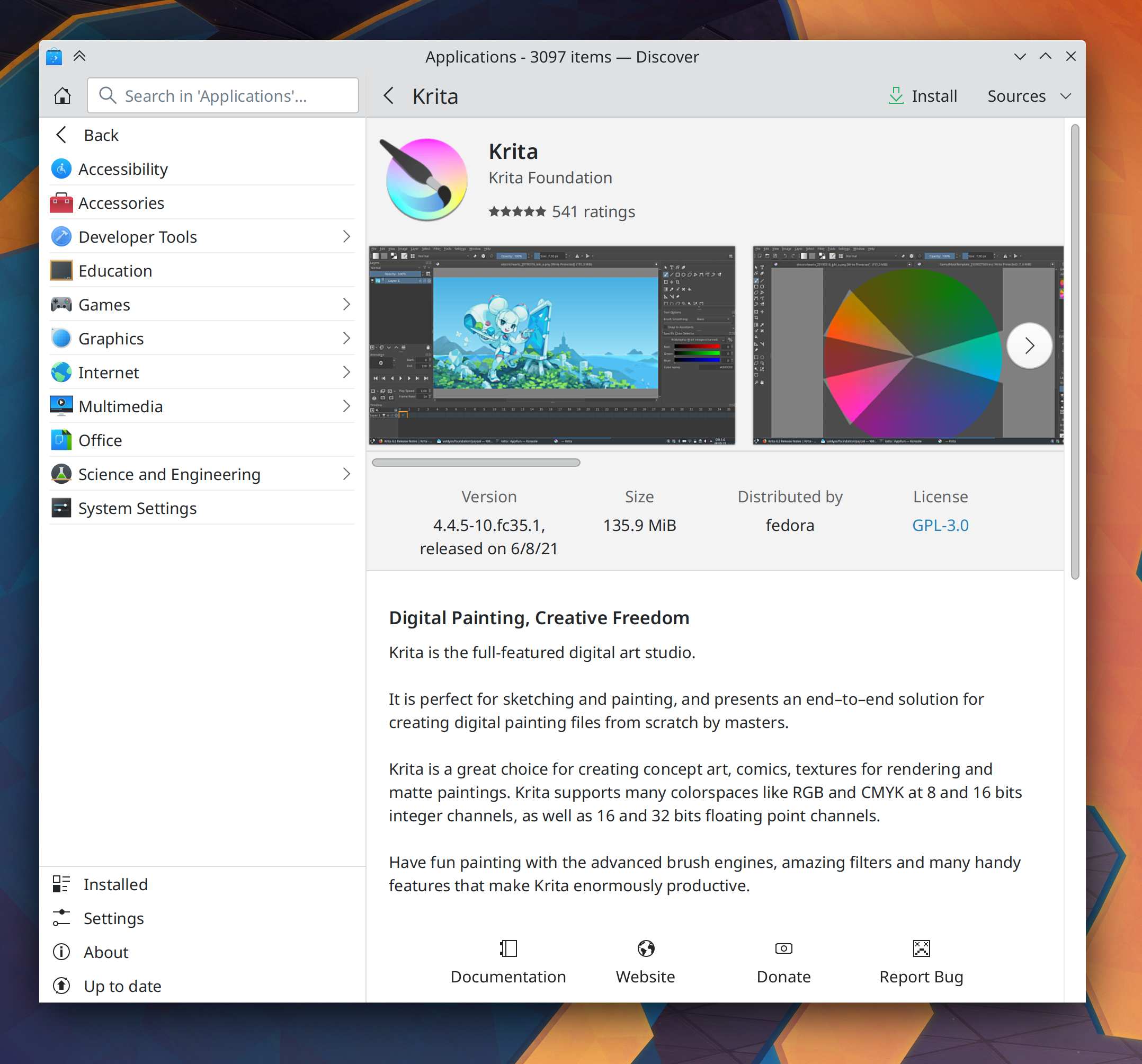
Discover’s App page has been redesigned for greater aesthetics and usability (me: Nate Graham and Manuel Jésus de la Fuente, Plasma 5.25):

You can now use the new default Meta+Alt+P shortcut to cycle keyboard focus between your panels and activate applets with the Keyboard (Marco Martin, Plasma 5.25)

The clipboard applet’s settings window is now much more comprehensible (Jonathan Marten, Plasma 5.25)

Searching for “switch user” no longer finds an item named “New Session”; it is now called “Switch User”, as you would expect (Alexander Lohnau, Plasma 5.25)

…And everything else

Keep in mind that this blog only covers the tip of the iceberg! Tons of KDE apps whose development I don’t have time to follow aren’t represented here, and I also don’t mention backend refactoring, improved test coverage, and other changes that are generally not user-facing. If you’re hungry for more, check out https://planet.kde.org/, where you can find blog posts by other KDE contributors detailing the work they’re doing.

How You Can Help

If you’re a developer, check out our 15-Minute Bug Initiative. Working on these issues makes a big difference quickly!

Otherwise, have a look at https://community.kde.org/Get_Involved to discover ways to be part of a project that really matters. Each contributor makes a huge difference in KDE; you are not a number or a cog in a machine! You don’t have to already be a programmer, either. I wasn’t when I got started. Try it, you’ll like it! We don’t bite!

Finally, consider making a tax-deductible donation to the KDE e.V. foundation.