Dressup Minigame / Character Customizer for Renpy
A downloadable asset pack for Windows and Linux
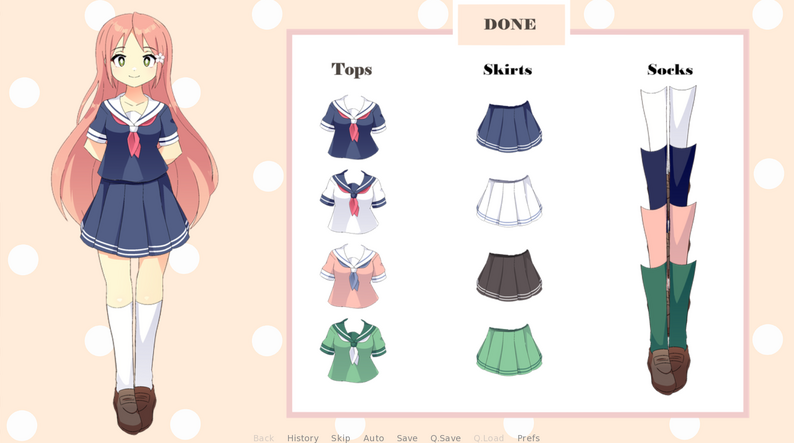
I wanted to implement a simple and easy to use dressup minigame/character customizer in Renpy, but couldn't quite find what I was looking for, so I made this!
***
Please note that I am not a programmer, and I am not proficient in Renpy!
I just wanted something simple to use and understand, and thought other beginners might find this useful as well!
If you have more experience, feel free to optimize or streamline the code.
***
Everything I included in the files is completely free to use: the minigame, the sprite and clothes (which you can download separately), the buttons, ...
Credit is not required, but appreciated! And if you use anything I made I'd love to know!
Hope this is helpful <3
(The character is based on Sutemo's sprites)
Download
Click download now to get access to the following files:

Comments
Log in with itch.io to leave a comment.
Hey! I'm getting this problem where when I call the screen for the outfits ui the program gives me this error regarding the imagebuttons:
For example for this one:
imagebutton auto "button top_1.png" align((1.0, 0.5)) action [Show(top1), Hide(top2)]
i get the error:
NameError: name 'top1' is not defined
Which is really confusing because in your code you never had to define each screen like that, or I mean, they're already defined above:
screen top1 zorder 1:
It cant be a problem with the version because your code runs with no issues
Unfortunately I don't know!
Tested this again and it works for me, so my guess is that there might have been a problem with the way you copied the code or files into your project? Sorry I can't be of much help!
Found it! I'm an idiot, I just wasn't putting those names inside quotes in the imagebutton line.
Thanks a lot for the quick response though! I got it to work!
Hi!! im very new to ren'py, where and how do i add this?!?! can i add it in the middle of the game??
Download the zip file, unzip it, open it. In the "game" folder, copy the script.rpy file and the "images" folder. Paste them into your own project (inside your "game" folder). From there, you can decide when the minigame appears in your game using any .rpy file. If this is too confusing for you, I recommend getting some more practice in RenPy first, maybe try finishing a short visual novel to get used to it. Hope this helps!
Does this have male sprites?
hi! i was wondering if i can use it for other games? e.g. rpgmaker mv or etc.
This only works in RenPy, sorry!
hehehe it's ok no problem, a small recommendation is that you make a program to create external characters, it would be very well received taking into account that there are not too many.
thank you for publishing it under cc0
So is it CC0?
Yes, just added it to the metadata!
It is a bit strange. I usually say how to do it when people answer yes on such questions...