Personalized Group Recommendations on Flickr

There are two primary paradigms for the discovery of digital content. First is the search paradigm, in which the user is actively looking for specific content using search terms and filters (e.g., Google web search, Flickr image search, Yelp restaurant search, etc.). Second is a passive approach, in which the user browses content presented to them (e.g., NYTimes news, Flickr Explore, and Twitter trending topics). Personalization benefits both approaches by providing relevant content that is tailored to users’ tastes (e.g., Google News, Netflix homepage, LinkedIn job search, etc.). We believe personalization can improve the user experience at Flickr by guiding both new as well as more experienced members as they explore photography. Today, we’re excited to bring you personalized group recommendations.

Flickr Groups are great for bringing people together around a common theme, be it a style of photography, camera, place, event, topic, or just some fun. Community members join for several reasons—to consume photos, to get feedback, to play games, to get more views, or to start a discussion about photos, cameras, life or the universe. We see value in connecting people with appropriate groups based on their interests. Hence, we decided to start the personalization journey by providing contextually relevant and personalized content that is tuned to each person’s unique taste.

Of course, in order to respect users’ privacy, group recommendations only consider public photos and public groups. Additionally, recommendations are private to the user. In other words, nobody else sees what is recommended to an individual.

In this post we describe how we are improving Flickr’s group recommendations. In particular, we describe how we are replacing a curated, non-personalized, static list of groups with a dynamic group recommendation engine that automatically generates new results based on user interactions to provide personalized recommendations unique to each person. The algorithms and backend systems we are building are broad and applicable to other scenarios, such as photo recommendations, contact recommendations, content discovery, etc.

Group_recommendations2.png

Figure: Personalized group recommendations

Challenges

One challenge of recommendations is determining a user’s interests. These interests could be user-specified, explicit preferences or could be inferred implicitly from their actions, supported by user feedback. For example:

  • Explicit:
    • Ask users what topics interest them
    • Ask users why they joined a particular group
  • Implicit:
    • Infer user tastes from groups they join, photos they like, and users they follow
    • Infer why users joined a particular group based on their activity, interactions, and dwell time
  • Feedback:
    • Get feedback on recommended items when users perform actions such as “Join” or “Follow” or click “Not interested”

Another challenge of recommendations is figuring out group characteristics. I.e.: what type of group is it? What interests does it serve? What brings Flickr members to this group? We can infer this by analyzing group members, photos posted to the group, discussions and amount of activity in the group.

Once we have figured out user preferences and group characteristics, recommendations essentially becomes a matchmaking process. At a high-level, we want to support 3 use cases:

  • Use Case # 1: Given a group, return all groups that are “similar”
  • Use Case # 2: Given a user, return a list of recommended groups
  • Use Case # 3: Given a photo, return a list of groups that the photo could belong to

Collaborative Filtering

One approach to recommender systems is presenting similar content in the current context of actions. For example, Amazon’s “Customers who bought this item also bought” or LinkedIn’s “People also viewed.” Item-based collaborative filtering can be used for computing similar items.

collaborative_filtering

Figure: Collaborative filtering in action

By Moshanin (Own work) [CC BY-SA 3.0] from Wikipedia

Intuitively, two groups are similar if they have the same content or same set of users. We observed that users often post the same photo to multiple groups. So, to begin, we compute group similarity based on a photo’s presence in multiple groups.  

Consider the following sample matrix M(Gi -> Pj) constructed from group photo pools, where 1 means a corresponding group (Gi) contains an image, and empty (0) means a group does not contain the image.
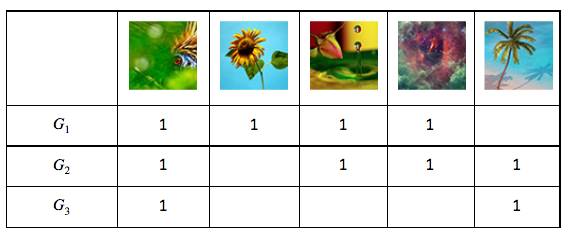
matrix1

From this, we can compute M.M’ (M’s transpose), which gives us the number of common photos between every pair of groups (Gi, Gj):

matrix2

We use modified cosine similarity to compute a similarity score between every pair of groups:

cosinesimilarity

To make this calculation robust, we only consider groups that have a minimum of X photos and keep only strong relationships (i.e., groups that have at least Y common photos). Finally, we use the similarity scores to come up with the top k-nearest neighbors for each group.

We also compute group similarity based on group membership —i.e., by defining group-user relationship (Gi -> Uj) matrix. It is interesting to note that the results obtained from this relationship are very different compared to (Gi, Pj) matrix. The group-photo relationship tends to capture groups that are similar by content (e.g.,“macro photography”). On the other hand, the group-user relationship gives us groups that the same users have joined but are possibly about very different topics, thus providing us with a diversity of results. We can extend this approach by computing group similarity using other features and relationships (e.g., autotags of photos to cluster groups by themes, geotags of photos to cluster groups by place, frequency of discussion to cluster groups by interaction model, etc.).

Using this we can easily come up with a list of similar groups (Use Case # 1). We can either merge the results obtained by different similarity relationships into a single result set, or keep them separate to power features like “Other groups similar to this group” and “People who joined this group also joined.”

We can also use the same data for recommending groups to users (Use Case # 2). We can look at all the groups that the user has already joined and recommend groups similar to those.

To come up with a list of relevant groups for a photo (Use Case # 3), we can compute photo similarity either by using a similar approach as above or by using Flickr computer vision models for finding photos similar to the query photo. A simple approach would then be to recommend groups that these similar photos belong to.

Implementation

Due to the massive scale (millions of users x 100k groups) of data, we used Yahoo’s Hadoop Stack to implement the collaborative filtering algorithm. We exploited sparsity of entity-item relationship matrices to come up with a more efficient model of computation and used several optimizations for computational efficiency. We only need to compute the similarity model once every 7 days, since signals change slowly.

architecture_diagram

Figure: Computational architecture

(All logos and icons are trademarks of respective entities)


Similarity scores and top k-nearest neighbors for each group are published to Redis for quick lookups needed by the serving layer. Recommendations for each user are computed in real-time when the user visits the groups page. Implementation of the serving layer takes care of a few aspects that are important from usability and performance point-of-view:

  • Freshness of results: Users hate to see the same results being offered even though they might be relevant. We have implemented a randomization scheme that returns fresh results every X hours, while making sure that results stay static over a user’s single session.
  • Diversity of results: Diversity of results in recommendations is very important since a user might not want to join a group that is very similar to a group he’s already involved in. We require a good threshold that balances similarity and diversity. To improve diversity further, we combine recommendations from different algorithms. We also cluster the user’s groups into diverse sets before computing recommendations.
  • Dynamic results: Users expect their interactions to have a quick effect on recommendations. We thus incorporate user interactions while making subsequent recommendations so that the system feels dynamic.
  • Performance: Recommendation results are cached so that API response is quick on subsequent visits.

Cold Start

The drawback to collaborative filtering is that it cannot offer recommendations to new users who do not have any associations. For these users, we plan to recommend groups from an algorithmically computed list of top/trending groups alongside manual curation. As users interact with the system by joining groups, the recommendations become more personalized.

Measuring Effectiveness

We use qualitative feedback from user studies and alpha group testing to understand user expectation and to guide initial feature design. However, for continued algorithmic improvements, we need an objective quantitative metric. Recommendation results by their very nature are subjective, so measuring effectiveness is tricky. The usual approach taken is to roll out to a random population of users and measure the outcome of interest for the test group as compared to the control group (ref: A/B testing).

We plan to employ this technique and measure user interaction and engagement to keep improving the recommendation algorithms. Additionally, we plan to measure explicit signals such as when users click “Not interested.” This feedback will also be used to fine-tune future recommendations for users.

measuringeffectiveness

Figure: Measuring user engagement

Future Directions

While we’re seeing good initial results, we’d like to continue improving the algorithms to provide better results to the Flickr community. Potential future directions can be classified broadly into 3 buckets: algorithmic improvements, new product use cases, and new recommendation applications.

If you’d like to help, we’re hiring. Check out our jobs page and get in touch.

Product Engineering: Mehul Patel, Chenfan (Frank) Sun,  Chinmay Kini

We Want You… and Your Teammates

14493569810_7ac064e3c4_oWe’re hiring here at Flickr and we got pretty excited the other week when we saw Stripe’s post: BYOT (Bring Your Own Team). The sum of the parts is greater than the whole and all that. Genius <big hat tip to them>.

In case you didn’t read Stripe’s post, here’s the gist: you’re a team player, you like to make an impact, focus on a tough problem, set a challenging goal, and see the fruits of your labor after blood, sweat, and tears (or, maybe just brainpower). But you’ve got the itch to collaborate, to talk an idea through, break it down, and parallelize tasks or simply to be around your mates through work and play. Turns out you already have your go-to group of colleagues, roommates, siblings, or buddies that push, inspire, and get the best out of you. Well, in that case we may want to hire all of you!

Like Stripe, we understand the importance of team dynamics. So if you’ve already got something good going on, we want in on it too. We love Stripe and are stoked for this initiative of theirs, but if Flickr tickles your fancy (and it does ours :) consider bringing that team of yours this way too, especially if you’ve got a penchant for mobile development. We’d love to chat!

Email us: jobs at flickr.com

Team crop

Photos by: @Chris Martin and @Captain Eric Willis

Introducing yakbak: Record and playback HTTP interactions in NodeJS

Did you know that the new Front End of www.flickr.com is one big Flickr API client? Writing a client for an existing API or service can be a lot of fun, but decoupling and testing that client can be quite tricky. There are many different approaches to taking the backing service out of the equation when it comes to writing tests for client code. Today we’ll discuss the pros and cons of some of these approaches, describe how the Flickr Front End team tests service-dependent libraries, and introduce you to our new NodeJS HTTP playback module: yakbak!

Scenario: Testing a Flickr API Client

Let’s jump into some code, shall we? Suppose we’re testing a (very, very simple) photo search API client:

https://gist.github.com/jeremyruppel/fd25c723a5962a49936f174d765aa11a

Currently, this code will make an HTTP request to the Flickr API on every test run. This is less than desirable for several reasons:

  • UGC is unpredictable. In this test, we’re asserting that the response code is an HTTP 200, but obviously our client code needs to provide the response data to be useful. It’s impossible to write a meaningful and predictable test against live content.
  • Traffic is unpredictable. This photos search API call usually takes ~150ms for simple queries, but a more complex query or a call during peak traffic may take longer.
  • Downtime is unpredictable. Every service has downtime (the term is “four nines,” not “one hundred percent” for a reason), and if your service is down, your client tests will fail.
  • Networks are unpredictable. Have you ever tried coding on a plane? Enough said.

We want our test suite to be consistent, predictable, and fast. We’re also only trying to test our client code, not the API. Let’s take a look at some ways to replace the API with a control, allowing us to predictably test the client code.

Approach 1: Stub the HTTP client methods

We’re using superagent as our HTTP client, so we could use a mocking library like sinon to stub out superagent’s Request methods:

https://gist.github.com/jeremyruppel/8b837f439663db325aaa2437a2259934

With these changes, we never actually make an HTTP request to the API during a test run. Now our test is predictable, controlled, and it runs crazy fast. However, this approach has some major drawbacks:

  • Tightly coupled with superagent. We’re all up in the client’s implementation details here, so if superagent ever changes their API, we’ll need to correct our tests to match. Likewise, if we ever want to use a different HTTP client, we’ll need to correct our tests as well.
  • Difficult to specify the full HTTP response. Here we’re only specifying the statusCode; what about when we need to specify the body or the headers? Talk about verbose.
  • Not necessarily accurate. We’re trusting the test author to provide a fake response that matches what the actual server would send back. What happens if the API changes the response schema? Some unhappy developer will have to manually update the tests to match reality (probably an intern, let’s be honest).

We’ve at least managed to replace the service with a control in our tests, but we can do (slightly) better.

Approach 2: Mock the NodeJS HTTP module

Every NodeJS HTTP client will eventually delegate to the standard NodeJS http module to perform the network request. This means we can intercept the request at a low level by using a tool like nock:

https://gist.github.com/jeremyruppel/d92a62400f635b42249adc041cdecc96

Great! We’re no longer stubbing out superagent and we can still control the HTTP response. This avoids the HTTP client coupling from the previous step, but still has many similar drawbacks:

  • We’re still completely implementation-dependent. If we want to pass a new query string parameter to our service, for example, we’ll also need to add it to the test so that nock will match the request.
  • It’s still laborious to specify the response headers, body, etc.
  • It’s still difficult to make sure the response body always matches reality.

At this point, it’s worth noting that none of these bullet points were an issue back when we were actually making the HTTP request. So, let’s do exactly that (once!).

Approach 3: Record and playback the HTTP interaction

The Ruby community created the excellent VCR gem for recording and replaying HTTP interactions during tests. Recorded HTTP requests exist as “tapes”, which are just files with some sort of format describing the interaction. The basic workflow goes like this:

  1. The client makes an actual HTTP request.
  2. VCR sits in front of the system’s HTTP library and intercepts the request.
  3. If VCR has a tape matching the request, it simply replays the response to the client.
  4. Otherwise, VCR lets the HTTP request through to the service, records the interaction to a new tape on disk and plays it back to the client.

Introducing yakbak

Today we’re open-sourcing yakbak, our take on recording and playing back HTTP interactions in NodeJS. Here’s what our tests look like with a yakbak proxy:

https://gist.github.com/jeremyruppel/7050b34342a10d8e3dd8bc2dba0d50c0

Here we’ve created a standard NodeJS http.Server with our proxy middleware. We’ve also configured our client to point to the proxy server instead of the origin service. Look, no implementation details!

yakbak tries to do things The Node Way™ wherever possible. For example, each yakbak “tape” is actually its own module that simply exports an http.Server handler, which allows us to do some really cool things. For example, it’s trivial to create a server that always responds a certain way. Since the tape’s hash is based solely on the incoming request, we can easily edit the response however we like. We’re also kicking around a handful of enhancements that should make yakbak an even more powerful development tool.

Thanks to yakbak, we’ve been writing fast, consistent, and reliable tests for our HTTP clients and applications. Want to give it a spin? Check it out today: https://github.com/flickr/yakbak

P.S. We’re hiring!

Do you love development tooling and helping keep teams on the latest and greatest technology? Or maybe you just want to help build the best home for your photos on the entire internet? We’re hiring Front End Ops and tons of other great positions. We’d love to hear from you!

Our Justified Layout Goes Open Source

We introduced the justified layout on Flickr.com late in 2011. Our community of photographers loved it for its ability to efficiently display many photos at their native aspect ratio with visually pleasing, consistent whitespace, so we quickly added it to the rest of the website.

Justified Example

It’s been through many iterations and optimizations. From back when we were primarily on the PHP stack to our lovely new JavaScript based isomorphic stack. Last year Eric Socolofsky did a great job explaining how the algorithm works and how it fits into a larger infrastructure for Flickr specifically.

In the years following its launch, we’ve had requests from our front end colleagues in other teams across Yahoo for a reusable package that does photo (or any rectangle) presentation like this, but it’s always been too tightly coupled to our stack to separate it out and hand it over. Until now! Today we’re publishing the justified-layout algorithm wrapped in an npm module for you to use on the server, or client, in your own projects.

Install/Download

npm install justified-layout --save

Or grab it directly from Github.

Using it

It’s really easy to use. No configuration is required. Just pass in an array of aspect ratios representing the photos/boxes you’d like to lay out:

var layoutGeometry = require('justified-layout')([1.33, 1, 0.65] [, config]);

If you only have dimensions and don’t want an extra step to convert them to aspect ratios, you can pass in an array of widths and heights like this:

https://gist.github.com/jimwhimpey/825377b78ef8d9b10e702aa6adc41eb4

What it returns

The geometry data for the layout items, in the same order they’re passed in.

https://gist.github.com/jimwhimpey/faaf2c95809647abcbea481d8445ecf9

This is the extent of what the module provides. There’s no rendering component. It’s up to you to use this data to render boxes the way you want. Use absolute positioning, background positions, canvas, generate a static image on the backend, whatever you like! There’s a very basic implementation used on the demo and docs page.

Configuration

It’s highly likely the defaults don’t satisfy your requirements; they don’t even satisfy ours. There’s a full set of configuration options to customize the output just the way you want. My favorite is the fullWidthBreakoutRowCadence option that we use on album pages. All config options are documented on the docs and demo page.

Compatibility

  • Latest Chrome
  • Latest Safari
  • Latest Firefox
  • Latest Mobile Safari
  • IE 9+
  • Node 0.10+

The future

The justified layout algorithm is just one part of our photo list infrastructure. Following this, we’ll be open sourcing more modules for handling data, handling state, reverse layouts, appending and prepending items for pagination.

We welcome your feedback, issues and contributions on Github.

P.S. Open Source at Flickr

This is the first of quite a bit of code we have in the works for open source release. If working on open source projects appeals to you, we’re hiring!


Configuration management for distributed systems (using GitHub and cfg4j)

Norbert Potocki, Software Engineer @ Yahoo Inc.

Warm up: Why configuration management?

When working with large-scale software systems, configuration management becomes crucial; supporting non-uniform environments gets greatly simplified if you decouple code from configuration. While building complex software/products such as Flickr, we had to come up with a simple, yet powerful, way to manage configuration. Popular approaches to solving this problem include using configuration files or having a dedicated configuration service. Our new solution combines the extremely popular GitHub and cfg4j library, giving you a very flexible approach that will work with applications of any size.

Why should I decouple configuration from the code?

  • Faster configuration changes (e.g. flipping feature toggles): Configuration can simply be injected without requiring parts of your code to be reloaded and re-executed. Config-only updates tend to be faster than code deployment.
  • Different configuration for different environments: Running your app on a laptop or in a test environment requires a different set of settings than production instance.
  • Keeping credentials private: If you don’t have a dedicated credential store, it may be convenient to keep credentials as part of configuration. They usually aren’t supposed to be “public,” but the code still may be. Be a good sport and don’t keep credentials in a public GitHub repo. :)

Meet the Gang: Overview of configuration management players

Let’s see what configuration-specific components we’ll be working with today:

image
Figure 1 –  Overview of configuration management components

Configuration repository and editor: Where your configuration lives. We’re using Git for storing configuration files and GitHub as an ad hoc editor.

Push cache : Intermediary store that we use to improve fetch speed and to ease load on GitHub servers.

CD pipeline: Continuous deployment pipeline pushing changes from repository to push cache, and validating config correctness.

Configuration library: Fetches configs from push cache and exposing them to your business logic.

Bootstrap configuration : Initial configuration specifying where your push cache is (so that library knows where to get configuration from).

All these players work as a team to provide an end-to-end configuration management solution.

The Coach: Configuration repository and editor

The first thing you might expect from the configuration repository and editor is ease of use. Let’s enumerate what that means:

  • Configuration should be easy to read and write.
  • It should be straightforward to add a new configuration set.
  • You most certainly want to be able to review changes if your team is bigger than one person.
  • It’s nice to see a history of changes, especially when you’re trying to fix a bug in the middle of the night.
  • Support from popular IDEs – freedom of choice is priceless.
  • Multi-tenancy support (optional) is often pragmatic.

So what options are out there that may satisfy those requirements? The three very popular formats for storing configuration are YAML, Java Property files, and XML files. We use YAML – it is widely supported by multiple programming languages and IDEs, and it’s very readable and easy to understand, even by a non-engineer.

We could use a dedicated configuration store; however, the great thing about files is that they can be easily versioned by version control tools like Git, which we decided to use as it’s widely known and proven.

Git provides us with a history of changes and an easy way to branch off configuration. It also has great support in the form of GitHub which we use both as an editor (built-in support for YAML files) and collaboration tool (pull requests, forks, review tool). Both are nicely glued together by following the Git flow branching model. Here’s an example of a configuration file that we use:

Figure 2 –  configuration file preview

One of the goals was to make managing multiple configuration sets (execution environments) a breeze. We need the ability to add and remove environments quickly. If you look at the screenshot below, you’ll notice a “prod-us-east” directory in the path. For every environment, we store a separate directory with config files in Git. All of them have the exact same structure and only differ in YAML file contents.

This solution makes working with environments simple and comes in very handy during local development or new production fleet rollout (see use cases at the end of this article). Here’s a sample config repo for a project that has only one “feature”:

Figure 3 –  support for multiple environments

Some of the products that we work with at Yahoo have a very granular architecture with hundreds of micro-services working together. For scenarios like this, it’s convenient to store configurations for all services in a single repository. It greatly reduces the overhead of maintaining multiple repositories. We support this use case by having multiple top-level directories, each holding configurations for one service only.

The sprinter: Push cache

The main role of push cache is to decrease the load put on the GitHub server and improve configuration fetch time. Since speed is the only concern here, we decided to keep the push cache simple: it’s just a key-value store. Consul was our choice, in part because it’s fully distributed.

You can install Consul clients on the edge nodes and they will keep being synchronized across the fleet. This greatly improves both the reliability and the performance of the system. If performance is not a concern, any key-value store will do. You can skip using push cache altogether and connect directly to Github, which comes in handy during development (see use cases to learn more about this).

The Manager: CD Pipeline

When the configuration repository is updated, a CD pipeline kicks in. This fetches configuration, converts it into a more optimized format, and pushes it to cache. Additionally, the CD pipeline validates the configuration (once at pull-request stage and again after being merged to master) and controls multi-phase deployment by deploying config change to only 20% of production hosts at one time.

The Mascot: Bootstrap configuration

Before we can connect to the push cache to fetch configuration, we need to know where it is. That’s where bootstrap configuration comes into play. It’s very simple. The config contains the hostname, port to connect to, and the name of the environment to use. You need to put this config with your code or as part of the CD pipeline. This simple yaml file binding Spring profiles to different Consul hosts suffices for our needs:

image
Figure 4 –  bootstrap configuration

The Cool Guy: Configuration library

image

The configuration library takes care of fetching the configuration from push cache and exposing it to your business logic. We use the library called cfg4j (“configuration for java”). This library re-loads configurations from the push cache every few seconds and injects them into configuration objects that our code uses. It also takes care of local caching, merging properties from different repositories, and falling back to user-provided defaults when necessary (read more at http://www.cfg4j.org/).

Briefly summarizing how we use cfg4j’s features:

  • Configuration auto-reloading: Each service reloads configuration every ~30 seconds and auto re-configures itself.
  • Multi-environment support: for our multiple environments (beta, performance, canary, production-us-west, production-us-east, etc.).
  • Local caching: Remedies service interruption when the push cache or configuration repository is down and also improves the performance for obtaining configs.
  • Fallback and merge strategies: Simplifies local development and provides support for multiple configuration repositories.
  • Integration with Dependency Injection containers – because we love DI!

If you want to play with this library yourself, there’s plenty of examples both in its documentation and cfg4j-sample-apps Github repository.

The Heavy Lifter: Configurable code

The most important piece is business logic. To best make use of a configuration service, the business logic has to be able to re-configure itself in runtime. Here are a few rules of thumb and code samples:

  • Use dependency injection for injecting configuration. This is how we do it using Spring Framework (see the bootstrap configuration above for host/port values):

https://gist.github.com/norbertpotocki/e91aa64b524592432630

  • Use configuration objects to inject configuration instead of providing configuration directly – here’s where the difference is:

Direct configuration injection (won’t reload as config changes)
https://gist.github.com/norbertpotocki/eac0a927ca2df45c2a0b

Configuration injection via “interface binding” (will reload as config changes):
https://gist.github.com/norbertpotocki/0c0b5b9aa9d11c06c937

The exercise: Common use-cases (applying our simple solution)

Configuration during development (local overrides)

When you develop a feature, a main concern is the ability to evolve your code quickly.  A full configuration-management pipeline is not conducive to this. We use the following approaches when doing local development:

  • Add a temporary configuration file to the project and use cfg4j’s MergeConfigurationSource for reading config both from the configuration store and your file. By making your local file a primary configuration source, you provide an override mechanism. If the property is found in your file, it will be used. If not, cfg4j will fall back to using values from configuration store. Here’s an example (reference examples above to get a complete code):

https://gist.github.com/norbertpotocki/289f3943249ea2813dcf

  • Fork the configuration repository, make changes to the fork and use cfg4j’s GitConfigurationSource to access it directly (no push
    cache required):

https://gist.github.com/norbertpotocki/dacdcc6671a2158ded5e

  • Set up your private push cache, point your service to the cache, and edit values in it directly.

Configuration defaults

When you work with multiple environments, some of them may share a configuration. That’s when using configuration defaults may be convenient. You can do this by creating a “default” environment and using cfg4j’s MergeConfigurationSource for reading config first from the original environment and then (as a fallback) from “default” environment.

Dealing with outages

Configuration repository, push cache, and configuration CD pipeline can experience outages. To minimize the impact of such events, it’s good practice to cache configuration locally (in-memory) after each fetch. cfg4j does that automatically.

Responding to incidents – ultra fast configuration updates (skipping configuration CD pipeline)

Tests can’t always detect all problems. Bugs leak to the production environment and at times it’s important to make a config change as fast as possible to stop the fire. If you’re using push cache, the fastest way to modify config values is to make changes directly within the cache. Consul offers a rich REST API and web ui for updating configuration in the key-value store.

Keeping code and configuration in sync

Verifying that code and configuration are kept in sync happens at the configuration CD pipeline level. One part of the continuous deployment process deploys the code into a temporary execution environment, and points it to the branch that contains the configuration changes. Once the service is up, we execute a batch of functional tests to verify configuration correctness.

The cool down: Summary

The presented solution is the result of work that we put into building huge-scale photo-serving services. We needed a simple, yet flexible, configuration management system. Combining Git, Github, Consul and cfg4j provided a very satisfactory solution that we encourage you to try.

I want to thank the following people for reviewing this article: Bhautik Joshi, Elanna Belanger, Archie Russell.

PS. You can also follow me on Twitter, GitHub, LinkedIn or my private blog.