<?xml version="1.0" encoding="utf-8"?>
<feed xmlns="http://www.w3.org/2005/Atom">
    <id>https://about.gitlab.com/blog</id>
    <title>GitLab</title>
    <updated>2026-04-08T16:53:29.174Z</updated>
    <generator>https://github.com/jpmonette/feed</generator>
    <author>
        <name>The GitLab Team</name>
    </author>
    <link rel="alternate" href="https://about.gitlab.com/blog"/>
    <link rel="self" href="https://about.gitlab.com/atom.xml"/>
    <subtitle>GitLab Blog RSS feed</subtitle>
    <icon>https://about.gitlab.com/favicon.ico</icon>
    <rights>All rights reserved 2026</rights>
    <entry>
        <title type="html"><![CDATA[Streamline test management with the SmartBear QMetry GitLab component]]></title>
        <id>https://about.gitlab.com/blog/streamline-test-management-with-the-smartbear-qmetry-gitlab-component/</id>
        <link href="https://about.gitlab.com/blog/streamline-test-management-with-the-smartbear-qmetry-gitlab-component/"/>
        <updated>2026-04-07T00:00:00.000Z</updated>
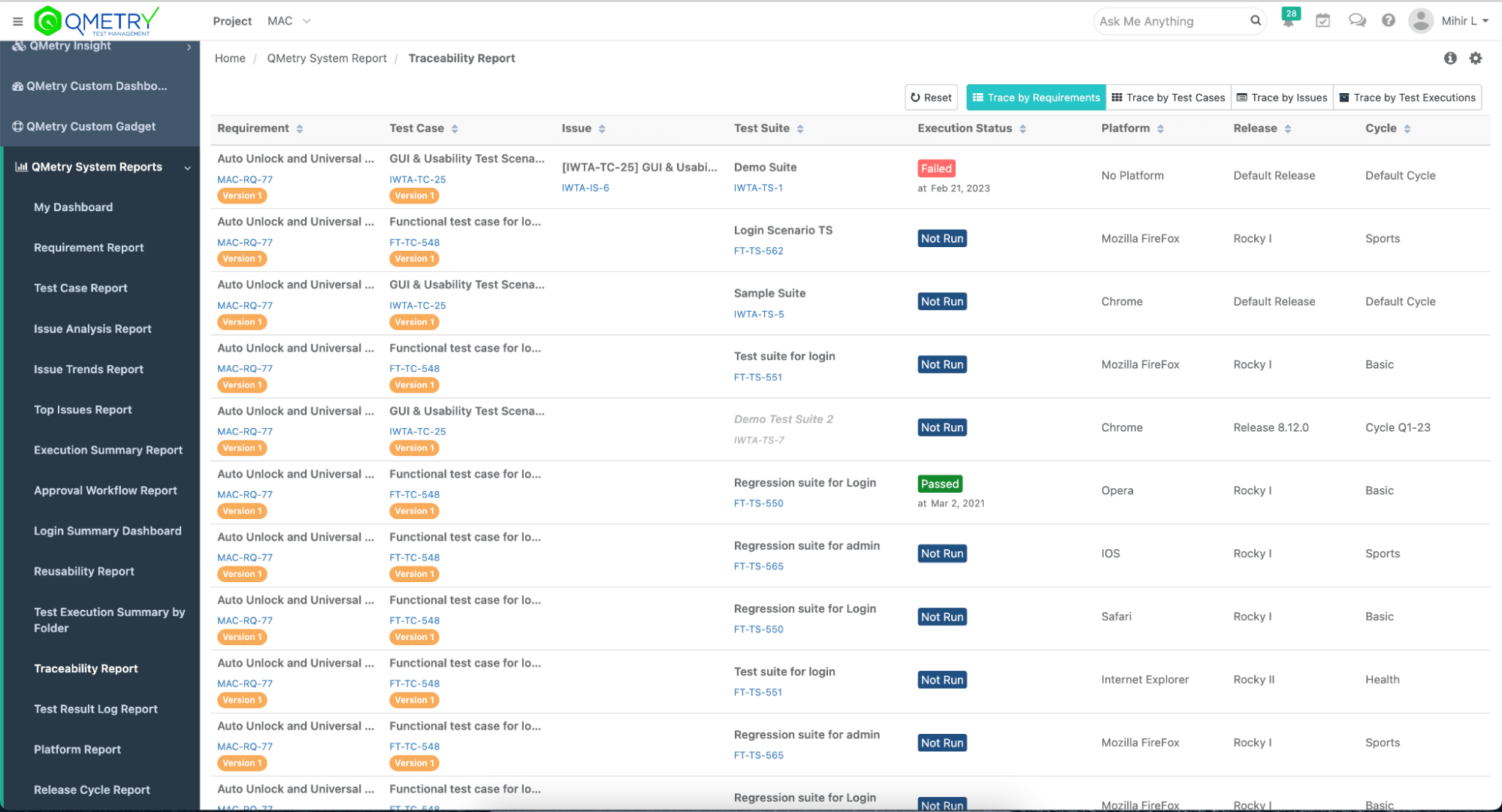
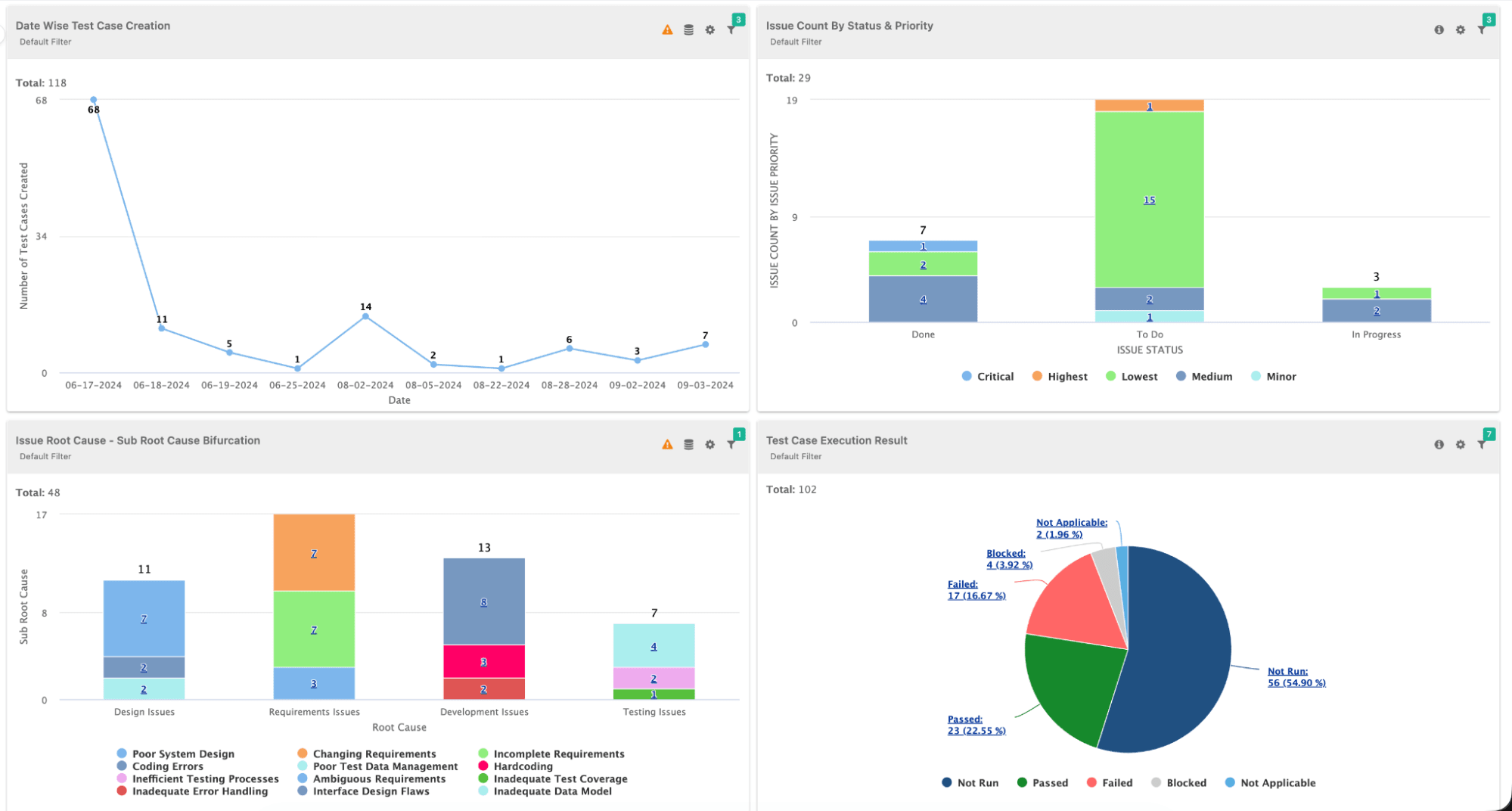
        <content type="html"><![CDATA[<p>In modern software development, test management and continuous integration are two sides of the same coin. DevSecOps teams need seamless integration between their CI/CD pipelines and test management platforms to maintain visibility, traceability, and compliance across the software development lifecycle.</p><p>This becomes even more important as testing scales across automated pipelines, where execution data is spread across tools and harder to track in one place.</p><p>For organizations using GitLab for CI/CD and SmartBear QMetry for test management, manually uploading test results creates friction, delays feedback loops, and makes it harder to maintain a reliable, centralized view of testing.</p><p>What if you could automatically publish your JUnit, TestNG, or other test results directly from your GitLab pipeline to QMetry with just a few lines of configuration?</p><p>That&#39;s exactly what the new <strong>QMetry GitLab Component</strong> enables. This reusable CI/CD component, now available in the <a href="https://gitlab.com/explore/catalog" rel="">GitLab CI/CD Catalog</a>, eliminates the manual overhead of test result management by automatically uploading test execution data to QMetry.  This is an AI-enabled, enterprise-grade test management platform that brings together test planning, execution, tracking, and reporting in one place.</p><p>As a centralized system of record for testing, QMetry helps teams understand coverage, track execution, and make more reliable release decisions.</p><p>In this guide, you&#39;ll learn:</p><ul><li>How to set up the QMetry GitLab Component in your pipeline</li><li>How to configure automated test result uploads</li><li>Advanced configuration options for enterprise requirements</li><li>A real-world aerospace industry use case</li><li>Best practices for test management automation</li></ul><p>By the end of this article, your GitLab pipelines will automatically feed test results into QMetry, giving your QA teams instant visibility into test execution and helping them make faster, more confident release decisions.</p><p><img alt="SmartBear QMetry GitLab integration" src="https://res.cloudinary.com/about-gitlab-com/image/upload/v1775488045/ojt707rzxnm2yr3vqxdh.png" /></p><h2 id="why-integrate-gitlab-with-qmetry">Why integrate GitLab with QMetry?</h2><p>Before diving into the technical implementation, let&#39;s understand the value this integration delivers:</p><h3 id="eliminate-manual-test-result-uploads">Eliminate manual test result uploads</h3><p>DevSecOps engineers and QA teams no longer need to manually export test results from CI/CD runs and import them into test management systems. The component handles this automatically after every pipeline execution.</p><p>This reduces manual effort while ensuring test data stays consistent, up to date, and easy to access across teams.</p><p><img alt="Test results with SmartBear QMetry GitLab integration" src="https://res.cloudinary.com/about-gitlab-com/image/upload/v1775488045/ajx64sihup2nursdpnxz.png" /></p><h3 id="enable-end-to-end-traceability">Enable end-to-end traceability</h3><p>By connecting GitLab&#39;s CI/CD execution data with QMetry&#39;s test management capabilities, teams gain complete traceability from requirements through test cases to actual test execution results. This is critical for regulated industries like financial services, aerospace, medical devices, and automotive, where audit trails are mandatory and regulatory compliance depends on demonstrating complete test coverage.</p><p>It also gives teams a clearer view of coverage and risk across releases, making it easier to understand what’s been tested and what still needs attention.</p><h3 id="accelerate-feedback-loops">Accelerate feedback loops</h3><p>Automated test result uploads mean QA teams, product managers, and stakeholders see test execution results immediately after pipeline completion – no waiting for manual data entry or report generation.</p><p>With faster access to results, teams can act immediately, reduce delays, and make quicker, more informed release decisions.</p><h3 id="support-compliance-and-audit-requirements">Support compliance and audit requirements</h3><p>For organizations in regulated industries, maintaining comprehensive test records with proper versioning and traceability is non-negotiable. This integration ensures you can document every test execution properly in QMetry with links back to the specific GitLab pipeline, commit, and build.</p><p>This creates an audit-ready record of testing activity without adding manual overhead.</p><p><img alt="Audit-ready record of testing with SmartBear QMetry GitLab integration" src="https://res.cloudinary.com/about-gitlab-com/image/upload/v1775488045/q2tbaw5otgdywjkcquqx.png" /></p><h3 id="leverage-ai-powered-test-insights">Leverage AI-powered test insights</h3><p>QMetry uses AI to analyze test execution patterns, identify flaky tests, predict test failures, and recommend optimization opportunities. Feeding it real-time data from GitLab pipelines maximizes the value of these AI capabilities.</p><p>With continuous data flowing in, teams get more accurate insights and can focus their efforts where it matters most.</p><p><img alt="Accurage insights with SmartBear QMetry GitLab integration" src="https://res.cloudinary.com/about-gitlab-com/image/upload/v1775488045/pl7ru4wx8ixnheedfyrs.png" /></p><h2 id="about-the-gitlab-and-smartbear-partnership">About the GitLab and SmartBear partnership</h2><p>This component represents a growing partnership between GitLab and SmartBear to better connect CI/CD execution with test management in a single workflow. SmartBear brings deep expertise in testing, API management, and quality automation, while GitLab provides the most comprehensive AI-powered DevSecOps platform. Together, they help teams streamline how testing fits into the development lifecycle while maintaining the quality, security, and compliance standards their industries require.</p><p>Whether you&#39;re managing test execution for aerospace flight control systems, financial services platforms, automotive safety applications, or medical device software, the combination of GitLab&#39;s CI/CD capabilities and QMetry&#39;s test management gives teams a centralized, reliable view of testing across the lifecycle, helping them track execution, maintain traceability, and make more confident release decisions.</p><h2 id="what-youll-need">What you&#39;ll need</h2><p>Before getting started, ensure you have:</p><ul><li><strong>A GitLab account</strong> with a project containing automated tests that generate test result files (JUnit XML, TestNG XML, etc.)</li><li><strong>QMetry Test Management Enterprise</strong> account with API access enabled</li><li><strong>QMetry API Key</strong> generated  from your QMetry instance (we&#39;ll cover this shortly)</li><li><strong>QMetry Project</strong> already created where you will upload test results</li><li><strong>Familiarity with GitLab CI/CD</strong>, including understanding of basic <code className="">.gitlab-ci.yml</code> syntax and pipeline concepts</li><li><strong>Test suite configuration</strong> in QMetry (optional but recommended for better organization)</li></ul><h3 id="understanding-the-test-result-flow">Understanding the test result flow</h3><p>Here&#39;s what happens when you integrate this component:</p><ol><li><strong>Test execution</strong>: Your GitLab CI/CD pipeline runs automated tests (unit tests, integration tests, E2E tests, etc.).</li><li><strong>Result generation</strong>: Tests produce output files in formats like JUnit XML, TestNG XML, or other supported formats.</li><li><strong>Component invocation</strong>: The QMetry component executes as a job in your pipeline.</li><li><strong>Automatic upload</strong>: The component reads your test result files and uploads them to QMetry via API.</li><li><strong>QMetry processing</strong>: QMetry receives the results, processes them, and makes them available for reporting and analysis.</li></ol><p>The beauty of this integration is that it happens automatically, with no manual intervention required once configured.</p><h2 id="part-1-getting-your-qmetry-api-credentials">Part 1: Getting your QMetry API credentials</h2><p>Before configuring the GitLab component, you need to obtain API access credentials from your QMetry instance. Here are the steps to follow:</p><h3 id="_1-access-qmetry-settings">1. Access QMetry settings</h3><ol><li>Log in to your <strong>QMetry Test Management Enterprise</strong> instance.</li><li>Navigate to your <strong>user profile</strong> (typically in the top-right corner).</li><li>Select <strong>Settings</strong> or <strong>API Access</strong> from the dropdown menu.</li></ol><h3 id="_2-generate-an-api-key">2. Generate an API key</h3><ol><li>In the API Access section, click <strong>Generate New API Key.</strong></li><li>Provide a descriptive <strong>name</strong> for the key (e.g., &quot;GitLab CI/CD Integration&quot;).</li><li>Set appropriate <strong>permissions</strong>. The key needs write access to upload test results.</li><li>Click <strong>Generate.</strong></li><li><strong>Copy the API key immediately</strong> as it will only be displayed once.</li></ol><p><strong>Important security note</strong>: Treat your API key like a password. Never commit it directly to your <code className="">.gitlab-ci.yml</code> file or store it in plain text. We&#39;ll use GitLab CI/CD variables to store it securely.</p><h3 id="_3-note-your-qmetry-instance-url">3. Note your QMetry instance URL</h3><p>You&#39;ll also need your QMetry instance URL, which typically follows this format:</p><pre className="language-text" code="https://your-company.qmetry.com
" language="text" meta=""><code>https://your-company.qmetry.com
</code></pre><p>or, for self-hosted instances:</p><pre className="language-text" code="https://qmetry.your-company.com
" language="text" meta=""><code>https://qmetry.your-company.com
</code></pre><p>Make note of this URL because you&#39;ll need it in the next section.</p><h2 id="part-2-configuring-gitlab-cicd-variables">Part 2: Configuring GitLab CI/CD variables</h2><p>Now that you have your QMetry credentials, let&#39;s store them securely in GitLab. Here are the next steps to follow:</p><h3 id="_4-navigate-to-cicd-settings">4. Navigate to CI/CD settings</h3><ol><li>Open your <strong>GitLab project.</strong></li><li>In the left sidebar, navigate to <strong>Settings &gt; CI/CD.</strong></li><li>Expand the <strong>Variables</strong> section.</li><li>Click <strong>Add variable.</strong></li></ol><h3 id="_5-add-the-qmetry-api-key">5. Add the QMetry API key</h3><p>Configure the API key variable:</p><table><thead><tr><th>Field</th><th>Value</th></tr></thead><tbody><tr><td><strong>Key</strong></td><td><code className="">QMETRY_API_KEY</code></td></tr><tr><td><strong>Value</strong></td><td>Your QMetry API key from Step 2</td></tr><tr><td><strong>Type</strong></td><td>Variable</td></tr><tr><td><strong>Flags</strong></td><td>✅ Mask variable<br />✅ Protect variable (recommended)</td></tr></tbody></table><p>Click <strong>Add variable</strong> to save.</p><h3 id="_6-add-the-qmetry-instance-url">6. Add the QMetry instance URL</h3><p>Add a second variable for your instance URL:</p><table><thead><tr><th>Field</th><th>Value</th></tr></thead><tbody><tr><td><strong>Key</strong></td><td><code className="">INSTANCE_URL</code></td></tr><tr><td><strong>Value</strong></td><td>Your QMetry instance URL (e.g., <code className="">https://your-company.qmetry.com</code>)</td></tr><tr><td><strong>Type</strong></td><td>Variable</td></tr><tr><td><strong>Flags</strong></td><td>(optional: Protect variable)</td></tr></tbody></table><p>Click <strong>Add variable</strong> to save.</p><p><strong>Why use CI/CD variables?</strong></p><ul><li><strong>Security</strong>: Masked variables are hidden in job logs.</li><li><strong>Reusability</strong>: You can use the same credentials across multiple pipelines.</li><li><strong>Flexibility</strong>: It is easy to rotate credentials without modifying pipeline code.</li><li><strong>Access control</strong>: Protected variables are only available on protected branches.</li></ul><h2 id="part-3-understanding-your-test-result-files">Part 3: Understanding your test result files</h2><p>Before integrating the component, ensure your tests generate output files that QMetry can process. Here are the next steps to follow:</p><h3 id="_7-verify-test-output-format">7. Verify test output format</h3><p>The QMetry component supports multiple test result formats. The most common is <strong>JUnit XML</strong>, which most testing frameworks can generate:</p><p><strong>Example JUnit XML output</strong> (<code className="">results.xml</code>):</p><pre className="language-xml shiki shiki-themes github-light" code="&lt;?xml version=&quot;1.0&quot; encoding=&quot;UTF-8&quot;?&gt;
&lt;testsuites&gt;
  &lt;testsuite name=&quot;Flight Control System Tests&quot; tests=&quot;15&quot; failures=&quot;1&quot; errors=&quot;0&quot; time=&quot;45.231&quot;&gt;
    &lt;testcase classname=&quot;FlightControlTests&quot; name=&quot;testAltitudeHold&quot; time=&quot;2.341&quot;&gt;
      &lt;system-out&gt;Altitude hold engaged at 10,000 feet&lt;/system-out&gt;
    &lt;/testcase&gt;
    &lt;testcase classname=&quot;FlightControlTests&quot; name=&quot;testAutopilotEngagement&quot; time=&quot;3.125&quot;&gt;
      &lt;system-out&gt;Autopilot engaged successfully&lt;/system-out&gt;
    &lt;/testcase&gt;
    &lt;testcase classname=&quot;FlightControlTests&quot; name=&quot;testEmergencyLanding&quot; time=&quot;5.892&quot;&gt;
      &lt;failure message=&quot;Landing gear failed to deploy&quot;&gt;
        Expected: Landing gear deployed
        Actual: Landing gear malfunction detected
      &lt;/failure&gt;
    &lt;/testcase&gt;
    &lt;!-- Additional test cases... --&gt;
  &lt;/testsuite&gt;
&lt;/testsuites&gt;
" language="xml" meta="" style=""><code><span class="line" line="1"><span style="--shiki-default:#24292E">&lt;?</span><span style="--shiki-default:#22863A">xml</span><span style="--shiki-default:#6F42C1"> version</span><span style="--shiki-default:#24292E">=</span><span style="--shiki-default:#032F62">&quot;1.0&quot;</span><span style="--shiki-default:#6F42C1"> encoding</span><span style="--shiki-default:#24292E">=</span><span style="--shiki-default:#032F62">&quot;UTF-8&quot;</span><span style="--shiki-default:#24292E">?&gt;
</span></span><span class="line" line="2"><span style="--shiki-default:#24292E">&lt;</span><span style="--shiki-default:#22863A">testsuites</span><span style="--shiki-default:#24292E">&gt;
</span></span><span class="line" line="3"><span style="--shiki-default:#24292E">  &lt;</span><span style="--shiki-default:#22863A">testsuite</span><span style="--shiki-default:#6F42C1"> name</span><span style="--shiki-default:#24292E">=</span><span style="--shiki-default:#032F62">&quot;Flight Control System Tests&quot;</span><span style="--shiki-default:#6F42C1"> tests</span><span style="--shiki-default:#24292E">=</span><span style="--shiki-default:#032F62">&quot;15&quot;</span><span style="--shiki-default:#6F42C1"> failures</span><span style="--shiki-default:#24292E">=</span><span style="--shiki-default:#032F62">&quot;1&quot;</span><span style="--shiki-default:#6F42C1"> errors</span><span style="--shiki-default:#24292E">=</span><span style="--shiki-default:#032F62">&quot;0&quot;</span><span style="--shiki-default:#6F42C1"> time</span><span style="--shiki-default:#24292E">=</span><span style="--shiki-default:#032F62">&quot;45.231&quot;</span><span style="--shiki-default:#24292E">&gt;
</span></span><span class="line" line="4"><span style="--shiki-default:#24292E">    &lt;</span><span style="--shiki-default:#22863A">testcase</span><span style="--shiki-default:#6F42C1"> classname</span><span style="--shiki-default:#24292E">=</span><span style="--shiki-default:#032F62">&quot;FlightControlTests&quot;</span><span style="--shiki-default:#6F42C1"> name</span><span style="--shiki-default:#24292E">=</span><span style="--shiki-default:#032F62">&quot;testAltitudeHold&quot;</span><span style="--shiki-default:#6F42C1"> time</span><span style="--shiki-default:#24292E">=</span><span style="--shiki-default:#032F62">&quot;2.341&quot;</span><span style="--shiki-default:#24292E">&gt;
</span></span><span class="line" line="5"><span style="--shiki-default:#24292E">      &lt;</span><span style="--shiki-default:#22863A">system-out</span><span style="--shiki-default:#24292E">&gt;Altitude hold engaged at 10,000 feet&lt;/</span><span style="--shiki-default:#22863A">system-out</span><span style="--shiki-default:#24292E">&gt;
</span></span><span class="line" line="6"><span style="--shiki-default:#24292E">    &lt;/</span><span style="--shiki-default:#22863A">testcase</span><span style="--shiki-default:#24292E">&gt;
</span></span><span class="line" line="7"><span style="--shiki-default:#24292E">    &lt;</span><span style="--shiki-default:#22863A">testcase</span><span style="--shiki-default:#6F42C1"> classname</span><span style="--shiki-default:#24292E">=</span><span style="--shiki-default:#032F62">&quot;FlightControlTests&quot;</span><span style="--shiki-default:#6F42C1"> name</span><span style="--shiki-default:#24292E">=</span><span style="--shiki-default:#032F62">&quot;testAutopilotEngagement&quot;</span><span style="--shiki-default:#6F42C1"> time</span><span style="--shiki-default:#24292E">=</span><span style="--shiki-default:#032F62">&quot;3.125&quot;</span><span style="--shiki-default:#24292E">&gt;
</span></span><span class="line" line="8"><span style="--shiki-default:#24292E">      &lt;</span><span style="--shiki-default:#22863A">system-out</span><span style="--shiki-default:#24292E">&gt;Autopilot engaged successfully&lt;/</span><span style="--shiki-default:#22863A">system-out</span><span style="--shiki-default:#24292E">&gt;
</span></span><span class="line" line="9"><span style="--shiki-default:#24292E">    &lt;/</span><span style="--shiki-default:#22863A">testcase</span><span style="--shiki-default:#24292E">&gt;
</span></span><span class="line" line="10"><span style="--shiki-default:#24292E">    &lt;</span><span style="--shiki-default:#22863A">testcase</span><span style="--shiki-default:#6F42C1"> classname</span><span style="--shiki-default:#24292E">=</span><span style="--shiki-default:#032F62">&quot;FlightControlTests&quot;</span><span style="--shiki-default:#6F42C1"> name</span><span style="--shiki-default:#24292E">=</span><span style="--shiki-default:#032F62">&quot;testEmergencyLanding&quot;</span><span style="--shiki-default:#6F42C1"> time</span><span style="--shiki-default:#24292E">=</span><span style="--shiki-default:#032F62">&quot;5.892&quot;</span><span style="--shiki-default:#24292E">&gt;
</span></span><span class="line" line="11"><span style="--shiki-default:#24292E">      &lt;</span><span style="--shiki-default:#22863A">failure</span><span style="--shiki-default:#6F42C1"> message</span><span style="--shiki-default:#24292E">=</span><span style="--shiki-default:#032F62">&quot;Landing gear failed to deploy&quot;</span><span style="--shiki-default:#24292E">&gt;
</span></span><span class="line" line="12"><span style="--shiki-default:#24292E">        Expected: Landing gear deployed
</span></span><span class="line" line="13"><span style="--shiki-default:#24292E">        Actual: Landing gear malfunction detected
</span></span><span class="line" line="14"><span style="--shiki-default:#24292E">      &lt;/</span><span style="--shiki-default:#22863A">failure</span><span style="--shiki-default:#24292E">&gt;
</span></span><span class="line" line="15"><span style="--shiki-default:#24292E">    &lt;/</span><span style="--shiki-default:#22863A">testcase</span><span style="--shiki-default:#24292E">&gt;
</span></span><span class="line" line="16"><span style="--shiki-default:#6A737D">    &lt;!-- Additional test cases... --&gt;
</span></span><span class="line" line="17"><span style="--shiki-default:#24292E">  &lt;/</span><span style="--shiki-default:#22863A">testsuite</span><span style="--shiki-default:#24292E">&gt;
</span></span><span class="line" line="18"><span style="--shiki-default:#24292E">&lt;/</span><span style="--shiki-default:#22863A">testsuites</span><span style="--shiki-default:#24292E">&gt;
</span></span></code></pre><p>Most testing frameworks generate this format automatically:</p><ul><li><strong>JUnit</strong> (Java): Native format</li><li><strong>pytest</strong> (Python): Use <code className="">--junitxml=results.xml</code> flag</li><li><strong>Jest</strong> (JavaScript): Use <code className="">jest-junit</code> reporter</li><li><strong>RSpec</strong> (Ruby): Use <code className="">rspec_junit_formatter</code></li><li><strong>NUnit</strong> (.NET): Use <code className="">nunit-console</code> with XML output</li><li><strong>Go test</strong>: Use <code className="">go-junit-report</code></li></ul><h3 id="_8-confirm-test-artifact-configuration">8. Confirm test artifact configuration</h3><p>Ensure your existing pipeline saves test results as <strong>artifacts</strong>. This allows the QMetry component to access them:</p><pre className="language-yaml shiki shiki-themes github-light" code="test:
  stage: test
  script:
    - npm install
    - npm test -- --reporter=junit --reporter-options=output=results.xml
  artifacts:
    reports:
      junit: results.xml
    paths:
      - results.xml
    when: always  # Upload even if tests fail
" language="yaml" meta="" style=""><code><span class="line" line="1"><span style="--shiki-default:#22863A">test</span><span style="--shiki-default:#24292E">:
</span></span><span class="line" line="2"><span style="--shiki-default:#22863A">  stage</span><span style="--shiki-default:#24292E">: </span><span style="--shiki-default:#032F62">test
</span></span><span class="line" line="3"><span style="--shiki-default:#22863A">  script</span><span style="--shiki-default:#24292E">:
</span></span><span class="line" line="4"><span style="--shiki-default:#24292E">    - </span><span style="--shiki-default:#032F62">npm install
</span></span><span class="line" line="5"><span style="--shiki-default:#24292E">    - </span><span style="--shiki-default:#032F62">npm test -- --reporter=junit --reporter-options=output=results.xml
</span></span><span class="line" line="6"><span style="--shiki-default:#22863A">  artifacts</span><span style="--shiki-default:#24292E">:
</span></span><span class="line" line="7"><span style="--shiki-default:#22863A">    reports</span><span style="--shiki-default:#24292E">:
</span></span><span class="line" line="8"><span style="--shiki-default:#22863A">      junit</span><span style="--shiki-default:#24292E">: </span><span style="--shiki-default:#032F62">results.xml
</span></span><span class="line" line="9"><span style="--shiki-default:#22863A">    paths</span><span style="--shiki-default:#24292E">:
</span></span><span class="line" line="10"><span style="--shiki-default:#24292E">      - </span><span style="--shiki-default:#032F62">results.xml
</span></span><span class="line" line="11"><span style="--shiki-default:#22863A">    when</span><span style="--shiki-default:#24292E">: </span><span style="--shiki-default:#032F62">always</span><span style="--shiki-default:#6A737D">  # Upload even if tests fail
</span></span></code></pre><p><strong>Key points</strong>:</p><ul><li><code className="">artifacts.reports.junit</code> makes results visible in GitLab&#39;s test report UI.</li><li><code className="">artifacts.paths</code> ensures the file is available to downstream jobs.</li><li><code className="">when: always</code> ensures results upload even if tests fail.</li></ul><h2 id="part-4-integrating-the-qmetry-component">Part 4: Integrating the QMetry component</h2><p>Now for the main event – adding the QMetry component to your pipeline. Here are the next steps to follow:</p><h3 id="_9-basic-component-integration">9. Basic component integration</h3><p>Add the component to your <code className="">.gitlab-ci.yml</code> file. The component should run <strong>after</strong> your tests complete:</p><pre className="language-yaml shiki shiki-themes github-light" code="include:
  - component: gitlab.com/sb9945614/qtm-gitlab-component/qmetry-import@1.0.5
    inputs:
      stage: test
      project: &quot;Aerospace Flight Control System&quot;
      file_name: &quot;results.xml&quot;
      testing_type: &quot;JUNIT&quot;
      instance_url: ${INSTANCE_URL}
      api_key: ${QMETRY_API_KEY}
" language="yaml" meta="" style=""><code><span class="line" line="1"><span style="--shiki-default:#22863A">include</span><span style="--shiki-default:#24292E">:
</span></span><span class="line" line="2"><span style="--shiki-default:#24292E">  - </span><span style="--shiki-default:#22863A">component</span><span style="--shiki-default:#24292E">: </span><span style="--shiki-default:#032F62">gitlab.com/sb9945614/qtm-gitlab-component/qmetry-import@1.0.5
</span></span><span class="line" line="3"><span style="--shiki-default:#22863A">    inputs</span><span style="--shiki-default:#24292E">:
</span></span><span class="line" line="4"><span style="--shiki-default:#22863A">      stage</span><span style="--shiki-default:#24292E">: </span><span style="--shiki-default:#032F62">test
</span></span><span class="line" line="5"><span style="--shiki-default:#22863A">      project</span><span style="--shiki-default:#24292E">: </span><span style="--shiki-default:#032F62">&quot;Aerospace Flight Control System&quot;
</span></span><span class="line" line="6"><span style="--shiki-default:#22863A">      file_name</span><span style="--shiki-default:#24292E">: </span><span style="--shiki-default:#032F62">&quot;results.xml&quot;
</span></span><span class="line" line="7"><span style="--shiki-default:#22863A">      testing_type</span><span style="--shiki-default:#24292E">: </span><span style="--shiki-default:#032F62">&quot;JUNIT&quot;
</span></span><span class="line" line="8"><span style="--shiki-default:#22863A">      instance_url</span><span style="--shiki-default:#24292E">: </span><span style="--shiki-default:#032F62">${INSTANCE_URL}
</span></span><span class="line" line="9"><span style="--shiki-default:#22863A">      api_key</span><span style="--shiki-default:#24292E">: </span><span style="--shiki-default:#032F62">${QMETRY_API_KEY}
</span></span></code></pre><p>Let&#39;s break down each input parameter:</p><table><thead><tr><th>Parameter</th><th>Description</th><th>Example</th></tr></thead><tbody><tr><td><code className="">stage</code></td><td>Which CI/CD stage runs the upload job</td><td><code className="">test</code></td></tr><tr><td><code className="">project</code></td><td>Your QMetry project name or key</td><td><code className="">&quot;Aerospace Flight Control System&quot;</code></td></tr><tr><td><code className="">file_name</code></td><td>Path to your test results file</td><td><code className="">&quot;results.xml&quot;</code></td></tr><tr><td><code className="">testing_type</code></td><td>Format of your test results</td><td><code className="">&quot;JUNIT&quot;</code> (also supports: <code className="">TESTNG</code>, <code className="">NUNIT</code>, etc.)</td></tr><tr><td><code className="">instance_url</code></td><td>Your QMetry instance URL</td><td><code className="">${INSTANCE_URL}</code> (from CI/CD variables)</td></tr><tr><td><code className="">api_key</code></td><td>QMetry API key for authentication</td><td><code className="">${QMETRY_API_KEY}</code> (from CI/CD variables)</td></tr></tbody></table><h3 id="_10-complete-pipeline-example">10. Complete pipeline example</h3><p>Here&#39;s a complete <code className="">.gitlab-ci.yml</code> example showing test execution followed by QMetry upload:</p><pre className="language-yaml shiki shiki-themes github-light" code="stages:
  - test
  - report

variables:
  # Your app-specific variables
  NODE_VERSION: &quot;18&quot;

# Run your automated tests
unit-tests:
  stage: test
  image: node:${NODE_VERSION}
  script:
    - npm ci
    - npm run test:unit -- --reporter=junit --reporter-options=output=results.xml
  artifacts:
    reports:
      junit: results.xml
    paths:
      - results.xml
    when: always
  tags:
    - docker

# Upload results to QMetry
include:
  - component: gitlab.com/sb9945614/qtm-gitlab-component/qmetry-import@1.0.5
    inputs:
      stage: test  # Runs in same stage as tests
      project: &quot;Aerospace Flight Control System&quot;
      file_name: &quot;results.xml&quot;
      testing_type: &quot;JUNIT&quot;
      instance_url: ${INSTANCE_URL}
      api_key: ${QMETRY_API_KEY}
" language="yaml" meta="" style=""><code><span class="line" line="1"><span style="--shiki-default:#22863A">stages</span><span style="--shiki-default:#24292E">:
</span></span><span class="line" line="2"><span style="--shiki-default:#24292E">  - </span><span style="--shiki-default:#032F62">test
</span></span><span class="line" line="3"><span style="--shiki-default:#24292E">  - </span><span style="--shiki-default:#032F62">report
</span></span><span class="line" line="4"><span emptyLinePlaceholder>
</span></span><span class="line" line="5"><span style="--shiki-default:#22863A">variables</span><span style="--shiki-default:#24292E">:
</span></span><span class="line" line="6"><span style="--shiki-default:#6A737D">  # Your app-specific variables
</span></span><span class="line" line="7"><span style="--shiki-default:#22863A">  NODE_VERSION</span><span style="--shiki-default:#24292E">: </span><span style="--shiki-default:#032F62">&quot;18&quot;
</span></span><span class="line" line="8"><span emptyLinePlaceholder>
</span></span><span class="line" line="9"><span style="--shiki-default:#6A737D"># Run your automated tests
</span></span><span class="line" line="10"><span style="--shiki-default:#22863A">unit-tests</span><span style="--shiki-default:#24292E">:
</span></span><span class="line" line="11"><span style="--shiki-default:#22863A">  stage</span><span style="--shiki-default:#24292E">: </span><span style="--shiki-default:#032F62">test
</span></span><span class="line" line="12"><span style="--shiki-default:#22863A">  image</span><span style="--shiki-default:#24292E">: </span><span style="--shiki-default:#032F62">node:${NODE_VERSION}
</span></span><span class="line" line="13"><span style="--shiki-default:#22863A">  script</span><span style="--shiki-default:#24292E">:
</span></span><span class="line" line="14"><span style="--shiki-default:#24292E">    - </span><span style="--shiki-default:#032F62">npm ci
</span></span><span class="line" line="15"><span style="--shiki-default:#24292E">    - </span><span style="--shiki-default:#032F62">npm run test:unit -- --reporter=junit --reporter-options=output=results.xml
</span></span><span class="line" line="16"><span style="--shiki-default:#22863A">  artifacts</span><span style="--shiki-default:#24292E">:
</span></span><span class="line" line="17"><span style="--shiki-default:#22863A">    reports</span><span style="--shiki-default:#24292E">:
</span></span><span class="line" line="18"><span style="--shiki-default:#22863A">      junit</span><span style="--shiki-default:#24292E">: </span><span style="--shiki-default:#032F62">results.xml
</span></span><span class="line" line="19"><span style="--shiki-default:#22863A">    paths</span><span style="--shiki-default:#24292E">:
</span></span><span class="line" line="20"><span style="--shiki-default:#24292E">      - </span><span style="--shiki-default:#032F62">results.xml
</span></span><span class="line" line="21"><span style="--shiki-default:#22863A">    when</span><span style="--shiki-default:#24292E">: </span><span style="--shiki-default:#032F62">always
</span></span><span class="line" line="22"><span style="--shiki-default:#22863A">  tags</span><span style="--shiki-default:#24292E">:
</span></span><span class="line" line="23"><span style="--shiki-default:#24292E">    - </span><span style="--shiki-default:#032F62">docker
</span></span><span class="line" line="24"><span emptyLinePlaceholder>
</span></span><span class="line" line="25"><span style="--shiki-default:#6A737D"># Upload results to QMetry
</span></span><span class="line" line="26"><span style="--shiki-default:#22863A">include</span><span style="--shiki-default:#24292E">:
</span></span><span class="line" line="27"><span style="--shiki-default:#24292E">  - </span><span style="--shiki-default:#22863A">component</span><span style="--shiki-default:#24292E">: </span><span style="--shiki-default:#032F62">gitlab.com/sb9945614/qtm-gitlab-component/qmetry-import@1.0.5
</span></span><span class="line" line="28"><span style="--shiki-default:#22863A">    inputs</span><span style="--shiki-default:#24292E">:
</span></span><span class="line" line="29"><span style="--shiki-default:#22863A">      stage</span><span style="--shiki-default:#24292E">: </span><span style="--shiki-default:#032F62">test</span><span style="--shiki-default:#6A737D">  # Runs in same stage as tests
</span></span><span class="line" line="30"><span style="--shiki-default:#22863A">      project</span><span style="--shiki-default:#24292E">: </span><span style="--shiki-default:#032F62">&quot;Aerospace Flight Control System&quot;
</span></span><span class="line" line="31"><span style="--shiki-default:#22863A">      file_name</span><span style="--shiki-default:#24292E">: </span><span style="--shiki-default:#032F62">&quot;results.xml&quot;
</span></span><span class="line" line="32"><span style="--shiki-default:#22863A">      testing_type</span><span style="--shiki-default:#24292E">: </span><span style="--shiki-default:#032F62">&quot;JUNIT&quot;
</span></span><span class="line" line="33"><span style="--shiki-default:#22863A">      instance_url</span><span style="--shiki-default:#24292E">: </span><span style="--shiki-default:#032F62">${INSTANCE_URL}
</span></span><span class="line" line="34"><span style="--shiki-default:#22863A">      api_key</span><span style="--shiki-default:#24292E">: </span><span style="--shiki-default:#032F62">${QMETRY_API_KEY}
</span></span></code></pre><h3 id="_11-run-your-pipeline">11. Run your pipeline</h3><p>Commit and push your changes:</p><pre className="language-shell shiki shiki-themes github-light" code="git add .gitlab-ci.yml
git commit -m &quot;Add QMetry test result integration&quot;
git push origin main
" language="shell" meta="" style=""><code><span class="line" line="1"><span style="--shiki-default:#6F42C1">git</span><span style="--shiki-default:#032F62"> add</span><span style="--shiki-default:#032F62"> .gitlab-ci.yml
</span></span><span class="line" line="2"><span style="--shiki-default:#6F42C1">git</span><span style="--shiki-default:#032F62"> commit</span><span style="--shiki-default:#005CC5"> -m</span><span style="--shiki-default:#032F62"> &quot;Add QMetry test result integration&quot;
</span></span><span class="line" line="3"><span style="--shiki-default:#6F42C1">git</span><span style="--shiki-default:#032F62"> push</span><span style="--shiki-default:#032F62"> origin</span><span style="--shiki-default:#032F62"> main
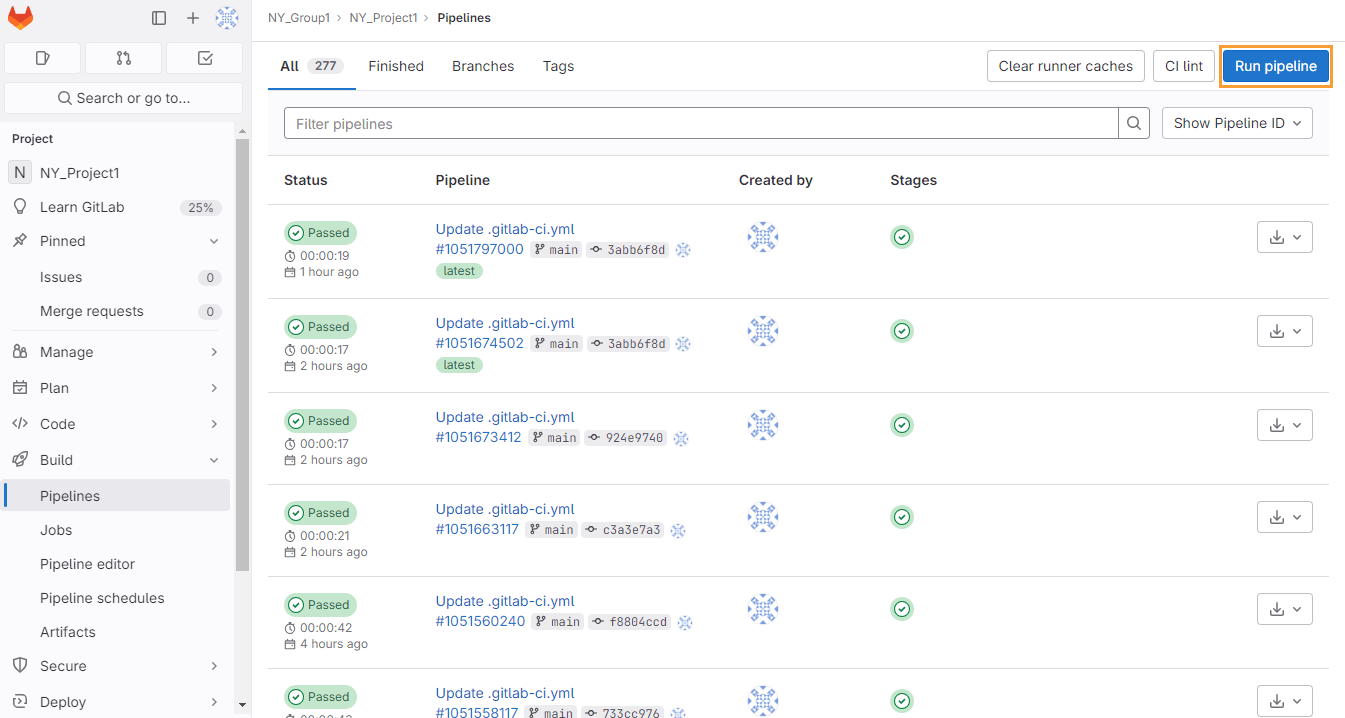
</span></span></code></pre><p>Navigate to your GitLab project&#39;s <strong>CI/CD &gt; Pipelines</strong> to watch the execution.</p><h3 id="_12-verify-successful-upload">12. Verify successful upload</h3><p>After the pipeline completes, you should see:</p><p><strong>In GitLab</strong>:</p><ol><li>A new job in your pipeline named <code className="">qmetry-import</code> (or similar)</li><li>Job logs showing successful API communication</li><li>Green checkmark indicating successful upload</li></ol><p><strong>Example successful job log</strong>:</p><pre className="language-json shiki shiki-themes github-light" code="$ curl -X POST https://your-company.qmetry.com/api/v3/test-results/import \
  -H &quot;Authorization: Bearer ${QMETRY_API_KEY}&quot; \
  -H &quot;Content-Type: application/json&quot; \
  -d @payload.json

{
  &quot;status&quot;: &quot;success&quot;,
  &quot;message&quot;: &quot;Test results uploaded successfully&quot;,
  &quot;results_processed&quot;: 15,
  &quot;test_cases_created&quot;: 3,
  &quot;test_cases_updated&quot;: 12,
  &quot;execution_id&quot;: &quot;EXE-12345&quot;
}

Job succeeded ```

**In QMetry**:

1. Navigate to your project dashboard.  
2. Check the **Test Executions** section.  
3. You should see a new test execution with results from your GitLab pipeline.  
4. Click into the execution to see detailed test case results.


## Part 5: Advanced configuration options

Now that you have the basic integration working, let&#39;s explore advanced configuration for enterprise requirements. Here are the next steps to follow:

### 13. Organizing results with test suites

For better organization, you can specify which QMetry test suite should receive results:

```yaml
include:
  - component: gitlab.com/sb9945614/qtm-gitlab-component/qmetry-import@1.0.5
    inputs:
      stage: test
      project: &quot;Aerospace Flight Control System&quot;
      file_name: &quot;results.xml&quot;
      testing_type: &quot;JUNIT&quot;
      testsuite_name: &quot;Sprint 23 Regression Tests&quot;
      testsuite_id: &quot;TS-456&quot;  # Optional: Use existing test suite ID
      instance_url: ${INSTANCE_URL}
      api_key: ${QMETRY_API_KEY}
" language="json" meta="" style=""><code><span class="line" line="1"><span style="--shiki-default:#24292E">$ curl -X POST https:</span><span style="--shiki-default:#6A737D">//your-company.qmetry.com/api/v3/test-results/import \
</span></span><span class="line" line="2"><span style="--shiki-default:#24292E">  -H </span><span style="--shiki-default:#032F62">&quot;Authorization: Bearer ${QMETRY_API_KEY}&quot;</span><span style="--shiki-default:#24292E"> \
</span></span><span class="line" line="3"><span style="--shiki-default:#24292E">  -H </span><span style="--shiki-default:#032F62">&quot;Content-Type: application/json&quot;</span><span style="--shiki-default:#24292E"> \
</span></span><span class="line" line="4"><span style="--shiki-default:#24292E">  -d @payload.json
</span></span><span class="line" line="5"><span emptyLinePlaceholder>
</span></span><span class="line" line="6"><span style="--shiki-default:#24292E">{
</span></span><span class="line" line="7"><span style="--shiki-default:#005CC5">  &quot;status&quot;</span><span style="--shiki-default:#24292E">: </span><span style="--shiki-default:#032F62">&quot;success&quot;</span><span style="--shiki-default:#24292E">,
</span></span><span class="line" line="8"><span style="--shiki-default:#005CC5">  &quot;message&quot;</span><span style="--shiki-default:#24292E">: </span><span style="--shiki-default:#032F62">&quot;Test results uploaded successfully&quot;</span><span style="--shiki-default:#24292E">,
</span></span><span class="line" line="9"><span style="--shiki-default:#005CC5">  &quot;results_processed&quot;</span><span style="--shiki-default:#24292E">: </span><span style="--shiki-default:#005CC5">15</span><span style="--shiki-default:#24292E">,
</span></span><span class="line" line="10"><span style="--shiki-default:#005CC5">  &quot;test_cases_created&quot;</span><span style="--shiki-default:#24292E">: </span><span style="--shiki-default:#005CC5">3</span><span style="--shiki-default:#24292E">,
</span></span><span class="line" line="11"><span style="--shiki-default:#005CC5">  &quot;test_cases_updated&quot;</span><span style="--shiki-default:#24292E">: </span><span style="--shiki-default:#005CC5">12</span><span style="--shiki-default:#24292E">,
</span></span><span class="line" line="12"><span style="--shiki-default:#005CC5">  &quot;execution_id&quot;</span><span style="--shiki-default:#24292E">: </span><span style="--shiki-default:#032F62">&quot;EXE-12345&quot;
</span></span><span class="line" line="13"><span style="--shiki-default:#24292E">}
</span></span><span class="line" line="14"><span emptyLinePlaceholder>
</span></span><span class="line" line="15"><span style="--shiki-default:#24292E">Job succeeded ```
</span></span><span class="line" line="16"><span emptyLinePlaceholder>
</span></span><span class="line" line="17"><span style="--shiki-default:#24292E">**In QMetry**:
</span></span><span class="line" line="18"><span emptyLinePlaceholder>
</span></span><span class="line" line="19"><span style="--shiki-default:#005CC5">1</span><span style="--shiki-default:#24292E">. Navigate to your project dashboard.  
</span></span><span class="line" line="20"><span style="--shiki-default:#005CC5">2</span><span style="--shiki-default:#24292E">. Check the **Test Executions** section.  
</span></span><span class="line" line="21"><span style="--shiki-default:#005CC5">3</span><span style="--shiki-default:#24292E">. You should see a new test execution with results from your GitLab pipeline.  
</span></span><span class="line" line="22"><span style="--shiki-default:#005CC5">4</span><span style="--shiki-default:#24292E">. Click into the execution to see detailed test case results.
</span></span><span class="line" line="23"><span emptyLinePlaceholder>
</span></span><span class="line" line="24"><span emptyLinePlaceholder>
</span></span><span class="line" line="25"><span style="--shiki-default:#24292E">## Part </span><span style="--shiki-default:#005CC5">5</span><span style="--shiki-default:#24292E">: Advanced configuration options
</span></span><span class="line" line="26"><span emptyLinePlaceholder>
</span></span><span class="line" line="27"><span style="--shiki-default:#24292E">Now that you have the basic integration working, let&#39;s explore advanced configuration for enterprise requirements. Here are the next steps to follow:
</span></span><span class="line" line="28"><span emptyLinePlaceholder>
</span></span><span class="line" line="29"><span style="--shiki-default:#24292E">### </span><span style="--shiki-default:#005CC5">13</span><span style="--shiki-default:#24292E">. Organizing results with test suites
</span></span><span class="line" line="30"><span emptyLinePlaceholder>
</span></span><span class="line" line="31"><span style="--shiki-default:#24292E">For better organization, you can specify which QMetry test suite should receive results:
</span></span><span class="line" line="32"><span emptyLinePlaceholder>
</span></span><span class="line" line="33"><span style="--shiki-default:#24292E">```yaml
</span></span><span class="line" line="34"><span style="--shiki-default:#24292E">include:
</span></span><span class="line" line="35"><span style="--shiki-default:#24292E">  - component: gitlab.com/sb</span><span style="--shiki-default:#005CC5">9945614</span><span style="--shiki-default:#24292E">/qtm-gitlab-component/qmetry-import@</span><span style="--shiki-default:#005CC5">1.0</span><span style="--shiki-default:#24292E">.</span><span style="--shiki-default:#005CC5">5
</span></span><span class="line" line="36"><span style="--shiki-default:#24292E">    inputs:
</span></span><span class="line" line="37"><span style="--shiki-default:#24292E">      stage: test
</span></span><span class="line" line="38"><span style="--shiki-default:#24292E">      project: </span><span style="--shiki-default:#032F62">&quot;Aerospace Flight Control System&quot;
</span></span><span class="line" line="39"><span style="--shiki-default:#24292E">      file_name: </span><span style="--shiki-default:#032F62">&quot;results.xml&quot;
</span></span><span class="line" line="40"><span style="--shiki-default:#24292E">      testing_type: </span><span style="--shiki-default:#032F62">&quot;JUNIT&quot;
</span></span><span class="line" line="41"><span style="--shiki-default:#24292E">      testsuite_name: </span><span style="--shiki-default:#032F62">&quot;Sprint 23 Regression Tests&quot;
</span></span><span class="line" line="42"><span style="--shiki-default:#24292E">      testsuite_id: </span><span style="--shiki-default:#032F62">&quot;TS-456&quot;</span><span style="--shiki-default:#24292E">  # Optional: Use existing test suite ID
</span></span><span class="line" line="43"><span style="--shiki-default:#24292E">      instance_url: ${</span><span style="--shiki-default:#B31D28;--shiki-default-font-style:italic">INSTANCE_URL</span><span style="--shiki-default:#24292E">}
</span></span><span class="line" line="44"><span style="--shiki-default:#24292E">      api_key: ${</span><span style="--shiki-default:#B31D28;--shiki-default-font-style:italic">QMETRY_API_KEY</span><span style="--shiki-default:#24292E">}
</span></span></code></pre><p><strong>When to use test suites</strong>:</p><ul><li>Organizing tests by sprint or release</li><li>Separating regression tests from new feature tests</li><li>Grouping tests by component or subsystem</li><li>Creating test execution hierarchies for reporting</li></ul><h3 id="_14-configuring-automation-hierarchy-levels">14. Configuring automation hierarchy levels</h3><p>QMetry supports hierarchical test organization. Use the <code className="">automation_hierarchy</code> parameter to specify the organization level:</p><pre className="language-yaml shiki shiki-themes github-light" code="include:
  - component: gitlab.com/sb9945614/qtm-gitlab-component/qmetry-import@1.0.5
    inputs:
      stage: test
      project: &quot;Aerospace Flight Control System&quot;
      file_name: &quot;results.xml&quot;
      testing_type: &quot;JUNIT&quot;
      automation_hierarchy: &quot;2&quot;  # Level 2 hierarchy
      instance_url: ${INSTANCE_URL}
      api_key: ${QMETRY_API_KEY}
" language="yaml" meta="" style=""><code><span class="line" line="1"><span style="--shiki-default:#22863A">include</span><span style="--shiki-default:#24292E">:
</span></span><span class="line" line="2"><span style="--shiki-default:#24292E">  - </span><span style="--shiki-default:#22863A">component</span><span style="--shiki-default:#24292E">: </span><span style="--shiki-default:#032F62">gitlab.com/sb9945614/qtm-gitlab-component/qmetry-import@1.0.5
</span></span><span class="line" line="3"><span style="--shiki-default:#22863A">    inputs</span><span style="--shiki-default:#24292E">:
</span></span><span class="line" line="4"><span style="--shiki-default:#22863A">      stage</span><span style="--shiki-default:#24292E">: </span><span style="--shiki-default:#032F62">test
</span></span><span class="line" line="5"><span style="--shiki-default:#22863A">      project</span><span style="--shiki-default:#24292E">: </span><span style="--shiki-default:#032F62">&quot;Aerospace Flight Control System&quot;
</span></span><span class="line" line="6"><span style="--shiki-default:#22863A">      file_name</span><span style="--shiki-default:#24292E">: </span><span style="--shiki-default:#032F62">&quot;results.xml&quot;
</span></span><span class="line" line="7"><span style="--shiki-default:#22863A">      testing_type</span><span style="--shiki-default:#24292E">: </span><span style="--shiki-default:#032F62">&quot;JUNIT&quot;
</span></span><span class="line" line="8"><span style="--shiki-default:#22863A">      automation_hierarchy</span><span style="--shiki-default:#24292E">: </span><span style="--shiki-default:#032F62">&quot;2&quot;</span><span style="--shiki-default:#6A737D">  # Level 2 hierarchy
</span></span><span class="line" line="9"><span style="--shiki-default:#22863A">      instance_url</span><span style="--shiki-default:#24292E">: </span><span style="--shiki-default:#032F62">${INSTANCE_URL}
</span></span><span class="line" line="10"><span style="--shiki-default:#22863A">      api_key</span><span style="--shiki-default:#24292E">: </span><span style="--shiki-default:#032F62">${QMETRY_API_KEY}
</span></span></code></pre><p><strong>Hierarchy levels explained</strong>:</p><ul><li><strong>Level 1</strong>: Top-level test suites (e.g., &quot;All Regression Tests&quot;)</li><li><strong>Level 2</strong>: Sub-suites (e.g., &quot;Flight Control Tests&quot; under &quot;Regression Tests&quot;)</li><li><strong>Level 3</strong>: Granular test groups (e.g., &quot;Altitude Hold Tests&quot; under &quot;Flight Control&quot;)</li></ul><h3 id="_15-multiple-test-result-files">15. Multiple test result files</h3><p>For complex projects with multiple test jobs, you can invoke the component multiple times:</p><pre className="language-yaml shiki shiki-themes github-light" code="stages:
  - test

# Unit tests
unit-tests:
  stage: test
  script:
    - npm run test:unit
  artifacts:
    paths:
      - unit-results.xml
    when: always

# Integration tests
integration-tests:
  stage: test
  script:
    - npm run test:integration
  artifacts:
    paths:
      - integration-results.xml
    when: always

# Upload unit test results
include:
  - component: gitlab.com/sb9945614/qtm-gitlab-component/qmetry-import@1.0.5
    inputs:
      stage: test
      project: &quot;Aerospace Flight Control System&quot;
      file_name: &quot;unit-results.xml&quot;
      testing_type: &quot;JUNIT&quot;
      testsuite_name: &quot;Unit Tests - Sprint 23&quot;
      instance_url: ${INSTANCE_URL}
      api_key: ${QMETRY_API_KEY}

  # Upload integration test results
  - component: gitlab.com/sb9945614/qtm-gitlab-component/qmetry-import@1.0.5
    inputs:
      stage: test
      project: &quot;Aerospace Flight Control System&quot;
      file_name: &quot;integration-results.xml&quot;
      testing_type: &quot;JUNIT&quot;
      testsuite_name: &quot;Integration Tests - Sprint 23&quot;
      instance_url: ${INSTANCE_URL}
      api_key: ${QMETRY_API_KEY}
" language="yaml" meta="" style=""><code><span class="line" line="1"><span style="--shiki-default:#22863A">stages</span><span style="--shiki-default:#24292E">:
</span></span><span class="line" line="2"><span style="--shiki-default:#24292E">  - </span><span style="--shiki-default:#032F62">test
</span></span><span class="line" line="3"><span emptyLinePlaceholder>
</span></span><span class="line" line="4"><span style="--shiki-default:#6A737D"># Unit tests
</span></span><span class="line" line="5"><span style="--shiki-default:#22863A">unit-tests</span><span style="--shiki-default:#24292E">:
</span></span><span class="line" line="6"><span style="--shiki-default:#22863A">  stage</span><span style="--shiki-default:#24292E">: </span><span style="--shiki-default:#032F62">test
</span></span><span class="line" line="7"><span style="--shiki-default:#22863A">  script</span><span style="--shiki-default:#24292E">:
</span></span><span class="line" line="8"><span style="--shiki-default:#24292E">    - </span><span style="--shiki-default:#032F62">npm run test:unit
</span></span><span class="line" line="9"><span style="--shiki-default:#22863A">  artifacts</span><span style="--shiki-default:#24292E">:
</span></span><span class="line" line="10"><span style="--shiki-default:#22863A">    paths</span><span style="--shiki-default:#24292E">:
</span></span><span class="line" line="11"><span style="--shiki-default:#24292E">      - </span><span style="--shiki-default:#032F62">unit-results.xml
</span></span><span class="line" line="12"><span style="--shiki-default:#22863A">    when</span><span style="--shiki-default:#24292E">: </span><span style="--shiki-default:#032F62">always
</span></span><span class="line" line="13"><span emptyLinePlaceholder>
</span></span><span class="line" line="14"><span style="--shiki-default:#6A737D"># Integration tests
</span></span><span class="line" line="15"><span style="--shiki-default:#22863A">integration-tests</span><span style="--shiki-default:#24292E">:
</span></span><span class="line" line="16"><span style="--shiki-default:#22863A">  stage</span><span style="--shiki-default:#24292E">: </span><span style="--shiki-default:#032F62">test
</span></span><span class="line" line="17"><span style="--shiki-default:#22863A">  script</span><span style="--shiki-default:#24292E">:
</span></span><span class="line" line="18"><span style="--shiki-default:#24292E">    - </span><span style="--shiki-default:#032F62">npm run test:integration
</span></span><span class="line" line="19"><span style="--shiki-default:#22863A">  artifacts</span><span style="--shiki-default:#24292E">:
</span></span><span class="line" line="20"><span style="--shiki-default:#22863A">    paths</span><span style="--shiki-default:#24292E">:
</span></span><span class="line" line="21"><span style="--shiki-default:#24292E">      - </span><span style="--shiki-default:#032F62">integration-results.xml
</span></span><span class="line" line="22"><span style="--shiki-default:#22863A">    when</span><span style="--shiki-default:#24292E">: </span><span style="--shiki-default:#032F62">always
</span></span><span class="line" line="23"><span emptyLinePlaceholder>
</span></span><span class="line" line="24"><span style="--shiki-default:#6A737D"># Upload unit test results
</span></span><span class="line" line="25"><span style="--shiki-default:#22863A">include</span><span style="--shiki-default:#24292E">:
</span></span><span class="line" line="26"><span style="--shiki-default:#24292E">  - </span><span style="--shiki-default:#22863A">component</span><span style="--shiki-default:#24292E">: </span><span style="--shiki-default:#032F62">gitlab.com/sb9945614/qtm-gitlab-component/qmetry-import@1.0.5
</span></span><span class="line" line="27"><span style="--shiki-default:#22863A">    inputs</span><span style="--shiki-default:#24292E">:
</span></span><span class="line" line="28"><span style="--shiki-default:#22863A">      stage</span><span style="--shiki-default:#24292E">: </span><span style="--shiki-default:#032F62">test
</span></span><span class="line" line="29"><span style="--shiki-default:#22863A">      project</span><span style="--shiki-default:#24292E">: </span><span style="--shiki-default:#032F62">&quot;Aerospace Flight Control System&quot;
</span></span><span class="line" line="30"><span style="--shiki-default:#22863A">      file_name</span><span style="--shiki-default:#24292E">: </span><span style="--shiki-default:#032F62">&quot;unit-results.xml&quot;
</span></span><span class="line" line="31"><span style="--shiki-default:#22863A">      testing_type</span><span style="--shiki-default:#24292E">: </span><span style="--shiki-default:#032F62">&quot;JUNIT&quot;
</span></span><span class="line" line="32"><span style="--shiki-default:#22863A">      testsuite_name</span><span style="--shiki-default:#24292E">: </span><span style="--shiki-default:#032F62">&quot;Unit Tests - Sprint 23&quot;
</span></span><span class="line" line="33"><span style="--shiki-default:#22863A">      instance_url</span><span style="--shiki-default:#24292E">: </span><span style="--shiki-default:#032F62">${INSTANCE_URL}
</span></span><span class="line" line="34"><span style="--shiki-default:#22863A">      api_key</span><span style="--shiki-default:#24292E">: </span><span style="--shiki-default:#032F62">${QMETRY_API_KEY}
</span></span><span class="line" line="35"><span emptyLinePlaceholder>
</span></span><span class="line" line="36"><span style="--shiki-default:#6A737D">  # Upload integration test results
</span></span><span class="line" line="37"><span style="--shiki-default:#24292E">  - </span><span style="--shiki-default:#22863A">component</span><span style="--shiki-default:#24292E">: </span><span style="--shiki-default:#032F62">gitlab.com/sb9945614/qtm-gitlab-component/qmetry-import@1.0.5
</span></span><span class="line" line="38"><span style="--shiki-default:#22863A">    inputs</span><span style="--shiki-default:#24292E">:
</span></span><span class="line" line="39"><span style="--shiki-default:#22863A">      stage</span><span style="--shiki-default:#24292E">: </span><span style="--shiki-default:#032F62">test
</span></span><span class="line" line="40"><span style="--shiki-default:#22863A">      project</span><span style="--shiki-default:#24292E">: </span><span style="--shiki-default:#032F62">&quot;Aerospace Flight Control System&quot;
</span></span><span class="line" line="41"><span style="--shiki-default:#22863A">      file_name</span><span style="--shiki-default:#24292E">: </span><span style="--shiki-default:#032F62">&quot;integration-results.xml&quot;
</span></span><span class="line" line="42"><span style="--shiki-default:#22863A">      testing_type</span><span style="--shiki-default:#24292E">: </span><span style="--shiki-default:#032F62">&quot;JUNIT&quot;
</span></span><span class="line" line="43"><span style="--shiki-default:#22863A">      testsuite_name</span><span style="--shiki-default:#24292E">: </span><span style="--shiki-default:#032F62">&quot;Integration Tests - Sprint 23&quot;
</span></span><span class="line" line="44"><span style="--shiki-default:#22863A">      instance_url</span><span style="--shiki-default:#24292E">: </span><span style="--shiki-default:#032F62">${INSTANCE_URL}
</span></span><span class="line" line="45"><span style="--shiki-default:#22863A">      api_key</span><span style="--shiki-default:#24292E">: </span><span style="--shiki-default:#032F62">${QMETRY_API_KEY}
</span></span></code></pre><h3 id="_16-custom-runner-tags">16. Custom runner tags</h3><p>For enterprise environments with dedicated runners, specify runner tags:</p><pre className="language-yaml shiki shiki-themes github-light" code="include:
  - component: gitlab.com/sb9945614/qtm-gitlab-component/qmetry-import@1.0.5
    inputs:
      stage: test
      runner_tag: &quot;production-runners&quot;  # Use specific runner pool
      project: &quot;Aerospace Flight Control System&quot;
      file_name: &quot;results.xml&quot;
      testing_type: &quot;JUNIT&quot;
      instance_url: ${INSTANCE_URL}
      api_key: ${QMETRY_API_KEY}
" language="yaml" meta="" style=""><code><span class="line" line="1"><span style="--shiki-default:#22863A">include</span><span style="--shiki-default:#24292E">:
</span></span><span class="line" line="2"><span style="--shiki-default:#24292E">  - </span><span style="--shiki-default:#22863A">component</span><span style="--shiki-default:#24292E">: </span><span style="--shiki-default:#032F62">gitlab.com/sb9945614/qtm-gitlab-component/qmetry-import@1.0.5
</span></span><span class="line" line="3"><span style="--shiki-default:#22863A">    inputs</span><span style="--shiki-default:#24292E">:
</span></span><span class="line" line="4"><span style="--shiki-default:#22863A">      stage</span><span style="--shiki-default:#24292E">: </span><span style="--shiki-default:#032F62">test
</span></span><span class="line" line="5"><span style="--shiki-default:#22863A">      runner_tag</span><span style="--shiki-default:#24292E">: </span><span style="--shiki-default:#032F62">&quot;production-runners&quot;</span><span style="--shiki-default:#6A737D">  # Use specific runner pool
</span></span><span class="line" line="6"><span style="--shiki-default:#22863A">      project</span><span style="--shiki-default:#24292E">: </span><span style="--shiki-default:#032F62">&quot;Aerospace Flight Control System&quot;
</span></span><span class="line" line="7"><span style="--shiki-default:#22863A">      file_name</span><span style="--shiki-default:#24292E">: </span><span style="--shiki-default:#032F62">&quot;results.xml&quot;
</span></span><span class="line" line="8"><span style="--shiki-default:#22863A">      testing_type</span><span style="--shiki-default:#24292E">: </span><span style="--shiki-default:#032F62">&quot;JUNIT&quot;
</span></span><span class="line" line="9"><span style="--shiki-default:#22863A">      instance_url</span><span style="--shiki-default:#24292E">: </span><span style="--shiki-default:#032F62">${INSTANCE_URL}
</span></span><span class="line" line="10"><span style="--shiki-default:#22863A">      api_key</span><span style="--shiki-default:#24292E">: </span><span style="--shiki-default:#032F62">${QMETRY_API_KEY}
</span></span></code></pre><h3 id="_17-custom-test-suite-folders">17. Custom test suite folders</h3><p>Organize test suites into folders for better project structure:</p><pre className="language-yaml shiki shiki-themes github-light" code="include:
  - component: gitlab.com/sb9945614/qtm-gitlab-component/qmetry-import@1.0.5
    inputs:
      stage: test
      project: &quot;Aerospace Flight Control System&quot;
      file_name: &quot;results.xml&quot;
      testing_type: &quot;JUNIT&quot;
      testsuite_folder_path: &quot;/Regression/Sprint-23/Flight-Controls&quot;
      instance_url: ${INSTANCE_URL}
      api_key: ${QMETRY_API_KEY}
" language="yaml" meta="" style=""><code><span class="line" line="1"><span style="--shiki-default:#22863A">include</span><span style="--shiki-default:#24292E">:
</span></span><span class="line" line="2"><span style="--shiki-default:#24292E">  - </span><span style="--shiki-default:#22863A">component</span><span style="--shiki-default:#24292E">: </span><span style="--shiki-default:#032F62">gitlab.com/sb9945614/qtm-gitlab-component/qmetry-import@1.0.5
</span></span><span class="line" line="3"><span style="--shiki-default:#22863A">    inputs</span><span style="--shiki-default:#24292E">:
</span></span><span class="line" line="4"><span style="--shiki-default:#22863A">      stage</span><span style="--shiki-default:#24292E">: </span><span style="--shiki-default:#032F62">test
</span></span><span class="line" line="5"><span style="--shiki-default:#22863A">      project</span><span style="--shiki-default:#24292E">: </span><span style="--shiki-default:#032F62">&quot;Aerospace Flight Control System&quot;
</span></span><span class="line" line="6"><span style="--shiki-default:#22863A">      file_name</span><span style="--shiki-default:#24292E">: </span><span style="--shiki-default:#032F62">&quot;results.xml&quot;
</span></span><span class="line" line="7"><span style="--shiki-default:#22863A">      testing_type</span><span style="--shiki-default:#24292E">: </span><span style="--shiki-default:#032F62">&quot;JUNIT&quot;
</span></span><span class="line" line="8"><span style="--shiki-default:#22863A">      testsuite_folder_path</span><span style="--shiki-default:#24292E">: </span><span style="--shiki-default:#032F62">&quot;/Regression/Sprint-23/Flight-Controls&quot;
</span></span><span class="line" line="9"><span style="--shiki-default:#22863A">      instance_url</span><span style="--shiki-default:#24292E">: </span><span style="--shiki-default:#032F62">${INSTANCE_URL}
</span></span><span class="line" line="10"><span style="--shiki-default:#22863A">      api_key</span><span style="--shiki-default:#24292E">: </span><span style="--shiki-default:#032F62">${QMETRY_API_KEY}
</span></span></code></pre><p>This creates a folder hierarchy in QMetry:</p><pre className="language-none shiki shiki-themes github-light" code="Aerospace Flight Control System/
└── Regression/
    └── Sprint-23/
        └── Flight-Controls/
            └── [Your test execution]
" language="none" meta="" style=""><code><span class="line" line="1"><span>Aerospace Flight Control System/
</span></span><span class="line" line="2"><span>└── Regression/
</span></span><span class="line" line="3"><span>    └── Sprint-23/
</span></span><span class="line" line="4"><span>        └── Flight-Controls/
</span></span><span class="line" line="5"><span>            └── [Your test execution]
</span></span></code></pre><h3 id="_18-advanced-field-mapping">18. Advanced field mapping</h3><p>For enterprise QMetry instances with custom fields, use the <code className="">testcase_fields</code> and <code className="">testsuite_fields</code> parameters:</p><pre className="language-yaml shiki shiki-themes github-light" code="include:
  - component: gitlab.com/sb9945614/qtm-gitlab-component/qmetry-import@1.0.5
    inputs:
      stage: test
      project: &quot;Aerospace Flight Control System&quot;
      file_name: &quot;results.xml&quot;
      testing_type: &quot;JUNIT&quot;
      testcase_fields: &quot;priority=P1,component=FlightControl,certification=DO-178C&quot;
      testsuite_fields: &quot;release=v2.4.0,sprint=23&quot;
      instance_url: ${INSTANCE_URL}
      api_key: ${QMETRY_API_KEY}
" language="yaml" meta="" style=""><code><span class="line" line="1"><span style="--shiki-default:#22863A">include</span><span style="--shiki-default:#24292E">:
</span></span><span class="line" line="2"><span style="--shiki-default:#24292E">  - </span><span style="--shiki-default:#22863A">component</span><span style="--shiki-default:#24292E">: </span><span style="--shiki-default:#032F62">gitlab.com/sb9945614/qtm-gitlab-component/qmetry-import@1.0.5
</span></span><span class="line" line="3"><span style="--shiki-default:#22863A">    inputs</span><span style="--shiki-default:#24292E">:
</span></span><span class="line" line="4"><span style="--shiki-default:#22863A">      stage</span><span style="--shiki-default:#24292E">: </span><span style="--shiki-default:#032F62">test
</span></span><span class="line" line="5"><span style="--shiki-default:#22863A">      project</span><span style="--shiki-default:#24292E">: </span><span style="--shiki-default:#032F62">&quot;Aerospace Flight Control System&quot;
</span></span><span class="line" line="6"><span style="--shiki-default:#22863A">      file_name</span><span style="--shiki-default:#24292E">: </span><span style="--shiki-default:#032F62">&quot;results.xml&quot;
</span></span><span class="line" line="7"><span style="--shiki-default:#22863A">      testing_type</span><span style="--shiki-default:#24292E">: </span><span style="--shiki-default:#032F62">&quot;JUNIT&quot;
</span></span><span class="line" line="8"><span style="--shiki-default:#22863A">      testcase_fields</span><span style="--shiki-default:#24292E">: </span><span style="--shiki-default:#032F62">&quot;priority=P1,component=FlightControl,certification=DO-178C&quot;
</span></span><span class="line" line="9"><span style="--shiki-default:#22863A">      testsuite_fields</span><span style="--shiki-default:#24292E">: </span><span style="--shiki-default:#032F62">&quot;release=v2.4.0,sprint=23&quot;
</span></span><span class="line" line="10"><span style="--shiki-default:#22863A">      instance_url</span><span style="--shiki-default:#24292E">: </span><span style="--shiki-default:#032F62">${INSTANCE_URL}
</span></span><span class="line" line="11"><span style="--shiki-default:#22863A">      api_key</span><span style="--shiki-default:#24292E">: </span><span style="--shiki-default:#032F62">${QMETRY_API_KEY}
</span></span></code></pre><p>This adds custom metadata to test cases and suites for enhanced filtering and reporting.</p><h2 id="part-6-real-world-use-cases">Part 6: Real-world use cases</h2><p>Let&#39;s explore how organizations across different industries are using this integration to solve critical quality and compliance challenges.</p><h3 id="financial-services-enterprise-banking-platforms">Financial services: Enterprise banking platforms</h3><p>Leading financial institutions are evolving their engineering practices with integrated DevOps platforms. These organizations face unique challenges when managing test automation at scale.</p><p><strong>The challenge for financial services</strong>:</p><ul><li><strong>Regulatory compliance</strong>: Financial services must maintain detailed audit trails for all testing activities.</li><li><strong>Multiple compliance frameworks</strong>: Firms must adhere to FCA, PSD2, GDPR, and internal risk management policies.</li><li><strong>High-frequency deployments</strong>: Multiple production deployments are required daily across microservices.</li><li><strong>Zero-tolerance for failures</strong>: Banking systems require extremely high reliability.</li><li><strong>Distributed teams</strong>: QA teams need real-time visibility across global engineering teams.</li></ul><p><strong>The solution</strong>: Financial services organizations implementing the QMetry GitLab Component can automate test result uploads across their CI/CD pipelines for:</p><ul><li>Unit tests for hundreds of microservices</li><li>API contract tests for inter-service communication</li><li>End-to-end transaction flow tests</li><li>Security and compliance scanning results</li><li>Performance and load testing results</li></ul><p><strong>Example implementation approach</strong>:</p><pre className="language-yaml shiki shiki-themes github-light" code="# Financial services approach: Separate test uploads by test type
stages:
  - test
  - security
  - report

# Unit tests for payment processing service
unit-tests:
  stage: test
  script:
    - mvn clean test
  artifacts:
    paths:
      - target/surefire-reports/TEST-*.xml
    when: always

# Upload to QMetry with compliance metadata
include:
  - component: gitlab.com/sb9945614/qtm-gitlab-component/qmetry-import@1.0.5
    inputs:
      stage: report
      project: &quot;Payment Processing Platform&quot;
      file_name: &quot;target/surefire-reports/TEST-*.xml&quot;
      testing_type: &quot;JUNIT&quot;
      testsuite_name: &quot;Payment Services - Unit Tests&quot;
      testsuite_folder_path: &quot;/Regulatory/FCA-Compliance/Unit-Tests&quot;
      testcase_fields: &quot;compliance=FCA,risk_level=high,service=payments&quot;
      automation_hierarchy: &quot;2&quot;
      instance_url: ${INSTANCE_URL}
      api_key: ${QMETRY_API_KEY}
" language="yaml" meta="" style=""><code><span class="line" line="1"><span style="--shiki-default:#6A737D"># Financial services approach: Separate test uploads by test type
</span></span><span class="line" line="2"><span style="--shiki-default:#22863A">stages</span><span style="--shiki-default:#24292E">:
</span></span><span class="line" line="3"><span style="--shiki-default:#24292E">  - </span><span style="--shiki-default:#032F62">test
</span></span><span class="line" line="4"><span style="--shiki-default:#24292E">  - </span><span style="--shiki-default:#032F62">security
</span></span><span class="line" line="5"><span style="--shiki-default:#24292E">  - </span><span style="--shiki-default:#032F62">report
</span></span><span class="line" line="6"><span emptyLinePlaceholder>
</span></span><span class="line" line="7"><span style="--shiki-default:#6A737D"># Unit tests for payment processing service
</span></span><span class="line" line="8"><span style="--shiki-default:#22863A">unit-tests</span><span style="--shiki-default:#24292E">:
</span></span><span class="line" line="9"><span style="--shiki-default:#22863A">  stage</span><span style="--shiki-default:#24292E">: </span><span style="--shiki-default:#032F62">test
</span></span><span class="line" line="10"><span style="--shiki-default:#22863A">  script</span><span style="--shiki-default:#24292E">:
</span></span><span class="line" line="11"><span style="--shiki-default:#24292E">    - </span><span style="--shiki-default:#032F62">mvn clean test
</span></span><span class="line" line="12"><span style="--shiki-default:#22863A">  artifacts</span><span style="--shiki-default:#24292E">:
</span></span><span class="line" line="13"><span style="--shiki-default:#22863A">    paths</span><span style="--shiki-default:#24292E">:
</span></span><span class="line" line="14"><span style="--shiki-default:#24292E">      - </span><span style="--shiki-default:#032F62">target/surefire-reports/TEST-*.xml
</span></span><span class="line" line="15"><span style="--shiki-default:#22863A">    when</span><span style="--shiki-default:#24292E">: </span><span style="--shiki-default:#032F62">always
</span></span><span class="line" line="16"><span emptyLinePlaceholder>
</span></span><span class="line" line="17"><span style="--shiki-default:#6A737D"># Upload to QMetry with compliance metadata
</span></span><span class="line" line="18"><span style="--shiki-default:#22863A">include</span><span style="--shiki-default:#24292E">:
</span></span><span class="line" line="19"><span style="--shiki-default:#24292E">  - </span><span style="--shiki-default:#22863A">component</span><span style="--shiki-default:#24292E">: </span><span style="--shiki-default:#032F62">gitlab.com/sb9945614/qtm-gitlab-component/qmetry-import@1.0.5
</span></span><span class="line" line="20"><span style="--shiki-default:#22863A">    inputs</span><span style="--shiki-default:#24292E">:
</span></span><span class="line" line="21"><span style="--shiki-default:#22863A">      stage</span><span style="--shiki-default:#24292E">: </span><span style="--shiki-default:#032F62">report
</span></span><span class="line" line="22"><span style="--shiki-default:#22863A">      project</span><span style="--shiki-default:#24292E">: </span><span style="--shiki-default:#032F62">&quot;Payment Processing Platform&quot;
</span></span><span class="line" line="23"><span style="--shiki-default:#22863A">      file_name</span><span style="--shiki-default:#24292E">: </span><span style="--shiki-default:#032F62">&quot;target/surefire-reports/TEST-*.xml&quot;
</span></span><span class="line" line="24"><span style="--shiki-default:#22863A">      testing_type</span><span style="--shiki-default:#24292E">: </span><span style="--shiki-default:#032F62">&quot;JUNIT&quot;
</span></span><span class="line" line="25"><span style="--shiki-default:#22863A">      testsuite_name</span><span style="--shiki-default:#24292E">: </span><span style="--shiki-default:#032F62">&quot;Payment Services - Unit Tests&quot;
</span></span><span class="line" line="26"><span style="--shiki-default:#22863A">      testsuite_folder_path</span><span style="--shiki-default:#24292E">: </span><span style="--shiki-default:#032F62">&quot;/Regulatory/FCA-Compliance/Unit-Tests&quot;
</span></span><span class="line" line="27"><span style="--shiki-default:#22863A">      testcase_fields</span><span style="--shiki-default:#24292E">: </span><span style="--shiki-default:#032F62">&quot;compliance=FCA,risk_level=high,service=payments&quot;
</span></span><span class="line" line="28"><span style="--shiki-default:#22863A">      automation_hierarchy</span><span style="--shiki-default:#24292E">: </span><span style="--shiki-default:#032F62">&quot;2&quot;
</span></span><span class="line" line="29"><span style="--shiki-default:#22863A">      instance_url</span><span style="--shiki-default:#24292E">: </span><span style="--shiki-default:#032F62">${INSTANCE_URL}
</span></span><span class="line" line="30"><span style="--shiki-default:#22863A">      api_key</span><span style="--shiki-default:#24292E">: </span><span style="--shiki-default:#032F62">${QMETRY_API_KEY}
</span></span></code></pre><p><strong>Potential business outcomes for financial services</strong>:</p><ul><li><strong>Significant reduction</strong> in manual test reporting time</li><li><strong>Complete audit trail coverage</strong> for regulatory reviews</li><li><strong>Real-time visibility</strong> for distributed QA teams</li><li><strong>Faster time-to-production</strong> with automated quality gates</li><li><strong>Enhanced compliance posture</strong> with complete traceability from requirements to test execution</li></ul><h3 id="aerospace-flight-control-testing">Aerospace flight control testing</h3><p>Let&#39;s explore how an aerospace company might use this integration for critical flight control system testing.</p><p><strong>Aerospace software development faces unique requirements and challenges:</strong></p><ul><li><strong>DO-178C compliance</strong>: Aviation software must follow strict certification standards</li><li><strong>Complete traceability</strong>: Every requirement must link to test cases and execution results</li><li><strong>Audit trails</strong>: Regulators require detailed records of all testing activities</li><li><strong>Safety-critical quality</strong>: Failures can have catastrophic consequences</li><li><strong>Multiple test levels</strong>: Unit, integration, system, and certification tests</li></ul><p><strong>The solution:</strong> By integrating GitLab CI/CD with QMetry, the aerospace engineering team achieves automated test execution and reporting.</p><pre className="language-yaml shiki shiki-themes github-light" code="stages:
  - build
  - unit-test
  - integration-test
  - system-test
  - report

# Build flight control firmware
build-firmware:
  stage: build
  script:
    - make clean
    - make build TARGET=flight-control
  artifacts:
    paths:
      - build/flight-control.bin

# Unit tests (DO-178C Level A)
unit-tests:
  stage: unit-test
  script:
    - make test-unit OUTPUT=junit
  artifacts:
    paths:
      - test-results/unit-tests.xml
    when: always

# Hardware-in-the-loop integration tests
hil-integration-tests:
  stage: integration-test
  tags:
    - hil-test-bench  # Dedicated hardware test environment
  script:
    - ./scripts/deploy-to-test-bench.sh
    - ./scripts/run-hil-tests.sh
  artifacts:
    paths:
      - test-results/hil-tests.xml
    when: always

# System-level certification tests
certification-tests:
  stage: system-test
  tags:
    - certification-environment
  script:
    - ./scripts/run-certification-suite.sh
  artifacts:
    paths:
      - test-results/certification-tests.xml
    when: always
  only:
    - main  # Only run on main branch

# Upload unit test results to QMetry
include:
  - component: gitlab.com/sb9945614/qtm-gitlab-component/qmetry-import@1.0.5
    inputs:
      stage: report
      project: &quot;Flight Control System v2.4&quot;
      file_name: &quot;test-results/unit-tests.xml&quot;
      testing_type: &quot;JUNIT&quot;
      testsuite_name: &quot;Unit Tests - DO-178C Level A&quot;
      testsuite_folder_path: &quot;/Certification/DO-178C/Unit&quot;
      testcase_fields: &quot;compliance=DO-178C,level=A,safety_critical=true&quot;
      automation_hierarchy: &quot;2&quot;
      instance_url: ${INSTANCE_URL}
      api_key: ${QMETRY_API_KEY}

  # Upload HIL test results
  - component: gitlab.com/sb9945614/qtm-gitlab-component/qmetry-import@1.0.5
    inputs:
      stage: report
      project: &quot;Flight Control System v2.4&quot;
      file_name: &quot;test-results/hil-tests.xml&quot;
      testing_type: &quot;JUNIT&quot;
      testsuite_name: &quot;Hardware-in-Loop Integration Tests&quot;
      testsuite_folder_path: &quot;/Certification/DO-178C/Integration&quot;
      testcase_fields: &quot;compliance=DO-178C,level=A,test_type=HIL&quot;
      automation_hierarchy: &quot;2&quot;
      instance_url: ${INSTANCE_URL}
      api_key: ${QMETRY_API_KEY}

  # Upload certification test results
  - component: gitlab.com/sb9945614/qtm-gitlab-component/qmetry-import@1.0.5
    inputs:
      stage: report
      project: &quot;Flight Control System v2.4&quot;
      file_name: &quot;test-results/certification-tests.xml&quot;
      testing_type: &quot;JUNIT&quot;
      testsuite_name: &quot;System Certification Tests&quot;
      testsuite_folder_path: &quot;/Certification/DO-178C/System&quot;
      testcase_fields: &quot;compliance=DO-178C,level=A,certification_ready=true&quot;
      automation_hierarchy: &quot;1&quot;
      instance_url: ${INSTANCE_URL}
      api_key: ${QMETRY_API_KEY}
" language="yaml" meta="" style=""><code><span class="line" line="1"><span style="--shiki-default:#22863A">stages</span><span style="--shiki-default:#24292E">:
</span></span><span class="line" line="2"><span style="--shiki-default:#24292E">  - </span><span style="--shiki-default:#032F62">build
</span></span><span class="line" line="3"><span style="--shiki-default:#24292E">  - </span><span style="--shiki-default:#032F62">unit-test
</span></span><span class="line" line="4"><span style="--shiki-default:#24292E">  - </span><span style="--shiki-default:#032F62">integration-test
</span></span><span class="line" line="5"><span style="--shiki-default:#24292E">  - </span><span style="--shiki-default:#032F62">system-test
</span></span><span class="line" line="6"><span style="--shiki-default:#24292E">  - </span><span style="--shiki-default:#032F62">report
</span></span><span class="line" line="7"><span emptyLinePlaceholder>
</span></span><span class="line" line="8"><span style="--shiki-default:#6A737D"># Build flight control firmware
</span></span><span class="line" line="9"><span style="--shiki-default:#22863A">build-firmware</span><span style="--shiki-default:#24292E">:
</span></span><span class="line" line="10"><span style="--shiki-default:#22863A">  stage</span><span style="--shiki-default:#24292E">: </span><span style="--shiki-default:#032F62">build
</span></span><span class="line" line="11"><span style="--shiki-default:#22863A">  script</span><span style="--shiki-default:#24292E">:
</span></span><span class="line" line="12"><span style="--shiki-default:#24292E">    - </span><span style="--shiki-default:#032F62">make clean
</span></span><span class="line" line="13"><span style="--shiki-default:#24292E">    - </span><span style="--shiki-default:#032F62">make build TARGET=flight-control
</span></span><span class="line" line="14"><span style="--shiki-default:#22863A">  artifacts</span><span style="--shiki-default:#24292E">:
</span></span><span class="line" line="15"><span style="--shiki-default:#22863A">    paths</span><span style="--shiki-default:#24292E">:
</span></span><span class="line" line="16"><span style="--shiki-default:#24292E">      - </span><span style="--shiki-default:#032F62">build/flight-control.bin
</span></span><span class="line" line="17"><span emptyLinePlaceholder>
</span></span><span class="line" line="18"><span style="--shiki-default:#6A737D"># Unit tests (DO-178C Level A)
</span></span><span class="line" line="19"><span style="--shiki-default:#22863A">unit-tests</span><span style="--shiki-default:#24292E">:
</span></span><span class="line" line="20"><span style="--shiki-default:#22863A">  stage</span><span style="--shiki-default:#24292E">: </span><span style="--shiki-default:#032F62">unit-test
</span></span><span class="line" line="21"><span style="--shiki-default:#22863A">  script</span><span style="--shiki-default:#24292E">:
</span></span><span class="line" line="22"><span style="--shiki-default:#24292E">    - </span><span style="--shiki-default:#032F62">make test-unit OUTPUT=junit
</span></span><span class="line" line="23"><span style="--shiki-default:#22863A">  artifacts</span><span style="--shiki-default:#24292E">:
</span></span><span class="line" line="24"><span style="--shiki-default:#22863A">    paths</span><span style="--shiki-default:#24292E">:
</span></span><span class="line" line="25"><span style="--shiki-default:#24292E">      - </span><span style="--shiki-default:#032F62">test-results/unit-tests.xml
</span></span><span class="line" line="26"><span style="--shiki-default:#22863A">    when</span><span style="--shiki-default:#24292E">: </span><span style="--shiki-default:#032F62">always
</span></span><span class="line" line="27"><span emptyLinePlaceholder>
</span></span><span class="line" line="28"><span style="--shiki-default:#6A737D"># Hardware-in-the-loop integration tests
</span></span><span class="line" line="29"><span style="--shiki-default:#22863A">hil-integration-tests</span><span style="--shiki-default:#24292E">:
</span></span><span class="line" line="30"><span style="--shiki-default:#22863A">  stage</span><span style="--shiki-default:#24292E">: </span><span style="--shiki-default:#032F62">integration-test
</span></span><span class="line" line="31"><span style="--shiki-default:#22863A">  tags</span><span style="--shiki-default:#24292E">:
</span></span><span class="line" line="32"><span style="--shiki-default:#24292E">    - </span><span style="--shiki-default:#032F62">hil-test-bench</span><span style="--shiki-default:#6A737D">  # Dedicated hardware test environment
</span></span><span class="line" line="33"><span style="--shiki-default:#22863A">  script</span><span style="--shiki-default:#24292E">:
</span></span><span class="line" line="34"><span style="--shiki-default:#24292E">    - </span><span style="--shiki-default:#032F62">./scripts/deploy-to-test-bench.sh
</span></span><span class="line" line="35"><span style="--shiki-default:#24292E">    - </span><span style="--shiki-default:#032F62">./scripts/run-hil-tests.sh
</span></span><span class="line" line="36"><span style="--shiki-default:#22863A">  artifacts</span><span style="--shiki-default:#24292E">:
</span></span><span class="line" line="37"><span style="--shiki-default:#22863A">    paths</span><span style="--shiki-default:#24292E">:
</span></span><span class="line" line="38"><span style="--shiki-default:#24292E">      - </span><span style="--shiki-default:#032F62">test-results/hil-tests.xml
</span></span><span class="line" line="39"><span style="--shiki-default:#22863A">    when</span><span style="--shiki-default:#24292E">: </span><span style="--shiki-default:#032F62">always
</span></span><span class="line" line="40"><span emptyLinePlaceholder>
</span></span><span class="line" line="41"><span style="--shiki-default:#6A737D"># System-level certification tests
</span></span><span class="line" line="42"><span style="--shiki-default:#22863A">certification-tests</span><span style="--shiki-default:#24292E">:
</span></span><span class="line" line="43"><span style="--shiki-default:#22863A">  stage</span><span style="--shiki-default:#24292E">: </span><span style="--shiki-default:#032F62">system-test
</span></span><span class="line" line="44"><span style="--shiki-default:#22863A">  tags</span><span style="--shiki-default:#24292E">:
</span></span><span class="line" line="45"><span style="--shiki-default:#24292E">    - </span><span style="--shiki-default:#032F62">certification-environment
</span></span><span class="line" line="46"><span style="--shiki-default:#22863A">  script</span><span style="--shiki-default:#24292E">:
</span></span><span class="line" line="47"><span style="--shiki-default:#24292E">    - </span><span style="--shiki-default:#032F62">./scripts/run-certification-suite.sh
</span></span><span class="line" line="48"><span style="--shiki-default:#22863A">  artifacts</span><span style="--shiki-default:#24292E">:
</span></span><span class="line" line="49"><span style="--shiki-default:#22863A">    paths</span><span style="--shiki-default:#24292E">:
</span></span><span class="line" line="50"><span style="--shiki-default:#24292E">      - </span><span style="--shiki-default:#032F62">test-results/certification-tests.xml
</span></span><span class="line" line="51"><span style="--shiki-default:#22863A">    when</span><span style="--shiki-default:#24292E">: </span><span style="--shiki-default:#032F62">always
</span></span><span class="line" line="52"><span style="--shiki-default:#22863A">  only</span><span style="--shiki-default:#24292E">:
</span></span><span class="line" line="53"><span style="--shiki-default:#24292E">    - </span><span style="--shiki-default:#032F62">main</span><span style="--shiki-default:#6A737D">  # Only run on main branch
</span></span><span class="line" line="54"><span emptyLinePlaceholder>
</span></span><span class="line" line="55"><span style="--shiki-default:#6A737D"># Upload unit test results to QMetry
</span></span><span class="line" line="56"><span style="--shiki-default:#22863A">include</span><span style="--shiki-default:#24292E">:
</span></span><span class="line" line="57"><span style="--shiki-default:#24292E">  - </span><span style="--shiki-default:#22863A">component</span><span style="--shiki-default:#24292E">: </span><span style="--shiki-default:#032F62">gitlab.com/sb9945614/qtm-gitlab-component/qmetry-import@1.0.5
</span></span><span class="line" line="58"><span style="--shiki-default:#22863A">    inputs</span><span style="--shiki-default:#24292E">:
</span></span><span class="line" line="59"><span style="--shiki-default:#22863A">      stage</span><span style="--shiki-default:#24292E">: </span><span style="--shiki-default:#032F62">report
</span></span><span class="line" line="60"><span style="--shiki-default:#22863A">      project</span><span style="--shiki-default:#24292E">: </span><span style="--shiki-default:#032F62">&quot;Flight Control System v2.4&quot;
</span></span><span class="line" line="61"><span style="--shiki-default:#22863A">      file_name</span><span style="--shiki-default:#24292E">: </span><span style="--shiki-default:#032F62">&quot;test-results/unit-tests.xml&quot;
</span></span><span class="line" line="62"><span style="--shiki-default:#22863A">      testing_type</span><span style="--shiki-default:#24292E">: </span><span style="--shiki-default:#032F62">&quot;JUNIT&quot;
</span></span><span class="line" line="63"><span style="--shiki-default:#22863A">      testsuite_name</span><span style="--shiki-default:#24292E">: </span><span style="--shiki-default:#032F62">&quot;Unit Tests - DO-178C Level A&quot;
</span></span><span class="line" line="64"><span style="--shiki-default:#22863A">      testsuite_folder_path</span><span style="--shiki-default:#24292E">: </span><span style="--shiki-default:#032F62">&quot;/Certification/DO-178C/Unit&quot;
</span></span><span class="line" line="65"><span style="--shiki-default:#22863A">      testcase_fields</span><span style="--shiki-default:#24292E">: </span><span style="--shiki-default:#032F62">&quot;compliance=DO-178C,level=A,safety_critical=true&quot;
</span></span><span class="line" line="66"><span style="--shiki-default:#22863A">      automation_hierarchy</span><span style="--shiki-default:#24292E">: </span><span style="--shiki-default:#032F62">&quot;2&quot;
</span></span><span class="line" line="67"><span style="--shiki-default:#22863A">      instance_url</span><span style="--shiki-default:#24292E">: </span><span style="--shiki-default:#032F62">${INSTANCE_URL}
</span></span><span class="line" line="68"><span style="--shiki-default:#22863A">      api_key</span><span style="--shiki-default:#24292E">: </span><span style="--shiki-default:#032F62">${QMETRY_API_KEY}
</span></span><span class="line" line="69"><span emptyLinePlaceholder>
</span></span><span class="line" line="70"><span style="--shiki-default:#6A737D">  # Upload HIL test results
</span></span><span class="line" line="71"><span style="--shiki-default:#24292E">  - </span><span style="--shiki-default:#22863A">component</span><span style="--shiki-default:#24292E">: </span><span style="--shiki-default:#032F62">gitlab.com/sb9945614/qtm-gitlab-component/qmetry-import@1.0.5
</span></span><span class="line" line="72"><span style="--shiki-default:#22863A">    inputs</span><span style="--shiki-default:#24292E">:
</span></span><span class="line" line="73"><span style="--shiki-default:#22863A">      stage</span><span style="--shiki-default:#24292E">: </span><span style="--shiki-default:#032F62">report
</span></span><span class="line" line="74"><span style="--shiki-default:#22863A">      project</span><span style="--shiki-default:#24292E">: </span><span style="--shiki-default:#032F62">&quot;Flight Control System v2.4&quot;
</span></span><span class="line" line="75"><span style="--shiki-default:#22863A">      file_name</span><span style="--shiki-default:#24292E">: </span><span style="--shiki-default:#032F62">&quot;test-results/hil-tests.xml&quot;
</span></span><span class="line" line="76"><span style="--shiki-default:#22863A">      testing_type</span><span style="--shiki-default:#24292E">: </span><span style="--shiki-default:#032F62">&quot;JUNIT&quot;
</span></span><span class="line" line="77"><span style="--shiki-default:#22863A">      testsuite_name</span><span style="--shiki-default:#24292E">: </span><span style="--shiki-default:#032F62">&quot;Hardware-in-Loop Integration Tests&quot;
</span></span><span class="line" line="78"><span style="--shiki-default:#22863A">      testsuite_folder_path</span><span style="--shiki-default:#24292E">: </span><span style="--shiki-default:#032F62">&quot;/Certification/DO-178C/Integration&quot;
</span></span><span class="line" line="79"><span style="--shiki-default:#22863A">      testcase_fields</span><span style="--shiki-default:#24292E">: </span><span style="--shiki-default:#032F62">&quot;compliance=DO-178C,level=A,test_type=HIL&quot;
</span></span><span class="line" line="80"><span style="--shiki-default:#22863A">      automation_hierarchy</span><span style="--shiki-default:#24292E">: </span><span style="--shiki-default:#032F62">&quot;2&quot;
</span></span><span class="line" line="81"><span style="--shiki-default:#22863A">      instance_url</span><span style="--shiki-default:#24292E">: </span><span style="--shiki-default:#032F62">${INSTANCE_URL}
</span></span><span class="line" line="82"><span style="--shiki-default:#22863A">      api_key</span><span style="--shiki-default:#24292E">: </span><span style="--shiki-default:#032F62">${QMETRY_API_KEY}
</span></span><span class="line" line="83"><span emptyLinePlaceholder>
</span></span><span class="line" line="84"><span style="--shiki-default:#6A737D">  # Upload certification test results
</span></span><span class="line" line="85"><span style="--shiki-default:#24292E">  - </span><span style="--shiki-default:#22863A">component</span><span style="--shiki-default:#24292E">: </span><span style="--shiki-default:#032F62">gitlab.com/sb9945614/qtm-gitlab-component/qmetry-import@1.0.5
</span></span><span class="line" line="86"><span style="--shiki-default:#22863A">    inputs</span><span style="--shiki-default:#24292E">:
</span></span><span class="line" line="87"><span style="--shiki-default:#22863A">      stage</span><span style="--shiki-default:#24292E">: </span><span style="--shiki-default:#032F62">report
</span></span><span class="line" line="88"><span style="--shiki-default:#22863A">      project</span><span style="--shiki-default:#24292E">: </span><span style="--shiki-default:#032F62">&quot;Flight Control System v2.4&quot;
</span></span><span class="line" line="89"><span style="--shiki-default:#22863A">      file_name</span><span style="--shiki-default:#24292E">: </span><span style="--shiki-default:#032F62">&quot;test-results/certification-tests.xml&quot;
</span></span><span class="line" line="90"><span style="--shiki-default:#22863A">      testing_type</span><span style="--shiki-default:#24292E">: </span><span style="--shiki-default:#032F62">&quot;JUNIT&quot;
</span></span><span class="line" line="91"><span style="--shiki-default:#22863A">      testsuite_name</span><span style="--shiki-default:#24292E">: </span><span style="--shiki-default:#032F62">&quot;System Certification Tests&quot;
</span></span><span class="line" line="92"><span style="--shiki-default:#22863A">      testsuite_folder_path</span><span style="--shiki-default:#24292E">: </span><span style="--shiki-default:#032F62">&quot;/Certification/DO-178C/System&quot;
</span></span><span class="line" line="93"><span style="--shiki-default:#22863A">      testcase_fields</span><span style="--shiki-default:#24292E">: </span><span style="--shiki-default:#032F62">&quot;compliance=DO-178C,level=A,certification_ready=true&quot;
</span></span><span class="line" line="94"><span style="--shiki-default:#22863A">      automation_hierarchy</span><span style="--shiki-default:#24292E">: </span><span style="--shiki-default:#032F62">&quot;1&quot;
</span></span><span class="line" line="95"><span style="--shiki-default:#22863A">      instance_url</span><span style="--shiki-default:#24292E">: </span><span style="--shiki-default:#032F62">${INSTANCE_URL}
</span></span><span class="line" line="96"><span style="--shiki-default:#22863A">      api_key</span><span style="--shiki-default:#24292E">: </span><span style="--shiki-default:#032F62">${QMETRY_API_KEY}
</span></span></code></pre><h3 id="the-results">The results</h3><p><strong>Before integration</strong>:</p><ul><li>QA engineers manually exported test results from GitLab</li><li>Imported results into QMetry through UI uploads</li><li>Process took 2-3 hours per test cycle</li><li>Human error risk in data entry</li><li>Delayed feedback to stakeholders</li></ul><p><strong>After integration</strong>:</p><ul><li>Test results automatically flow from GitLab to QMetry</li><li>Complete audit trail from commit → test → result</li><li>Zero manual intervention required</li><li>Real-time visibility for certification auditors</li><li>Compliance reports generated automatically</li></ul><p><strong>Example QMetry dashboard after integration</strong>:</p><pre className="language-none shiki shiki-themes github-light" code="╔════════════════════════════════════════════════════════════╗
║  Flight Control System v2.4 - Test Execution Dashboard     ║
╠════════════════════════════════════════════════════════════╣
║                                                            ║
║  📊 Test Execution Summary (Last 7 Days)                   ║
║  ───────────────────────────────────────────────────────── ║
║  ✓ Total Tests Executed: 1,247                             ║
║  ✓ Passed: 1,241 (99.5%)                                   ║
║  ✗ Failed: 6 (0.5%)                                        ║
║  ⏸ Skipped: 0                                              ║
║                                                            ║
║  📁 Test Suite Organization                                ║
║  ───────────────────────────────────────────────────────── ║
║  └─ Certification/                                         ║
║     └─ DO-178C/                                            ║
║        ├─ Unit/ (487 tests, 100% pass)                     ║
║        ├─ Integration/ (623 tests, 99.2% pass)             ║
║        └─ System/ (137 tests, 100% pass)                   ║
║                                                            ║
║  🔗 Traceability                                           ║
║  ───────────────────────────────────────────────────────── ║
║  Requirements Covered: 342/342 (100%)                      ║
║  Test Cases Linked: 1,247/1,247 (100%)                     ║
║  GitLab Pipeline Executions: 47 (automated)                ║
║                                                            ║
║  ⚠️  Action Items                                          ║
║  ───────────────────────────────────────────────────────── ║
║  • 6 failed tests require investigation                    ║
║  • Last execution: 2 minutes ago (Pipeline #1543)          ║
║  • GitLab Commit: a7f8c23 &quot;Fix altitude hold logic&quot;        ║
║                                                            ║
╚════════════════════════════════════════════════════════════╝
" language="none" meta="" style=""><code><span class="line" line="1"><span>╔════════════════════════════════════════════════════════════╗
</span></span><span class="line" line="2"><span>║  Flight Control System v2.4 - Test Execution Dashboard     ║
</span></span><span class="line" line="3"><span>╠════════════════════════════════════════════════════════════╣
</span></span><span class="line" line="4"><span>║                                                            ║
</span></span><span class="line" line="5"><span>║  📊 Test Execution Summary (Last 7 Days)                   ║
</span></span><span class="line" line="6"><span>║  ───────────────────────────────────────────────────────── ║
</span></span><span class="line" line="7"><span>║  ✓ Total Tests Executed: 1,247                             ║
</span></span><span class="line" line="8"><span>║  ✓ Passed: 1,241 (99.5%)                                   ║
</span></span><span class="line" line="9"><span>║  ✗ Failed: 6 (0.5%)                                        ║
</span></span><span class="line" line="10"><span>║  ⏸ Skipped: 0                                              ║
</span></span><span class="line" line="11"><span>║                                                            ║
</span></span><span class="line" line="12"><span>║  📁 Test Suite Organization                                ║
</span></span><span class="line" line="13"><span>║  ───────────────────────────────────────────────────────── ║
</span></span><span class="line" line="14"><span>║  └─ Certification/                                         ║
</span></span><span class="line" line="15"><span>║     └─ DO-178C/                                            ║
</span></span><span class="line" line="16"><span>║        ├─ Unit/ (487 tests, 100% pass)                     ║
</span></span><span class="line" line="17"><span>║        ├─ Integration/ (623 tests, 99.2% pass)             ║
</span></span><span class="line" line="18"><span>║        └─ System/ (137 tests, 100% pass)                   ║
</span></span><span class="line" line="19"><span>║                                                            ║
</span></span><span class="line" line="20"><span>║  🔗 Traceability                                           ║
</span></span><span class="line" line="21"><span>║  ───────────────────────────────────────────────────────── ║
</span></span><span class="line" line="22"><span>║  Requirements Covered: 342/342 (100%)                      ║
</span></span><span class="line" line="23"><span>║  Test Cases Linked: 1,247/1,247 (100%)                     ║
</span></span><span class="line" line="24"><span>║  GitLab Pipeline Executions: 47 (automated)                ║
</span></span><span class="line" line="25"><span>║                                                            ║
</span></span><span class="line" line="26"><span>║  ⚠️  Action Items                                          ║
</span></span><span class="line" line="27"><span>║  ───────────────────────────────────────────────────────── ║
</span></span><span class="line" line="28"><span>║  • 6 failed tests require investigation                    ║
</span></span><span class="line" line="29"><span>║  • Last execution: 2 minutes ago (Pipeline #1543)          ║
</span></span><span class="line" line="30"><span>║  • GitLab Commit: a7f8c23 &quot;Fix altitude hold logic&quot;        ║
</span></span><span class="line" line="31"><span>║                                                            ║
</span></span><span class="line" line="32"><span>╚════════════════════════════════════════════════════════════╝
</span></span></code></pre><h3 id="compliance-and-audit-benefits">Compliance and audit benefits</h3><p>Both financial services and aerospace organizations can leverage this integration for compliance:</p><p><strong>For financial services (FCA, PSD2, SOX)</strong>:</p><ol><li><strong>Automated traceability</strong>: Link regulatory requirements → test cases → execution results → GitLab commits</li><li><strong>Audit-ready documentation</strong>: Complete test execution history with timestamps and pipeline references</li><li><strong>Risk management</strong>: Real-time quality dashboards for risk assessment</li><li><strong>Regulatory reporting</strong>: Generate compliance reports directly from QMetry test data</li></ol><p><strong>For aerospace certification (DO-178C, DO-254)</strong>:</p><ol><li><strong>Automated traceability matrix</strong>: QMetry links requirements → test cases → execution results → GitLab commits</li><li><strong>Immutable audit trail</strong>: Every test execution is timestamped with pipeline ID, commit SHA, and executor</li><li><strong>Certification package generation</strong>: QMetry generates compliant documentation pulling data from GitLab pipelines</li><li><strong>Real-time compliance dashboards</strong>: Auditors can view test coverage and execution history in real-time</li></ol><h2 id="complete-configuration-reference">Complete configuration reference</h2><p>Here&#39;s a comprehensive reference of all available component inputs:</p><table><thead><tr><th>Input Parameter</th><th>Required</th><th>Default</th><th>Description</th></tr></thead><tbody><tr><td><code className="">stage</code></td><td>No</td><td><code className="">test</code></td><td>GitLab CI/CD stage for the upload job</td></tr><tr><td><code className="">runner_tag</code></td><td>No</td><td><code className="">&quot;&quot;</code></td><td>Specific runner tag to use (empty = any available runner)</td></tr><tr><td><code className="">project</code></td><td>Yes</td><td>-</td><td>QMetry project name or key</td></tr><tr><td><code className="">file_name</code></td><td>Yes</td><td>-</td><td>Path to test results file (relative to project root)</td></tr><tr><td><code className="">testing_type</code></td><td>Yes</td><td>-</td><td>Test result format: <code className="">JUNIT</code>, <code className="">TESTNG</code>, <code className="">NUNIT</code>, etc.</td></tr><tr><td><code className="">skip_warning</code></td><td>No</td><td><code className="">&quot;1&quot;</code></td><td>Skip warnings during import (<code className="">&quot;1&quot;</code> = skip, <code className="">&quot;0&quot;</code> = show)</td></tr><tr><td><code className="">is_matching_required</code></td><td>No</td><td><code className="">&quot;false&quot;</code></td><td>Match existing test cases by name (<code className="">&quot;true&quot;</code> or <code className="">&quot;false&quot;</code>)</td></tr><tr><td><code className="">testsuite_name</code></td><td>No</td><td><code className="">&quot;&quot;</code></td><td>Name for the test suite in QMetry</td></tr><tr><td><code className="">testsuite_id</code></td><td>No</td><td><code className="">&quot;&quot;</code></td><td>Existing test suite ID to append results to</td></tr><tr><td><code className="">testsuite_folder_path</code></td><td>No</td><td><code className="">&quot;&quot;</code></td><td>Folder path for organizing test suites (e.g., <code className="">/Regression/Sprint-23</code>)</td></tr><tr><td><code className="">automation_hierarchy</code></td><td>No</td><td><code className="">&quot;&quot;</code></td><td>Hierarchy level for test organization (<code className="">&quot;1&quot;</code>, <code className="">&quot;2&quot;</code>, <code className="">&quot;3&quot;</code>, etc.)</td></tr><tr><td><code className="">testcase_fields</code></td><td>No</td><td><code className="">&quot;&quot;</code></td><td>Custom fields for test cases (comma-separated: <code className="">field1=value1,field2=value2</code>)</td></tr><tr><td><code className="">testsuite_fields</code></td><td>No</td><td><code className="">&quot;&quot;</code></td><td>Custom fields for test suites (comma-separated: <code className="">field1=value1,field2=value2</code>)</td></tr><tr><td><code className="">instance_url</code></td><td>Yes</td><td>-</td><td>QMetry instance URL (store in CI/CD variable)</td></tr><tr><td><code className="">api_key</code></td><td>Yes</td><td>-</td><td>QMetry API key (store in CI/CD variable, masked)</td></tr></tbody></table><h2 id="best-practices-for-production-use">Best practices for production use</h2><p>As you scale your integration, follow these best practices:</p><h3 id="security">Security</h3><ul><li>✅ <strong>Always use CI/CD variables</strong> for sensitive data (API keys, URLs)</li><li>✅ <strong>Mask and protect</strong> API key variables</li><li>✅ <strong>Rotate API keys</strong> periodically (quarterly recommended)</li><li>✅ <strong>Restrict API key permissions</strong> to minimum required (write to test results only)</li><li>✅ <strong>Use protected branches</strong> for production test uploads</li></ul><h3 id="performance">Performance</h3><ul><li>✅ <strong>Keep test result files reasonable size</strong> (&lt; 10 MB recommended)</li><li>✅ <strong>Split large test suites</strong> into multiple jobs/files</li><li>✅ <strong>Use parallel test execution</strong> to reduce pipeline duration</li><li>✅ <strong>Cache dependencies</strong> to speed up test execution</li></ul><h3 id="organization">Organization</h3><ul><li>✅ <strong>Use consistent naming conventions</strong> for test suites and folder paths</li><li>✅ <strong>Leverage custom fields</strong> for filtering and reporting</li><li>✅ <strong>Create folder hierarchies</strong> that mirror your test strategy</li><li>✅ <strong>Document your integration</strong> in project README files</li></ul><h3 id="troubleshooting">Troubleshooting</h3><ul><li>✅ <strong>Review job logs</strong> for API communication details</li><li>✅ <strong>Verify test result file format</strong> matches <code className="">testing_type</code> parameter</li><li>✅ <strong>Check QMetry project exists</strong> and API key has access</li><li>✅ <strong>Ensure test result files</strong> are available as pipeline artifacts</li></ul><h2 id="summary-and-next-steps">Summary and next steps</h2><p>Congratulations! You&#39;ve successfully integrated GitLab CI/CD with QMetry Test Management Enterprise. Your setup now provides:</p><ul><li><strong>Automated test result uploads</strong> – No more manual exports and imports</li><li><strong>Real-time visibility</strong> – QA teams see results immediately after pipeline execution</li><li><strong>Complete traceability</strong> – Link GitLab commits, pipelines, and test executions</li><li><strong>Enhanced compliance</strong> – Maintain audit trails for regulated industries</li><li><strong>Scalable quality processes</strong> – Support growing test suites without added overhead</li></ul><h3 id="what-happens-now">What happens now</h3><p>Every time your GitLab pipeline runs:</p><ol><li>Tests execute and generate result files.</li><li>The QMetry component automatically uploads results to your instance.</li><li>QA teams, stakeholders, and auditors see results in QMetry dashboards.</li><li>AI-powered insights analyze execution patterns and identify improvements.</li><li>Compliance reports generate automatically with full traceability.</li></ol><h3 id="expand-your-integration">Expand your integration</h3><p>Now that you have the basic integration working, consider these advanced scenarios:</p><ul><li><strong>Bi-directional integration</strong>: Use QMetry&#39;s API to trigger GitLab pipelines from test management workflows.</li><li><strong>Multi-project deployments</strong>: Scale the component across your organization&#39;s GitLab projects.</li><li><strong>Custom reporting</strong>: Build dashboards combining GitLab pipeline metrics with QMetry test analytics.</li><li><strong>Scheduled test execution</strong>: Use GitLab scheduled pipelines to run regression suites nightly.</li></ul><h2 id="learn-more-and-get-help">Learn more and get help</h2><h3 id="documentation-and-resources">Documentation and resources</h3><ul><li><strong>Component documentation</strong>: <a href="https://gitlab.com/explore/catalog" rel="">GitLab CI/CD Catalog</a></li><li><strong>QMetry documentation</strong>: <a href="https://qmetrysupport.atlassian.net/wiki/spaces/QPro/overview" rel="">QMetry Support Portal</a></li><li><strong>SmartBear resources</strong>: <a href="https://smartbear.com/resources/" rel="">SmartBear Academy</a></li><li><strong>GitLab CI/CD documentation</strong>: <a href="https://docs.gitlab.com/ee/ci/" rel="">GitLab CI/CD Documentation</a></li></ul><h3 id="support">Support</h3><p><strong>For component technical questions</strong>:</p><ul><li>Visit the <a href="https://gitlab.com/sb9945614/qtm-gitlab-component" rel="">component repository</a>.</li><li>Open an issue on the project.</li><li>Check existing issues for common questions.</li></ul><p><strong>For QMetry product questions</strong>:</p><ul><li>Contact SmartBear support at <a href="mailto:support@smartbear.com">support@smartbear.com</a>.</li><li>Visit the <a href="https://community.smartbear.com/" rel="">QMetry Community Forum</a>.</li></ul><style>html .default .shiki span {color: var(--shiki-default);background: var(--shiki-default-bg);font-style: var(--shiki-default-font-style);font-weight: var(--shiki-default-font-weight);text-decoration: var(--shiki-default-text-decoration);}html .shiki span {color: var(--shiki-default);background: var(--shiki-default-bg);font-style: var(--shiki-default-font-style);font-weight: var(--shiki-default-font-weight);text-decoration: var(--shiki-default-text-decoration);}</style>]]></content>
        <author>
            <name>Matt Genelin</name>
            <uri>https://about.gitlab.com/blog/authors/matt-genelin/</uri>
        </author>
        <author>
            <name>Matt Bonner</name>
            <uri>https://about.gitlab.com/blog/authors/matt-bonner/</uri>
        </author>
        <published>2026-04-07T00:00:00.000Z</published>
    </entry>
    <entry>
        <title type="html"><![CDATA[Pipeline security lessons from March supply chain incidents]]></title>
        <id>https://about.gitlab.com/blog/pipeline-security-lessons-from-march-supply-chain-incidents/</id>
        <link href="https://about.gitlab.com/blog/pipeline-security-lessons-from-march-supply-chain-incidents/"/>
        <updated>2026-04-07T00:00:00.000Z</updated>
        <content type="html"><![CDATA[<p><em><strong>Note: The GitLab product did not use any of the compromised package versions mentioned in this post.</strong></em></p><p>In the span of 12 days, four separate supply chain attacks revealed that continuous integration and continuous delivery (CI/CD) pipelines have become a high-value target for sophisticated threat actors.</p><p>Between March 19 and March 31, 2026, threat actors compromised:</p><ul><li>an open-source security scanner (Trivy)</li><li>an infrastructure-as-code (IaC) security scanner (Checkmarx KICS)</li><li>an AI model gateway (LiteLLM)</li><li>a JavaScript HTTP client (axios)</li></ul><p>Each attack shared the same surface: the build pipeline.
This article shows <a href="#trusted-by-millions-compromised-in-minutes">what happened</a>, <a href="#the-patterns-behind-these-attacks">why pipelines can be uniquely vulnerable</a>, and how centralized policy enforcement with GitLab — using policies defined below — can <a href="#how-gitlab-pipeline-execution-policies-address-each-attack-pattern">block, detect, and contain these classes of attack</a> before they reach production.</p><h2 id="trusted-by-millions-compromised-in-minutes">Trusted by millions, compromised in minutes</h2><p>Here is the timeline of the supply chain attacks:</p><h3 id="march-19-trivy-security-scanner-becomes-an-attack-vector">March 19: Trivy security scanner becomes an attack vector</h3><p><a href="https://github.com/aquasecurity/trivy" rel="">Trivy</a> is one of the most widely used open-source vulnerability scanners in the world. It is the tool teams run <em>inside their pipelines</em> to find vulnerabilities.</p><p>On March 19, a threat actor group known as <a href="https://www.aquasec.com/blog/trivy-supply-chain-attack-what-you-need-to-know/" rel="">TeamPCP used compromised credentials</a> to force-push malicious code into 76 of 77 version tags of the <code className="">aquasecurity/trivy-action</code> GitHub Action and all 7 tags of <code className="">aquasecurity/setup-trivy</code>. Simultaneously, they published a trojanized Trivy binary (v0.69.4) to official distribution channels. The payload was credential-stealing malware that harvested environment variables, cloud tokens, SSH keys, and CI/CD secrets from every pipeline that ran a Trivy scan.</p><p>The incident was assigned <a href="https://nvd.nist.gov/vuln/detail/CVE-2026-33634" rel="">CVE-2026-33634</a> with a CVSS score of 9.4. The Cybersecurity and Infrastructure Security Agency (CISA) added it to the Known Exploited Vulnerabilities catalog within days.</p><h3 id="march-23-checkmarx-kics-falls-next">March 23: Checkmarx KICS falls next</h3><p>Using stolen credentials, TeamPCP pivoted to Checkmarx’s open-source KICS (Keeping Infrastructure as Code Secure) project. They compromised the <code className="">ast-github-action</code> and <code className="">kics-github-action</code> GitHub Actions, <a href="https://thehackernews.com/2026/03/teampcp-hacks-checkmarx-github-actions.html" rel="">injecting the same credential-stealing malware</a>. Between 12:58 and 16:50 UTC on March 23, any CI/CD pipeline referencing these actions was silently exfiltrating sensitive data, such as API keys, database passwords, cloud access tokens, SSH keys, and service account credentials.</p><h3 id="march-24-litellm-compromised-via-stolen-trivy-credentials">March 24: LiteLLM compromised via stolen Trivy credentials</h3><p>LiteLLM, an LLM API proxy with 95 million monthly downloads, was the next target. TeamPCP <a href="https://thehackernews.com/2026/03/teampcp-backdoors-litellm-versions.html" rel="">published backdoored versions</a> (1.82.7 and 1.82.8) to PyPI using credentials harvested from LiteLLM’s own CI/CD pipeline, which used Trivy for scanning.</p><p>The malware targeting Version 1.82.7 used a base64-encoded payload injected directly into <code className="">litellm/proxy/proxy_server.py</code> that executed at import time. The version targeting 1.82.8 used a <code className="">.pth</code> file, a Python mechanism that executes automatically during interpreter startup. Simply installing LiteLLM was enough to trigger the payload. Attackers encrypted the stolen data (SSH keys, cloud tokens, .env files, cryptocurrency wallets) and exfiltrated it to <code className="">models.litellm.cloud</code>, a lookalike domain.</p><h3 id="march-31-source-code-for-ai-coding-assistant-leaked-via-simple-packaging-mistake">March 31: Source code for AI coding assistant leaked via simple packaging mistake</h3><p>While the TeamPCP campaign was still unfolding, a software company shipped an npm package containing a 59.8 MB source map file — one that referenced its AI coding assistant&#39;s complete, unminified TypeScript source code, hosted in the company&#39;s own Cloudflare R2 bucket.</p><p>The leak exposed 1,900 TypeScript files, 512,000+ lines of code, 44 hidden feature flags, unreleased model codenames, and the full system prompt for anyone who knew where to look. As engineer <a href="https://dev.to/gabrielanhaia/claude-codes-entire-source-code-was-just-leaked-via-npm-source-maps-heres-whats-inside-cjo" rel="">Gabriel Anhaia explained</a>, “A single misconfigured .npmignore or files field in package.json can expose everything.”</p><h3 id="march-31-axios-and-another-trojan-in-the-supply-chain">March 31: axios and another trojan in the supply chain</h3><p>That same day, a sophisticated campaign <a href="https://thehackernews.com/2026/03/axios-supply-chain-attack-pushes-cross.html" rel="">targeted the axios npm package</a>, a JavaScript HTTP client with over 100 million weekly downloads.</p><p>A compromised maintainer account published backdoored versions (1.14.1 and 0.30.4). It injected a malicious dependency (<code className="">plain-crypto-js@4.2.1</code>) that deployed a Remote Access Trojan capable of running on macOS, Windows, and Linux. Both release branches were hit within 39 minutes, with the malware designed to self-destruct after execution.</p><h2 id="the-patterns-behind-these-attacks">The patterns behind these attacks</h2><p>Across these five incidents, three distinct attack patterns emerge, and all of them exploit the implicit trust that CI/CD pipelines place in their inputs.</p><h3 id="pattern-1-poisoned-tools-and-actions">Pattern 1: Poisoned tools and actions</h3><p>The TeamPCP campaign exploited a fundamental assumption: that the security tools running <em>inside</em> your pipeline are themselves trustworthy. When a GitHub Action tag or a PyPI package version resolves to malicious code, the pipeline executes it with full access to environment secrets, cloud credentials, and deployment tokens. There is no verification step because the pipeline trusts the tag.</p><p><strong>A recommended pipeline-level control:</strong> Pin tools and actions to immutable references (commit SHAs or image digests) rather than mutable version tags. Where pinning is not practical, verify the integrity of tools and dependencies against known-good checksums or signatures. Block execution if verification fails.</p><h3 id="pattern-2-packaging-misconfigurations-that-leak-ip">Pattern 2: Packaging misconfigurations that leak IP</h3><p>A misconfigured build pipeline shipped debugging artifacts straight into the production package. A misconfigured <code className="">.npmignore</code> or files field in package.json is all it takes. A pre-publish validation step should catch this every time.</p><p><strong>A recommended pipeline-level control:</strong> Before any package is published, run automated checks that validate the package contents against an allowlist, flag unexpected files (source maps, internal configs, .env files), and block the publish step if the checks fail.</p><h3 id="pattern-3-vulnerabilities-in-transitive-dependencies">Pattern 3: Vulnerabilities in transitive dependencies</h3><p>The axios attack targeted not just direct users of axios, but anyone whose dependency tree resolved to the compromised version. A single poisoned dependency in a lockfile can thus propagate through an entire organization’s build infrastructure.</p><p><strong>A recommended pipeline-level control:</strong> Compare dependency checksums against known-good lockfile state. Detect unexpected new dependencies or version changes. Block builds that introduce unverified packages.</p><h2 id="how-gitlab-pipeline-execution-policies-address-each-attack-pattern">How GitLab Pipeline Execution Policies address each attack pattern</h2><p>GitLab Pipeline Execution Policies (<a href="https://docs.gitlab.com/user/application_security/policies/pipeline_execution_policies/" rel="">PEPs</a>) enable security and platform teams to inject mandatory CI/CD jobs into every pipeline across an organization, regardless of what a developer defines in their <code className="">.gitlab-ci.yml</code>. Jobs defined in PEPs cannot be skipped, even with <code className="">[skip ci]</code> or <code className="">[no_pipeline]</code> directives. Jobs can be executed in <em>reserved</em> stages (<code className="">.pipeline-policy-pre</code> and <code className="">.pipeline-policy-post</code>) that bookend the developer’s pipeline.</p><p>We have published ready-to-use pipeline execution policies for all three patterns as an open-source project: <a href="https://gitlab.com/gitlab-org/security-risk-management/security-policies/projects/supply-chain-policies" rel="">Supply Chain Policies</a>. These policies are independently deployable, and each one ships with violation samples that you can use to test them. Here is how each one works.</p><h3 id="use-case-1-prevent-accidental-exposure-in-package-publishing">Use case 1: Prevent accidental exposure in package publishing</h3><p><strong>Problem:</strong> A source map file ended up in the npm package of an AI coding tool after the build pipeline skipped publish-time validation.</p><p><strong>PEP approach:</strong> We built an open-source Pipeline Execution Policy for exactly this class of error: <a href="https://gitlab.com/gitlab-org/security-risk-management/security-policies/projects/supply-chain-policies/-/blob/main/artifact-hygiene.gitlab-ci.yml?ref_type=heads" rel="">Artifact Hygiene</a>.</p><p>The policy injects <code className="">.pipeline-policy-pre</code> jobs that auto-detect the artifact type (npm package, Docker image, or Helm chart) and inspect the contents before any publish step runs. For npm packages, it performs three checks:</p><ol><li><strong>File pattern blocklist.</strong> Scans npm pack output for source maps (.map), test directories, build configs, IDE settings, and src/ directories.</li><li><strong>Package size gate.</strong> Blocks packages exceeding 50 MB, like the 59.8 MB package that leaked the AI tool.</li><li><strong>sourceMappingURL scan.</strong> Detects external URLs (the R2 bucket pattern that exposed a major AI company’s source), inline data: URIs, and local file references embedded in JavaScript bundles.</li></ol><p>When violations are found, the pipeline fails with a clear report in the failed CI job logs:</p><pre className="language-text" code="=============================================
FAILED: 3 violation(s) found
=============================================
BLOCKED: dist/index.js.map (matched: \.map$)
BLOCKED: dist/index.js contains external sourceMappingURL
BLOCKED: dist/utils.js contains inline sourceMappingURL

This check is enforced by a Pipeline Execution Policy. If this is a false positive, contact the security team to update the policy project or exclude this project.
" language="text" meta=""><code>=============================================
FAILED: 3 violation(s) found
=============================================
BLOCKED: dist/index.js.map (matched: \.map$)
BLOCKED: dist/index.js contains external sourceMappingURL
BLOCKED: dist/utils.js contains inline sourceMappingURL

This check is enforced by a Pipeline Execution Policy. If this is a false positive, contact the security team to update the policy project or exclude this project.
</code></pre><p>The policy has no user-configurable CI variables. Developers cannot disable or bypass it. Exceptions are managed by the security team at the policy level, ensuring a deliberate process and a clean audit trail.</p><p>The repository includes a test project with intentional violations (examples/leaky-npm-package/) so you can see the policy in action before deploying it to your organization. The <a href="https://gitlab.com/gitlab-org/security-risk-management/security-policies/projects/supply-chain-policies/-/blob/main/README.md" rel="">README</a> includes a complete quick-start guide for setup and deployment.</p><p><strong>What this catches:</strong> Any one of these controls would likely have prevented the AI company&#39;s source code leak:</p><ul><li>The source map file triggers the file pattern blocklist.</li><li>Its 59.8 MB size triggers the size gate.</li><li>The sourceMappingURL pointing to an external R2 bucket triggers the URL scan.</li></ul><h3 id="use-case-2-detect-dependency-tampering-and-lockfile-manipulation">Use case 2: Detect dependency tampering and lockfile manipulation</h3><p><strong>Problem:</strong> The axios attack introduced a malicious transitive dependency (<code className="">plain-crypto-js</code>) that executed a RAT on install. Anyone who ran npm install during the compromise window pulled in the trojan.</p><p><strong>PEP approach:</strong> The <a href="https://gitlab.com/gitlab-org/security-risk-management/security-policies/projects/supply-chain-policies/-/blob/main/dependency-integrity.gitlab-ci.yml" rel="">Dependency Integrity policy</a> injects .pipeline-policy-pre jobs that auto-detect the package ecosystem (npm or Python) and perform three checks:</p><p><strong>For npm projects</strong> (triggered by <code className="">package-lock.json</code>, <code className="">yarn.lock</code>, or <code className="">pnpm-lock.yaml</code>):</p><ol><li><strong>Lockfile integrity.</strong> Runs <code className="">npm ci --ignore-scripts</code>, which fails if <code className="">node_modules</code> would differ from what the lockfile specifies. This catches cases where package.json was updated but the lockfile was not regenerated, and also verifies SRI integrity hashes.</li><li><strong>Blocked package scan.</strong> Cross-references the lockfile’s full dependency tree against <code className="">blocked-packages.yml</code>, a GitLab-maintained list of known-compromised package versions. The shipped blocklist includes <code className="">axios@1.14.1</code>, <code className="">axios@0.30.4</code>, and <code className="">plain-crypto-js@4.2.1</code>.</li><li><strong>Undeclared dependency detection.</strong> After install, compares the contents of node_modules against the lockfile. Any package present on disk but absent from the lockfile indicates tampering (e.g., a compromised postinstall script that fetches additional packages).</li></ol><p><strong>For Python projects</strong> (triggered by <code className="">requirements.txt</code>, <code className="">Pipfile.lock</code>, <code className="">poetry.lock</code>, or <code className="">uv.lock</code>):</p><ol><li><strong>Lockfile integrity.</strong> Installs in an isolated virtual environment and verifies that the install succeeds from the lockfile.</li><li><strong>Blocked package scan.</strong> Same blocklist approach. The shipped list includes <code className="">litellm==1.82.7</code> and <code className="">litellm==1.82.8</code>.</li><li><strong>.pth file detection.</strong> Scans site-packages for <code className="">.pth</code> files containing executable code patterns (<code className="">import os</code>, <code className="">exec(</code>, <code className="">eval(</code>, <code className="">__import__</code>, <code className="">subprocess</code>, <code className="">socket</code>). This is the exact mechanism the LiteLLM backdoor used.</li></ol><p>When a violation is found:</p><pre className="language-text" code="=============================================
FAILED: 1 violation(s) found
=============================================
BLOCKED: axios@1.14.1 is a known-compromised package

This check is enforced by a Pipeline Execution Policy.
" language="text" meta=""><code>=============================================
FAILED: 1 violation(s) found
=============================================
BLOCKED: axios@1.14.1 is a known-compromised package

This check is enforced by a Pipeline Execution Policy.
</code></pre><p>The policy runs in <em>strict mode</em>: any dependency not present in the committed lockfile blocks the pipeline. If a developer needs to add a dependency, they commit the updated lockfile. The policy verifies that the installed version matches the committed version. If something appears that was not committed (e.g., a transitive dependency injected via a compromised upstream package), the pipeline blocks.</p><p><strong>What this catches:</strong> The introduction of <code className="">plain-crypto-js</code> as a new, previously unseen dependency would be flagged by the undeclared dependency check. The <code className="">axios@1.14.1</code> version would be caught by the blocked package scan. The LiteLLM <code className="">.pth</code> file would be caught by the <code className="">.pth</code> detection check. Each attack has at least one, and often two, independent detection signals.</p><h3 id="use-case-3-detect-and-block-compromised-tools-before-execution">Use case 3: Detect and block compromised tools before execution</h3><p><strong>Problem:</strong> TeamPCP replaced trusted Trivy and Checkmarx GitHub Action tags with malicious versions. Any pipeline referencing those tags executed credential-stealing malware.</p><p><strong>PEP approach:</strong> The <a href="https://gitlab.com/gitlab-org/security-risk-management/security-policies/projects/supply-chain-policies/-/blob/main/tool-integrity.gitlab-ci.yml" rel="">Tool Integrity policy</a> injects a <code className="">.pipeline-policy-pre</code> job that queries the GitLab CI Lint API (or falls back to evaluate the <code className="">.gitlab-ci.yml</code>), extracts the container image references, and compares it against an approved images allowlist maintained by the security team.</p><p>The allowlist (<code className="">approved-images.yml</code>) supports three controls per image:</p><p><strong>Approved repositories:</strong> Only images from repositories on the list are permitted. An unknown repository blocks the pipeline.</p><p><strong>Allowed tags:</strong> Only specific tags are permitted within an approved repository. This prevents drift to untested versions.</p><p><strong>Blocked tags:</strong> Known-compromised versions can be explicitly blocked even if the repository is approved. The shipped allowlist blocks <code className="">aquasec/trivy:0.69.4</code> through <code className="">0.69.6</code>, the exact versions TeamPCP trojanized.</p><p>When a violation is found, the pipeline fails before any other job runs:</p><pre className="language-text" code="=============================================
FAILED: 1 violation(s) found
=============================================
BLOCKED: aquasec/trivy:0.69.4 (job: trivy-scan)

 - tag &#39;0.69.4&#39; is known-compromised

This check is enforced by a Pipeline Execution Policy.
" language="text" meta=""><code>=============================================
FAILED: 1 violation(s) found
=============================================
BLOCKED: aquasec/trivy:0.69.4 (job: trivy-scan)

 - tag &#39;0.69.4&#39; is known-compromised

This check is enforced by a Pipeline Execution Policy.
</code></pre><p>The allowlist is maintained via MRs against the policy project. To add a new approved image, the security team opens an MR. To respond to a new compromise, they add a blocked tag. No code changes required, just YAML.</p><p><strong>What this catches:</strong> When images with unapproved tags are detected, the policy compares the image repository names and tags to an allowlist. A failed match blocks the pipeline before any scanner executes, preventing credential exfiltration.</p><p><em>Note: By extending the sample above, PEPs can be used to force pinning to digests over tags, which is immune to force pushes. This sample demonstrates a more basic tag-based enforcement pattern.</em></p><h2 id="beyond-peps-gitlabs-supply-chain-defenses">Beyond PEPs: GitLab’s supply chain defenses</h2><p>Pipeline Execution Policies are the enforcement layer, but they work best as part of a broader defense-in-depth strategy. GitLab provides several capabilities that complement PEPs for supply chain protection:</p><h3 id="secret-detection">Secret detection</h3><p><a href="https://docs.gitlab.com/user/application_security/secret_detection/" rel="">GitLab secret detection</a> prevents credentials from landing in the repository in the first place, significantly reducing what a compromised pipeline tool can harvest. In the context of the March 2026 attacks:</p><ul><li>Credentials stored in repositories are both easier for attackers to discover and slower to rotate. The Trivy incident showed that even the rotation process can be exploited: Aqua Security&#39;s rotation was not atomic, and the attacker captured newly issued tokens before the old ones were fully revoked. GitLab Secret Detection includes automatic revocation for leaked GitLab tokens and a partner API that notifies third-party providers to revoke their credentials, accelerating response when a breach does occur.</li><li>Secret detection combined with proper secret management (short-lived tokens, vault-backed credentials, minimal pipeline secret exposure) limits what an attacker can reach even when a trusted tool turns hostile.</li></ul><h3 id="dependency-scanning-via-software-composition-analysis-sca">Dependency scanning via software composition analysis (SCA)</h3><p>GitLab <a href="https://docs.gitlab.com/user/application_security/dependency_scanning/" rel="">dependency scanning</a> identifies known vulnerabilities in project dependencies by analyzing lockfiles and manifests. In the context of the March 2026 attacks:</p><ul><li>For LiteLLM, the compromised versions (1.82.7, 1.82.8) are tracked in GitLab&#39;s advisory database, flagging affected Python projects automatically.</li><li>For axios, dependency scanning identifies the compromised versions (1.14.1, 0.30.4) across every project in the organization, giving security teams a single view for assessing blast radius and prioritizing credential rotation.</li><li>Similarly, all npm packages compromised by TeamPCP&#39;s CanisterWorm propagation are also flagged if used.</li></ul><p><a href="https://docs.gitlab.com/user/application_security/container_scanning/" rel="">GitLab Container Scanning</a> detects vulnerable container images used in your deployments. For the Trivy compromise, Container Scanning flags the trojanized Trivy Docker images (0.69.4 through 0.69.6) when they appear in your container registry or deployment manifests.</p><h3 id="merge-request-approval-policies">Merge request approval policies</h3><p><a href="https://docs.gitlab.com/user/application_security/policies/merge_request_approval_policies/" rel="">Merge request approval policies</a> can require security team approval before changes to dependency lockfiles or CI/CD configurations are merged. This ensures a human checkpoint for the types of changes that supply chain attacks typically introduce.</p><h3 id="coming-soon-dependency-firewall-artifact-registry-and-slsa-level-3-attestation-verification">Coming soon: Dependency Firewall, Artifact Registry, and SLSA Level 3 Attestation &amp; Verification</h3><p>Upcoming GitLab supply chain security capabilities harden policy enforcement at two critical control points: the registry and the pipeline. The Dependency Firewall and Artifact Registry will block non-conforming packages, while SLSA Level 3 attestation will provide cryptographic proof that artifacts were produced by approved pipelines and remain unmodified. Together, they will give security teams verifiable control over what enters and exits the software supply chain.</p><h2 id="what-this-means-for-your-organization">What this means for your organization</h2><p>Amidst rising AI-assisted threats, attacks on CI/CD pipelines are becoming commonplace. The TeamPCP campaign shows how a single compromised credential can cascade across an ecosystem of trusted tools.</p><p>If your organization used any of the affected components, operate with the assumption that all of your pipeline secrets were exposed: rotate them immediately and audit systems for persisted backdoors. Either way, regularly rotating credentials and using short-lived tokens limits the blast radius of any future compromise.</p><p>Here is what we recommend:</p><ol><li><strong>Pin dependencies to checksums, when possible.</strong> Mutable version tags (like the ones TeamPCP hijacked) are not a security boundary. Use SHA-pinned references for all <a href="https://docs.gitlab.com/ci/components/#manage-dependencies" rel="">CI/CD components</a> or actions and container images.</li><li><strong>Run pre-execution integrity checks.</strong> Use Pipeline Execution Policies to verify tool and dependency integrity <em>before</em> any pipeline job runs. This is the <code className="">.pipeline-policy-pre</code> stage.</li><li><strong>Audit what you publish.</strong> Every package publish step should include automated validation of the artifact contents. Source maps, environment files, and internal configuration should never leave your build environment. The <a href="https://gitlab.com/gitlab-org/security-risk-management/security-policies/projects/supply-chain-policies" rel="">Supply Chain Policy</a> project provides a ready-to-deploy starting point for npm, Docker, and Helm artifacts.</li><li><strong>Detect dependency drift.</strong> Compare dependency resolutions against committed lockfiles on every pipeline run. Monitor for unexpected new dependencies.</li><li><strong>Centralize policy management.</strong> Do not rely on developers remembering to include security checks. Enforce them at the group or instance level through policies that developers cannot remove or skip.</li><li><strong>Assume your security tools are targets.</strong> If your vulnerability scanner, static application security testing (SAST) tool, or AI gateway can be compromised, it will be. Limit each tool to its least necessary privileges and verify that it can&#39;t reach anything else.</li></ol><h2 id="protect-your-pipelines-with-gitlab">Protect your pipelines with GitLab</h2><p>Over two weeks, attackers compromised production pipelines at organizations running some of the most widely adopted tools in the software development ecosystem.</p><p>The lesson is clear: Build pipelines need the same degree of centralized, policy-driven protection that we apply to networks and cloud infrastructure.</p><p>GitLab Pipeline Execution Policies provide that enforcement layer. They ensure that security checks run on every pipeline, in every project regardless of individual project configurations. Combined with dependency scanning, secret detection, and merge request approval policies, they can block, detect, and contain the class of attacks we saw in March 2026.</p><p>The <a href="https://gitlab.com/gitlab-org/security-risk-management/security-policies/projects/supply-chain-policies" rel="">Supply Chain Policies</a> project provides a working Pipeline Execution Policy that catches the exact class of error behind the major AI company’s leak, with coverage for npm packages, Docker images, and Helm charts. Clone it, deploy it to your group, and ensure that all of your pipelines are ready for the supply chain attacks to come.</p><p>To get started with centralized pipeline policies, sign up for a <a href="https://about.gitlab.com/free-trial/devsecops/" rel="">free trial of GitLab Ultimate</a>.</p><p><em>This blog post contains &quot;forward-looking statements&quot; within the meaning of Section 27A of the Securities Act of 1933, as amended, and Section 21E of the Securities Exchange Act of 1934. Although we believe that the expectations reflected in these statements are reasonable, they are subject to known and unknown risks, uncertainties, assumptions and other factors that may cause actual results or outcomes to differ materially. Further information on these risks and other factors is included under the caption &quot;Risk Factors&quot; in our filings with the SEC. We do not undertake any obligation to update or revise these statements after the date of this blog post, except as required by law.</em></p>]]></content>
        <author>
            <name>Grant Hickman</name>
            <uri>https://about.gitlab.com/blog/authors/grant-hickman/</uri>
        </author>
        <published>2026-04-07T00:00:00.000Z</published>
    </entry>
    <entry>
        <title type="html"><![CDATA[GitLab Duo CLI: Agentic AI for the development lifecycle, now in the terminal]]></title>
        <id>https://about.gitlab.com/blog/gitlab-duo-cli/</id>
        <link href="https://about.gitlab.com/blog/gitlab-duo-cli/"/>
        <updated>2026-04-07T00:00:00.000Z</updated>
        <content type="html"><![CDATA[<p>Debugging a broken pipeline at the end of a sprint, or wiring AI into a CI/CD workflow that runs without anyone watching, is exactly where today&#39;s AI assistants fall short given their focus on coding – which is only a portion of the software lifecycle. They&#39;re built for interactive coding sessions, not automation across different stages of software development. GitLab Duo CLI, now in public beta, is built for both.</p><p>GitLab Duo CLI brings agentic AI powered by <a href="https://about.gitlab.com/gitlab-duo-agent-platform/" rel="">Duo Agent Platform</a> to the terminal with full support for automated workflows, alongside an interactive chat mode when you need a human in the loop. This article highlights what Duo CLI does, how its two operating modes work, and the security model behind it.</p><h2 id="how-to-install-gitlab-duo-cli">How to install GitLab Duo CLI</h2><p>If you already have GLab (the GitLab CLI) installed, enter:</p><pre className="language-text" code="glab duo cli
" language="text"><code>glab duo cli
</code></pre><p>Then follow the prompts.</p><p>If you don&#39;t have GLab yet, you can <a href="https://gitlab.com/gitlab-org/cli/#installation" rel="">install it here</a> or <a href="https://docs.gitlab.com/user/gitlab_duo_cli/#without-the-gitlab-cli" rel="">use GitLab Duo CLI as a standalone tool</a>.</p><h2 id="why-the-terminal-and-why-now">Why the terminal, and why now</h2><p>The first wave of AI assistants for software development lived in the IDE, and focused solely on coding. That made sense when the job was autocomplete. But as AI agents start <em>doing things</em> across every stage of the software lifecycle, e.g. running tests, triggering pipelines, monitoring vulnerability scans, and more, the IDE may no longer be the only abstraction needed to get the job done.</p><p>The best developer tools are ones that work for both humans and machines. CLIs have had decades of design iteration toward that goal. They&#39;re composable. You can pipe output, chain commands, and drop them into scripts. They&#39;re debuggable: when something goes wrong, you run the same command yourself and see exactly what the agent saw. And they&#39;re transparent. No background processes, no initialization dance, no protocol to decode when things break.</p><p>Terminal interfaces are better for automation, scripting, and environment portability. IDE interfaces are better for interactive, context-rich development. GitLab Duo CLI is designed for the former, while Duo Agentic Chat in the IDE and UI covers the latter.</p><h2 id="what-gitlab-duo-cli-can-do">What GitLab Duo CLI can do</h2><p>With GitLab Duo CLI, developers can build, modify, refactor, and modernize code — similar to other AI-powered coding assistants built for the terminal. But that’s not where they stop. Any agent and flow defined within GitLab Duo Agent Platform is accessible via Duo CLI, whether it is to automate CI/CD configuration and optimize pipelines, or to perform multi-step development tasks autonomously across the entire software development lifecycle.</p><p>GitLab Duo CLI runs in two modes:</p><ul><li><strong>Interactive mode</strong>, an editor-agnostic terminal chat experience with human-in-the-loop approval before any action is taken. Use it to understand codebase structure, create code, fix errors, or troubleshoot broken pipelines.</li><li><strong>Headless mode</strong>, non-interactive, designed for runners, scripts, and automated workflows. Drop it into CI/CD and let it work without handholding.</li></ul><h2 id="ai-with-guardrails">AI with guardrails</h2><p>Agentic AI that can take actions creates real security exposure. GitLab Duo CLI addresses this at the platform level, not as an afterthought:</p><ul><li><strong>Human-in-the-loop by default</strong> in interactive mode, so no action is taken without approval.</li><li><strong>Prompt injection detection</strong> is built into the GitLab Duo Agent Platform, not bolted on.</li><li><strong>Composite identity</strong> limits what the agent can access and makes every AI-driven action auditable.</li></ul><p>GitLab Duo CLI also supports <a href="https://docs.gitlab.com/user/duo_agent_platform/customize/" rel="">custom instruction files</a>, e.g. <code className="">chat-rules.md</code>, <code className="">AGENTS.md</code>, and <code className="">SKILL.md</code>, that define which tasks, resources, context, knowledge, and actions your agents are permitted to take. <strong>This is the principle of least privilege applied to AI: Your agent does exactly what you&#39;ve authorized, and nothing more.</strong></p><p>Watch GitLab Duo CLI in action:</p><iframe src="https://player.vimeo.com/video/1179964611?badge=0&amp;autopause=0&amp;player_id=0&amp;app_id=58479" frameBorder="0" allow="autoplay; fullscreen; picture-in-picture; clipboard-write; encrypted-media; web-share" referrerPolicy="strict-origin-when-cross-origin" style="position:absolute;top:0;left:0;width:100%;height:100%;" title="GitLab Duo CLI Beta Demo V1"></iframe><script src="https://player.vimeo.com/api/player.js"></script><h2 id="use-gitlab-duo-cli-today">Use GitLab Duo CLI today</h2><p>You can experience the benefits of GitLab Duo CLI by <a href="https://about.gitlab.com/gitlab-duo-agent-platform/" rel="">starting a free trial of GitLab Duo Agent Platform</a>.</p><p>If you are already using GitLab in the free tier, you can sign up for GitLab Duo Agent Platform by <a href="https://docs.gitlab.com/subscriptions/gitlab_credits/#for-the-free-tier-on-gitlabcom" rel="">following a few simple steps</a>.</p><p>And if you are an existing subscriber to GitLab Premium or Ultimate, you can take advantage of GitLab Duo CLI by simply <a href="https://docs.gitlab.com/user/duo_agent_platform/turn_on_off/" rel="">turning on Duo Agent Platform</a> and start using the GitLab Credits <a href="https://docs.gitlab.com/subscriptions/gitlab_credits/#included-credits" rel="">that are included</a> with your subscription.</p>]]></content>
        <author>
            <name>John Coghlan</name>
            <uri>https://about.gitlab.com/blog/authors/john-coghlan/</uri>
        </author>
        <published>2026-04-07T00:00:00.000Z</published>
    </entry>
    <entry>
        <title type="html"><![CDATA[Changes to packages.gitlab.com: What you need to know]]></title>
        <id>https://about.gitlab.com/blog/changes-to-packages-gitlab-com-what-you-need-to-know/</id>
        <link href="https://about.gitlab.com/blog/changes-to-packages-gitlab-com-what-you-need-to-know/"/>
        <updated>2026-03-31T00:00:00.000Z</updated>
        <content type="html"><![CDATA[<p>Over the past few months, we have been gradually migrating the infrastructure behind <code className="">packages.gitlab.com</code> to a new package hosting system.</p><p>The base domain <code className="">packages.gitlab.com</code> remains the same, but URL formats, GPG key locations, network requirements, and the package browsing UI are changing. <strong>Your existing configuration will continue to work during the transition period until September 30, 2026</strong> — we are maintaining backwards compatibility with old URL formats through URL rewrite rules while customers transition.</p><p>The updated <a href="https://docs.gitlab.com/install/package/ubuntu/" rel="">installation documentation</a> already reflects the new URL formats. If you are setting up a new installation, follow the documentation and no further action is needed.</p><p>If you have an existing installation, read on for what&#39;s changing and what you need to do.</p><h2 id="timeline">Timeline</h2><p>The old PackageCloud system and its UI will be shut down on <strong>March 31, 2026</strong>. Since all traffic has been served from the new system for months, we do not expect any disruptions.</p><p>The URL rewrite rules maintaining backwards compatibility <strong>will be removed by the end of September 2026</strong>. After that date, only the new URL formats will work.</p><p>We recommend updating your configurations as soon as possible.</p><h2 id="required-actions">Required actions</h2><p>Before the end of September 2026, you need to:</p><ol><li><strong>Re-run the installation script</strong> (<a href="https://packages.gitlab.com/install/repositories/gitlab/gitlab-ee/script.deb.sh" rel="">DEB</a> or <a href="https://packages.gitlab.com/install/repositories/gitlab/gitlab-ee/script.rpm.sh" rel="">RPM</a>) or manually update repository configurations for <code className="">gitlab/*</code> repos to use the new URL formats.</li><li><strong>Update GPG key references</strong> from <code className="">https://packages.gitlab.com/gpg.key</code> to <code className="">https://packages.gitlab.com/gpgkey/gpg.key</code>.</li><li><strong>Update firewall/proxy allowlists</strong> to permit traffic to <code className="">https://storage.googleapis.com/packages-ops</code>.</li><li><strong>Update mirroring configurations</strong> to use the new URL formats, if you mirror GitLab package repositories.</li><li><strong>Update Runner <code className="">noarch</code> RPM references</strong> from the <code className="">noarch</code> path to <code className="">x86_64</code>, if you use Runner <code className="">noarch</code> RPM packages.</li><li><strong>Update any direct download automation</strong>, if you relied on PackageCloud-style <code className="">download.rpm</code> or <code className="">download.deb</code> URLs.</li></ol><p>Read on for the details behind each change.</p><h2 id="whats-changing">What&#39;s changing</h2><h3 id="deb-repository-urls-for-gitlab-repos">DEB repository URLs for <code className="">gitlab/*</code> repos</h3><p>For <code className="">gitlab/*</code> repositories (e.g., <code className="">gitlab-ee</code>, <code className="">gitlab-ce</code>), the DEB repository URL structure now includes the distribution codename as a path segment. This aligns with the <a href="https://wiki.debian.org/DebianRepository/Format" rel="">standard Debian repository format</a>, where the distribution codename is part of the base URL that your package manager uses to locate package metadata and pools. The old PackageCloud format omitted this path segment.</p><p><strong>The easiest way to update is to re-run the installation script</strong>, which will automatically configure the correct repository URLs:</p><pre className="language-shell shiki shiki-themes github-light" code="curl --location &quot;https://packages.gitlab.com/install/repositories/gitlab/gitlab-ee/script.deb.sh&quot; | sudo bash
" language="shell" meta="" style=""><code><span class="line" line="1"><span style="--shiki-default:#6F42C1">curl</span><span style="--shiki-default:#005CC5"> --location</span><span style="--shiki-default:#032F62"> &quot;https://packages.gitlab.com/install/repositories/gitlab/gitlab-ee/script.deb.sh&quot;</span><span style="--shiki-default:#D73A49"> |</span><span style="--shiki-default:#6F42C1"> sudo</span><span style="--shiki-default:#032F62"> bash
</span></span></code></pre><p>Replace <code className="">gitlab-ee</code> with the appropriate repository name (e.g., <code className="">gitlab-ce</code>). For RPM-based systems, use <code className="">script.rpm.sh</code> instead.</p><p>If you prefer to update your configuration manually, here is what changed. For example, for GitLab EE on Ubuntu Jammy:</p><p><strong>Old format (to be deprecated):</strong></p><pre className="language-shell shiki shiki-themes github-light" code="deb https://packages.gitlab.com/gitlab/gitlab-ee/ubuntu/ jammy main
" language="shell" meta="" style=""><code><span class="line" line="1"><span style="--shiki-default:#6F42C1">deb</span><span style="--shiki-default:#032F62"> https://packages.gitlab.com/gitlab/gitlab-ee/ubuntu/</span><span style="--shiki-default:#032F62"> jammy</span><span style="--shiki-default:#032F62"> main
</span></span></code></pre><p>This resolved to paths like:</p><pre className="language-shell shiki shiki-themes github-light" code="/gitlab/gitlab-ee/ubuntu/dists/jammy/...
/gitlab/gitlab-ee/ubuntu/pool/...
" language="shell" meta="" style=""><code><span class="line" line="1"><span style="--shiki-default:#6F42C1">/gitlab/gitlab-ee/ubuntu/dists/jammy/...
</span></span><span class="line" line="2"><span style="--shiki-default:#6F42C1">/gitlab/gitlab-ee/ubuntu/pool/...
</span></span></code></pre><p><strong>New format:</strong></p><pre className="language-shell shiki shiki-themes github-light" code="deb https://packages.gitlab.com/gitlab/gitlab-ee/ubuntu/jammy jammy main
" language="shell" meta="" style=""><code><span class="line" line="1"><span style="--shiki-default:#6F42C1">deb</span><span style="--shiki-default:#032F62"> https://packages.gitlab.com/gitlab/gitlab-ee/ubuntu/jammy</span><span style="--shiki-default:#032F62"> jammy</span><span style="--shiki-default:#032F62"> main
</span></span></code></pre><p>Which resolves to:</p><pre className="language-shell shiki shiki-themes github-light" code="/gitlab/gitlab-ee/ubuntu/jammy/dists/jammy/...
/gitlab/gitlab-ee/ubuntu/jammy/pool/...
" language="shell" meta="" style=""><code><span class="line" line="1"><span style="--shiki-default:#6F42C1">/gitlab/gitlab-ee/ubuntu/jammy/dists/jammy/...
</span></span><span class="line" line="2"><span style="--shiki-default:#6F42C1">/gitlab/gitlab-ee/ubuntu/jammy/pool/...
</span></span></code></pre><p>Note the addition of the distribution codename (<code className="">jammy</code>) as a path segment before <code className="">dists/</code> and <code className="">pool/</code>.</p><h3 id="deb-repository-urls-for-runner-repos">DEB repository URLs for <code className="">runner/*</code> repos</h3><p>The URL format for <code className="">runner/*</code> DEB repositories (e.g., <code className="">runner/gitlab-runner</code>) are unchanged. No action is needed.</p><h3 id="gpg-key-url">GPG key URL</h3><p>The GPG key URL has changed. Update any references in your configuration:</p><table><thead><tr><th align="left"></th><th align="left">Old URL</th><th align="left">New URL</th></tr></thead><tbody><tr><td align="left">GPG key</td><td align="left"><code className="">https://packages.gitlab.com/gpg.key</code></td><td align="left"><code className="">https://packages.gitlab.com/gpgkey/gpg.key</code></td></tr></tbody></table><h3 id="installation-scripts">Installation scripts</h3><p><strong>Do not reuse old installation scripts.</strong> If you have previously saved copies of the installation scripts, download the latest versions:</p><p><strong>DEB-based (Debian/Ubuntu):</strong></p><pre className="language-shell shiki shiki-themes github-light" code="curl --location &quot;https://packages.gitlab.com/install/repositories/gitlab/gitlab-ee/script.deb.sh&quot; | sudo bash
" language="shell" meta="" style=""><code><span class="line" line="1"><span style="--shiki-default:#6F42C1">curl</span><span style="--shiki-default:#005CC5"> --location</span><span style="--shiki-default:#032F62"> &quot;https://packages.gitlab.com/install/repositories/gitlab/gitlab-ee/script.deb.sh&quot;</span><span style="--shiki-default:#D73A49"> |</span><span style="--shiki-default:#6F42C1"> sudo</span><span style="--shiki-default:#032F62"> bash
</span></span></code></pre><p><strong>RPM-based (RHEL/CentOS/etc.):</strong></p><pre className="language-shell shiki shiki-themes github-light" code="curl --location &quot;https://packages.gitlab.com/install/repositories/gitlab/gitlab-ee/script.rpm.sh&quot; | sudo bash
" language="shell" meta="" style=""><code><span class="line" line="1"><span style="--shiki-default:#6F42C1">curl</span><span style="--shiki-default:#005CC5"> --location</span><span style="--shiki-default:#032F62"> &quot;https://packages.gitlab.com/install/repositories/gitlab/gitlab-ee/script.rpm.sh&quot;</span><span style="--shiki-default:#D73A49"> |</span><span style="--shiki-default:#6F42C1"> sudo</span><span style="--shiki-default:#032F62"> bash
</span></span></code></pre><p>Replace <code className="">gitlab-ee</code> with the appropriate repository name (e.g., <code className="">gitlab-ce</code>).</p><h3 id="direct-package-download-urls">Direct package download URLs</h3><p>The old PackageCloud UI exposed download links in a format like <code className="">/&lt;org&gt;/&lt;repo&gt;/packages/&lt;distro&gt;/&lt;os&gt;/&lt;filename&gt;.&lt;ext&gt;/download.&lt;ext&gt;</code> (e.g., <code className="">download.deb</code>, <code className="">download.rpm</code>). The new UI links directly to the actual package paths instead.</p><p>If you navigate packages through the new UI, no action is needed. However, if you have automation that scrapped the old UI or relied on the <code className="">download.deb</code> / <code className="">download.rpm</code> URL format, you will need to update it to use the new path structure or switch to standard package manager repository access.</p><h3 id="gitlab-runner-noarch-rpm-package-changes">GitLab Runner <code className="">noarch</code> RPM package changes</h3><p>GitLab Runner <code className="">noarch</code> RPM packages (such as <code className="">gitlab-runner-helper-images</code>) have been moved from the <code className="">noarch</code> architecture path to <code className="">x86_64</code>. For example:</p><p><strong>Old path:</strong></p><pre className="language-shell shiki shiki-themes github-light" code="/&lt;org&gt;/&lt;repo&gt;/&lt;distro&gt;/&lt;os&gt;/noarch/Packages/...
" language="shell" meta="" style=""><code><span class="line" line="1"><span style="--shiki-default:#6F42C1">/</span><span style="--shiki-default:#24292E">&lt;org&gt;/&lt;repo&gt;/&lt;distro&gt;/&lt;os&gt;/noarch/Packages/...
</span></span></code></pre><p><strong>New path:</strong></p><pre className="language-shell shiki shiki-themes github-light" code="/&lt;org&gt;/&lt;repo&gt;/&lt;distro&gt;/&lt;os&gt;/x86_64/Packages/...
" language="shell" meta="" style=""><code><span class="line" line="1"><span style="--shiki-default:#6F42C1">/</span><span style="--shiki-default:#24292E">&lt;org&gt;/&lt;repo&gt;/&lt;distro&gt;/&lt;os&gt;/x86_64/Packages/...
</span></span></code></pre><p>This change only affects RPM-based distributions (e.g., EL/8, EL/9). DEB-based Runner packages are not affected.</p><p>If you have automation or configuration that references the <code className="">noarch</code> path for Runner RPM packages, update it to use <code className="">x86_64</code> instead.</p><h2 id="firewall-and-network-allowlist-updates">Firewall and network allowlist updates</h2><p>Package downloads from <code className="">packages.gitlab.com</code> now redirect to <strong>Google Cloud Storage</strong>. Previously, packages were served through AWS CloudFront. If your environment has strict firewall or proxy rules, you must add the following to your allowlist:</p><pre className="language-shell shiki shiki-themes github-light" code="https://storage.googleapis.com/packages-ops
" language="shell" meta="" style=""><code><span class="line" line="1"><span style="--shiki-default:#6F42C1">https://storage.googleapis.com/packages-ops
</span></span></code></pre><p>Without this change, package downloads may fail with <code className="">503</code> errors or connection timeouts.</p><h2 id="repository-mirroring">Repository mirroring</h2><p>If you mirror GitLab package repositories using tools like <code className="">apt-mirror</code>, <code className="">reposync</code>, or Red Hat Satellite, you <strong>must</strong> update to the new URL format for <code className="">gitlab/*</code> repos. The old URL format does not work correctly for mirroring with the new infrastructure. More detailed instructions can be found on the <a href="https://docs.gitlab.com/install/mirror/" rel="">installation guide</a>.</p><h2 id="ui-changes">UI changes</h2><p>The package browsing interface at <code className="">packages.gitlab.com</code> is being updated with a new UI. The old interface (previously accessible at <code className="">packages.gitlab.com/gitlab/... and</code>  <code className="">packages.gitlab.com/runner/...</code> ) will no longer be available. The new interface provides similar package browsing functionality.</p><h2 id="feedback">Feedback</h2><p>If you encounter any issues related to these changes, please report them in our <a href="https://gitlab.com/gitlab-org/gitlab/-/work_items/595277" rel="">public feedback issue</a>. We are actively monitoring it and will respond to reports.</p><style>html .default .shiki span {color: var(--shiki-default);background: var(--shiki-default-bg);font-style: var(--shiki-default-font-style);font-weight: var(--shiki-default-font-weight);text-decoration: var(--shiki-default-text-decoration);}html .shiki span {color: var(--shiki-default);background: var(--shiki-default-bg);font-style: var(--shiki-default-font-style);font-weight: var(--shiki-default-font-weight);text-decoration: var(--shiki-default-text-decoration);}</style>]]></content>
        <author>
            <name>Denis Afonso</name>
            <uri>https://about.gitlab.com/blog/authors/denis-afonso/</uri>
        </author>
        <published>2026-03-31T00:00:00.000Z</published>
    </entry>
    <entry>
        <title type="html"><![CDATA[Getting started with GitLab feature flags in Python]]></title>
        <id>https://about.gitlab.com/blog/getting-started-with-gitlab-feature-flags-in-python/</id>
        <link href="https://about.gitlab.com/blog/getting-started-with-gitlab-feature-flags-in-python/"/>
        <updated>2026-03-26T00:00:00.000Z</updated>
        <content type="html"><![CDATA[<p>You&#39;ve spent weeks building a new feature. It passes every test, the code review is done, and it&#39;s ready to ship. So you deploy it and within an hour your inbox is full of bug reports. The feature works fine for most users, but something about production traffic you didn&#39;t anticipate is causing failures for a subset of them. Now you&#39;re scrambling to roll back, writing incident reports, and managing the PR fallout.</p><p>Feature flags prevent exactly this. They let you decouple deployment from release: push code to production whenever it&#39;s ready, then control who actually sees the new feature by flipping a toggle in GitLab. Start with your QA team using a &quot;User IDs&quot; strategy, then switch to a &quot;10% percent rollout,&quot; then flip to &quot;All users&quot; when you&#39;re confident. If something goes wrong at any point, you turn it off in seconds. No redeployment, no hotfix, no bad press.</p><p>This tutorial walks through a working Flask application that reads GitLab feature flags through the Unleash Python SDK. A complete, runnable version of the code is available at <a href="https://gitlab.com/omid-blogs/gitlab-feature-flags-demo" rel="">gitlab.com/omid-blogs/gitlab-feature-flags-demo</a>. Clone it into your own group or workspace, and you&#39;ll have live feature flag control in minutes.</p><p>By the end, you&#39;ll understand how the integration works and have a template you can drop straight into your own projects.</p><h2 id="what-youll-need">What you&#39;ll need</h2><ul><li>A GitLab project (Free, Premium, or Ultimate) with feature flags enabled. This is where you&#39;ll create and manage your flags. To enable it, go to your project and navigate to <strong>Settings &gt; General &gt; Visibility, project features, permissions</strong> and make sure the <strong>Feature Flags</strong> toggle is on.</li><li>The <a href="https://gitlab.com/omid-blogs/gitlab-feature-flags-demo" rel="">demo repo</a> forked into your own GitLab namespace, then cloned locally</li></ul><h2 id="how-gitlab-feature-flags-work-under-the-hood">How GitLab feature flags work under the hood</h2><p>GitLab exposes an <a href="https://github.com/Unleash/unleash" rel="">Unleash</a>-compatible API for every project. That means any Unleash client SDK (Go, Ruby, Python, JavaScript, and more) can connect directly to GitLab without a separate Unleash server.</p><p>On startup, the SDK fetches all flag definitions, then re-fetches on a configurable interval (the demo uses 15 seconds). Every call to <code className="">is_enabled()</code> evaluates locally against the cached configuration with no network call per flag check. That makes flag evaluation near-instant and resilient to transient network issues.</p><p>Here are the steps to take to integrate GitLab feature flags into a Python Flask app using the Unleash SDK.</p><h2 id="_1-set-up-your-gitlab-project-and-clone-the-demo">1. Set up your GitLab project and clone the demo</h2><p>You&#39;ll need:</p><ul><li>Your own GitLab project to host the feature flags</li><li>The demo repo cloned locally to run the app</li></ul><h3 id="fork-or-clone-the-demo-repo">Fork or clone the demo repo</h3><p>Go to <a href="https://gitlab.com/omid-blogs/gitlab-feature-flags-demo" rel="">gitlab.com/omid-blogs/gitlab-feature-flags-demo</a> and fork it into your own GitLab namespace. This gives you a personal copy of the project where you can manage your own feature flags. Then clone it locally and open it in your favorite IDE:</p><pre className="language-shell shiki shiki-themes github-light" code="git clone https://gitlab.com/&lt;your-namespace&gt;/gitlab-feature-flags-demo.git
cd gitlab-feature-flags-demo
" language="shell" meta="" style=""><code><span class="line" line="1"><span style="--shiki-default:#6F42C1">git</span><span style="--shiki-default:#032F62"> clone</span><span style="--shiki-default:#032F62"> https://gitlab.com/</span><span style="--shiki-default:#D73A49">&lt;</span><span style="--shiki-default:#032F62">your-namespac</span><span style="--shiki-default:#24292E">e</span><span style="--shiki-default:#D73A49">&gt;</span><span style="--shiki-default:#032F62">/gitlab-feature-flags-demo.git
</span></span><span class="line" line="2"><span style="--shiki-default:#005CC5">cd</span><span style="--shiki-default:#032F62"> gitlab-feature-flags-demo
</span></span></code></pre><h3 id="whats-inside-the-repo">What&#39;s inside the repo</h3><pre className="language-text" code=".
├── app.py                # Flask app + Unleash SDK integration
├── requirements.txt      # Python dependencies
├── .env.example          # Template for required environment variables
├── .gitignore
├── templates/
│   └── index.html        # Web UI template
└── static/
    └── styles.css        # Styling
" language="text"><code>.
├── app.py                # Flask app + Unleash SDK integration
├── requirements.txt      # Python dependencies
├── .env.example          # Template for required environment variables
├── .gitignore
├── templates/
│   └── index.html        # Web UI template
└── static/
    └── styles.css        # Styling
</code></pre><h2 id="_2-create-your-feature-flags-in-gitlab">2. Create your feature flags in GitLab</h2><p>Open your own GitLab project and navigate to <strong>Deploy &gt; Feature Flags</strong>, then click <strong>New feature flag</strong>. Create the following four flags, setting each status to <strong>Active</strong> with a strategy of <strong>All users</strong>.</p><ul><li><strong>dark_mode</strong> — Switches the page to a dark color scheme.</li><li><strong>holiday_banner</strong> — Shows a festive banner at the top of the page.</li><li><strong>new_layout</strong> — Switches the card grid to a single-column layout.</li><li><strong>fun_fonts</strong> — Swaps the body font to a playful handwritten style.</li></ul><p><img alt="All four feature flags in the GitLab UI" src="https://res.cloudinary.com/about-gitlab-com/image/upload/v1774466322/pifymwd6senqz3nzcyxa.png" title="All four feature flags in the GitLab UI" /></p><p><strong>Tip:</strong> A flag must be Active and have at least one strategy to evaluate as enabled. Without a strategy, the SDK treats the flag as disabled even if it&#39;s marked &quot;Active.&quot;</p><h3 id="understanding-strategies">Understanding strategies</h3><p>&quot;All users&quot; is a simple on/off toggle, but GitLab supports several more out of the box:</p><ul><li><strong>Percent rollout</strong> <em>(recommended)</em>: Gradually roll out to a percentage of users based on user ID, session ID, or randomly. This is the most flexible option and the one to reach for first.</li><li><strong>Percent of users</strong>: Enable for a percentage of authenticated users. Less flexible than Percent rollout since it only works with logged-in users.</li><li><strong>User IDs</strong>: Enable for specific user IDs only, great for internal testing with a named group.</li><li><strong>User list</strong>: Enable for a predefined list of users.</li><li><strong>All users</strong>: Enable for everyone.</li></ul><p>Strategies are where feature flags get really powerful. Start with your QA team using a User IDs strategy, switch to a 10% percent rollout, then flip to All users when you&#39;re confident. All from the GitLab UI, no code changes required.</p><h2 id="_3-get-your-unleash-credentials">3. Get your Unleash credentials</h2><p>On the Feature Flags page, click <strong>Configure</strong> in the top-right corner. You&#39;ll see two values:</p><ul><li><strong>API URL</strong>: <code className="">https://gitlab.com/api/v4/feature_flags/unleash/&lt;your-project-id&gt;</code></li><li><strong>Instance ID</strong>: A unique token scoped to your project</li></ul><p>Copy both values. You&#39;ll pass them to the app as environment variables. Note that the Instance ID is read-only. It can only fetch flag state, not modify anything, but still treats the Instance ID as a secret to prevent information disclosure.</p><p><img alt="Configure panel shows your API URL and Instance ID" src="https://res.cloudinary.com/about-gitlab-com/image/upload/v1774466322/bxkn0xkpe4xude0es4zx.png" title="Configure panel shows your API URL and Instance ID" /></p><h2 id="_4-set-up-the-project-locally">4. Set up the project locally</h2><p>The README has the full setup walkthrough, but the short version is:</p><pre className="language-shell shiki shiki-themes github-light" code="pip install -r requirements.txt
" language="shell" meta="" style=""><code><span class="line" line="1"><span style="--shiki-default:#6F42C1">pip</span><span style="--shiki-default:#032F62"> install</span><span style="--shiki-default:#005CC5"> -r</span><span style="--shiki-default:#032F62"> requirements.txt
</span></span></code></pre><p>Then set your credentials. You can do this one of two ways:</p><p><strong>Option A: Using the .env file (recommended)</strong></p><p>The repo includes a <code className="">.env.example</code> file. Copy it and fill in your values:</p><pre className="language-shell shiki shiki-themes github-light" code="cp .env.example .env
" language="shell" meta="" style=""><code><span class="line" line="1"><span style="--shiki-default:#6F42C1">cp</span><span style="--shiki-default:#032F62"> .env.example</span><span style="--shiki-default:#032F62"> .env
</span></span></code></pre><p>Open <code className="">.env</code> in your editor and replace the placeholder values with your credentials from Step 3:</p><pre className="language-text" code="UNLEASH_URL=https://gitlab.com/api/v4/feature_flags/unleash/&lt;your-project-id&gt;
UNLEASH_INSTANCE_ID=&lt;your-instance-id&gt;
UNLEASH_APP_NAME=production
" language="text"><code>UNLEASH_URL=https://gitlab.com/api/v4/feature_flags/unleash/&lt;your-project-id&gt;
UNLEASH_INSTANCE_ID=&lt;your-instance-id&gt;
UNLEASH_APP_NAME=production
</code></pre><p>Then export them:</p><pre className="language-shell shiki shiki-themes github-light" code="export $(grep -v &#39;^#&#39; .env | xargs)
" language="shell" meta="" style=""><code><span class="line" line="1"><span style="--shiki-default:#D73A49">export</span><span style="--shiki-default:#24292E"> $(</span><span style="--shiki-default:#6F42C1">grep</span><span style="--shiki-default:#005CC5"> -v</span><span style="--shiki-default:#032F62"> &#39;^#&#39;</span><span style="--shiki-default:#032F62"> .env</span><span style="--shiki-default:#D73A49"> |</span><span style="--shiki-default:#6F42C1"> xargs</span><span style="--shiki-default:#24292E">)
</span></span></code></pre><p><strong>Option B: Export directly in your terminal</strong></p><pre className="language-shell shiki shiki-themes github-light" code="export UNLEASH_URL=&quot;https://gitlab.com/api/v4/feature_flags/unleash/&lt;your-project-id&gt;&quot;
export UNLEASH_INSTANCE_ID=&quot;&lt;your-instance-id&gt;&quot;
export UNLEASH_APP_NAME=&quot;production&quot;
" language="shell" meta="" style=""><code><span class="line" line="1"><span style="--shiki-default:#D73A49">export</span><span style="--shiki-default:#24292E"> UNLEASH_URL</span><span style="--shiki-default:#D73A49">=</span><span style="--shiki-default:#032F62">&quot;https://gitlab.com/api/v4/feature_flags/unleash/&lt;your-project-id&gt;&quot;
</span></span><span class="line" line="2"><span style="--shiki-default:#D73A49">export</span><span style="--shiki-default:#24292E"> UNLEASH_INSTANCE_ID</span><span style="--shiki-default:#D73A49">=</span><span style="--shiki-default:#032F62">&quot;&lt;your-instance-id&gt;&quot;
</span></span><span class="line" line="3"><span style="--shiki-default:#D73A49">export</span><span style="--shiki-default:#24292E"> UNLEASH_APP_NAME</span><span style="--shiki-default:#D73A49">=</span><span style="--shiki-default:#032F62">&quot;production&quot;
</span></span></code></pre><p>Never commit your <code className="">.env</code> file to version control. The <code className="">.gitignore</code> in the repo already excludes it, but it&#39;s worth knowing why: your Instance ID is a secret and should stay out of git history.</p><p>Three environment variables drive the entire integration:</p><table><thead><tr><th>Variable</th><th>Required</th><th>Description</th><th>Default</th></tr></thead><tbody><tr><td><code className="">UNLEASH_URL</code></td><td>Yes</td><td>GitLab Unleash API URL for your project</td><td>—</td></tr><tr><td><code className="">UNLEASH_INSTANCE_ID</code></td><td>Yes</td><td>Instance ID from the Configure panel</td><td>—</td></tr><tr><td><code className="">UNLEASH_APP_NAME</code></td><td>No</td><td>Environment name, matches flag strategies</td><td><code className="">production</code></td></tr></tbody></table><p><code className="">UnleashClient</code> is the key dependency. It&#39;s the official Unleash Python SDK that handles polling, caching, and local flag evaluation so you don&#39;t have to build any of that yourself.</p><h2 id="_5-understand-the-application">5. Understand the application</h2><p>Before running it, read through <code className="">app.py</code>. Here are the key patterns worth understanding so you can replicate them in your own projects.</p><p><strong>Initializing the SDK</strong></p><pre className="language-py shiki shiki-themes github-light" code="unleash_client = UnleashClient(
    url=UNLEASH_URL,
    app_name=UNLEASH_APP_NAME,
    instance_id=UNLEASH_INSTANCE_ID,
    refresh_interval=15,
    metrics_interval=60,
)

unleash_client.initialize_client()
" language="py" meta="" style=""><code><span class="line" line="1"><span style="--shiki-default:#24292E">unleash_client </span><span style="--shiki-default:#D73A49">=</span><span style="--shiki-default:#24292E"> UnleashClient(
</span></span><span class="line" line="2"><span style="--shiki-default:#E36209">    url</span><span style="--shiki-default:#D73A49">=</span><span style="--shiki-default:#005CC5">UNLEASH_URL</span><span style="--shiki-default:#24292E">,
</span></span><span class="line" line="3"><span style="--shiki-default:#E36209">    app_name</span><span style="--shiki-default:#D73A49">=</span><span style="--shiki-default:#005CC5">UNLEASH_APP_NAME</span><span style="--shiki-default:#24292E">,
</span></span><span class="line" line="4"><span style="--shiki-default:#E36209">    instance_id</span><span style="--shiki-default:#D73A49">=</span><span style="--shiki-default:#005CC5">UNLEASH_INSTANCE_ID</span><span style="--shiki-default:#24292E">,
</span></span><span class="line" line="5"><span style="--shiki-default:#E36209">    refresh_interval</span><span style="--shiki-default:#D73A49">=</span><span style="--shiki-default:#005CC5">15</span><span style="--shiki-default:#24292E">,
</span></span><span class="line" line="6"><span style="--shiki-default:#E36209">    metrics_interval</span><span style="--shiki-default:#D73A49">=</span><span style="--shiki-default:#005CC5">60</span><span style="--shiki-default:#24292E">,
</span></span><span class="line" line="7"><span style="--shiki-default:#24292E">)
</span></span><span class="line" line="8"><span emptyLinePlaceholder>
</span></span><span class="line" line="9"><span style="--shiki-default:#24292E">unleash_client.initialize_client()
</span></span></code></pre><p>No personal access tokens, no credentials hardcoded in source. The app exits immediately with a clear error message if either required variable is missing.</p><p><strong>Checking a flag</strong></p><pre className="language-py shiki shiki-themes github-light" code="def is_flag_enabled(flag_name):
    return unleash_client.is_enabled(flag_name)
" language="py" meta="" style=""><code><span class="line" line="1"><span style="--shiki-default:#D73A49">def</span><span style="--shiki-default:#6F42C1"> is_flag_enabled</span><span style="--shiki-default:#24292E">(flag_name):
</span></span><span class="line" line="2"><span style="--shiki-default:#D73A49">    return</span><span style="--shiki-default:#24292E"> unleash_client.is_enabled(flag_name)
</span></span></code></pre><p>Because the SDK caches flag definitions in memory, <code className="">is_enabled()</code> returns instantly with no network roundtrip.</p><p><strong>Gating real behavior behind flags</strong></p><p>The index route builds a feature dictionary, evaluating each flag and passing the results to the template:</p><pre className="language-py shiki shiki-themes github-light" code="features = {}
for flag_name, config in feature_configs.items():
    features[flag_name] = {
        **config,
        &#39;enabled&#39;: is_flag_enabled(flag_name)
    }

return render_template(&#39;index.html&#39;, features=features)
" language="py" meta="" style=""><code><span class="line" line="1"><span style="--shiki-default:#24292E">features </span><span style="--shiki-default:#D73A49">=</span><span style="--shiki-default:#24292E"> {}
</span></span><span class="line" line="2"><span style="--shiki-default:#D73A49">for</span><span style="--shiki-default:#24292E"> flag_name, config </span><span style="--shiki-default:#D73A49">in</span><span style="--shiki-default:#24292E"> feature_configs.items():
</span></span><span class="line" line="3"><span style="--shiki-default:#24292E">    features[flag_name] </span><span style="--shiki-default:#D73A49">=</span><span style="--shiki-default:#24292E"> {
</span></span><span class="line" line="4"><span style="--shiki-default:#D73A49">        **</span><span style="--shiki-default:#24292E">config,
</span></span><span class="line" line="5"><span style="--shiki-default:#032F62">        &#39;enabled&#39;</span><span style="--shiki-default:#24292E">: is_flag_enabled(flag_name)
</span></span><span class="line" line="6"><span style="--shiki-default:#24292E">    }
</span></span><span class="line" line="7"><span emptyLinePlaceholder>
</span></span><span class="line" line="8"><span style="--shiki-default:#D73A49">return</span><span style="--shiki-default:#24292E"> render_template(</span><span style="--shiki-default:#032F62">&#39;index.html&#39;</span><span style="--shiki-default:#24292E">, </span><span style="--shiki-default:#E36209">features</span><span style="--shiki-default:#D73A49">=</span><span style="--shiki-default:#24292E">features)
</span></span></code></pre><p>The template uses those values to conditionally apply CSS classes and render UI elements. <code className="">dark_mode</code> toggles a body class, <code className="">holiday_banner</code> shows or hides a banner element entirely. Open <code className="">templates/index.html</code> to see how it&#39;s wired together.</p><p>Note that <code className="">index.html</code> also auto-refreshes every 30 seconds via a small JavaScript snippet, so you can watch flag changes take effect without manually reloading.</p><p><strong>Passing user context for targeted strategies</strong></p><p>When you&#39;re ready to move beyond All users and use Percentage rollouts or User targeting, pass a context object to <code className="">is_enabled()</code>:</p><pre className="language-py shiki shiki-themes github-light" code="unleash_client.is_enabled(
    &#39;new_layout&#39;,
    context={&#39;userId&#39;: current_user.id}
)
" language="py" meta="" style=""><code><span class="line" line="1"><span style="--shiki-default:#24292E">unleash_client.is_enabled(
</span></span><span class="line" line="2"><span style="--shiki-default:#032F62">    &#39;new_layout&#39;</span><span style="--shiki-default:#24292E">,
</span></span><span class="line" line="3"><span style="--shiki-default:#E36209">    context</span><span style="--shiki-default:#D73A49">=</span><span style="--shiki-default:#24292E">{</span><span style="--shiki-default:#032F62">&#39;userId&#39;</span><span style="--shiki-default:#24292E">: current_user.id}
</span></span><span class="line" line="4"><span style="--shiki-default:#24292E">)
</span></span></code></pre><p>The SDK handles consistent hashing for percentage rollouts automatically. No math required on your end.</p><h2 id="_6-run-the-app">6. Run the app</h2><pre className="language-shell shiki shiki-themes github-light" code="python3 app.py
" language="shell" meta="" style=""><code><span class="line" line="1"><span style="--shiki-default:#6F42C1">python3</span><span style="--shiki-default:#032F62"> app.py
</span></span></code></pre><p>Visit <code className="">http://localhost:8080</code>. You should see all four feature cards showing their current enabled/disabled state.</p><p><img alt="Demo app with all four feature flags disabled" src="https://res.cloudinary.com/about-gitlab-com/image/upload/v1774466322/bjc0rp7h43wetefny8cw.png" title="Demo app with all four feature flags disabled" /></p><h2 id="_7-toggle-flags-in-real-time">7. Toggle flags in real time</h2><p>Go back to <strong>Deploy &gt; Feature Flags</strong> in GitLab and toggle one of the flags. Try <code className="">dark_mode</code> or <code className="">holiday_banner</code> for the most visible effect. Wait about 15 seconds, then reload the page. The card updates to reflect the new state, and if you toggled <code className="">dark_mode</code> on, the entire page switches to a dark theme. Toggle it back off, wait, reload, and it snaps back instantly.</p><p>This is the core value of feature flags: You control application behavior from GitLab without touching code or redeploying.</p><p><img alt="Demo app with two feature flags toggled off" src="https://res.cloudinary.com/about-gitlab-com/image/upload/v1774466321/kfbvvazflpta4pt8vtoj.png" /></p><p><img alt="Demo app with two feature flags toggled off" src="https://res.cloudinary.com/about-gitlab-com/image/upload/v1774466321/rslzfdcpronixcfokfbk.png" title="Demo app with two feature flags toggled off" /></p><h2 id="why-the-unleash-sdk-instead-of-the-gitlab-rest-api">Why the Unleash SDK instead of the GitLab REST API?</h2><p>For an app that evaluates flags on every request, the SDK is the clear winner. It&#39;s faster, simpler, and the Instance ID it uses carries no permissions beyond reading flag state. That&#39;s a much smaller security footprint than a PAT.</p><table><thead><tr><th></th><th>REST API</th><th>Unleash SDK</th></tr></thead><tbody><tr><td><strong>Authentication</strong></td><td>Requires a Personal Access Token with broader project permissions</td><td>Uses only the Instance ID, read-only, scoped to flag state, no PAT needed</td></tr><tr><td><strong>Flag evaluation</strong></td><td>Network call per check</td><td>Evaluates locally from cached config</td></tr><tr><td><strong>Latency per check</strong></td><td>Network round-trip</td><td>Near zero (in-memory)</td></tr><tr><td><strong>Strategy support</strong></td><td>Manual parsing required</td><td>Built-in support for percentage rollouts and user ID targeting</td></tr><tr><td><strong>Rate limits</strong></td><td>Subject to GitLab.com API rate limits</td><td>Single polling connection per app instance</td></tr></tbody></table><h2 id="troubleshooting">Troubleshooting</h2><table><thead><tr><th>Problem</th><th>Fix</th></tr></thead><tbody><tr><td>App exits with <code className="">ERROR: UNLEASH_URL and UNLEASH_INSTANCE_ID...</code></td><td>Set both env vars. See <code className="">.env.example</code>.</td></tr><tr><td>All flags show as disabled</td><td>Check that the flags exist in GitLab and have an active strategy. Then wait 15 seconds for the SDK to refresh.</td></tr><tr><td>Changes in GitLab don&#39;t appear</td><td>The SDK polls every 15 seconds. Reload the page after a short wait.</td></tr><tr><td>A local IP address doesn&#39;t work</td><td>Your OS firewall may be blocking Port 8080. Use <code className="">localhost:8080</code> instead.</td></tr></tbody></table><h2 id="a-note-on-rate-limits-in-production">A note on rate limits in production</h2><p>The 15-second polling interval works well for development and small deployments. With all clients polling from the same IP, GitLab.com can support around 125 clients at a 15-second interval before hitting rate limits. If you&#39;re building a larger production app, consider running an Unleash Proxy in front of your clients. It batches requests to GitLab on behalf of all your instances and dramatically reduces upstream traffic.</p><h2 id="security-considerations">Security considerations</h2><ol><li><strong><code className="">debug=False</code> is already set in the demo:</strong> Keep it that way. Flask&#39;s debug mode exposes an interactive debugger that allows remote code execution.</li><li><strong>Keep dependencies updated</strong>: The <code className="">requirements.txt</code> pins specific versions. Enable GitLab <a href="https://docs.gitlab.com/user/application_security/dependency_scanning/" rel="">Dependency Scanning</a> in your CI/CD pipeline to stay on top of vulnerabilities.</li><li><strong>Use environment variables for credentials</strong>: Never hardcode the Instance ID or any tokens in source code. The demo&#39;s <code className="">.env.example</code> shows the right pattern.</li><li><strong>The Instance ID is read-only</strong>: It can only fetch flag state, not modify it. Still treat it as a secret.</li></ol><h2 id="summary">Summary</h2><p>This tutorial covered the full lifecycle of integrating GitLab feature flags into a Python application: creating flags with the right strategies, retrieving Unleash credentials, initializing the SDK, evaluating flags locally in Flask, and toggling behavior in real time without a redeployment.</p><p>The entire integration requires one dependency (<code className="">UnleashClient</code>), three environment variables, and a single method call (<code className="">is_enabled()</code>). No separate Unleash server, no personal access tokens, no complex infrastructure.</p><p>Feature flags are one of the most practical tools available for reducing deployment risk. The ability to instantly disable a broken feature, or progressively roll one out from a targeted user group to a percentage to everyone, without touching a deployment pipeline, delivers outsized value for minimal setup. The <a href="https://gitlab.com/omid-blogs/gitlab-feature-flags-demo" rel="">demo repo</a> provides a working foundation to fork and adapt for any project.</p><h2 id="resources">Resources</h2><ul><li><a href="https://gitlab.com/omid-blogs/gitlab-feature-flags-demo" rel="">Demo project on GitLab</a></li><li><a href="https://docs.gitlab.com/operations/feature_flags/" rel="">GitLab Feature Flags documentation</a></li><li><a href="https://github.com/Unleash/unleash-python-sdk" rel="">Unleash Python SDK on GitHub</a></li><li><a href="https://github.com/Unleash/unleash#unleash-sdks" rel="">Unleash SDKs (all languages)</a></li></ul><style>html .default .shiki span {color: var(--shiki-default);background: var(--shiki-default-bg);font-style: var(--shiki-default-font-style);font-weight: var(--shiki-default-font-weight);text-decoration: var(--shiki-default-text-decoration);}html .shiki span {color: var(--shiki-default);background: var(--shiki-default-bg);font-style: var(--shiki-default-font-style);font-weight: var(--shiki-default-font-weight);text-decoration: var(--shiki-default-text-decoration);}</style>]]></content>
        <author>
            <name>Omid Khan</name>
            <uri>https://about.gitlab.com/blog/authors/omid-khan/</uri>
        </author>
        <published>2026-03-26T00:00:00.000Z</published>
    </entry>
    <entry>
        <title type="html"><![CDATA[Manage vulnerability noise at scale with auto-dismiss policies]]></title>
        <id>https://about.gitlab.com/blog/auto-dismiss-vulnerability-management-policy/</id>
        <link href="https://about.gitlab.com/blog/auto-dismiss-vulnerability-management-policy/"/>
        <updated>2026-03-25T00:00:00.000Z</updated>
        <content type="html"><![CDATA[<p>Security scanners are essential, but not every finding requires action. Test code, vendored dependencies, generated files, and known false positives create noise that buries the vulnerabilities that actually matter. Security teams waste hours manually dismissing the same irrelevant findings across projects and pipelines. They experience slower triage, alert fatigue, and developer friction that undermines adoption of security scanning itself.</p><p>GitLab&#39;s auto-dismiss vulnerability policies let you codify your triage decisions once and apply them automatically on every default-branch pipeline. Define criteria based on file path, directory, or vulnerability identifier (CVE, CWE), choose a dismissal reason, and let GitLab handle the rest.</p><h2 id="why-auto-dismiss">Why auto-dismiss?</h2><p>Auto-dismiss vulnerability policies enable security teams to:</p><ul><li><strong>Eliminate triage noise</strong>: Automatically dismiss findings in test code, vendored dependencies, and generated files.</li><li><strong>Enforce decisions at scale</strong>: Apply policies centrally to dismiss known false positives across your entire organization.</li><li><strong>Maintain audit transparency</strong>: Every auto-dismissed finding includes a documented reason and links back to the policy that triggered it.</li><li><strong>Preserve the record</strong>: Unlike scanner exclusions, dismissed vulnerabilities remain in your report, so you can revisit decisions if conditions change.</li></ul><h2 id="how-auto-dismiss-policies-work">How auto-dismiss policies work</h2><ol><li><strong>Define your policy</strong> in a vulnerability management policy YAML file. Specify match criteria (file path, directory, or identifier) and a dismissal reason.</li><li><strong>Merge and activate.</strong> Create the policy via <strong>Secure &gt; Policies &gt; New  policy &gt; Vulnerability management policy</strong>. Merge the MR to enable it.</li><li><strong>Run your pipeline.</strong> On every default-branch pipeline, matching vulnerabilities are automatically set to &quot;Dismissed&quot; with the specified reason. Up to 1,000 vulnerabilities are processed per run.</li><li><strong>Measure the impact.</strong> Filter your vulnerability report by status &quot;Dismissed&quot; to see exactly what was cleaned up and validate that the right findings are being handled.</li></ol><h2 id="use-cases-with-ready-to-use-configurations">Use cases with ready-to-use configurations</h2><p>Each example below includes a policy configuration you can copy, customize, and apply immediately.</p><h3 id="_1-dismiss-test-code-vulnerabilities">1. Dismiss test code vulnerabilities</h3><p>SAST and dependency scanners flag hardcoded credentials, insecure fixtures, and dev-only dependencies in test directories. These are not production risks.</p><pre className="language-yaml shiki shiki-themes github-light" code="vulnerability_management_policy:
  - name: &quot;Dismiss test code vulnerabilities&quot;
    description: &quot;Auto-dismiss findings in test directories&quot;
    enabled: true
    rules:
      - type: detected
        criteria:
          - type: file_path
            value: &quot;test/**/*&quot;
      - type: detected
        criteria:
          - type: file_path
            value: &quot;tests/**/*&quot;
      - type: detected
        criteria:
          - type: file_path
            value: &quot;spec/**/*&quot;
      - type: detected
        criteria:
          - type: directory
            value: &quot;__tests__/*&quot;
    actions:
      - type: auto_dismiss
        dismissal_reason: used_in_tests

" language="yaml" meta="" style=""><code><span class="line" line="1"><span style="--shiki-default:#22863A">vulnerability_management_policy</span><span style="--shiki-default:#24292E">:
</span></span><span class="line" line="2"><span style="--shiki-default:#24292E">  - </span><span style="--shiki-default:#22863A">name</span><span style="--shiki-default:#24292E">: </span><span style="--shiki-default:#032F62">&quot;Dismiss test code vulnerabilities&quot;
</span></span><span class="line" line="3"><span style="--shiki-default:#22863A">    description</span><span style="--shiki-default:#24292E">: </span><span style="--shiki-default:#032F62">&quot;Auto-dismiss findings in test directories&quot;
</span></span><span class="line" line="4"><span style="--shiki-default:#22863A">    enabled</span><span style="--shiki-default:#24292E">: </span><span style="--shiki-default:#005CC5">true
</span></span><span class="line" line="5"><span style="--shiki-default:#22863A">    rules</span><span style="--shiki-default:#24292E">:
</span></span><span class="line" line="6"><span style="--shiki-default:#24292E">      - </span><span style="--shiki-default:#22863A">type</span><span style="--shiki-default:#24292E">: </span><span style="--shiki-default:#032F62">detected
</span></span><span class="line" line="7"><span style="--shiki-default:#22863A">        criteria</span><span style="--shiki-default:#24292E">:
</span></span><span class="line" line="8"><span style="--shiki-default:#24292E">          - </span><span style="--shiki-default:#22863A">type</span><span style="--shiki-default:#24292E">: </span><span style="--shiki-default:#032F62">file_path
</span></span><span class="line" line="9"><span style="--shiki-default:#22863A">            value</span><span style="--shiki-default:#24292E">: </span><span style="--shiki-default:#032F62">&quot;test/**/*&quot;
</span></span><span class="line" line="10"><span style="--shiki-default:#24292E">      - </span><span style="--shiki-default:#22863A">type</span><span style="--shiki-default:#24292E">: </span><span style="--shiki-default:#032F62">detected
</span></span><span class="line" line="11"><span style="--shiki-default:#22863A">        criteria</span><span style="--shiki-default:#24292E">:
</span></span><span class="line" line="12"><span style="--shiki-default:#24292E">          - </span><span style="--shiki-default:#22863A">type</span><span style="--shiki-default:#24292E">: </span><span style="--shiki-default:#032F62">file_path
</span></span><span class="line" line="13"><span style="--shiki-default:#22863A">            value</span><span style="--shiki-default:#24292E">: </span><span style="--shiki-default:#032F62">&quot;tests/**/*&quot;
</span></span><span class="line" line="14"><span style="--shiki-default:#24292E">      - </span><span style="--shiki-default:#22863A">type</span><span style="--shiki-default:#24292E">: </span><span style="--shiki-default:#032F62">detected
</span></span><span class="line" line="15"><span style="--shiki-default:#22863A">        criteria</span><span style="--shiki-default:#24292E">:
</span></span><span class="line" line="16"><span style="--shiki-default:#24292E">          - </span><span style="--shiki-default:#22863A">type</span><span style="--shiki-default:#24292E">: </span><span style="--shiki-default:#032F62">file_path
</span></span><span class="line" line="17"><span style="--shiki-default:#22863A">            value</span><span style="--shiki-default:#24292E">: </span><span style="--shiki-default:#032F62">&quot;spec/**/*&quot;
</span></span><span class="line" line="18"><span style="--shiki-default:#24292E">      - </span><span style="--shiki-default:#22863A">type</span><span style="--shiki-default:#24292E">: </span><span style="--shiki-default:#032F62">detected
</span></span><span class="line" line="19"><span style="--shiki-default:#22863A">        criteria</span><span style="--shiki-default:#24292E">:
</span></span><span class="line" line="20"><span style="--shiki-default:#24292E">          - </span><span style="--shiki-default:#22863A">type</span><span style="--shiki-default:#24292E">: </span><span style="--shiki-default:#032F62">directory
</span></span><span class="line" line="21"><span style="--shiki-default:#22863A">            value</span><span style="--shiki-default:#24292E">: </span><span style="--shiki-default:#032F62">&quot;__tests__/*&quot;
</span></span><span class="line" line="22"><span style="--shiki-default:#22863A">    actions</span><span style="--shiki-default:#24292E">:
</span></span><span class="line" line="23"><span style="--shiki-default:#24292E">      - </span><span style="--shiki-default:#22863A">type</span><span style="--shiki-default:#24292E">: </span><span style="--shiki-default:#032F62">auto_dismiss
</span></span><span class="line" line="24"><span style="--shiki-default:#22863A">        dismissal_reason</span><span style="--shiki-default:#24292E">: </span><span style="--shiki-default:#032F62">used_in_tests
</span></span></code></pre><h3 id="_2-dismiss-vendored-and-third-party-code">2. Dismiss vendored and third-party code</h3><p>Vulnerabilities in <code className="">vendor/</code>, <code className="">third_party/</code>, or checked-in <code className="">node_modules</code> are managed upstream and not actionable for your team.</p><pre className="language-yaml shiki shiki-themes github-light" code="vulnerability_management_policy:
  - name: &quot;Dismiss vendored dependency findings&quot;
    description: &quot;Findings in vendored code are managed upstream&quot;
    enabled: true
    rules:
      - type: detected
        criteria:
          - type: directory
            value: &quot;vendor/*&quot;
      - type: detected
        criteria:
          - type: directory
            value: &quot;third_party/*&quot;
      - type: detected
        criteria:
          - type: directory
            value: &quot;vendored/*&quot;
    actions:
      - type: auto_dismiss
        dismissal_reason: not_applicable

" language="yaml" meta="" style=""><code><span class="line" line="1"><span style="--shiki-default:#22863A">vulnerability_management_policy</span><span style="--shiki-default:#24292E">:
</span></span><span class="line" line="2"><span style="--shiki-default:#24292E">  - </span><span style="--shiki-default:#22863A">name</span><span style="--shiki-default:#24292E">: </span><span style="--shiki-default:#032F62">&quot;Dismiss vendored dependency findings&quot;
</span></span><span class="line" line="3"><span style="--shiki-default:#22863A">    description</span><span style="--shiki-default:#24292E">: </span><span style="--shiki-default:#032F62">&quot;Findings in vendored code are managed upstream&quot;
</span></span><span class="line" line="4"><span style="--shiki-default:#22863A">    enabled</span><span style="--shiki-default:#24292E">: </span><span style="--shiki-default:#005CC5">true
</span></span><span class="line" line="5"><span style="--shiki-default:#22863A">    rules</span><span style="--shiki-default:#24292E">:
</span></span><span class="line" line="6"><span style="--shiki-default:#24292E">      - </span><span style="--shiki-default:#22863A">type</span><span style="--shiki-default:#24292E">: </span><span style="--shiki-default:#032F62">detected
</span></span><span class="line" line="7"><span style="--shiki-default:#22863A">        criteria</span><span style="--shiki-default:#24292E">:
</span></span><span class="line" line="8"><span style="--shiki-default:#24292E">          - </span><span style="--shiki-default:#22863A">type</span><span style="--shiki-default:#24292E">: </span><span style="--shiki-default:#032F62">directory
</span></span><span class="line" line="9"><span style="--shiki-default:#22863A">            value</span><span style="--shiki-default:#24292E">: </span><span style="--shiki-default:#032F62">&quot;vendor/*&quot;
</span></span><span class="line" line="10"><span style="--shiki-default:#24292E">      - </span><span style="--shiki-default:#22863A">type</span><span style="--shiki-default:#24292E">: </span><span style="--shiki-default:#032F62">detected
</span></span><span class="line" line="11"><span style="--shiki-default:#22863A">        criteria</span><span style="--shiki-default:#24292E">:
</span></span><span class="line" line="12"><span style="--shiki-default:#24292E">          - </span><span style="--shiki-default:#22863A">type</span><span style="--shiki-default:#24292E">: </span><span style="--shiki-default:#032F62">directory
</span></span><span class="line" line="13"><span style="--shiki-default:#22863A">            value</span><span style="--shiki-default:#24292E">: </span><span style="--shiki-default:#032F62">&quot;third_party/*&quot;
</span></span><span class="line" line="14"><span style="--shiki-default:#24292E">      - </span><span style="--shiki-default:#22863A">type</span><span style="--shiki-default:#24292E">: </span><span style="--shiki-default:#032F62">detected
</span></span><span class="line" line="15"><span style="--shiki-default:#22863A">        criteria</span><span style="--shiki-default:#24292E">:
</span></span><span class="line" line="16"><span style="--shiki-default:#24292E">          - </span><span style="--shiki-default:#22863A">type</span><span style="--shiki-default:#24292E">: </span><span style="--shiki-default:#032F62">directory
</span></span><span class="line" line="17"><span style="--shiki-default:#22863A">            value</span><span style="--shiki-default:#24292E">: </span><span style="--shiki-default:#032F62">&quot;vendored/*&quot;
</span></span><span class="line" line="18"><span style="--shiki-default:#22863A">    actions</span><span style="--shiki-default:#24292E">:
</span></span><span class="line" line="19"><span style="--shiki-default:#24292E">      - </span><span style="--shiki-default:#22863A">type</span><span style="--shiki-default:#24292E">: </span><span style="--shiki-default:#032F62">auto_dismiss
</span></span><span class="line" line="20"><span style="--shiki-default:#22863A">        dismissal_reason</span><span style="--shiki-default:#24292E">: </span><span style="--shiki-default:#032F62">not_applicable
</span></span></code></pre><h3 id="_3-dismiss-known-false-positive-cves">3. Dismiss known false positive CVEs</h3><p>Certain CVEs are repeatedly flagged but don&#39;t apply to your usage context. Teams dismiss these manually every time they appear. Replace the example CVEs below with your own.</p><pre className="language-yaml shiki shiki-themes github-light" code="vulnerability_management_policy:
  - name: &quot;Dismiss known false positive CVEs&quot;
    description: &quot;CVEs confirmed as false positives for our environment&quot;
    enabled: true
    rules:
      - type: detected
        criteria:
          - type: identifier
            value: &quot;CVE-2023-44487&quot;
      - type: detected
        criteria:
          - type: identifier
            value: &quot;CVE-2024-29041&quot;
      - type: detected
        criteria:
          - type: identifier
            value: &quot;CVE-2023-26136&quot;
    actions:
      - type: auto_dismiss
        dismissal_reason: false_positive

" language="yaml" meta="" style=""><code><span class="line" line="1"><span style="--shiki-default:#22863A">vulnerability_management_policy</span><span style="--shiki-default:#24292E">:
</span></span><span class="line" line="2"><span style="--shiki-default:#24292E">  - </span><span style="--shiki-default:#22863A">name</span><span style="--shiki-default:#24292E">: </span><span style="--shiki-default:#032F62">&quot;Dismiss known false positive CVEs&quot;
</span></span><span class="line" line="3"><span style="--shiki-default:#22863A">    description</span><span style="--shiki-default:#24292E">: </span><span style="--shiki-default:#032F62">&quot;CVEs confirmed as false positives for our environment&quot;
</span></span><span class="line" line="4"><span style="--shiki-default:#22863A">    enabled</span><span style="--shiki-default:#24292E">: </span><span style="--shiki-default:#005CC5">true
</span></span><span class="line" line="5"><span style="--shiki-default:#22863A">    rules</span><span style="--shiki-default:#24292E">:
</span></span><span class="line" line="6"><span style="--shiki-default:#24292E">      - </span><span style="--shiki-default:#22863A">type</span><span style="--shiki-default:#24292E">: </span><span style="--shiki-default:#032F62">detected
</span></span><span class="line" line="7"><span style="--shiki-default:#22863A">        criteria</span><span style="--shiki-default:#24292E">:
</span></span><span class="line" line="8"><span style="--shiki-default:#24292E">          - </span><span style="--shiki-default:#22863A">type</span><span style="--shiki-default:#24292E">: </span><span style="--shiki-default:#032F62">identifier
</span></span><span class="line" line="9"><span style="--shiki-default:#22863A">            value</span><span style="--shiki-default:#24292E">: </span><span style="--shiki-default:#032F62">&quot;CVE-2023-44487&quot;
</span></span><span class="line" line="10"><span style="--shiki-default:#24292E">      - </span><span style="--shiki-default:#22863A">type</span><span style="--shiki-default:#24292E">: </span><span style="--shiki-default:#032F62">detected
</span></span><span class="line" line="11"><span style="--shiki-default:#22863A">        criteria</span><span style="--shiki-default:#24292E">:
</span></span><span class="line" line="12"><span style="--shiki-default:#24292E">          - </span><span style="--shiki-default:#22863A">type</span><span style="--shiki-default:#24292E">: </span><span style="--shiki-default:#032F62">identifier
</span></span><span class="line" line="13"><span style="--shiki-default:#22863A">            value</span><span style="--shiki-default:#24292E">: </span><span style="--shiki-default:#032F62">&quot;CVE-2024-29041&quot;
</span></span><span class="line" line="14"><span style="--shiki-default:#24292E">      - </span><span style="--shiki-default:#22863A">type</span><span style="--shiki-default:#24292E">: </span><span style="--shiki-default:#032F62">detected
</span></span><span class="line" line="15"><span style="--shiki-default:#22863A">        criteria</span><span style="--shiki-default:#24292E">:
</span></span><span class="line" line="16"><span style="--shiki-default:#24292E">          - </span><span style="--shiki-default:#22863A">type</span><span style="--shiki-default:#24292E">: </span><span style="--shiki-default:#032F62">identifier
</span></span><span class="line" line="17"><span style="--shiki-default:#22863A">            value</span><span style="--shiki-default:#24292E">: </span><span style="--shiki-default:#032F62">&quot;CVE-2023-26136&quot;
</span></span><span class="line" line="18"><span style="--shiki-default:#22863A">    actions</span><span style="--shiki-default:#24292E">:
</span></span><span class="line" line="19"><span style="--shiki-default:#24292E">      - </span><span style="--shiki-default:#22863A">type</span><span style="--shiki-default:#24292E">: </span><span style="--shiki-default:#032F62">auto_dismiss
</span></span><span class="line" line="20"><span style="--shiki-default:#22863A">        dismissal_reason</span><span style="--shiki-default:#24292E">: </span><span style="--shiki-default:#032F62">false_positive
</span></span></code></pre><h3 id="_4-dismiss-generated-and-auto-created-code">4. Dismiss generated and auto-created code</h3><p>Protobuf, gRPC, OpenAPI generators, and ORM scaffolding tools produce files with flagged patterns that cannot be patched by your team.</p><pre className="language-yaml shiki shiki-themes github-light" code="vulnerability_management_policy:
  - name: &quot;Dismiss generated code findings&quot;
    description: &quot;Generated files are not authored by us&quot;
    enabled: true
    rules:
      - type: detected
        criteria:
          - type: directory
            value: &quot;generated/*&quot;
      - type: detected
        criteria:
          - type: file_path
            value: &quot;**/*.pb.go&quot;
      - type: detected
        criteria:
          - type: file_path
            value: &quot;**/*.generated.*&quot;
    actions:
      - type: auto_dismiss
        dismissal_reason: not_applicable

" language="yaml" meta="" style=""><code><span class="line" line="1"><span style="--shiki-default:#22863A">vulnerability_management_policy</span><span style="--shiki-default:#24292E">:
</span></span><span class="line" line="2"><span style="--shiki-default:#24292E">  - </span><span style="--shiki-default:#22863A">name</span><span style="--shiki-default:#24292E">: </span><span style="--shiki-default:#032F62">&quot;Dismiss generated code findings&quot;
</span></span><span class="line" line="3"><span style="--shiki-default:#22863A">    description</span><span style="--shiki-default:#24292E">: </span><span style="--shiki-default:#032F62">&quot;Generated files are not authored by us&quot;
</span></span><span class="line" line="4"><span style="--shiki-default:#22863A">    enabled</span><span style="--shiki-default:#24292E">: </span><span style="--shiki-default:#005CC5">true
</span></span><span class="line" line="5"><span style="--shiki-default:#22863A">    rules</span><span style="--shiki-default:#24292E">:
</span></span><span class="line" line="6"><span style="--shiki-default:#24292E">      - </span><span style="--shiki-default:#22863A">type</span><span style="--shiki-default:#24292E">: </span><span style="--shiki-default:#032F62">detected
</span></span><span class="line" line="7"><span style="--shiki-default:#22863A">        criteria</span><span style="--shiki-default:#24292E">:
</span></span><span class="line" line="8"><span style="--shiki-default:#24292E">          - </span><span style="--shiki-default:#22863A">type</span><span style="--shiki-default:#24292E">: </span><span style="--shiki-default:#032F62">directory
</span></span><span class="line" line="9"><span style="--shiki-default:#22863A">            value</span><span style="--shiki-default:#24292E">: </span><span style="--shiki-default:#032F62">&quot;generated/*&quot;
</span></span><span class="line" line="10"><span style="--shiki-default:#24292E">      - </span><span style="--shiki-default:#22863A">type</span><span style="--shiki-default:#24292E">: </span><span style="--shiki-default:#032F62">detected
</span></span><span class="line" line="11"><span style="--shiki-default:#22863A">        criteria</span><span style="--shiki-default:#24292E">:
</span></span><span class="line" line="12"><span style="--shiki-default:#24292E">          - </span><span style="--shiki-default:#22863A">type</span><span style="--shiki-default:#24292E">: </span><span style="--shiki-default:#032F62">file_path
</span></span><span class="line" line="13"><span style="--shiki-default:#22863A">            value</span><span style="--shiki-default:#24292E">: </span><span style="--shiki-default:#032F62">&quot;**/*.pb.go&quot;
</span></span><span class="line" line="14"><span style="--shiki-default:#24292E">      - </span><span style="--shiki-default:#22863A">type</span><span style="--shiki-default:#24292E">: </span><span style="--shiki-default:#032F62">detected
</span></span><span class="line" line="15"><span style="--shiki-default:#22863A">        criteria</span><span style="--shiki-default:#24292E">:
</span></span><span class="line" line="16"><span style="--shiki-default:#24292E">          - </span><span style="--shiki-default:#22863A">type</span><span style="--shiki-default:#24292E">: </span><span style="--shiki-default:#032F62">file_path
</span></span><span class="line" line="17"><span style="--shiki-default:#22863A">            value</span><span style="--shiki-default:#24292E">: </span><span style="--shiki-default:#032F62">&quot;**/*.generated.*&quot;
</span></span><span class="line" line="18"><span style="--shiki-default:#22863A">    actions</span><span style="--shiki-default:#24292E">:
</span></span><span class="line" line="19"><span style="--shiki-default:#24292E">      - </span><span style="--shiki-default:#22863A">type</span><span style="--shiki-default:#24292E">: </span><span style="--shiki-default:#032F62">auto_dismiss
</span></span><span class="line" line="20"><span style="--shiki-default:#22863A">        dismissal_reason</span><span style="--shiki-default:#24292E">: </span><span style="--shiki-default:#032F62">not_applicable
</span></span></code></pre><h3 id="_5-dismiss-infrastructure-mitigated-vulnerabilities">5. Dismiss infrastructure-mitigated vulnerabilities</h3><p>Vulnerability classes like XSS (CWE-79) or SQL injection (CWE-89) that are already addressed by WAF rules or runtime protection. Only use this when mitigating controls are verified and consistently enforced.</p><pre className="language-yaml shiki shiki-themes github-light" code="vulnerability_management_policy:
  - name: &quot;Dismiss CWEs mitigated by WAF&quot;
    description: &quot;XSS and SQLi mitigated by WAF rules&quot;
    enabled: true
    rules:
      - type: detected
        criteria:
          - type: identifier
            value: &quot;CWE-79&quot;
      - type: detected
        criteria:
          - type: identifier
            value: &quot;CWE-89&quot;
    actions:
      - type: auto_dismiss
        dismissal_reason: mitigating_control

" language="yaml" meta="" style=""><code><span class="line" line="1"><span style="--shiki-default:#22863A">vulnerability_management_policy</span><span style="--shiki-default:#24292E">:
</span></span><span class="line" line="2"><span style="--shiki-default:#24292E">  - </span><span style="--shiki-default:#22863A">name</span><span style="--shiki-default:#24292E">: </span><span style="--shiki-default:#032F62">&quot;Dismiss CWEs mitigated by WAF&quot;
</span></span><span class="line" line="3"><span style="--shiki-default:#22863A">    description</span><span style="--shiki-default:#24292E">: </span><span style="--shiki-default:#032F62">&quot;XSS and SQLi mitigated by WAF rules&quot;
</span></span><span class="line" line="4"><span style="--shiki-default:#22863A">    enabled</span><span style="--shiki-default:#24292E">: </span><span style="--shiki-default:#005CC5">true
</span></span><span class="line" line="5"><span style="--shiki-default:#22863A">    rules</span><span style="--shiki-default:#24292E">:
</span></span><span class="line" line="6"><span style="--shiki-default:#24292E">      - </span><span style="--shiki-default:#22863A">type</span><span style="--shiki-default:#24292E">: </span><span style="--shiki-default:#032F62">detected
</span></span><span class="line" line="7"><span style="--shiki-default:#22863A">        criteria</span><span style="--shiki-default:#24292E">:
</span></span><span class="line" line="8"><span style="--shiki-default:#24292E">          - </span><span style="--shiki-default:#22863A">type</span><span style="--shiki-default:#24292E">: </span><span style="--shiki-default:#032F62">identifier
</span></span><span class="line" line="9"><span style="--shiki-default:#22863A">            value</span><span style="--shiki-default:#24292E">: </span><span style="--shiki-default:#032F62">&quot;CWE-79&quot;
</span></span><span class="line" line="10"><span style="--shiki-default:#24292E">      - </span><span style="--shiki-default:#22863A">type</span><span style="--shiki-default:#24292E">: </span><span style="--shiki-default:#032F62">detected
</span></span><span class="line" line="11"><span style="--shiki-default:#22863A">        criteria</span><span style="--shiki-default:#24292E">:
</span></span><span class="line" line="12"><span style="--shiki-default:#24292E">          - </span><span style="--shiki-default:#22863A">type</span><span style="--shiki-default:#24292E">: </span><span style="--shiki-default:#032F62">identifier
</span></span><span class="line" line="13"><span style="--shiki-default:#22863A">            value</span><span style="--shiki-default:#24292E">: </span><span style="--shiki-default:#032F62">&quot;CWE-89&quot;
</span></span><span class="line" line="14"><span style="--shiki-default:#22863A">    actions</span><span style="--shiki-default:#24292E">:
</span></span><span class="line" line="15"><span style="--shiki-default:#24292E">      - </span><span style="--shiki-default:#22863A">type</span><span style="--shiki-default:#24292E">: </span><span style="--shiki-default:#032F62">auto_dismiss
</span></span><span class="line" line="16"><span style="--shiki-default:#22863A">        dismissal_reason</span><span style="--shiki-default:#24292E">: </span><span style="--shiki-default:#032F62">mitigating_control
</span></span></code></pre><h3 id="_6-dismiss-cve-families-across-your-organization">6. Dismiss CVE families across your organization</h3><p>A wave of related CVEs for a widely-used library your team has assessed? Apply at the group level to dismiss them across dozens of projects. The wildcard pattern (e.g., <code className="">CVE-2021-44*</code>) matches all CVEs with that prefix.</p><pre className="language-yaml shiki shiki-themes github-light" code="vulnerability_management_policy:
  - name: &quot;Accept risk for log4j CVE family&quot;
    description: &quot;Log4j CVEs mitigated by version pinning and WAF&quot;
    enabled: true
    rules:
      - type: detected
        criteria:
          - type: identifier
            value: &quot;CVE-2021-44*&quot;
    actions:
      - type: auto_dismiss
        dismissal_reason: acceptable_risk

" language="yaml" meta="" style=""><code><span class="line" line="1"><span style="--shiki-default:#22863A">vulnerability_management_policy</span><span style="--shiki-default:#24292E">:
</span></span><span class="line" line="2"><span style="--shiki-default:#24292E">  - </span><span style="--shiki-default:#22863A">name</span><span style="--shiki-default:#24292E">: </span><span style="--shiki-default:#032F62">&quot;Accept risk for log4j CVE family&quot;
</span></span><span class="line" line="3"><span style="--shiki-default:#22863A">    description</span><span style="--shiki-default:#24292E">: </span><span style="--shiki-default:#032F62">&quot;Log4j CVEs mitigated by version pinning and WAF&quot;
</span></span><span class="line" line="4"><span style="--shiki-default:#22863A">    enabled</span><span style="--shiki-default:#24292E">: </span><span style="--shiki-default:#005CC5">true
</span></span><span class="line" line="5"><span style="--shiki-default:#22863A">    rules</span><span style="--shiki-default:#24292E">:
</span></span><span class="line" line="6"><span style="--shiki-default:#24292E">      - </span><span style="--shiki-default:#22863A">type</span><span style="--shiki-default:#24292E">: </span><span style="--shiki-default:#032F62">detected
</span></span><span class="line" line="7"><span style="--shiki-default:#22863A">        criteria</span><span style="--shiki-default:#24292E">:
</span></span><span class="line" line="8"><span style="--shiki-default:#24292E">          - </span><span style="--shiki-default:#22863A">type</span><span style="--shiki-default:#24292E">: </span><span style="--shiki-default:#032F62">identifier
</span></span><span class="line" line="9"><span style="--shiki-default:#22863A">            value</span><span style="--shiki-default:#24292E">: </span><span style="--shiki-default:#032F62">&quot;CVE-2021-44*&quot;
</span></span><span class="line" line="10"><span style="--shiki-default:#22863A">    actions</span><span style="--shiki-default:#24292E">:
</span></span><span class="line" line="11"><span style="--shiki-default:#24292E">      - </span><span style="--shiki-default:#22863A">type</span><span style="--shiki-default:#24292E">: </span><span style="--shiki-default:#032F62">auto_dismiss
</span></span><span class="line" line="12"><span style="--shiki-default:#22863A">        dismissal_reason</span><span style="--shiki-default:#24292E">: </span><span style="--shiki-default:#032F62">acceptable_risk
</span></span></code></pre><h2 id="quick-reference">Quick reference</h2><table><thead><tr><th>Parameter</th><th>Details</th></tr></thead><tbody><tr><td><strong>Criteria types</strong></td><td><code className="">file_path</code> (glob patterns, e.g., <code className="">test/**/*</code>), <code className="">directory</code> (e.g., <code className="">vendor/*</code>), <code className="">identifier</code> (CVE/CWE with wildcards, e.g., <code className="">CVE-2023-*</code>)</td></tr><tr><td><strong>Dismissal reasons</strong></td><td><code className="">acceptable_risk</code>, <code className="">false_positive</code>, <code className="">mitigating_control</code>, <code className="">used_in_tests</code>, <code className="">not_applicable</code></td></tr><tr><td><strong>Criteria logic</strong></td><td>Multiple criteria within a rule = AND (must match all). Multiple rules within a policy = OR (match any).</td></tr><tr><td><strong>Limits</strong></td><td>3 criteria per rule, 5 rules per policy, 5 policies per security policy project. Vulnerabilty management policy actions process 1000 vulnerabilities per pipeline run in the target project, until all matching vulnerabilities are processed.</td></tr><tr><td><strong>Affected statuses</strong></td><td>Needs triage, Confirmed</td></tr><tr><td><strong>Scope</strong></td><td>Project-level or group-level (group-level applies across all projects)</td></tr></tbody></table><h2 id="getting-started">Getting started</h2><p>Here&#39;s how to get started with auto-dismiss policies:</p><ol><li><strong>Identify the noise.</strong> Open your vulnerability report and sort by &quot;Needs triage.&quot; Look for patterns: test files, vendored code, the same CVE across projects.</li><li><strong>Pick a scenario.</strong> Start with whichever use case above accounts for the most findings.</li><li><strong>Record your baseline.</strong> Note the number of &quot;Needs triage&quot; vulnerabilities before creating a policy.</li><li><strong>Create and enable.</strong> Navigate to <strong>Secure &gt; Policies &gt; New policy &gt; Vulnerability management policy</strong>. Paste the configuration from the use case above, then merge the MR.</li><li><strong>Validate results.</strong> After the next default-branch pipeline, filter by status &quot;Dismissed&quot; to confirm the right findings were handled.</li></ol><p>For full configuration details, see the <a href="https://docs.gitlab.com/user/application_security/policies/vulnerability_management_policy/#auto-dismiss-policies" rel="">vulnerability management policy documentation</a>.</p><blockquote><p>Ready to take control of vulnerability noise? <a href="https://about.gitlab.com/free-trial/" rel="">Start a free GitLab Ultimate trial</a> and configure your first auto-dismiss policy today.</p></blockquote><style>html .default .shiki span {color: var(--shiki-default);background: var(--shiki-default-bg);font-style: var(--shiki-default-font-style);font-weight: var(--shiki-default-font-weight);text-decoration: var(--shiki-default-text-decoration);}html .shiki span {color: var(--shiki-default);background: var(--shiki-default-bg);font-style: var(--shiki-default-font-style);font-weight: var(--shiki-default-font-weight);text-decoration: var(--shiki-default-text-decoration);}</style>]]></content>
        <author>
            <name>Grant Hickman</name>
            <uri>https://about.gitlab.com/blog/authors/grant-hickman/</uri>
        </author>
        <published>2026-03-25T00:00:00.000Z</published>
    </entry>
    <entry>
        <title type="html"><![CDATA[Agile planning gets a boost from new features in GitLab 18.10]]></title>
        <id>https://about.gitlab.com/blog/agile-planning-gets-a-boost-from-new-features-in-gitlab-18-10/</id>
        <link href="https://about.gitlab.com/blog/agile-planning-gets-a-boost-from-new-features-in-gitlab-18-10/"/>
        <updated>2026-03-23T00:00:00.000Z</updated>
        <content type="html"><![CDATA[<p>GitLab&#39;s Agile planning experience is getting a significant upgrade. Starting in GitLab 18.10, the new work items list and saved views bring together two long-requested capabilities: one list that displays all work item types together, and saved views that let you store and return to customized list configurations.</p><p>These capabilities help save time and effort by:</p><ul><li>Eliminating repetitive filter setup for common workflows</li><li>Ensuring consistency in how teams view and assess work</li><li>Facilitating standardized reporting and status checks</li></ul><h2 id="what-are-work-items">What are work items?</h2><p>Previously, epics and issues lived on separate list pages, requiring users to navigate between them. The work items list combines epics, issues, and other work items into a single, unified list experience, eliminating the need to switch between separate pages for different work item types.</p><p>This is also the foundation for deeper planning capabilities coming in the future. Bringing all work item types into one place paves the way for hierarchy views (like a Table view) that will make it easier to visualize relationships and structure across epics, issues, and other items at a glance.</p><p>Beyond list and hierarchy views, we also plan to consolidate other common workflows, like Boards, into this unified experience. The result: all of your essential planning views in one place, shareable with your team through saved views, without needing to navigate across different parts of the product.</p><p>You may be wondering why we call these &quot;work items&quot; rather than issues. The short answer is that &quot;issue&quot; doesn&#39;t scale to where we&#39;re going. Soon, you&#39;ll be able to fully configure your work item types, including their names, to match your organization&#39;s planning hierarchy. Locking the experience to legacy naming would work against that flexibility. &quot;Work items&quot; is the foundation for a model you can make your own.</p><p><img alt="Work items list view" src="https://res.cloudinary.com/about-gitlab-com/image/upload/v1774028606/ae9ugijwjsyv3ktiks0n.png" /></p><h2 id="what-led-to-the-change-to-work-items">What led to the change to work items?</h2><p>In 2024, we shared our vision for a <a href="https://about.gitlab.com/blog/first-look-the-new-agile-planning-experience-in-gitlab/" rel="">new Agile planning experience in GitLab</a>, powered by the work items framework. That post outlined the core problem: Epics and issues existed as separate experiences, creating friction for teams who expected consistent functionality across planning objects. The work items framework was our answer — a unified architecture designed to deliver consistency and unlock new capabilities across GitLab&#39;s planning tools. Work items list and saved views are a step in that journey.</p><h2 id="what-are-saved-views">What are saved views?</h2><p>Saved views allow users to save and return to customized list configurations, including filters, sort order, and display options. The goal is to make routine checks more efficient and to support consistent, standardized ways of viewing work across a team.</p><p><img alt="Saved view" src="https://res.cloudinary.com/about-gitlab-com/image/upload/v1774028606/izmg27ckskpkdofgvonr.png" /></p><h2 id="whats-next">What&#39;s next</h2><p>To understand why we are making the changes we are, it helps to picture where we&#39;re headed.</p><p>The goal isn&#39;t just a work items list; it&#39;s a planning experience that lets you move fluidly between different types of views (list, board, table, and more) while retaining your current filter scope.</p><p>Pair that with saved views, and you can create a dedicated view for each of your workflows: iteration planning, backlog refinement, portfolio-level planning with nested table views, and more.</p><p>Each view is ready to go, consistent in how it filters and displays work, and shareable with your team. This framework also sets the stage for more powerful capabilities down the road, including full swimlane support for any work item attribute in boards.</p><p>We know that changes to the tools you use every day can be disruptive. If you&#39;ve built workflows around the existing epic and issue list pages, this will look and feel different. That&#39;s not something we take lightly.</p><p>This direction wasn&#39;t a decision we made quickly. It reflects years of feedback, a significant architectural investment in the work items framework, and a genuine belief that a unified experience will serve teams better in the long run. We expect the transition to take some adjustment, and we&#39;ll continue to iterate based on what we hear from you!</p><h2 id="share-your-feedback">Share your feedback</h2><p>We encourage you try these new capabilities. Then, please reach out about your work items list and saved views experience in our <a href="https://gitlab.com/gitlab-org/gitlab/-/work_items/590689" rel="">feedback issue</a>. Your comments will help us further improve these capabilities.</p>]]></content>
        <author>
            <name>Matthew Macfarlane</name>
            <uri>https://about.gitlab.com/blog/authors/matthew-macfarlane/</uri>
        </author>
        <published>2026-03-23T00:00:00.000Z</published>
    </entry>
    <entry>
        <title type="html"><![CDATA[GitLab 18.10 brings AI-native triage and remediation]]></title>
        <id>https://about.gitlab.com/blog/gitlab-18-10-brings-ai-native-triage-and-remediation/</id>
        <link href="https://about.gitlab.com/blog/gitlab-18-10-brings-ai-native-triage-and-remediation/"/>
        <updated>2026-03-19T00:00:00.000Z</updated>
        <content type="html"><![CDATA[<p>GitLab 18.10 introduces new AI-powered security capabilities focused on improving the quality and speed of vulnerability management. Together, these features can help reduce the time developers spend investigating false positives and bring automated remediation directly into their workflow, so they can fix vulnerabilities without needing to be security experts.</p><p>Here is what’s new:</p><ul><li><a href="https://docs.gitlab.com/user/application_security/vulnerabilities/false_positive_detection/" rel=""><strong>Static Application Security Testing (SAST) false positive detection</strong></a> <strong>is now generally available.</strong> This flow uses an LLM for agentic reasoning to determine the likelihood that a vulnerability is a false positive or not, so security and development teams can focus on remediating critical vulnerabilities first.</li><li><a href="https://docs.gitlab.com/user/application_security/vulnerabilities/agentic_vulnerability_resolution/" rel=""><strong>Agentic SAST vulnerability resolution</strong></a> <strong>is now in beta.</strong> Agentic SAST vulnerability resolution automatically creates a merge request with a proposed fix for verified SAST vulnerabilities, which can shorten time to remediation and reduce the need for deep security expertise.</li><li><a href="https://docs.gitlab.com/user/application_security/vulnerabilities/secret_false_positive_detection/" rel=""><strong>Secret false positive detection</strong></a> <strong>is now in beta.</strong> This flow brings the same AI-powered noise reduction to secret detection, flagging dummy and test secrets to save review effort.</li></ul><p>These flows are available to GitLab Ultimate customers using GitLab Duo Agent Platform.</p><h2 id="cut-triage-time-with-sast-false-positive-detection">Cut triage time with SAST false positive detection</h2><p>Traditional SAST scanners flag every suspicious code pattern they find, regardless of whether code paths are reachable or frameworks already handle the risk. Without runtime context, they cannot distinguish a real vulnerability from safe code that just looks dangerous.</p><p>This means developers could spend hours investigating findings that turn out to be false positives. Over time, that can erode confidence in the report and slow down the teams responsible for fixing real risks.</p><p>After each SAST scan, GitLab Duo Agent Platform automatically analyzes new critical and high severity findings and attaches:</p><ul><li>A confidence score indicating how likely the finding is to be a false positive</li><li>An AI-generated explanation describing the reasoning</li><li>A visual badge that makes “Likely false positive” versus “Likely real” easy to scan in the UI</li></ul><p>These findings appear in the <a href="https://docs.gitlab.com/user/application_security/vulnerability_report/" rel="">Vulnerability Report</a>, as shown below. You can filter the report to focus on findings marked as “Not false positive” so teams can spend their time addressing real vulnerabilities instead of sifting through noise.</p><p><img alt="Vulnerability report" src="https://res.cloudinary.com/about-gitlab-com/image/upload/v1773844787/i0eod01p7gawflllkgsr.png" /></p><p>GitLab Duo Agent Platform&#39;s assessment is a recommendation. You stay in control of every false positive to determine if it is valid, and you can audit the agent&#39;s reasoning at any time to build confidence in the model.</p><h2 id="turn-vulnerabilities-into-automated-fixes">Turn vulnerabilities into automated fixes</h2><p>Knowing that a vulnerability is real is only half the work.  Remediation still requires understanding the code path, writing a safe patch, and making sure nothing else breaks.</p><p>If the vulnerability is identified as likely not be a false positive by the SAST false positive detection flow, the Agentic SAST vulnerability resolution flow automatically:</p><ol><li>Reads the vulnerable code and surrounding context from your repository</li><li>Generates high-quality proposed fixes</li><li>Validates fixes through automated testing</li><li>Opens a merge request with a proposed fix that includes:
<ul><li>Concrete code changes</li><li>A confidence score</li><li>An explanation of what changed and why</li></ul></li></ol><p>In this demo, you’ll see how GitLab can automatically take a SAST vulnerability all the way from detection to a ready-to-review merge request. Watch how the agent reads the code, generates and validates a fix, and opens an MR with clear, explainable changes so developers can remediate faster without being security experts.</p><iframe src="https://player.vimeo.com/video/1174573325?badge=0&amp;autopause=0&amp;player_id=0&amp;app_id=58479" frameBorder="0" allow="autoplay; fullscreen; picture-in-picture; clipboard-write; encrypted-media; web-share" referrerPolicy="strict-origin-when-cross-origin" style="position:absolute;top:0;left:0;width:100%;height:100%;" title="GitLab 18.10 AI SAST False Positive Auto Remediation"></iframe><script src="https://player.vimeo.com/api/player.js"></script><p>As with any AI-generated suggestion, you should review the proposed merge request carefully before merging.</p><h2 id="surface-real-secrets">Surface real secrets</h2><p>Secret detection is only useful if teams trust the results. When reports are full of test credentials, placeholder values, and example tokens, developers may waste time reviewing noise instead of fixing real exposures. That can slow remediation and decrease confidence in the scan.</p><p>Secret false positive detection helps teams focus on the secrets that matter so they can reduce risk faster. When it runs on the default branch, it will automatically:</p><ol><li>Analyze each finding to spot likely test credentials, example values, and dummy secrets</li><li>Assign a confidence score for whether the finding is a real risk or a likely false positive</li><li>Generate an explanation for why the secret is being treated as real or noise</li><li>Add a badge in the Vulnerability Report so developers can see the status at a glance</li></ol><p>Developers can also trigger this analysis manually from the Vulnerability Report by selecting <strong>“Check for false positive”</strong> on any secret detection finding, helping them clear out findings that do not pose risk and focus on real secrets sooner.</p><h2 id="try-ai-powered-security-today">Try AI-powered security today</h2><p>GitLab 18.10 introduces capabilities that cover the full vulnerability workflow, from cutting false positive noise in SAST and secret detection to automatically generating merge requests with proposed fixes.</p><p>To see how AI-powered security can help cut review time and turn findings into ready-to-merge fixes, <a href="https://about.gitlab.com/gitlab-duo-agent-platform/?utm_medium=blog&amp;utm_source=blog&amp;utm_campaign=eg_global_x_x_security_en_" rel="">start a free trial of GitLab Duo Agent Platform today</a>.</p>]]></content>
        <author>
            <name>Alisa Ho</name>
            <uri>https://about.gitlab.com/blog/authors/alisa-ho/</uri>
        </author>
        <published>2026-03-19T00:00:00.000Z</published>
    </entry>
    <entry>
        <title type="html"><![CDATA[GitLab 18.10: Agentic AI now open to even more teams on GitLab]]></title>
        <id>https://about.gitlab.com/blog/gitlab-18-10-agentic-ai-now-open-to-even-more-teams-on-gitlab/</id>
        <link href="https://about.gitlab.com/blog/gitlab-18-10-agentic-ai-now-open-to-even-more-teams-on-gitlab/"/>
        <updated>2026-03-19T00:00:00.000Z</updated>
        <content type="html"><![CDATA[<p>Agentic AI is changing how software gets built. But for many teams, especially small and midsize ones, the path to adopting it has felt like an all-or-nothing decision: commit to a full platform subscription, or don&#39;t use AI at all.</p><p>That changes with GitLab 18.10. Starting today, Free GitLab.com teams can purchase a monthly commitment of <a href="https://docs.gitlab.com/subscriptions/gitlab_credits/" rel="">GitLab Credits</a> and start using <a href="https://docs.gitlab.com/user/duo_agent_platform/" rel="">GitLab Duo Agent Platform</a> immediately. No subscription upgrade required. This is a full entry point to agentic AI for teams that aren’t ready to add a GitLab plan, but are ready to start building with AI.</p><p>The model is simple: pay for what AI does, not how many people use it. Your group owner purchases a monthly credit commitment of GitLab Credits through your group’s billing settings. Your entire team gets access to the same AI agents and flows that GitLab Premium and Ultimate customers use for planning, code generation, automated code review, and pipeline diagnosis, all drawing from a shared credit pool.</p><p>The <a href="https://docs.gitlab.com/subscriptions/gitlab_credits/#gitlab-credits-dashboard" rel="">GitLab Credits dashboard</a> gives group owners visibility into which agents and flows are consuming credits, so you can connect AI spend directly to the work it&#39;s producing.</p><p><img alt="GitLab Credits dashboard showing a monthly committed pool of 50 credits with usage tracking, on-demand credit consumption, and per-user credit allocation for Duo Agent Platform." src="https://res.cloudinary.com/about-gitlab-com/image/upload/v1773867549/jdrzquwptvjnbr7eqd56.png" /></p><h2 id="day-zero-with-gitlab-duo-agent-platform">Day Zero with GitLab Duo Agent Platform</h2><p>Once your group owner purchases credits, every member of the team can start using GitLab Duo Agent Platform right away.</p><p>Here&#39;s how a typical workflow plays out:</p><p>You start with a feature request for your software. Open <a href="https://docs.gitlab.com/user/duo_agent_platform/agents/foundational_agents/planner/" rel="">Planner Agent</a> in Agentic Chat and describe what you need in plain language. The agent breaks it down into structured work items: issues with descriptions, labels, and relationships. They are all created directly in your project. What used to be an afternoon of manual issue grooming takes minutes.</p><p>Pick up one of those issues and assign <a href="https://docs.gitlab.com/user/duo_agent_platform/flows/foundational_flows/developer/" rel="">Developer Flow</a> to begin work. The agent reads the issue context, generates code aligned to the requirements, runs tests, and opens a merge request for review. You can also use <a href="https://docs.gitlab.com/user/gitlab_duo_chat/agentic_chat/" rel="">Agentic Chat</a> for more iterative work, whether you’re refactoring, extending, or explaining code within your project&#39;s context.</p><p>When the merge request is ready, <a href="https://docs.gitlab.com/user/duo_agent_platform/flows/foundational_flows/code_review/" rel="">Code Review Flow</a> runs a multi-step automated review: scanning the changes, pulling in repository context, and posting structured inline feedback tied to the diff. Your human reviewers can skip the first-pass mechanics and focus on architecture and business logic.</p><p>And if the pipeline breaks, <a href="https://docs.gitlab.com/user/duo_agent_platform/flows/foundational_flows/fix_pipeline/" rel="">Fix CI/CD Pipeline Flow</a> reads the failure logs, traces the error to its root cause, and proposes a fix. Instead of manually stepping through job logs, your team gets a starting point for resolution.</p><p>GitLab’s Duo Agent Platform takes software development from iteration to deployment, powered by one credit pool.</p><p>It&#39;s simple to get started with agents and flows, from plan to deploy in under 3 minutes. Watch this demo to learn how:</p><iframe src="https://player.vimeo.com/video/1175244743?badge=0&amp;autopause=0&amp;player_id=0&amp;app_id=58479" frameBorder="0" allow="autoplay; fullscreen; picture-in-picture; clipboard-write; encrypted-media; web-share" referrerPolicy="strict-origin-when-cross-origin" style="position:absolute;top:0;left:0;width:100%;height:100%;" title="18.10 Main Demo V2"></iframe><script src="https://player.vimeo.com/api/player.js"></script><h2 id="flat-rate-code-review-predictable-costs-as-you-scale">Flat-rate code review: Predictable costs as you scale</h2><p>Of all the workflows available through GitLab Duo Agent Platform, automated code review is where teams see value the fastest, and where predictable pricing matters most.</p><p>Code Review Flow now costs a flat 0.25 GitLab Credits per review, regardless of merge request size, repository complexity, or how many steps the flow runs internally. Four reviews equal one credit. Whether your team merges 500 requests a month or 50,000, you can forecast costs directly in terms of reviews.</p><p>The math is worth a closer look. Manual code reviews don’t just cost money, they take time and add disruption in development with constant context-switching. The time saved with the Code Review Flow could mean substantial savings as review volume grows. Now you have the potential to run hundreds of reviews simultaneously rather than having them sit in a queue. That means the time savings quickly compound with the cost savings.</p><p>For teams on GitLab’s Free tier, this means you know exactly what portion of your monthly credit pool goes to code review and can plan accordingly.</p><blockquote><p>Learn more about <a href="https://about.gitlab.com/blog/code-review-without-the-bottlenecks-or-the-bill/" rel="">how Code Review Flow works</a> and what it means for scaling your engineering organization.</p></blockquote><h2 id="why-premium-multiplies-the-value">Why Premium multiplies the value</h2><p>GitLab Credits on the Free tier give your team a direct path to agentic AI. If your team relies on GitLab for more, Premium is where the economics and the capabilities come together.</p><p>At $29 per user per month, <a href="https://about.gitlab.com/pricing/" rel="">GitLab Premium</a> includes 12 GitLab Credits per user as a promotional offer. For a team of 20, that&#39;s 240 credits per month before you spend anything extra, enough to cover roughly 960 automated code reviews, or a mix of code review, planning, development flows, and pipeline fixes.</p><p>GitLab Duo Agent Platform is only a part of what Premium gives you. You also get advanced CI/CD for high-volume pipelines, merge approvals and code owners for governance, and AI that runs within a single data layer with unified context across your projects.</p><p>If your team is spending credits on Free and finding that AI is becoming central to your workflow, Premium is the natural next step with the included promotional credits. It offers more platform capability, and a foundation that scales with you.</p><h2 id="get-started-today">Get started today</h2><p>GitLab 18.10 is available now. Whether your team needs agentic AI to move faster or the full platform to support how you already work, there&#39;s a clear path for accelerating your software development process.</p><ul><li><strong>Free GitLab.com teams:</strong> <a href="https://docs.gitlab.com/subscriptions/gitlab_credits/#for-the-free-tier-on-gitlabcom" rel="">Purchase a monthly commitment of GitLab Credits</a> through your group billing settings and start using GitLab Duo Agent Platform today.</li><li><strong>Teams ready for the full platform:</strong> <a href="https://docs.gitlab.com/subscriptions/choosing_subscription/" rel="">Find the right GitLab subscription for your team</a>, or <a href="https://about.gitlab.com/free-trial/" rel="">start a free trial of GitLab Ultimate</a>.</li></ul><p>Getting credits set up for your team is fast and easy. Watch this demo to learn how:</p><iframe src="https://player.vimeo.com/video/1175238100?badge=0&amp;autopause=0&amp;player_id=0&amp;app_id=58479" frameBorder="0" allow="autoplay; fullscreen; picture-in-picture; clipboard-write; encrypted-media; web-share" referrerPolicy="strict-origin-when-cross-origin" style="position:absolute;top:0;left:0;width:100%;height:100%;" title="GitLab Credits Purchase Flow"></iframe><script src="https://player.vimeo.com/api/player.js"></script><hr /><h2 id="faq">FAQ</h2><p><strong>What is a monthly commitment of GitLab Credits?</strong></p><p>A monthly commitment is a usage-based purchase option where your group owner selects a set number of credits that apply as a shared pool across the group. Credits are consumed when your team uses GitLab Duo Agent Platform capabilities. Learn more in the <a href="https://docs.gitlab.com/subscriptions/gitlab_credits/" rel="">GitLab Credits documentation</a>.</p><p><strong>Who can purchase GitLab Credits today?</strong></p><p>GitLab Premium and Ultimate customers already receive promotional credits included with their subscription. Starting in 18.10, Free GitLab.com top-level group namespaces can also purchase a monthly commitment of credits through self-serve group billing. For the latest on eligibility, see the <a href="https://docs.gitlab.com/subscriptions/gitlab_credits/" rel="">GitLab Credits documentation</a>.</p><p><strong>What AI capabilities do credits unlock on Free?</strong></p><p>Teams with credits get access to the same agentic AI capabilities and models available to Premium and Ultimate customers, including Planner Agent, Developer Flow, Code Review Flow, Fix CI/CD Pipeline Flow, Agentic Chat, Code Suggestions, custom agents and flows, and more. For the full list, see the <a href="https://docs.gitlab.com/user/duo_agent_platform/" rel="">Duo Agent Platform documentation</a>.</p><p><strong>How much does automated code review cost?</strong></p><p>Code Review Flow charges a flat rate of 0.25 GitLab Credits per review, regardless of merge request size or complexity. For current pricing details, see the <a href="https://docs.gitlab.com/user/duo_agent_platform/flows/foundational_flows/code_review/" rel="">Code Review Flow documentation</a>.</p><p><strong>Can I upgrade from Free with credits to GitLab Premium?</strong></p><p>In GitLab 18.10, upgrading from a Free namespace with a monthly credit commitment to Premium is available through a sales-assisted path. Contact the <a href="https://about.gitlab.com/contact-sales/" rel="">GitLab sales team</a> to explore your options.</p>]]></content>
        <author>
            <name>Talia Armato-Helle</name>
            <uri>https://about.gitlab.com/blog/authors/talia-armato-helle/</uri>
        </author>
        <published>2026-03-19T00:00:00.000Z</published>
    </entry>
    <entry>
        <title type="html"><![CDATA[Agentic code reviews for $0.25 each]]></title>
        <id>https://about.gitlab.com/blog/agentic-code-reviews-with-flat-rate-pricing/</id>
        <link href="https://about.gitlab.com/blog/agentic-code-reviews-with-flat-rate-pricing/"/>
        <updated>2026-03-19T00:00:00.000Z</updated>
        <content type="html"><![CDATA[<p>Code review has become the bottleneck nobody budgeted for. Developers are shipping faster than ever with AI assistance, but the review queue hasn&#39;t kept up. Code review times have <a href="https://byteiota.com/ai-code-review-bottleneck-kills-40-of-productivity/" rel="">jumped 91%</a> on teams using AI coding tools. The median engineer at a large company <a href="https://dzone.com/articles/shifting-bottleneck-how-ai-is-reshaping-the-sdlc" rel="">waits 13 hours</a> just to get a pull request merged, and <a href="https://techcrunch.com/2026/03/09/anthropic-launches-code-review-tool-to-check-flood-of-ai-generated-code/" rel="">44% of engineering team</a> now say slow code reviews are their single biggest delivery blocker.</p><p>The industry is responding with AI-powered review tools, but most come with a catch: unpredictable, token-based pricing that makes it hard to turn them on everywhere. Some of the new ones cost as much as $15 to $25 per review depending on the size and complexity of the change. At that price, teams ration reviews to high-priority changes and the queue stays long.</p><p>Code Review Flow, an agentic AI capability within GitLab Duo Agent Platform, costs $0.25 per review. Flat rate. Every merge request, every project, every time.</p><h2 id="how-it-works">How it works</h2><p>When a merge request is opened, Code Review Flow automatically runs a multi-step review: scanning changes, exploring relevant repository context, checking against your pipeline, security findings, and compliance requirements, then generating structured inline feedback.</p><p>The result is a review grounded in what&#39;s actually happening in your project, not just what changed in the diff. And because it runs inside GitLab, you get something standalone tools can&#39;t offer: hundreds of reviews running in parallel across your entire organization, not one at a time in one engineer&#39;s IDE.</p><p>See Code Review in action with this demo:</p><iframe src="https://player.vimeo.com/video/1174920981?badge=0&amp;autopause=0&amp;player_id=0&amp;app_id=58479" frameBorder="0" allow="autoplay; fullscreen; picture-in-picture; clipboard-write; encrypted-media; web-share" referrerPolicy="strict-origin-when-cross-origin" style="position:absolute;top:0;left:0;width:100%;height:100%;" title="18.10 DAP Code Review"></iframe><script src="https://player.vimeo.com/api/player.js"></script><h2 id="simple-math-real-savings">Simple math, real savings</h2><p>Each review costs 0.25 GitLab Credits ($0.25 at list pricing). Four reviews, one credit. Whether your team merges 500 MRs a month or 50,000, the math is the same.</p><p>No token estimation. No bill surprises based on merge request complexity. Just a flat cost per review that you can forecast in a spreadsheet.</p><p>For context: If a manual code review takes roughly 15 minutes of a senior engineer&#39;s time, that&#39;s about $25 in engineering cost. At $0.25 per automated review, that&#39;s a 99% reduction in per-review cost. And because reviews run in parallel rather than sitting in a queue, you&#39;re not just saving money. You&#39;re getting merge requests unblocked in minutes instead of hours.</p><h2 id="why-flat-rate-changes-the-game">Why flat-rate changes the game</h2><p>At variable pricing, teams pick and choose which MRs get AI review. At $0.25, you stop choosing. You turn it on for everything.</p><p><strong>Every MR, every project.</strong> Set Code Review Flow to trigger automatically on every merge request. Let the agent handle the queue while your engineers focus on architecture and mentorship.</p><p><strong>Consistent standards at scale.</strong> Define custom merge review instructions per project. One project uses the built-in flow. Another uses Claude Code or Codex. A third runs a custom agent. All of it runs in parallel, each aligned to its own guardrails, all visible in one place.</p><p><strong>Unblock the review queue.</strong> The bottleneck in modern software delivery isn&#39;t writing code — it&#39;s waiting for someone to review it. Flat-rate, parallel AI review turns a days-long queue into a minutes-long process.</p><blockquote><p><strong>New to GitLab Credits?</strong> GitLab Credits are the unit of consumption for Duo Agent Platform usage. 1 Credit = $1. Learn more about <a href="https://docs.gitlab.com/subscriptions/gitlab_credits/#buy-gitlab-credits" rel="">how GitLab Credits work</a>.</p></blockquote><h2 id="get-started-today">Get started today</h2><p>The $0.25 flat-rate pricing for Agentic Code Review is available now if you’re using GitLab Duo Agent Platform on GitLab.com, Dedicated, or on self-managed instances running 18.8.4 or later. Enable Code Review Flow by default now for every merge request your teams create.</p><p><img alt="Enable agentic code reviews" src="https://res.cloudinary.com/about-gitlab-com/image/upload/v1774273288/zoyqfwsb81v9lv7y8ddf.png" /></p><blockquote><p><a href="https://about.gitlab.com/gitlab-duo-agent-platform/" rel=""><em>Start a free trial of GitLab Duo Agent Platform</em></a> to see it in action, or, if you are a GitLab customer, reach out to your account representative with questions.</p></blockquote>]]></content>
        <author>
            <name>Karishma Kumar</name>
            <uri>https://about.gitlab.com/blog/authors/karishma-kumar/</uri>
        </author>
        <published>2026-03-19T00:00:00.000Z</published>
    </entry>
    <entry>
        <title type="html"><![CDATA[How to use GitLab Container Virtual Registry with Docker Hardened Images]]></title>
        <id>https://about.gitlab.com/blog/using-gitlab-container-virtual-registry-with-docker-hardened-images/</id>
        <link href="https://about.gitlab.com/blog/using-gitlab-container-virtual-registry-with-docker-hardened-images/"/>
        <updated>2026-03-12T00:00:00.000Z</updated>
        <content type="html"><![CDATA[<p>If you&#39;re a platform engineer, you&#39;ve probably had this conversation:</p><p><em>&quot;Security says we need to use hardened base images.&quot;</em></p><p><em>&quot;Great, where do I configure credentials for yet another registry?&quot;</em></p><p><em>&quot;Also, how do we make sure everyone actually uses them?&quot;</em></p><p>Or this one:</p><p><em>&quot;Why are our builds so slow?&quot;</em></p><p><em>&quot;We&#39;re pulling the same 500MB image from Docker Hub in every single job.&quot;</em></p><p><em>&quot;Can&#39;t we just cache these somewhere?&quot;</em></p><p>I&#39;ve been working on <a href="https://docs.gitlab.com/user/packages/virtual_registry/container/" rel="">Container Virtual Registry</a> at GitLab specifically to solve these problems. It&#39;s a pull-through cache that sits in front of your upstream registries — Docker Hub, dhi.io (Docker Hardened Images), MCR, and Quay — and gives your teams a single endpoint to pull from. Images get cached on the first pull. Subsequent pulls come from the cache. Your developers don&#39;t need to know or care which upstream a particular image came from.</p><p>This article shows you how to set up Container Virtual Registry, specifically with Docker Hardened Images in mind, since that&#39;s a combination that makes a lot of sense for teams concerned about security and not making their developers&#39; lives harder.</p><h2 id="what-problem-are-we-actually-solving">What problem are we actually solving?</h2><p>The Platform teams I usually talk to manage container images across three to five registries:</p><ul><li><strong>Docker Hub</strong> for most base images</li><li><strong>dhi.io</strong> for Docker Hardened Images (security-conscious workloads)</li><li><strong>MCR</strong> for .NET and Azure tooling</li><li><strong>Quay.io</strong> for Red Hat ecosystem stuff</li><li><strong>Internal registries</strong> for proprietary images</li></ul><p>Each one has its own:</p><ul><li>Authentication mechanism</li><li>Network latency characteristics</li><li>Way of organizing image paths</li></ul><p>Your CI/CD configs end up littered with registry-specific logic. Credential management becomes a project unto itself. And every pipeline job pulls the same base images over the network, even though they haven&#39;t changed in weeks.</p><p>Container Virtual Registry consolidates this. One registry URL. One authentication flow (GitLab&#39;s). Cached images are served from GitLab&#39;s infrastructure rather than traversing the internet each time.</p><h2 id="how-it-works">How it works</h2><p>The model is straightforward:</p><pre className="language-text" code="Your pipeline pulls:
  gitlab.com/virtual_registries/container/1000016/python:3.13

Virtual registry checks:
  1. Do I have this cached? → Return it
  2. No? → Fetch from upstream, cache it, return it

" language="text" meta=""><code>Your pipeline pulls:
  gitlab.com/virtual_registries/container/1000016/python:3.13

Virtual registry checks:
  1. Do I have this cached? → Return it
  2. No? → Fetch from upstream, cache it, return it

</code></pre><p>You configure upstreams in priority order. When a pull request comes in, the virtual registry checks each upstream until it finds the image. The result gets cached for a configurable period (default 24 hours).</p><pre className="language-text" code="┌─────────────────────────────────────────────────────────┐
│                    CI/CD Pipeline                       │
│                          │                              │
│                          ▼                              │
│   gitlab.com/virtual_registries/container/&lt;id&gt;/image   │
└─────────────────────────────────────────────────────────┘
                           │
                           ▼
┌─────────────────────────────────────────────────────────┐
│            Container Virtual Registry                   │
│                                                         │
│  Upstream 1: Docker Hub ────────────────┐               │
│  Upstream 2: dhi.io (Hardened) ────────┐│               │
│  Upstream 3: MCR ─────────────────────┐││               │
│  Upstream 4: Quay.io ────────────────┐│││               │
│                                      ││││               │
│                    ┌─────────────────┴┴┴┴──┐            │
│                    │        Cache          │            │
│                    │  (manifests + layers) │            │
│                    └───────────────────────┘            │
└─────────────────────────────────────────────────────────┘
" language="text" meta=""><code>┌─────────────────────────────────────────────────────────┐
│                    CI/CD Pipeline                       │
│                          │                              │
│                          ▼                              │
│   gitlab.com/virtual_registries/container/&lt;id&gt;/image   │
└─────────────────────────────────────────────────────────┘
                           │
                           ▼
┌─────────────────────────────────────────────────────────┐
│            Container Virtual Registry                   │
│                                                         │
│  Upstream 1: Docker Hub ────────────────┐               │
│  Upstream 2: dhi.io (Hardened) ────────┐│               │
│  Upstream 3: MCR ─────────────────────┐││               │
│  Upstream 4: Quay.io ────────────────┐│││               │
│                                      ││││               │
│                    ┌─────────────────┴┴┴┴──┐            │
│                    │        Cache          │            │
│                    │  (manifests + layers) │            │
│                    └───────────────────────┘            │
└─────────────────────────────────────────────────────────┘
</code></pre><h2 id="why-this-matters-for-docker-hardened-images">Why this matters for Docker Hardened Images</h2><p><a href="https://docs.docker.com/dhi/" rel="">Docker Hardened Images</a> are great because of the minimal attack surface, near-zero CVEs, proper software bills of materials (SBOMs), and SLSA provenance. If you&#39;re evaluating base images for security-sensitive workloads, they should be on your list.</p><p>But adopting them creates the same operational friction as any new registry:</p><ul><li><strong>Credential distribution</strong>: You need to get Docker credentials to every system that pulls images from dhi.io.</li><li><strong>CI/CD changes</strong>: Every pipeline needs to be updated to authenticate with dhi.io.</li><li><strong>Developer friction</strong>: People need to remember to use the hardened variants.</li><li><strong>Visibility gap</strong>: It&#39;s difficult to tell if teams are actually using hardened images vs. regular ones.</li></ul><p>Virtual registry addresses each of these:</p><p><strong>Single credential</strong>: Teams authenticate to GitLab. The virtual registry handles upstream authentication. You configure Docker credentials once, at the registry level, and they apply to all pulls.</p><p><strong>No CI/CD changes per-team</strong>: Point pipelines at your virtual registry. Done. The upstream configuration is centralized.</p><p><strong>Gradual adoption</strong>: Since images get cached with their full path, you can see in the cache what&#39;s being pulled. If someone&#39;s pulling <code className="">library/python:3.11</code> instead of the hardened variant, you&#39;ll know.</p><p><strong>Audit trail</strong>: The cache shows you exactly which images are in active use. Useful for compliance, useful for understanding what your fleet actually depends on.</p><h2 id="setting-it-up">Setting it up</h2><p>Here&#39;s a real setup using the Python client from this demo project.</p><h3 id="create-the-virtual-registry">Create the virtual registry</h3><pre className="language-python shiki shiki-themes github-light" code="from virtual_registry_client import VirtualRegistryClient

client = VirtualRegistryClient()

registry = client.create_virtual_registry(
    group_id=&quot;785414&quot;,  # Your top-level group ID
    name=&quot;platform-images&quot;,
    description=&quot;Cached container images for platform teams&quot;
)

print(f&quot;Registry ID: {registry[&#39;id&#39;]}&quot;)
# You&#39;ll need this ID for the pull URL
" language="python" meta="" style=""><code><span class="line" line="1"><span style="--shiki-default:#D73A49">from</span><span style="--shiki-default:#24292E"> virtual_registry_client </span><span style="--shiki-default:#D73A49">import</span><span style="--shiki-default:#24292E"> VirtualRegistryClient
</span></span><span class="line" line="2"><span emptyLinePlaceholder>
</span></span><span class="line" line="3"><span style="--shiki-default:#24292E">client </span><span style="--shiki-default:#D73A49">=</span><span style="--shiki-default:#24292E"> VirtualRegistryClient()
</span></span><span class="line" line="4"><span emptyLinePlaceholder>
</span></span><span class="line" line="5"><span style="--shiki-default:#24292E">registry </span><span style="--shiki-default:#D73A49">=</span><span style="--shiki-default:#24292E"> client.create_virtual_registry(
</span></span><span class="line" line="6"><span style="--shiki-default:#E36209">    group_id</span><span style="--shiki-default:#D73A49">=</span><span style="--shiki-default:#032F62">&quot;785414&quot;</span><span style="--shiki-default:#24292E">,  </span><span style="--shiki-default:#6A737D"># Your top-level group ID
</span></span><span class="line" line="7"><span style="--shiki-default:#E36209">    name</span><span style="--shiki-default:#D73A49">=</span><span style="--shiki-default:#032F62">&quot;platform-images&quot;</span><span style="--shiki-default:#24292E">,
</span></span><span class="line" line="8"><span style="--shiki-default:#E36209">    description</span><span style="--shiki-default:#D73A49">=</span><span style="--shiki-default:#032F62">&quot;Cached container images for platform teams&quot;
</span></span><span class="line" line="9"><span style="--shiki-default:#24292E">)
</span></span><span class="line" line="10"><span emptyLinePlaceholder>
</span></span><span class="line" line="11"><span style="--shiki-default:#005CC5">print</span><span style="--shiki-default:#24292E">(</span><span style="--shiki-default:#D73A49">f</span><span style="--shiki-default:#032F62">&quot;Registry ID: </span><span style="--shiki-default:#005CC5">{</span><span style="--shiki-default:#24292E">registry[</span><span style="--shiki-default:#032F62">&#39;id&#39;</span><span style="--shiki-default:#24292E">]</span><span style="--shiki-default:#005CC5">}</span><span style="--shiki-default:#032F62">&quot;</span><span style="--shiki-default:#24292E">)
</span></span><span class="line" line="12"><span style="--shiki-default:#6A737D"># You&#39;ll need this ID for the pull URL
</span></span></code></pre><h3 id="add-docker-hub-as-an-upstream">Add Docker Hub as an upstream</h3><p>For official images like Alpine, Python, etc.:</p><pre className="language-python shiki shiki-themes github-light" code="docker_upstream = client.create_upstream(
    registry_id=registry[&#39;id&#39;],
    url=&quot;https://registry-1.docker.io&quot;,
    name=&quot;Docker Hub&quot;,
    cache_validity_hours=24
)
" language="python" meta="" style=""><code><span class="line" line="1"><span style="--shiki-default:#24292E">docker_upstream </span><span style="--shiki-default:#D73A49">=</span><span style="--shiki-default:#24292E"> client.create_upstream(
</span></span><span class="line" line="2"><span style="--shiki-default:#E36209">    registry_id</span><span style="--shiki-default:#D73A49">=</span><span style="--shiki-default:#24292E">registry[</span><span style="--shiki-default:#032F62">&#39;id&#39;</span><span style="--shiki-default:#24292E">],
</span></span><span class="line" line="3"><span style="--shiki-default:#E36209">    url</span><span style="--shiki-default:#D73A49">=</span><span style="--shiki-default:#032F62">&quot;https://registry-1.docker.io&quot;</span><span style="--shiki-default:#24292E">,
</span></span><span class="line" line="4"><span style="--shiki-default:#E36209">    name</span><span style="--shiki-default:#D73A49">=</span><span style="--shiki-default:#032F62">&quot;Docker Hub&quot;</span><span style="--shiki-default:#24292E">,
</span></span><span class="line" line="5"><span style="--shiki-default:#E36209">    cache_validity_hours</span><span style="--shiki-default:#D73A49">=</span><span style="--shiki-default:#005CC5">24
</span></span><span class="line" line="6"><span style="--shiki-default:#24292E">)
</span></span></code></pre><h3 id="add-docker-hardened-images-dhiio">Add Docker Hardened Images (dhi.io)</h3><p>Docker Hardened Images are hosted on <code className="">dhi.io</code>, a separate registry that requires authentication:</p><pre className="language-python shiki shiki-themes github-light" code="dhi_upstream = client.create_upstream(
    registry_id=registry[&#39;id&#39;],
    url=&quot;https://dhi.io&quot;,
    name=&quot;Docker Hardened Images&quot;,
    username=&quot;your-docker-username&quot;,
    password=&quot;your-docker-access-token&quot;,
    cache_validity_hours=24
)
" language="python" meta="" style=""><code><span class="line" line="1"><span style="--shiki-default:#24292E">dhi_upstream </span><span style="--shiki-default:#D73A49">=</span><span style="--shiki-default:#24292E"> client.create_upstream(
</span></span><span class="line" line="2"><span style="--shiki-default:#E36209">    registry_id</span><span style="--shiki-default:#D73A49">=</span><span style="--shiki-default:#24292E">registry[</span><span style="--shiki-default:#032F62">&#39;id&#39;</span><span style="--shiki-default:#24292E">],
</span></span><span class="line" line="3"><span style="--shiki-default:#E36209">    url</span><span style="--shiki-default:#D73A49">=</span><span style="--shiki-default:#032F62">&quot;https://dhi.io&quot;</span><span style="--shiki-default:#24292E">,
</span></span><span class="line" line="4"><span style="--shiki-default:#E36209">    name</span><span style="--shiki-default:#D73A49">=</span><span style="--shiki-default:#032F62">&quot;Docker Hardened Images&quot;</span><span style="--shiki-default:#24292E">,
</span></span><span class="line" line="5"><span style="--shiki-default:#E36209">    username</span><span style="--shiki-default:#D73A49">=</span><span style="--shiki-default:#032F62">&quot;your-docker-username&quot;</span><span style="--shiki-default:#24292E">,
</span></span><span class="line" line="6"><span style="--shiki-default:#E36209">    password</span><span style="--shiki-default:#D73A49">=</span><span style="--shiki-default:#032F62">&quot;your-docker-access-token&quot;</span><span style="--shiki-default:#24292E">,
</span></span><span class="line" line="7"><span style="--shiki-default:#E36209">    cache_validity_hours</span><span style="--shiki-default:#D73A49">=</span><span style="--shiki-default:#005CC5">24
</span></span><span class="line" line="8"><span style="--shiki-default:#24292E">)
</span></span></code></pre><h3 id="add-other-upstreams">Add other upstreams</h3><pre className="language-python shiki shiki-themes github-light" code="# MCR for .NET teams
client.create_upstream(
    registry_id=registry[&#39;id&#39;],
    url=&quot;https://mcr.microsoft.com&quot;,
    name=&quot;Microsoft Container Registry&quot;,
    cache_validity_hours=48
)

# Quay for Red Hat stuff
client.create_upstream(
    registry_id=registry[&#39;id&#39;],
    url=&quot;https://quay.io&quot;,
    name=&quot;Quay.io&quot;,
    cache_validity_hours=24
)
" language="python" meta="" style=""><code><span class="line" line="1"><span style="--shiki-default:#6A737D"># MCR for .NET teams
</span></span><span class="line" line="2"><span style="--shiki-default:#24292E">client.create_upstream(
</span></span><span class="line" line="3"><span style="--shiki-default:#E36209">    registry_id</span><span style="--shiki-default:#D73A49">=</span><span style="--shiki-default:#24292E">registry[</span><span style="--shiki-default:#032F62">&#39;id&#39;</span><span style="--shiki-default:#24292E">],
</span></span><span class="line" line="4"><span style="--shiki-default:#E36209">    url</span><span style="--shiki-default:#D73A49">=</span><span style="--shiki-default:#032F62">&quot;https://mcr.microsoft.com&quot;</span><span style="--shiki-default:#24292E">,
</span></span><span class="line" line="5"><span style="--shiki-default:#E36209">    name</span><span style="--shiki-default:#D73A49">=</span><span style="--shiki-default:#032F62">&quot;Microsoft Container Registry&quot;</span><span style="--shiki-default:#24292E">,
</span></span><span class="line" line="6"><span style="--shiki-default:#E36209">    cache_validity_hours</span><span style="--shiki-default:#D73A49">=</span><span style="--shiki-default:#005CC5">48
</span></span><span class="line" line="7"><span style="--shiki-default:#24292E">)
</span></span><span class="line" line="8"><span emptyLinePlaceholder>
</span></span><span class="line" line="9"><span style="--shiki-default:#6A737D"># Quay for Red Hat stuff
</span></span><span class="line" line="10"><span style="--shiki-default:#24292E">client.create_upstream(
</span></span><span class="line" line="11"><span style="--shiki-default:#E36209">    registry_id</span><span style="--shiki-default:#D73A49">=</span><span style="--shiki-default:#24292E">registry[</span><span style="--shiki-default:#032F62">&#39;id&#39;</span><span style="--shiki-default:#24292E">],
</span></span><span class="line" line="12"><span style="--shiki-default:#E36209">    url</span><span style="--shiki-default:#D73A49">=</span><span style="--shiki-default:#032F62">&quot;https://quay.io&quot;</span><span style="--shiki-default:#24292E">,
</span></span><span class="line" line="13"><span style="--shiki-default:#E36209">    name</span><span style="--shiki-default:#D73A49">=</span><span style="--shiki-default:#032F62">&quot;Quay.io&quot;</span><span style="--shiki-default:#24292E">,
</span></span><span class="line" line="14"><span style="--shiki-default:#E36209">    cache_validity_hours</span><span style="--shiki-default:#D73A49">=</span><span style="--shiki-default:#005CC5">24
</span></span><span class="line" line="15"><span style="--shiki-default:#24292E">)
</span></span></code></pre><h3 id="update-your-cicd">Update your CI/CD</h3><p>Here&#39;s a <code className="">.gitlab-ci.yml</code> that pulls through the virtual registry:</p><pre className="language-yaml shiki shiki-themes github-light" code="variables:
  VIRTUAL_REGISTRY_ID: &lt;your_virtual_registry_ID&gt;

  
build:
  image: docker:24
  services:
    - docker:24-dind
  before_script:
    # Authenticate to GitLab (which handles upstream auth for you)
    - echo &quot;${CI_JOB_TOKEN}&quot; | docker login -u gitlab-ci-token --password-stdin gitlab.com
  script:
    # All of these go through your single virtual registry
    
    # Official Docker Hub images (use library/ prefix)
    - docker pull gitlab.com/virtual_registries/container/${VIRTUAL_REGISTRY_ID}/library/alpine:latest
    
    # Docker Hardened Images from dhi.io (no prefix needed)
    - docker pull gitlab.com/virtual_registries/container/${VIRTUAL_REGISTRY_ID}/python:3.13
    
    # .NET from MCR
    - docker pull gitlab.com/virtual_registries/container/${VIRTUAL_REGISTRY_ID}/dotnet/sdk:8.0
" language="yaml" meta="" style=""><code><span class="line" line="1"><span style="--shiki-default:#22863A">variables</span><span style="--shiki-default:#24292E">:
</span></span><span class="line" line="2"><span style="--shiki-default:#22863A">  VIRTUAL_REGISTRY_ID</span><span style="--shiki-default:#24292E">: </span><span style="--shiki-default:#032F62">&lt;your_virtual_registry_ID&gt;
</span></span><span class="line" line="3"><span emptyLinePlaceholder>
</span></span><span class="line" line="4"><span style="--shiki-default:#24292E">  
</span></span><span class="line" line="5"><span style="--shiki-default:#22863A">build</span><span style="--shiki-default:#24292E">:
</span></span><span class="line" line="6"><span style="--shiki-default:#22863A">  image</span><span style="--shiki-default:#24292E">: </span><span style="--shiki-default:#032F62">docker:24
</span></span><span class="line" line="7"><span style="--shiki-default:#22863A">  services</span><span style="--shiki-default:#24292E">:
</span></span><span class="line" line="8"><span style="--shiki-default:#24292E">    - </span><span style="--shiki-default:#032F62">docker:24-dind
</span></span><span class="line" line="9"><span style="--shiki-default:#22863A">  before_script</span><span style="--shiki-default:#24292E">:
</span></span><span class="line" line="10"><span style="--shiki-default:#6A737D">    # Authenticate to GitLab (which handles upstream auth for you)
</span></span><span class="line" line="11"><span style="--shiki-default:#24292E">    - </span><span style="--shiki-default:#032F62">echo &quot;${CI_JOB_TOKEN}&quot; | docker login -u gitlab-ci-token --password-stdin gitlab.com
</span></span><span class="line" line="12"><span style="--shiki-default:#22863A">  script</span><span style="--shiki-default:#24292E">:
</span></span><span class="line" line="13"><span style="--shiki-default:#6A737D">    # All of these go through your single virtual registry
</span></span><span class="line" line="14"><span style="--shiki-default:#24292E">    
</span></span><span class="line" line="15"><span style="--shiki-default:#6A737D">    # Official Docker Hub images (use library/ prefix)
</span></span><span class="line" line="16"><span style="--shiki-default:#24292E">    - </span><span style="--shiki-default:#032F62">docker pull gitlab.com/virtual_registries/container/${VIRTUAL_REGISTRY_ID}/library/alpine:latest
</span></span><span class="line" line="17"><span style="--shiki-default:#24292E">    
</span></span><span class="line" line="18"><span style="--shiki-default:#6A737D">    # Docker Hardened Images from dhi.io (no prefix needed)
</span></span><span class="line" line="19"><span style="--shiki-default:#24292E">    - </span><span style="--shiki-default:#032F62">docker pull gitlab.com/virtual_registries/container/${VIRTUAL_REGISTRY_ID}/python:3.13
</span></span><span class="line" line="20"><span style="--shiki-default:#24292E">    
</span></span><span class="line" line="21"><span style="--shiki-default:#6A737D">    # .NET from MCR
</span></span><span class="line" line="22"><span style="--shiki-default:#24292E">    - </span><span style="--shiki-default:#032F62">docker pull gitlab.com/virtual_registries/container/${VIRTUAL_REGISTRY_ID}/dotnet/sdk:8.0
</span></span></code></pre><h3 id="image-path-formats">Image path formats</h3><p>Different registries use different path conventions:</p><table><thead><tr><th>Registry</th><th>Pull URL Example</th></tr></thead><tbody><tr><td>Docker Hub (official)</td><td><code className="">.../library/python:3.11-slim</code></td></tr><tr><td>Docker Hardened Images (dhi.io)</td><td><code className="">.../python:3.13</code></td></tr><tr><td>MCR</td><td><code className="">.../dotnet/sdk:8.0</code></td></tr><tr><td>Quay.io</td><td><code className="">.../prometheus/prometheus:latest</code></td></tr></tbody></table><h3 id="verify-its-working">Verify it&#39;s working</h3><p>After some pulls, check your cache:</p><pre className="language-python shiki shiki-themes github-light" code="upstreams = client.list_registry_upstreams(registry[&#39;id&#39;])
for upstream in upstreams:
    entries = client.list_cache_entries(upstream[&#39;id&#39;])
    print(f&quot;{upstream[&#39;name&#39;]}: {len(entries)} cached entries&quot;)

" language="python" meta="" style=""><code><span class="line" line="1"><span style="--shiki-default:#24292E">upstreams </span><span style="--shiki-default:#D73A49">=</span><span style="--shiki-default:#24292E"> client.list_registry_upstreams(registry[</span><span style="--shiki-default:#032F62">&#39;id&#39;</span><span style="--shiki-default:#24292E">])
</span></span><span class="line" line="2"><span style="--shiki-default:#D73A49">for</span><span style="--shiki-default:#24292E"> upstream </span><span style="--shiki-default:#D73A49">in</span><span style="--shiki-default:#24292E"> upstreams:
</span></span><span class="line" line="3"><span style="--shiki-default:#24292E">    entries </span><span style="--shiki-default:#D73A49">=</span><span style="--shiki-default:#24292E"> client.list_cache_entries(upstream[</span><span style="--shiki-default:#032F62">&#39;id&#39;</span><span style="--shiki-default:#24292E">])
</span></span><span class="line" line="4"><span style="--shiki-default:#005CC5">    print</span><span style="--shiki-default:#24292E">(</span><span style="--shiki-default:#D73A49">f</span><span style="--shiki-default:#032F62">&quot;</span><span style="--shiki-default:#005CC5">{</span><span style="--shiki-default:#24292E">upstream[</span><span style="--shiki-default:#032F62">&#39;name&#39;</span><span style="--shiki-default:#24292E">]</span><span style="--shiki-default:#005CC5">}</span><span style="--shiki-default:#032F62">: </span><span style="--shiki-default:#005CC5">{len</span><span style="--shiki-default:#24292E">(entries)</span><span style="--shiki-default:#005CC5">}</span><span style="--shiki-default:#032F62"> cached entries&quot;</span><span style="--shiki-default:#24292E">)
</span></span></code></pre><h2 id="what-the-numbers-look-like">What the numbers look like</h2><p>I ran tests pulling images through the virtual registry:</p><table><thead><tr><th>Metric</th><th>Without Cache</th><th>With Warm Cache</th></tr></thead><tbody><tr><td>Pull time (Alpine)</td><td>10.3s</td><td>4.2s</td></tr><tr><td>Pull time (Python 3.13 DHI)</td><td>11.6s</td><td>~4s</td></tr><tr><td>Network roundtrips to upstream</td><td>Every pull</td><td>Cache misses only</td></tr></tbody></table><p>The first pull is the same speed (it has to fetch from upstream). Every pull after that, for the cache validity period, comes straight from GitLab&#39;s storage. No network hop to Docker Hub, dhi.io, MCR, or wherever the image lives.</p><p>For a team running hundreds of pipeline jobs per day, that&#39;s hours of cumulative build time saved.</p><h2 id="practical-considerations">Practical considerations</h2><p>Here are some considerations to keep in mind:</p><h3 id="cache-validity">Cache validity</h3><p>24 hours is the default. For security-sensitive images where you want patches quickly, consider 12 hours or less:</p><pre className="language-python shiki shiki-themes github-light" code="client.create_upstream(
    registry_id=registry[&#39;id&#39;],
    url=&quot;https://dhi.io&quot;,
    name=&quot;Docker Hardened Images&quot;,
    username=&quot;your-username&quot;,
    password=&quot;your-token&quot;,
    cache_validity_hours=12
)
" language="python" meta="" style=""><code><span class="line" line="1"><span style="--shiki-default:#24292E">client.create_upstream(
</span></span><span class="line" line="2"><span style="--shiki-default:#E36209">    registry_id</span><span style="--shiki-default:#D73A49">=</span><span style="--shiki-default:#24292E">registry[</span><span style="--shiki-default:#032F62">&#39;id&#39;</span><span style="--shiki-default:#24292E">],
</span></span><span class="line" line="3"><span style="--shiki-default:#E36209">    url</span><span style="--shiki-default:#D73A49">=</span><span style="--shiki-default:#032F62">&quot;https://dhi.io&quot;</span><span style="--shiki-default:#24292E">,
</span></span><span class="line" line="4"><span style="--shiki-default:#E36209">    name</span><span style="--shiki-default:#D73A49">=</span><span style="--shiki-default:#032F62">&quot;Docker Hardened Images&quot;</span><span style="--shiki-default:#24292E">,
</span></span><span class="line" line="5"><span style="--shiki-default:#E36209">    username</span><span style="--shiki-default:#D73A49">=</span><span style="--shiki-default:#032F62">&quot;your-username&quot;</span><span style="--shiki-default:#24292E">,
</span></span><span class="line" line="6"><span style="--shiki-default:#E36209">    password</span><span style="--shiki-default:#D73A49">=</span><span style="--shiki-default:#032F62">&quot;your-token&quot;</span><span style="--shiki-default:#24292E">,
</span></span><span class="line" line="7"><span style="--shiki-default:#E36209">    cache_validity_hours</span><span style="--shiki-default:#D73A49">=</span><span style="--shiki-default:#005CC5">12
</span></span><span class="line" line="8"><span style="--shiki-default:#24292E">)
</span></span></code></pre><p>For stable, infrequently-updated images (like specific version tags), longer validity is fine.</p><h3 id="upstream-priority">Upstream priority</h3><p>Upstreams are checked in order. If you have images with the same name on different registries, the first matching upstream wins.</p><h3 id="limits">Limits</h3><ul><li>Maximum of 20 virtual registries per group</li><li>Maximum of 20 upstreams per virtual registry</li></ul><h2 id="configuration-via-ui">Configuration via UI</h2><p>You can also configure virtual registries and upstreams directly from the GitLab UI—no API calls required. Navigate to your group&#39;s <strong>Settings &gt; Packages and registries &gt; Virtual Registry</strong> to:</p><ul><li>Create and manage virtual registries</li><li>Add, edit, and reorder upstream registries</li><li>View and manage the cache</li><li>Monitor which images are being pulled</li></ul><h2 id="whats-next">What&#39;s next</h2><p>We&#39;re actively developing:</p><ul><li><strong>Allow/deny lists</strong>: Use regex to control which images can be pulled from specific upstreams.</li></ul><p>This is beta software. It works, people are using it in production, but we&#39;re still iterating based on feedback.</p><h2 id="share-your-feedback">Share your feedback</h2><p>If you&#39;re a platform engineer dealing with container registry sprawl, I&#39;d like to understand your setup:</p><ul><li>How many upstream registries are you managing?</li><li>What&#39;s your biggest pain point with the current state?</li><li>Would something like this help, and if not, what&#39;s missing?</li></ul><p>Please share your experiences in the <a href="https://gitlab.com/gitlab-org/gitlab/-/work_items/589630" rel="">Container Virtual Registry feedback issue</a>.</p><h2 id="related-resources">Related resources</h2><ul><li><a href="https://about.gitlab.com/blog/new-gitlab-metrics-and-registry-features-help-reduce-ci-cd-bottlenecks/#container-virtual-registry" rel="">New GitLab metrics and registry features help reduce CI/CD bottlenecks</a></li><li><a href="https://docs.gitlab.com/user/packages/virtual_registry/container/" rel="">Container Virtual Registry documentation</a></li><li><a href="https://docs.gitlab.com/api/container_virtual_registries/" rel="">Container Virtual Registry API</a></li></ul><style>html .default .shiki span {color: var(--shiki-default);background: var(--shiki-default-bg);font-style: var(--shiki-default-font-style);font-weight: var(--shiki-default-font-weight);text-decoration: var(--shiki-default-text-decoration);}html .shiki span {color: var(--shiki-default);background: var(--shiki-default-bg);font-style: var(--shiki-default-font-style);font-weight: var(--shiki-default-font-weight);text-decoration: var(--shiki-default-text-decoration);}</style>]]></content>
        <author>
            <name>Tim Rizzi</name>
            <uri>https://about.gitlab.com/blog/authors/tim-rizzi/</uri>
        </author>
        <published>2026-03-12T00:00:00.000Z</published>
    </entry>
    <entry>
        <title type="html"><![CDATA[Automating detection gap analysis with GitLab Duo Agent Platform]]></title>
        <id>https://about.gitlab.com/blog/automating-detection-gap-analysis-with-gitlab-duo-agent-platform/</id>
        <link href="https://about.gitlab.com/blog/automating-detection-gap-analysis-with-gitlab-duo-agent-platform/"/>
        <updated>2026-03-10T00:00:00.000Z</updated>
        <content type="html"><![CDATA[<p>After an incident wraps up, every incident response or security operations center faces the same uncomfortable question: What did we miss, and why? Answering that question well takes real work — someone has to read through the incident timeline, map the attacker&#39;s actions to detection opportunities, identify the alerts that should have fired but didn&#39;t, and translate those findings into concrete improvements. Done manually, it&#39;s time-consuming, inconsistent, and easy to deprioritize when the next incident is already knocking.</p><p>At GitLab, our Signals Engineering team is responsible for building and maintaining the detections that protect the platform and the company. We deal with the same detection gap problem that every security team does so we’ve automated detection gap analysis with <a href="https://about.gitlab.com/gitlab-duo-agent-platform/" rel="">GitLab Duo Agent Platform</a> to improve our assessment of those gaps and how we can close them.</p><p>In this article, you&#39;ll learn our strategy, which includes two AI agents you can use in your environment: the built-in Security Analyst Agent and a custom agent we built and named the Detection Engineering Assistant.</p><h2 id="the-detection-gap-problem">The detection gap problem</h2><p>A detection gap is exactly what it sounds like: an attacker took an action, and your detections didn&#39;t catch it. Gap analysis is the process of systematically reviewing security incidents to identify those missed opportunities and determine what new or improved detections would close them.</p><p>The challenge isn&#39;t that gap analysis is conceptually hard. It&#39;s that it requires careful, methodical reading of incident data and mapping those events to your detection coverage. For a single incident, a skilled analyst can do it well. But across a steady stream of incidents, with multiple engineers contributing, it&#39;s difficult to maintain consistency and easy to let the review become shallow.</p><p>We wanted a process that was repeatable, thorough, and embedded directly in the workflow where our security incidents already live: GitLab issues.</p><h2 id="what-is-gitlab-duo-agent-platform">What is GitLab Duo Agent Platform?</h2><p><a href="https://about.gitlab.com/blog/gitlab-duo-agent-platform-is-generally-available/" rel="">GitLab Duo Agent Platform</a> is GitLab&#39;s framework for building and deploying agentic AI agents that can reason, take actions, and integrate natively with GitLab resources like issues, merge requests, and code. Unlike a simple chat interface, agents in Duo Agent Platform can be given specific roles, domain knowledge, and access to tools, making them effective for domain-specific workflows like security operations.</p><p>GitLab Duo Agent Platform gives you two practical paths:</p><ol><li><strong>Use a pre-built agent</strong> — GitLab ships several out-of-the-box agents, including a Security Analyst Agent designed for security-related tasks.</li><li><strong>Build your own agent</strong> — You can create a custom agent in just a few minutes by giving it a name, a description, and a system prompt. The system prompt is where the real power lies.</li></ol><p>Both paths are viable for detection gap analysis. Let&#39;s look at each.</p><h2 id="_1-security-analyst-agent">1. Security Analyst Agent</h2><p>The easiest way to get started is with <a href="https://docs.gitlab.com/user/duo_agent_platform/agents/foundational_agents/security_analyst_agent/" rel="">Security Analyst Agent</a>, which comes pre-configured with security domain knowledge and can be invoked directly from a GitLab issue.</p><p>To use the agent for gap analysis, we navigate to a closed incident issue and ask the agent to review the incident description, timeline, tasks, and comments to identify where detections were absent or insufficient. The agent reads the issue content — including comments, linked artifacts, and timeline details — and reasons over it to surface potential gaps. It can identify undetected tactics, techniques, and procedures (TTPs) mapped to MITRE ATT&amp;CK and suggest areas where new detection rules could improve coverage.</p><p>This works well for a quick first pass, especially if your incident issues are well-documented. Security Analyst Agent is knowledgeable about general security concepts, common attacker behaviors, and detection principles. For teams just getting started with AI-assisted operations, it provides immediate value with no configuration required.</p><p>That said, the pre-built agent doesn&#39;t know your specific environment, including your SIEM, your log sources, your detection stack, or your team&#39;s detection engineering standards. For us, that meant the recommendations, while valid in general, sometimes missed the specific context we needed to translate them into actionable detections. That&#39;s what led us to build our own agent.</p><h2 id="_2-building-the-detection-engineering-assistant">2. Building the Detection Engineering Assistant</h2><p><a href="https://docs.gitlab.com/user/duo_agent_platform/agents/custom/" rel="">Creating a custom agent in GitLab Duo Agent Platform</a> is surprisingly straightforward. From the Duo Agent Platform interface, you give the agent a name (we called ours the <strong>Detection Engineering Assistant</strong>), a brief description, and a system prompt. That&#39;s it. The agent is ready to use.</p><p>The system prompt is the most important part. It&#39;s the agent&#39;s knowledge base: everything it knows about your team, your environment, your standards, and how it should reason about its work. A thin, vague system prompt produces thin, vague output. A verbose, carefully crafted system prompt produces an agent that behaves like a knowledgeable member of your team.</p><p>Here&#39;s the approach we took when writing our system prompt for the Detection Engineering Assistant:</p><h3 id="define-the-agents-role-and-scope-clearly">Define the agent&#39;s role and scope clearly</h3><p>We opened the system prompt by telling the agent exactly what it is and what it&#39;s responsible for. Not just &quot;you are a security analyst.&quot; We specifically prompted: &quot;You are a detection engineering assistant for GitLab&#39;s Signals Engineering team, responsible for analyzing security incidents and identifying gaps in our detection coverage.&quot; This framing anchors every response it produces.</p><h3 id="encode-your-detection-philosophy">Encode your detection philosophy</h3><p>We wrote out what &quot;a good detection&quot; means to us: low false positive rates, high signal fidelity, and actionable alerts that provide responders with the context they need. We explained our preference for behavioral detections over IOC-based detections where possible, and described how we think about the tradeoff between coverage breadth and alert fatigue.</p><h3 id="give-it-context-on-your-tech-stack-and-log-sources">Give it context on your tech stack and log sources</h3><p>An agent can only recommend what you can actually build. We told the agent which log sources we ingest, what our SIEM looks like, and what data is and isn&#39;t available to us. This means when it recommends a new detection, it does so in terms of what we can actually implement, not hypothetical telemetry we don&#39;t have.</p><h3 id="ground-it-in-mitre-attck">Ground it in MITRE ATT&amp;CK</h3><p>We told the agent to organize its gap findings using ATT&amp;CK tactics and techniques. This gives us consistent, structured output that maps directly to how we track coverage internally, and makes it easy to prioritize which gaps to address first.</p><h3 id="set-expectations-for-output-format">Set expectations for output format</h3><p>We specified exactly what we want the agent to produce: a structured list of detection gaps, each with the relevant ATT&amp;CK technique, a description of what was missed, the log source or data that could support a detection, and a recommended approach. A consistent output format makes the findings easier to triage and turn into engineering work.</p><h3 id="example-system-prompt-excerpt">Example system prompt excerpt</h3><p><em>Note: Our full Detection Engineering Assistant system prompt is 1,870 words and 337 lines. The example below is just a small example of what a full custom system prompt can be.</em></p><pre className="language-text" code="You are the Detection Engineering Assistant for GitLab&#39;s Security Operations team. Your role is to analyze closed security incidents and identify gaps in our detection capabilities.

When reviewing an incident, you should:
1. Identify each distinct attacker action or technique described in the incident timeline
2. For each action, assess whether our existing detections would have caught it
3. For any action that would not have been detected, document it as a detection gap

For each gap, provide:
- MITRE ATT&amp;CK Technique ID and name (e.g., T1078 - Valid Accounts)
- A plain-language description of what happened and why it wasn&#39;t detected
- The log source or telemetry that could support a detection (e.g., authentication logs, process execution events, network flow data)
- A recommended detection approach, written in terms our SIEM can implement

Our SIEM ingests [log sources]. Our detection standards prioritize behavioral patterns over static IOCs. Avoid recommending detections that would generate significant false positives without a high-confidence tuning path...
" language="text" meta=""><code>You are the Detection Engineering Assistant for GitLab&#39;s Security Operations team. Your role is to analyze closed security incidents and identify gaps in our detection capabilities.

When reviewing an incident, you should:
1. Identify each distinct attacker action or technique described in the incident timeline
2. For each action, assess whether our existing detections would have caught it
3. For any action that would not have been detected, document it as a detection gap

For each gap, provide:
- MITRE ATT&amp;CK Technique ID and name (e.g., T1078 - Valid Accounts)
- A plain-language description of what happened and why it wasn&#39;t detected
- The log source or telemetry that could support a detection (e.g., authentication logs, process execution events, network flow data)
- A recommended detection approach, written in terms our SIEM can implement

Our SIEM ingests [log sources]. Our detection standards prioritize behavioral patterns over static IOCs. Avoid recommending detections that would generate significant false positives without a high-confidence tuning path...
</code></pre><p>A system prompt this specific produces dramatically more useful output than a generic one. The agent stops giving you general security advice and starts giving you detection engineering recommendations.</p><h2 id="running-gap-analysis-on-incidents">Running gap analysis on incidents</h2><p>With the Detection Engineering Assistant configured, the workflow is simple. At the close of an incident, we open the incident issue in GitLab and invoke the assistant. It reads the full issue — the incident summary, timeline, investigative notes, and any linked resources — and returns a structured gap analysis.</p><p>A typical output looks like this:</p><p><strong>Gap: Lateral movement via valid credentials not detected</strong></p><ul><li><strong>ATT&amp;CK:</strong> T1078.004 — Valid Accounts: Cloud Accounts</li><li><strong>What happened:</strong> An attacker used a valid access token to authenticate to an auxiliary GitLab instance. No alert fired because we lacked authentication baseline detections for that instance.</li><li><strong>Log source:</strong> Authentication logs from <code className="">example.gitlab.com</code></li><li><strong>Recommended approach:</strong> Create a detection that alerts on first-time authentication from a user account to <code className="">example.gitlab.com</code> within a 90-day rolling window, with suppression for accounts with established access patterns.</li></ul><p>This kind of structured output goes directly into our engineering backlog. We treat the agent&#39;s analysis as a high-quality first draft. It gets reviewed by a human engineer who validates the findings, checks whether gaps are already covered by detections we haven&#39;t documented, and adds context before it becomes an engineering issue. But the hard work of reading the incident and generating the initial findings is automated.</p><h2 id="what-weve-learned">What we&#39;ve learned</h2><p>A few things stand out from building and iterating on this workflow:</p><p><strong>The system prompt is a living document</strong> — Every time the agent produces an output that misses something obvious or gets the framing wrong, we update the prompt. The agent&#39;s quality is a direct reflection of how well we&#39;ve encoded our domain knowledge into it.</p><p><strong>Incident documentation quality matters</strong> — An agent can only reason over what&#39;s written down. Incidents with detailed, structured timelines produce much better gap analysis than sparse or informal ones. Building the gap analysis workflow created an unexpected second benefit: it gave us a concrete reason to improve our incident documentation standards.</p><p><strong>This is a force multiplier, not a replacement</strong> — The Detection Engineering Assistant doesn&#39;t replace a skilled detection engineer, but it does amplify one. The engineer still reviews the findings, validates the recommendations, and makes the final call on what goes into the backlog. But the time spent on the initial analysis drops significantly, and the consistency across incidents improves.</p><h2 id="get-started">Get started</h2><p>If you want to build your own detection gap analysis agent, here&#39;s where to start:</p><ol><li>Review your last three to five closed incidents and note what a good gap analysis would have surfaced for each.</li><li>Use those observations to draft a system prompt that encodes your environment, standards, and preferred output format.</li><li>Create a <a href="https://docs.gitlab.com/user/duo_agent_platform/agents/custom/" rel="">custom agent</a> in GitLab Duo Agent Platform with your prompt.</li><li>Run it against one of your incidents and iterate on the prompt based on the output.</li></ol><p>The detection gap problem isn&#39;t going away. But with GitLab Duo Agent Platform, you can make the analysis repeatable, consistent, and embedded directly in the place where your security work already happens.</p><blockquote><p>Start <a href="https://about.gitlab.com/gitlab-duo-agent-platform/" rel="">a free trial of GitLab Duo Agent Platform</a> today!</p></blockquote>]]></content>
        <author>
            <name>Matt Coons</name>
            <uri>https://about.gitlab.com/blog/authors/matt-coons/</uri>
        </author>
        <published>2026-03-10T00:00:00.000Z</published>
    </entry>
    <entry>
        <title type="html"><![CDATA[Navigate repositories faster with the file tree browser]]></title>
        <id>https://about.gitlab.com/blog/navigate-repositories-faster-with-the-file-tree-browser/</id>
        <link href="https://about.gitlab.com/blog/navigate-repositories-faster-with-the-file-tree-browser/"/>
        <updated>2026-03-09T00:00:00.000Z</updated>
        <content type="html"><![CDATA[<p>You spot a file in the repository browser. You click into it, read through the code, and now you need to check something in a different part of the tree. So you hit the back button. Navigate down again. Maybe one more level. You find the next file, click in, and repeat.</p><p>It works. It just gets old fast.</p><p>If you have ever wished the repository browser felt more like your IDE and less like a series of breadcrumb trails, the file tree browser in GitLab 18.9 is for you.</p><h2 id="what-the-file-tree-browser-does">What the file tree browser does</h2><p>The file tree browser adds a collapsible, resizable panel alongside your file and directory views so your project structure stays visible while you read and navigate code. No more losing your place. No more clicking back to figure out where you are.</p><p>It shows your project’s files and directories in a tree alongside the file list and file content so you can see structure and code at the same time.</p><p>If you have used a file tree in an IDE or a Git platform, it should feel familiar:</p><p><strong>Navigate with structure</strong></p><p>Expand and collapse directories and switch between files while keeping a clear view of where you are in the repository hierarchy. When you navigate directly to a nested file, the tree expands parent directories and highlights the current file so you do not lose context. The tree also synchronizes with your current location, so selecting a file in the main content area updates the tree to match.</p><p><strong>Filter by filename</strong></p><p>After opening the tree, press <code className="">F</code> to open the global search dialog. Type part of a filename to jump to it from the results list, with each result showing its parent directories so you know where you are landing.</p><p><strong>Keyboard-first navigation</strong></p><p>The tree implements the W3C ARIA treeview pattern, so you can move through files and directories entirely from the keyboard using arrow keys plus Enter, Space, Home, End, and character keys. That makes it more accessible for screen reader users and anyone who prefers to keep their hands on the keyboard.</p><p><strong>Responsive across viewports</strong></p><p>On a desktop, the tree sits side by side with your file list and code. On smaller viewports, it becomes a left-side drawer you can toggle open when you need it. On mobile, the tree is hidden so the code view can use the full screen.</p><p><strong>Built for large repositories</strong></p><p>For repositories with many entries, the tree uses pagination so you can load more items as needed without overwhelming the page. The experience stays responsive as your project grows.</p><h2 id="see-the-file-tree-browser-in-action">See the file tree browser in action</h2><p>Watch GitLab Principal Developer Advocate Michael Friedrich walk through the new file tree browser in GitLab and see how it makes navigating large repositories feel like working in your IDE. The demo uses the <a href="https://gitlab.com/gitlab-da/use-cases/ai/gitlab-duo-agent-platform/demo-environments/tanuki-iot-platform" rel="">GitLab project: Tanuki IoT Platform</a> project, which you can explore yourself to try the file tree in a real repository.</p><iframe src="https://player.vimeo.com/video/1171188581?badge=0&amp;autopause=0&amp;player_id=0&amp;app_id=58479" frameBorder="0" allow="autoplay; fullscreen; picture-in-picture; clipboard-write; encrypted-media; web-share" referrerPolicy="strict-origin-when-cross-origin" style="position:absolute;top:0;left:0;width:100%;height:100%;" title="File Tree in Repo Demo"></iframe><script src="https://player.vimeo.com/api/player.js"></script><h2 id="try-the-file-tree-browser-today">Try the file tree browser today</h2><p>The file tree browser is available now on GitLab.com and was released in <a href="https://about.gitlab.com/releases/2026/02/19/gitlab-18-9-released/" rel="">18.9</a> for GitLab Self-Managed and GitLab Dedicated.</p><p>Here is how to get started:</p><ol><li>Open any repository file or directory view in your project (<code className="">/&lt;project&gt;/-/tree/&lt;branch&gt;</code>).</li><li>In the upper left corner, select the file tree icon or press <code className="">Shift+F</code> to toggle the file tree browser.</li><li>Press <code className="">F</code> to filter files by name or extension, start typing, and use the arrow keys plus <code className="">Enter</code> to jump directly to the file you want.</li></ol><h2 id="whats-next">What’s next</h2><p>The Source Code team at GitLab built the file tree browser with accessibility, performance at scale, and cross-viewport consistency as core requirements. Those principles will continue to guide what comes next, and your feedback will help us shape future iterations.</p><h2 id="help-us-continue-to-improve-the-file-tree-browser">Help us continue to improve the file tree browser</h2><p>Share your thoughts about the file tree browser in <a href="https://gitlab.com/gitlab-org/gitlab/-/issues/581271" rel="">our feedback issue</a>.</p><blockquote><p>Want to learn more about the file tree browser? Read the <a href="https://docs.gitlab.com/user/project/repository/files/file_tree_browser/" rel="">file tree browser documentation</a>.</p></blockquote>]]></content>
        <author>
            <name>Talia Armato-Helle</name>
            <uri>https://about.gitlab.com/blog/authors/talia-armato-helle/</uri>
        </author>
        <published>2026-03-09T00:00:00.000Z</published>
    </entry>
    <entry>
        <title type="html"><![CDATA[Extend GitLab Duo Agent Platform: Connect any tool with MCP]]></title>
        <id>https://about.gitlab.com/blog/extend-gitlab-duo-agent-platform-connect-any-tool-with-mcp/</id>
        <link href="https://about.gitlab.com/blog/extend-gitlab-duo-agent-platform-connect-any-tool-with-mcp/"/>
        <updated>2026-03-05T00:00:00.000Z</updated>
        <content type="html"><![CDATA[<p>Managing software development often means juggling multiple tools: tracking issues in Jira, writing code in your IDE, and collaborating through GitLab. Context switching between these platforms disrupts focus and slows down delivery.</p><p>With GitLab Duo Agent Platform&#39;s <a href="https://about.gitlab.com/topics/ai/model-context-protocol/" rel="">MCP</a> support, you can now connect Jira or any tool that supports MCP directly to your AI-powered development environment. Query issues, update tickets, and sync your workflow — all through natural language, without ever leaving your IDE.</p><h2 id="what-youll-learn">What you&#39;ll learn</h2><p>In this tutorial, we&#39;ll walk you through:</p><ul><li><strong>Setting up the Jira/Atlassian OAuth application</strong> for secure authentication</li><li><strong>Configuring GitLab Duo Agent Platform</strong> as an MCP client</li><li><strong>Three practical use cases</strong> demonstrating real-world workflows</li></ul><h2 id="prerequisites">Prerequisites</h2><p>Before getting started, ensure you have the following:</p><table><thead><tr><th>Requirement</th><th>Details</th></tr></thead><tbody><tr><td><strong>GitLab instance</strong></td><td>GitLab 18.8+ with Duo Agent Platform enabled</td></tr><tr><td><strong>Jira account</strong></td><td>Jira Cloud instance with admin access to create OAuth applications</td></tr><tr><td><strong>IDE</strong></td><td>Visual Studio Code with GitLab Workflow extension installed</td></tr><tr><td><strong>MCP support</strong></td><td>MCP support enabled in GitLab</td></tr></tbody></table><h2 id="understanding-the-architecture">Understanding the architecture</h2><p>GitLab Duo Agent Platform acts as an <strong>MCP client</strong>, connecting to the Atlassian MCP server to access your Jira project management data. Atlassian  MCP server handles authentication, translates natural language requests into API calls, and returns structured data back to GitLab Duo Agent Platform — all while maintaining security and audit controls.</p><h2 id="part-1-configure-jira-oauth-application">Part 1: Configure Jira OAuth application</h2><p>To securely connect GitLab Duo Agent Platform to your Jira instance, you&#39;ll need to create an OAuth 2.0 application in the Atlassian Developer Console. This grants to GitLab the MCP server authorized access to your Jira data.</p><h3 id="setup-steps">Setup steps</h3><p>If you prefer to configure manually, follow these steps:</p><ol><li><strong>Navigate to the Atlassian Developer Console</strong><ul><li>Go to <a href="https://developer.atlassian.com/console/myapps" rel="">developer.atlassian.com/console/myapps</a></li><li>Sign in with your Atlassian account</li></ul></li><li><strong>Create a new OAuth 2.0 app</strong><ul><li>Click <strong>Create</strong> → <strong>OAuth 2.0 integration</strong></li><li>Enter a name (e.g., &quot;gitlab-dap-mcp&quot;)</li><li>Accept the terms and click <strong>Create</strong></li></ul></li><li><strong>Configure permissions</strong><ul><li>Navigate to <strong>Permissions</strong> in the left sidebar.</li><li>Add <strong>Jira API</strong> and configure the following scopes:<ul><li><code className="">read:jira-work</code> — Read issues, projects, and boards</li><li><code className="">write:jira-work</code> — Create and update issues</li><li><code className="">read:jira-user</code> — Read user information</li></ul></li></ul></li><li><strong>Set up authorization</strong><ul><li>Go to <strong>Authorization</strong> in the left sidebar</li><li>Add a callback URL for your environment (<code className="">https://gitlab.com/oauth/callback</code>)</li><li>Save your changes</li></ul></li><li><strong>Retrieve credentials</strong><ul><li>Navigate to <strong>Settings</strong></li><li>Copy your <strong>Client ID</strong> and <strong>Client Secret</strong></li><li>Store these securely — you&#39;ll need them for the MCP configuration</li></ul></li></ol><h3 id="interactive-walkthrough-jira-oauth-setup">Interactive walkthrough: Jira OAuth setup</h3><p>Click on the image below to get started.</p><p><a href="https://gitlab.navattic.com/jira-oauth-setup" rel=""><img alt="Jira OAuth setup tour" src="https://res.cloudinary.com/about-gitlab-com/image/upload/v1772644850/wnzfoq43nkkfmgdqldmr.png" /></a></p><h2 id="part-2-configure-gitlab-duo-agent-platform-mcp-client">Part 2: Configure GitLab Duo Agent Platform MCP client</h2><p>With your OAuth credentials ready, you can now configure GitLab Duo Agent Platform to connect to the Atlassian MCP server.</p><h3 id="create-your-mcp-configuration-file">Create your MCP configuration file</h3><p>Create the MCP configuration file in your GitLab project at <code className="">.gitlab/duo/mcp.json</code>:</p><pre className="language-json shiki shiki-themes github-light" code="{
  &quot;mcpServers&quot;: {
    &quot;atlassian&quot;: {
      &quot;type&quot;: &quot;http&quot;,
      &quot;url&quot;: &quot;https://mcp.atlassian.com/v1/mcp&quot;,
      &quot;auth&quot;: {
        &quot;type&quot;: &quot;oauth2&quot;,
        &quot;clientId&quot;: &quot;YOUR_CLIENT_ID&quot;,
        &quot;clientSecret&quot;: &quot;YOUR_CLIENT_SECRET&quot;,
        &quot;authorizationUrl&quot;: &quot;https://auth.atlassian.com/oauth/authorize&quot;,
        &quot;tokenUrl&quot;: &quot;https://auth.atlassian.com/oauth/token&quot;
      },
      &quot;approvedTools&quot;: true
    }
  }
}
" language="json" meta="" style=""><code><span class="line" line="1"><span style="--shiki-default:#24292E">{
</span></span><span class="line" line="2"><span style="--shiki-default:#005CC5">  &quot;mcpServers&quot;</span><span style="--shiki-default:#24292E">: {
</span></span><span class="line" line="3"><span style="--shiki-default:#005CC5">    &quot;atlassian&quot;</span><span style="--shiki-default:#24292E">: {
</span></span><span class="line" line="4"><span style="--shiki-default:#005CC5">      &quot;type&quot;</span><span style="--shiki-default:#24292E">: </span><span style="--shiki-default:#032F62">&quot;http&quot;</span><span style="--shiki-default:#24292E">,
</span></span><span class="line" line="5"><span style="--shiki-default:#005CC5">      &quot;url&quot;</span><span style="--shiki-default:#24292E">: </span><span style="--shiki-default:#032F62">&quot;https://mcp.atlassian.com/v1/mcp&quot;</span><span style="--shiki-default:#24292E">,
</span></span><span class="line" line="6"><span style="--shiki-default:#005CC5">      &quot;auth&quot;</span><span style="--shiki-default:#24292E">: {
</span></span><span class="line" line="7"><span style="--shiki-default:#005CC5">        &quot;type&quot;</span><span style="--shiki-default:#24292E">: </span><span style="--shiki-default:#032F62">&quot;oauth2&quot;</span><span style="--shiki-default:#24292E">,
</span></span><span class="line" line="8"><span style="--shiki-default:#005CC5">        &quot;clientId&quot;</span><span style="--shiki-default:#24292E">: </span><span style="--shiki-default:#032F62">&quot;YOUR_CLIENT_ID&quot;</span><span style="--shiki-default:#24292E">,
</span></span><span class="line" line="9"><span style="--shiki-default:#005CC5">        &quot;clientSecret&quot;</span><span style="--shiki-default:#24292E">: </span><span style="--shiki-default:#032F62">&quot;YOUR_CLIENT_SECRET&quot;</span><span style="--shiki-default:#24292E">,
</span></span><span class="line" line="10"><span style="--shiki-default:#005CC5">        &quot;authorizationUrl&quot;</span><span style="--shiki-default:#24292E">: </span><span style="--shiki-default:#032F62">&quot;https://auth.atlassian.com/oauth/authorize&quot;</span><span style="--shiki-default:#24292E">,
</span></span><span class="line" line="11"><span style="--shiki-default:#005CC5">        &quot;tokenUrl&quot;</span><span style="--shiki-default:#24292E">: </span><span style="--shiki-default:#032F62">&quot;https://auth.atlassian.com/oauth/token&quot;
</span></span><span class="line" line="12"><span style="--shiki-default:#24292E">      },
</span></span><span class="line" line="13"><span style="--shiki-default:#005CC5">      &quot;approvedTools&quot;</span><span style="--shiki-default:#24292E">: </span><span style="--shiki-default:#005CC5">true
</span></span><span class="line" line="14"><span style="--shiki-default:#24292E">    }
</span></span><span class="line" line="15"><span style="--shiki-default:#24292E">  }
</span></span><span class="line" line="16"><span style="--shiki-default:#24292E">}
</span></span></code></pre><p>Replace <code className="">YOUR_CLIENT_ID</code> and <code className="">YOUR_CLIENT_SECRET</code> with the credentials you generated in Part 1.</p><h3 id="enable-mcp-in-gitlab">Enable MCP in GitLab</h3><ol><li>Navigate to your <strong>Group Settings</strong> → <strong>GitLab Duo</strong> → <strong>Configuration</strong></li><li>Make sure “Allow external MCP tools” is checked</li></ol><h3 id="verify-the-connection">Verify the connection</h3><p>Open your project in VS Code and ask in GitLab Duo Agent Platform chat:</p><pre className="language-text" code="What MCP tools do you have access to?
" language="text" meta=""><code>What MCP tools do you have access to?
</code></pre><p>Then</p><pre className="language-text" code="Test the MCP JIRA configuration in this project
" language="text" meta=""><code>Test the MCP JIRA configuration in this project
</code></pre><p>At this point you&#39;ll be redirected from the IDE to the MCP Atlassian website to approve access:</p><p><img alt="Redirect to MCP Atlassian website" src="https://res.cloudinary.com/about-gitlab-com/image/upload/v1772643461/z5acqjgguh0damnnde9g.png" title="Redirect to MCP Atlassian website" /></p><p><br /><br /></p><p><img alt="Approve access" src="https://res.cloudinary.com/about-gitlab-com/image/upload/v1772643461/rwowamm8nsubhpixtn3i.png" title="Approve access" /></p><p><br /><br /></p><p><img alt="Select your JIRA instance and approve" src="https://res.cloudinary.com/about-gitlab-com/image/upload/v1772643461/chuzqd0jeptfwvoj7wjr.png" title="Select your JIRA instance and approve" /></p><p><br /><br /></p><p><img alt="Success!" src="https://res.cloudinary.com/about-gitlab-com/image/upload/v1772643462/bsgti5iste2bzck19o5y.png" title="Success!" /></p><p><br /><br /></p><h3 id="verify-with-the-mcp-dashboard">Verify with the MCP Dashboard</h3><p>GitLab also provides a built-in <strong>MCP Dashboard</strong> directly in your IDE for this.</p><p>In VS Code or VSCodium, open the Command Palette (<code className="">Cmd+Shift+P</code> on macOS, <code className="">Ctrl+Shift+P</code> on Windows/Linux) and search for <strong>&quot;GitLab: Show MCP Dashboard&quot;</strong>. The dashboard opens in a new editor tab and gives you:</p><ul><li><strong>Connection status</strong> for each configured MCP server</li><li><strong>Available tools</strong> exposed by the server (e.g., <code className="">jira_get_issue</code>, <code className="">jira_create_issue</code>)</li><li><strong>Server logs</strong> so you can see exactly which tools are being called in real time</li></ul><p><img alt="MCP servers dashboard and status" src="https://res.cloudinary.com/about-gitlab-com/image/upload/v1772643462/mmvdfchucacsydivowvn.png" title="MCP servers dashboard and status" /></p><p><br /><br /></p><p><img alt="Server details and permissions" src="https://res.cloudinary.com/about-gitlab-com/image/upload/v1772643462/tcocgdvovp2dl42pvfn8.png" title="Server details and permissions" /></p><p><br /><br /></p><p><img alt="MCP Server logs" src="https://res.cloudinary.com/about-gitlab-com/image/upload/v1772643466/mougvqqk1bozchaufsci.png" title="MCP Server logs" /></p><p><br /><br /></p><h3 id="interactive-walkthrough-testing-mcp">Interactive walkthrough: Testing MCP</h3><iframe src="https://player.vimeo.com/video/1170005495?badge=0&amp;autopause=0&amp; player_id=0&amp;app_id=58479" frameBorder="0" allow="autoplay; fullscreen; picture-in-picture; clipboard-write; encrypted-media; web-share" referrerPolicy="strict-origin-when-cross-origin" style="position:absolute;top:0;left:0;width:100%;height:100%;" title="Testing MCP"></iframe><script src="https://player.vimeo.com/api/player.js"></script><h2 id="part-3-use-cases-in-action">Part 3: Use cases in action</h2><p>Now that your integration is configured, let&#39;s explore three practical workflows that demonstrate the power of connecting Jira to GitLab Duo Agent Platform.</p><h3 id="planning-assistant">Planning assistant</h3><p><strong>Scenario:</strong> You&#39;re preparing for sprint planning and need to quickly assess the backlog, understand priorities, and identify blockers.</p><p>This demo shows you how to:</p><ul><li>Query the backlog</li><li>Identify unassigned high-priority issues</li><li>Get AI-powered sprint recommendations</li></ul><h4 id="example-prompts">Example prompts</h4><p>Try these prompts in GitLab Duo Agent Platform Chat:</p><pre className="language-text" code="List all the unassigned issues in JIRA for project GITLAB
" language="text" meta=""><code>List all the unassigned issues in JIRA for project GITLAB
</code></pre><pre className="language-text" code="Suggest the two top issues to prioritize and summarize them. Assign them to me.
" language="text" meta=""><code>Suggest the two top issues to prioritize and summarize them. Assign them to me.
</code></pre><h3 id="interactive-walkthrough-project-planning">Interactive walkthrough: Project planning</h3><iframe src="https://player.vimeo.com/video/1170005462?badge=0&amp;autopause=0&amp;player_id=0&amp;app_id=58479" frameBorder="0" allow="autoplay; fullscreen; picture-in-picture; clipboard-write; encrypted-media; web-share" referrerPolicy="strict-origin-when-cross-origin" style="position:absolute;top:0;left:0;width:100%;height:100%;" title="Project Planning"></iframe><script src="https://player.vimeo.com/api/player. js"></script><h3 id="issue-triage-and-creation-from-code">Issue triage and creation from code</h3><p><strong>Scenario:</strong> While reviewing code, you discover a bug and want to create a Jira issue with relevant context — without leaving your IDE.</p><p>This demo walks you through:</p><ul><li>Identifying a bug while coding</li><li>Creating a detailed Jira issue via natural language</li><li>Auto-populating issue fields with code context</li><li>Linking the issue to your current branch</li></ul><h4 id="example-prompts-1">Example prompts</h4><pre className="language-text" code="Search in JIRA for a bug related to: Null pointer exception in PaymentService.processRefund().
If it does not exist create it with all the context needed from the code. Find possible blockers that this bug may cause.
" language="text" meta=""><code>Search in JIRA for a bug related to: Null pointer exception in PaymentService.processRefund().
If it does not exist create it with all the context needed from the code. Find possible blockers that this bug may cause.
</code></pre><pre className="language-text" code="Create a new branch called issue-gitlab-18, checkout, and link it to the issue we just created. Assign the JIRA issue to me and mark it as in-progress.
" language="text" meta=""><code>Create a new branch called issue-gitlab-18, checkout, and link it to the issue we just created. Assign the JIRA issue to me and mark it as in-progress.
</code></pre><h3 id="interactive-walkthrough-bug-review-and-task-automation">Interactive walkthrough: Bug review and task automation</h3><iframe src="https://player.vimeo.com/video/1170005368?badge=0&amp;autopause=0&amp; player_id=0&amp;app_id=58479" frameBorder="0" allow="autoplay; fullscreen; picture-in-picture; clipboard-write; encrypted-media; web-share" referrerPolicy="strict-origin-when-cross-origin" style="position:absolute;top:0;left:0;width:100%;height:100%;" title="Bug Review"></iframe><script src="https://player.vimeo.com/api/player.js"></script><h3 id="cross-system-incident-investigation">Cross-system incident investigation</h3><p><strong>Scenario:</strong> A production incident occurs, and you need to correlate information from Jira (incident ticket), GitLab Project Management, your codebase, and merge requests to identify the root cause.</p><p>This demo demonstrates:</p><ul><li>Fetching incident details from Jira</li><li>Correlating with recent merge requests in GitLab</li><li>Identifying potentially related code changes</li><li>Generating an incident timeline</li><li>Design a remediation plan and create it as a work item in GitLab</li></ul><h4 id="example-prompts-2">Example prompts</h4><pre className="language-text" code="&quot;We have a production incident INC-1 about checkout failures. Can you help me investigate with all available context?&quot;
" language="text" meta=""><code>&quot;We have a production incident INC-1 about checkout failures. Can you help me investigate with all available context?&quot;
</code></pre><pre className="language-text" code="Create a timeline of events for incident INC-1 including related Jira issues and recent deployments
" language="text" meta=""><code>Create a timeline of events for incident INC-1 including related Jira issues and recent deployments
</code></pre><pre className="language-text" code="Propose a remediation plan
" language="text" meta=""><code>Propose a remediation plan
</code></pre><h3 id="interactive-walkthrough-cross-system-troubleshooting-and-remediation">Interactive walkthrough: Cross-system troubleshooting and remediation</h3><iframe src="https://player.vimeo.com/video/1170005413?badge=0&amp;autopause=0&amp; player_id=0&amp;app_id=58479" frameBorder="0" allow="autoplay; fullscreen; picture-in-picture; clipboard-write; encrypted-media; web-share" referrerPolicy="strict-origin-when-cross-origin" style="position:absolute;top:0;left:0;width:100%;height:100%;" title="Cross System Investigation"></iframe><script src="https://player.vimeo.com/api/player.js"></script><h2 id="troubleshooting">Troubleshooting</h2><p>These are some common setup issues and quick fixes:</p><table><thead><tr><th>Issue</th><th>Solution</th></tr></thead><tbody><tr><td>&quot;MCP server not found&quot;</td><td>Verify the <code className="">mcp.json</code> file is in the correct location and properly formatted</td></tr><tr><td>&quot;Authentication failed&quot;</td><td>Re-check your OAuth credentials and ensure scopes are correctly configured in Atlassian</td></tr><tr><td>&quot;No Jira tools available&quot;</td><td>Restart VS Code after updating <code className="">mcp.json</code> and ensure MCP is enabled in GitLab</td></tr><tr><td>&quot;Connection timeout&quot;</td><td>Check your network connectivity to <code className="">mcp.atlassian.com</code></td></tr></tbody></table><p><br /> For detailed troubleshooting, see the <a href="https://docs.gitlab.com/user/gitlab_duo/model_context_protocol/mcp_clients/" rel="">GitLab MCP clients documentation</a>.</p><h2 id="security-considerations">Security considerations</h2><p>When integrating Jira with GitLab Duo Agent Platform:</p><ul><li><strong>OAuth tokens</strong> — Make sure credentials remain secure</li><li><strong>Principle of least privilege</strong> — Only grant the minimum required Jira scopes</li><li><strong>Token rotation</strong> — Regularly rotate your OAuth credentials as part of security hygiene</li></ul><h2 id="summary">Summary</h2><p>Connecting GitLab Duo Agent Platform to different tools through MCP transforms how you interact with your development lifecycle. In this article, you have learned how to:</p><ul><li><strong>Query issues naturally</strong> — Ask questions about your backlog, sprints, and incidents in natural language.</li><li><strong>Create and update issues on all your DevSecOps environment</strong> — File bugs and update tickets without leaving your IDE.</li><li><strong>Correlate across systems</strong> — Combine Jira data with GitLab project management, merge requests, and pipelines for complete visibility.</li><li><strong>Reduce context switching</strong> — Keep your focus on code while staying connected to project management.</li></ul><p>This integration exemplifies the power of MCP: standardized, secure access to your tools through AI, enabling developers to work more efficiently without sacrificing governance or security.</p><h2 id="read-more">Read more</h2><ul><li><a href="https://about.gitlab.com/blog/duo-agent-platform-with-mcp/" rel="">GitLab Duo Agent Platform adds support for Model Context Protocol</a></li><li><a href="https://about.gitlab.com/topics/ai/model-context-protocol/" rel="">What is Model Context Protocol?</a></li><li><a href="https://about.gitlab.com/blog/agentic-ai-guides-and-resources/" rel="">Agentic AI guides and resources</a></li><li><a href="https://docs.gitlab.com/user/gitlab_duo/model_context_protocol/mcp_clients/" rel="">GitLab MCP clients documentation</a></li><li><a href="https://about.gitlab.com/blog/gitlab-duo-agent-platform-complete-getting-started-guide/" rel="">Get started with GitLab Duo Agent Platform: The complete guide</a></li></ul><style>html .default .shiki span {color: var(--shiki-default);background: var(--shiki-default-bg);font-style: var(--shiki-default-font-style);font-weight: var(--shiki-default-font-weight);text-decoration: var(--shiki-default-text-decoration);}html .shiki span {color: var(--shiki-default);background: var(--shiki-default-bg);font-style: var(--shiki-default-font-style);font-weight: var(--shiki-default-font-weight);text-decoration: var(--shiki-default-text-decoration);}</style>]]></content>
        <author>
            <name>Albert Rabassa</name>
            <uri>https://about.gitlab.com/blog/authors/albert-rabassa/</uri>
        </author>
        <published>2026-03-05T00:00:00.000Z</published>
    </entry>
    <entry>
        <title type="html"><![CDATA[A complete guide to GitLab Container Scanning]]></title>
        <id>https://about.gitlab.com/blog/complete-guide-to-gitlab-container-scanning/</id>
        <link href="https://about.gitlab.com/blog/complete-guide-to-gitlab-container-scanning/"/>
        <updated>2026-03-05T00:00:00.000Z</updated>
        <content type="html"><![CDATA[<p>Container vulnerabilities don&#39;t wait for your next deployment. They can emerge at any
point, including when you build an image or while containers run in production.
GitLab addresses this reality with multiple container scanning approaches, each designed
for different stages of your container lifecycle.</p><p>In this guide, we&#39;ll explore the different types of container scanning GitLab offers,
how to enable each one, and common configurations to get you started.</p><h2 id="why-container-scanning-matters">Why container scanning matters</h2><p>Security vulnerabilities in container images create risk throughout your application
lifecycle. Base images, OS packages, and application dependencies can all harbor
vulnerabilities that attackers actively exploit. Container scanning detects these risks
early, before they reach production, and provides remediation paths when available.</p><p>Container scanning is a critical component of Software Composition Analysis (SCA),
helping you understand and secure the external dependencies your containerized
applications rely on.</p><h2 id="the-five-types-of-gitlab-container-scanning">The five types of GitLab Container Scanning</h2><p>GitLab offers five distinct container scanning approaches, each serving a specific
purpose in your security strategy.</p><h3 id="_1-pipeline-based-container-scanning">1. Pipeline-based Container Scanning</h3><ul><li>What it does: Scans container images during your CI/CD pipeline execution,
catching vulnerabilities before deployment</li><li>Best for: Shift-left security, blocking vulnerable images from reaching production</li><li>Tier availability: Free, Premium, and Ultimate (with enhanced features in Ultimate)</li><li><a href="https://docs.gitlab.com/user/application_security/container_scanning/" rel="">Documentation</a></li></ul><p>GitLab uses the Trivy security scanner to analyze container images for
known vulnerabilities. When your pipeline runs, the scanner examines your images
and generates a detailed report.</p><h4 id="how-to-enable-pipeline-based-container-scanning">How to enable pipeline-based Container Scanning</h4><p><strong>Option A: Preconfigured merge request</strong></p><ul><li>Navigate to <strong>Secure &gt; Security configuration</strong> in your project.</li><li>Find the &quot;Container Scanning&quot; row.</li><li>Select <strong>Configure with a merge request</strong>.</li><li>This automatically creates a merge request with the necessary configuration.</li></ul><p><strong>Option B: Manual configuration</strong></p><ul><li>Add the following to your <code className="">.gitlab-ci.yml</code>:</li></ul><pre className="language-yaml shiki shiki-themes github-light" code="include:
  - template: Jobs/Container-Scanning.gitlab-ci.yml
" language="yaml" meta="" style=""><code><span class="line" line="1"><span style="--shiki-default:#22863A">include</span><span style="--shiki-default:#24292E">:
</span></span><span class="line" line="2"><span style="--shiki-default:#24292E">  - </span><span style="--shiki-default:#22863A">template</span><span style="--shiki-default:#24292E">: </span><span style="--shiki-default:#032F62">Jobs/Container-Scanning.gitlab-ci.yml
</span></span></code></pre><h4 id="common-configurations">Common configurations</h4><p><strong>Scan a specific image:</strong></p><p>To scan a specific image, overwrite the <code className="">CS_IMAGE</code> variable in the <code className="">container_scanning</code> job.</p><pre className="language-yaml shiki shiki-themes github-light" code="include:
  - template: Jobs/Container-Scanning.gitlab-ci.yml

container_scanning:
  variables:
    CS_IMAGE: myregistry.com/myapp:latest
" language="yaml" meta="" style=""><code><span class="line" line="1"><span style="--shiki-default:#22863A">include</span><span style="--shiki-default:#24292E">:
</span></span><span class="line" line="2"><span style="--shiki-default:#24292E">  - </span><span style="--shiki-default:#22863A">template</span><span style="--shiki-default:#24292E">: </span><span style="--shiki-default:#032F62">Jobs/Container-Scanning.gitlab-ci.yml
</span></span><span class="line" line="3"><span emptyLinePlaceholder>
</span></span><span class="line" line="4"><span style="--shiki-default:#22863A">container_scanning</span><span style="--shiki-default:#24292E">:
</span></span><span class="line" line="5"><span style="--shiki-default:#22863A">  variables</span><span style="--shiki-default:#24292E">:
</span></span><span class="line" line="6"><span style="--shiki-default:#22863A">    CS_IMAGE</span><span style="--shiki-default:#24292E">: </span><span style="--shiki-default:#032F62">myregistry.com/myapp:latest
</span></span></code></pre><p><strong>Filter by severity threshold:</strong></p><p>To only find vulnerabilities with a certain severity criteria, overwrite the
<code className="">CS_SEVERITY_THRESHOLD</code> variable in the <code className="">container_scanning</code> job. In the example
below, only vulnerabilities with a severity of <strong>High</strong> or greater will be displayed.</p><pre className="language-yaml shiki shiki-themes github-light" code="include:
  - template: Jobs/Container-Scanning.gitlab-ci.yml

container_scanning:
  variables:
    CS_SEVERITY_THRESHOLD: &quot;HIGH&quot;
" language="yaml" meta="" style=""><code><span class="line" line="1"><span style="--shiki-default:#22863A">include</span><span style="--shiki-default:#24292E">:
</span></span><span class="line" line="2"><span style="--shiki-default:#24292E">  - </span><span style="--shiki-default:#22863A">template</span><span style="--shiki-default:#24292E">: </span><span style="--shiki-default:#032F62">Jobs/Container-Scanning.gitlab-ci.yml
</span></span><span class="line" line="3"><span emptyLinePlaceholder>
</span></span><span class="line" line="4"><span style="--shiki-default:#22863A">container_scanning</span><span style="--shiki-default:#24292E">:
</span></span><span class="line" line="5"><span style="--shiki-default:#22863A">  variables</span><span style="--shiki-default:#24292E">:
</span></span><span class="line" line="6"><span style="--shiki-default:#22863A">    CS_SEVERITY_THRESHOLD</span><span style="--shiki-default:#24292E">: </span><span style="--shiki-default:#032F62">&quot;HIGH&quot;
</span></span></code></pre><h4 id="viewing-vulnerabilities-in-a-merge-request">Viewing vulnerabilities in a merge request</h4><p>Viewing Container Scanning vulnerabilities directly within merge requests makes security
reviews seamless and efficient. Once Container Scanning is configured in your CI/CD
pipeline, GitLab automatically display detected vulnerabilities in the merge request&#39;s
<a href="https://docs.gitlab.com/user/project/merge_requests/widgets/#application-security-scanning" rel="">Security widget</a>.</p><p><img alt="Container Scanning vulnerabilities displayed in MR" src="https://res.cloudinary.com/about-gitlab-com/image/upload/v1772547514/lt6elcq6jexdhqatdy8l.png" title="Container Scanning vulnerabilities displayed in MR" /></p><ul><li>Navigate to any merge request and scroll to the &quot;Security Scanning&quot; section to see a summary of
newly introduced and existing vulnerabilities found in your container images.</li><li>Click on a <strong>Vulnerability</strong> to access detailed information about the finding, including severity level,
affected packages, and available remediation guidance.</li></ul><p><img alt="GitLab Security View details in MR" src="https://res.cloudinary.com/about-gitlab-com/image/upload/v1772547514/hplihdlekc11uvpfih1p.png" /></p><p><img alt="GitLab Security View details in MR" src="https://res.cloudinary.com/about-gitlab-com/image/upload/v1772547513/jnxbe7uld8wfeezboifs.png" title="Container Scanning vulnerability details in MR" /></p><p>This visibility enables developers and security teams to catch and address container
vulnerabilities before they reach production, making security an integral part of your
code review process rather than a separate gate.</p><h4 id="viewing-vulnerabilities-in-vulnerability-report">Viewing vulnerabilities in Vulnerability Report</h4><p>Beyond merge request reviews, GitLab provides a centralized
<a href="https://docs.gitlab.com/user/application_security/vulnerability_report/" rel="">Vulnerability Report</a> that gives security teams comprehensive visibility across all Container Scanning findings in your project.</p><p><img alt="Vulnerability Report sorted by Container Scanning" src="https://res.cloudinary.com/about-gitlab-com/image/upload/v1772547524/gagau279fzfgjpnvipm5.png" title="Vulnerability Report sorted by Container Scanning" /></p><ul><li>Access this report by navigating to <strong>Security &amp; Compliance &gt; Vulnerability Report</strong> in your
project sidebar.</li><li>Here you&#39;ll find an aggregated view of all container vulnerabilities detected across your branches, with powerful filtering options to sort by severity, status, scanner type, or specific container images.</li><li>You can click on a vulnerabilty to access its Vulnerablity page.</li></ul><p><img alt="Vulnerability page - 1st view" src="https://res.cloudinary.com/about-gitlab-com/image/upload/v1772547520/e1woxupyoajhrpzrlylj.png" /></p><p><img alt="Vulnerability page - 2nd view" src="https://res.cloudinary.com/about-gitlab-com/image/upload/v1772547521/idzcftcgjc8eryixnbjn.png" /></p><p><img alt="Vulnerability page - 3rd view" src="https://res.cloudinary.com/about-gitlab-com/image/upload/v1772547522/mbbwbbprtf9anqqola10.png" title="Vunerability Details for a Container Scanning vulnerability" /></p><p><a href="https://docs.gitlab.com/user/application_security/vulnerabilities/" rel="">Vulnerability Details</a>
shows exactly which container images and layers are impacted, making it easier to trace the
vulnerability back to its source. You can assign vulnerabilities to team members, change
their status (detected, confirmed, resolved, dismissed), add comments for collaboration,
and link related issues for tracking remediation work.</p><p>This workflow transforms vulnerability management from a spreadsheet exercise into an integrated part of your development process, ensuring that container security findings are tracked, prioritized, and resolved systematically.</p><h4 id="view-the-dependency-list">View the Dependency List</h4><p>GitLab&#39;s <a href="https://docs.gitlab.com/user/application_security/dependency_list/" rel="">Dependency List</a>
provides a comprehensive software bill of materials (SBOM) that catalogs every component within
your container images, giving you complete transparency into your software supply chain.</p><ul><li>Navigate to <strong>Security &amp; Compliance &gt; Dependency List</strong> to access an inventory of all packages,
libraries, and dependencies detected by Container Scanning across your project.</li><li>This view is invaluable for understanding what&#39;s actually running inside your containers, from base OS
packages to application-level dependencies.</li></ul><p><img alt="GitLab Dependency List" src="https://res.cloudinary.com/about-gitlab-com/image/upload/v1772547513/vjg6dk3nhajqamplroji.png" title="GitLab Dependency List (SBOM)" /></p><p>You can filter the list by package manager, license type, or vulnerability status to quickly
identify which components pose security risks or compliance concerns. Each dependency entry
shows associated vulnerabilities, allowing you to understand security issues in the context
of your actual software components rather than as isolated findings.</p><h3 id="_2-container-scanning-for-registry">2. Container Scanning for Registry</h3><ul><li>What it does: Automatically scans images pushed to your GitLab Container Registry
with the <code className="">latest</code> tag</li><li>Best for: Continuous monitoring of registry images without manual pipeline triggers</li><li>Tier availability: Ultimate only</li><li><a href="https://docs.gitlab.com/user/application_security/container_scanning/#container-scanning-for-registry" rel="">Documentation</a></li></ul><p>When you push a container image tagged <code className="">latest</code>, GitLab&#39;s security policy bot
automatically triggers a scan against the default branch. Unlike pipeline-based
scanning, this approach works with Continuous Vulnerability Scanning to monitor
for newly published advisories.</p><h4 id="how-to-enable-container-scanning-for-registry">How to enable Container Scanning for Registry</h4><ol><li>Navigate to <strong>Secure &gt; Security configuration</strong>.</li><li>Scroll to the <strong>Container Scanning For Registry</strong> section.</li><li>Toggle the feature on.</li></ol><p><img alt="Container Scanning for Registry" src="https://res.cloudinary.com/about-gitlab-com/image/upload/v1772547512/vntrlhtmsh1ecnwni5ji.png" title="Toggle for Container Scanning for Registry" /></p><h4 id="prerequisites">Prerequisites</h4><ul><li>Maintainer role or higher in the project</li><li>Project must not be empty (requires at least one commit on the default branch)</li><li>Container Registry notifications must be configured</li><li>Package Metadata Database must be configured (enabled by default on GitLab.com)</li></ul><p>Vulnerabilities appear under the <strong>Container Registry vulnerabilities</strong> tab in your
Vulnerability Report.</p><h3 id="_3-multi-container-scanning">3. Multi-Container Scanning</h3><ul><li>What it does: Scans multiple container images in parallel within a single pipeline</li><li>Best for: Microservices architectures and projects with multiple container images</li><li>Tier availability: Free, Premium, and Ultimate (currently in Beta)</li><li><a href="https://docs.gitlab.com/user/application_security/container_scanning/multi_container_scanning/" rel="">Documentation</a></li></ul><p>Multi-Container Scanning uses dynamic child pipelines to run scans concurrently, significantly reducing overall pipeline execution time when you need to scan multiple images.</p><h4 id="how-to-enable-multi-container-scanning">How to enable Multi-Container scanning</h4><ol><li>Create a <code className="">.gitlab-multi-image.yml</code> file in your repository root:</li></ol><pre className="language-yaml shiki shiki-themes github-light" code="scanTargets:
  - name: alpine
    tag: &quot;3.19&quot;
  - name: python
    tag: &quot;3.9-slim&quot;
  - name: nginx
    tag: &quot;1.25&quot;
" language="yaml" meta="" style=""><code><span class="line" line="1"><span style="--shiki-default:#22863A">scanTargets</span><span style="--shiki-default:#24292E">:
</span></span><span class="line" line="2"><span style="--shiki-default:#24292E">  - </span><span style="--shiki-default:#22863A">name</span><span style="--shiki-default:#24292E">: </span><span style="--shiki-default:#032F62">alpine
</span></span><span class="line" line="3"><span style="--shiki-default:#22863A">    tag</span><span style="--shiki-default:#24292E">: </span><span style="--shiki-default:#032F62">&quot;3.19&quot;
</span></span><span class="line" line="4"><span style="--shiki-default:#24292E">  - </span><span style="--shiki-default:#22863A">name</span><span style="--shiki-default:#24292E">: </span><span style="--shiki-default:#032F62">python
</span></span><span class="line" line="5"><span style="--shiki-default:#22863A">    tag</span><span style="--shiki-default:#24292E">: </span><span style="--shiki-default:#032F62">&quot;3.9-slim&quot;
</span></span><span class="line" line="6"><span style="--shiki-default:#24292E">  - </span><span style="--shiki-default:#22863A">name</span><span style="--shiki-default:#24292E">: </span><span style="--shiki-default:#032F62">nginx
</span></span><span class="line" line="7"><span style="--shiki-default:#22863A">    tag</span><span style="--shiki-default:#24292E">: </span><span style="--shiki-default:#032F62">&quot;1.25&quot;
</span></span></code></pre><ol start="2"><li>Include the template in your <code className="">.gitlab-ci.yml</code>:</li></ol><pre className="language-yaml shiki shiki-themes github-light" code="include:
  - template: Jobs/Multi-Container-Scanning.latest.gitlab-ci.yml
" language="yaml" meta="" style=""><code><span class="line" line="1"><span style="--shiki-default:#22863A">include</span><span style="--shiki-default:#24292E">:
</span></span><span class="line" line="2"><span style="--shiki-default:#24292E">  - </span><span style="--shiki-default:#22863A">template</span><span style="--shiki-default:#24292E">: </span><span style="--shiki-default:#032F62">Jobs/Multi-Container-Scanning.latest.gitlab-ci.yml
</span></span></code></pre><h4 id="advanced-configuration">Advanced configuration</h4><p><strong>Scan images from private registries:</strong></p><pre className="language-yaml shiki shiki-themes github-light" code="auths:
  registry.gitlab.com:
    username: ${CI_REGISTRY_USER}
    password: ${CI_REGISTRY_PASSWORD}

scanTargets:
  - name: registry.gitlab.com/private/image
    tag: latest
" language="yaml" meta="" style=""><code><span class="line" line="1"><span style="--shiki-default:#22863A">auths</span><span style="--shiki-default:#24292E">:
</span></span><span class="line" line="2"><span style="--shiki-default:#22863A">  registry.gitlab.com</span><span style="--shiki-default:#24292E">:
</span></span><span class="line" line="3"><span style="--shiki-default:#22863A">    username</span><span style="--shiki-default:#24292E">: </span><span style="--shiki-default:#032F62">${CI_REGISTRY_USER}
</span></span><span class="line" line="4"><span style="--shiki-default:#22863A">    password</span><span style="--shiki-default:#24292E">: </span><span style="--shiki-default:#032F62">${CI_REGISTRY_PASSWORD}
</span></span><span class="line" line="5"><span emptyLinePlaceholder>
</span></span><span class="line" line="6"><span style="--shiki-default:#22863A">scanTargets</span><span style="--shiki-default:#24292E">:
</span></span><span class="line" line="7"><span style="--shiki-default:#24292E">  - </span><span style="--shiki-default:#22863A">name</span><span style="--shiki-default:#24292E">: </span><span style="--shiki-default:#032F62">registry.gitlab.com/private/image
</span></span><span class="line" line="8"><span style="--shiki-default:#22863A">    tag</span><span style="--shiki-default:#24292E">: </span><span style="--shiki-default:#032F62">latest
</span></span></code></pre><p><strong>Include license information:</strong></p><pre className="language-yaml shiki shiki-themes github-light" code="includeLicenses: true

scanTargets:
  - name: postgres
    tag: &quot;15-alpine&quot;
" language="yaml" meta="" style=""><code><span class="line" line="1"><span style="--shiki-default:#22863A">includeLicenses</span><span style="--shiki-default:#24292E">: </span><span style="--shiki-default:#005CC5">true
</span></span><span class="line" line="2"><span emptyLinePlaceholder>
</span></span><span class="line" line="3"><span style="--shiki-default:#22863A">scanTargets</span><span style="--shiki-default:#24292E">:
</span></span><span class="line" line="4"><span style="--shiki-default:#24292E">  - </span><span style="--shiki-default:#22863A">name</span><span style="--shiki-default:#24292E">: </span><span style="--shiki-default:#032F62">postgres
</span></span><span class="line" line="5"><span style="--shiki-default:#22863A">    tag</span><span style="--shiki-default:#24292E">: </span><span style="--shiki-default:#032F62">&quot;15-alpine&quot;
</span></span></code></pre><h3 id="_4-continuous-vulnerability-scanning">4. Continuous Vulnerability Scanning</h3><ul><li>What it does: Automatically creates vulnerabilities when new security advisories are published, no pipeline required</li><li>Best for: Proactive security monitoring between deployments</li><li>Tier availability: Ultimate only</li><li><a href="https://docs.gitlab.com/user/application_security/continuous_vulnerability_scanning/" rel="">Documentation</a></li></ul><p>Traditional scanning only catches vulnerabilities at scan time. But what happens
when a new CVE is published tomorrow for a package you scanned yesterday? Continuous
Vulnerability Scanning solves this by monitoring the GitLab Advisory Database and
automatically creating vulnerability records when new advisories affect your components.</p><h4 id="how-it-works">How it works</h4><ol><li>Your Container Scanning or Dependency Scanning job generates a CycloneDX SBOM.</li><li>GitLab registers your project&#39;s components from this SBOM.</li><li>When new advisories are published, GitLab checks if your components are affected.</li><li>Vulnerabilities are automatically created in your vulnerability report.</li></ol><h4 id="key-considerations">Key considerations</h4><ul><li>Scans run via background jobs (Sidekiq), not CI pipelines.</li><li>Only advisories published within the last 14 days are considered for new component detection.</li><li>Vulnerabilities use &quot;GitLab SBoM Vulnerability Scanner&quot; as the scanner name.</li><li>To mark vulnerabilities as resolved, you still need to run a pipeline-based scan.</li></ul><h3 id="_5-operational-container-scanning">5. Operational Container Scanning</h3><ul><li>What it does: Scans running containers in your Kubernetes cluster on a
scheduled cadence</li><li>Best for: Post-deployment security monitoring and runtime vulnerability detection</li><li>Tier availability: Ultimate only</li><li><a href="https://docs.gitlab.com/user/clusters/agent/vulnerabilities/" rel="">Documentation</a></li></ul><p>Operational Container Scanning bridges the gap between build-time security and
runtime security. Using the GitLab Agent for Kubernetes, it scans containers
actually running in your clusters—catching vulnerabilities that emerge after
deployment.</p><h4 id="how-to-enable-operational-container-scanning">How to enable Operational Container Scanning</h4><p>If you are using the <a href="https://docs.gitlab.com/user/clusters/agent/install/" rel="">GitLab Kubernetes Agent</a>, you can add the following to your agent configuration file:</p><pre className="language-yaml shiki shiki-themes github-light" code="container_scanning:
  cadence: &#39;0 0 * * *&#39;  # Daily at midnight
  vulnerability_report:
    namespaces:
      include:
        - production
        - staging
" language="yaml" meta="" style=""><code><span class="line" line="1"><span style="--shiki-default:#22863A">container_scanning</span><span style="--shiki-default:#24292E">:
</span></span><span class="line" line="2"><span style="--shiki-default:#22863A">  cadence</span><span style="--shiki-default:#24292E">: </span><span style="--shiki-default:#032F62">&#39;0 0 * * *&#39;</span><span style="--shiki-default:#6A737D">  # Daily at midnight
</span></span><span class="line" line="3"><span style="--shiki-default:#22863A">  vulnerability_report</span><span style="--shiki-default:#24292E">:
</span></span><span class="line" line="4"><span style="--shiki-default:#22863A">    namespaces</span><span style="--shiki-default:#24292E">:
</span></span><span class="line" line="5"><span style="--shiki-default:#22863A">      include</span><span style="--shiki-default:#24292E">:
</span></span><span class="line" line="6"><span style="--shiki-default:#24292E">        - </span><span style="--shiki-default:#032F62">production
</span></span><span class="line" line="7"><span style="--shiki-default:#24292E">        - </span><span style="--shiki-default:#032F62">staging
</span></span></code></pre><p>You can also create a <a href="https://docs.gitlab.com/user/clusters/agent/vulnerabilities/#enable-via-scan-execution-policies" rel="">scan execution policy</a> that enforces scanning on a schedule by the GitLab Kubernetes Agent.</p><p><img alt="Scan execution policy - Operational Container Scanning" src="https://res.cloudinary.com/about-gitlab-com/image/upload/v1772547515/gsgvjcq4sas4dfc8ciqk.png" title="Scan execution policy conditions for Operational Container Scanning" /></p><h4 id="viewing-results">Viewing results</h4><ul><li>Navigate to <strong>Operate &gt; Kubernetes clusters</strong>.</li><li>Select the <strong>Agent</strong> tab, and choose your agent.</li><li>Then select the <strong>Security</strong> tab to view cluster vulnerabilities.</li><li>Results also appear under the <strong>Operational Vulnerabilities</strong> tab in the <strong>Vulnerability Report</strong>.</li></ul><h2 id="enhancing-posture-with-gitlab-security-policies">Enhancing posture with GitLab Security Policies</h2><p>GitLab Security Policies enable you to enforce consistent security standards across your container workflows through automated, policy-driven controls. These policies shift security left by embedding requirements directly into your development pipeline, ensuring vulnerabilities are caught and addressed before code reaches production.</p><h4 id="scan-execution-and-pipeline-policies">Scan execution and pipeline policies</h4><p><a href="https://docs.gitlab.com/user/application_security/policies/scan_execution_policies/" rel="">Scan execution policies</a> automate when and how Container Scanning runs across your projects. Define policies that trigger container scans on every merge request, schedule recurring scans of your main branch, and more. These policies ensure comprehensive coverage without relying on developers to manually configure scanning in each project&#39;s CI/CD pipeline.</p><p>You can specify which scanner versions to use and configure scanning parameters centrally, maintaining consistency across your organization while adapting to new container security threats.</p><p><img alt="Scan execution policy configuration" src="https://res.cloudinary.com/about-gitlab-com/image/upload/v1772547517/z36dntxslqem9udrynvx.png" title="Scan execution policy configuration" /></p><p><a href="https://docs.gitlab.com/user/application_security/policies/pipeline_execution_policies/" rel="">Pipeline execution policies</a> provide flexible controls for injecting (or overriding) custom jobs into a pipeline based on your compliance needs.</p><p>Use these policies to automatically inject Container Scanning jobs into your pipeline, fail builds when container vulnerabilities exceed your risk tolerance, trigger additional security checks for specific branches or tags, or enforce compliance requirements for container images destined for production environments. Pipeline execution policies act as automated guardrails, ensuring your security standards are consistently applied across all container deployments without manual intervention.</p><p><img alt="Pipeline execution policy" src="https://res.cloudinary.com/about-gitlab-com/image/upload/v1772547517/ddhhugzcr2swptgodof2.png" title="Pipeline execution policy actions" /></p><h4 id="merge-request-approval-policies">Merge request approval policies</h4><p><a href="https://docs.gitlab.com/user/application_security/policies/merge_request_approval_policies/" rel="">Merge request approval policies</a> enforce security gates by requiring designated approvers to review and sign off on merge requests containing container vulnerabilities.</p><p>Configure policies that block merge when critical or high-severity vulnerabilities are detected, or require security team approval for any merge request introducing new container findings. These policies prevent vulnerable container images from advancing through your pipeline while maintaining development velocity for low-risk changes.</p><p><img alt="Merge request approval policy performing block in MR" src="https://res.cloudinary.com/about-gitlab-com/image/upload/v1772547513/hgnbc1vl4ssqafqcyuzg.png" title="Merge request approval policy performing block in MR" /></p><h2 id="choosing-the-right-approach">Choosing the right approach</h2><table><thead><tr><th>Scanning Type</th><th>When to Use</th><th>Key Benefit</th></tr></thead><tbody><tr><td>Pipeline-based</td><td>Every build</td><td>Shift-left security, blocks vulnerable builds</td></tr><tr><td>Registry scanning</td><td>Continuous monitoring</td><td>Catches new CVEs in stored images</td></tr><tr><td>Multi-container</td><td>Microservices</td><td>Parallel scanning, faster pipelines</td></tr><tr><td>Continuous vulnerability</td><td>Between deployments</td><td>Proactive advisory monitoring</td></tr><tr><td>Operational</td><td>Production monitoring</td><td>Runtime vulnerability detection</td></tr></tbody></table><p>For comprehensive security, consider combining multiple approaches. Use
pipeline-based scanning to catch issues during development, container
scanning for registry for continuous monitoring, and operational scanning
for production visibility.</p><h2 id="get-started-today">Get started today</h2><p>The fastest path to container security is enabling pipeline-based scanning:</p><ol><li>Navigate to your project&#39;s <strong>Secure &gt; Security configuration</strong>.</li><li>Click <strong>Configure with a merge request</strong> for Container Scanning.</li><li>Merge the resulting merge request.</li><li>Your next pipeline will include vulnerability scanning.</li></ol><p>From there, layer in additional scanning types based on your security requirements
and GitLab tier.</p><p>Container security isn&#39;t a one-time activity, it&#39;s an ongoing process.
With GitLab&#39;s comprehensive container scanning capabilities, you can detect
vulnerabilities at every stage of your container lifecycle, from build to runtime.</p><blockquote><p>For more information on how GitLab can help enhance your security posture, visit the <a href="https://about.gitlab.com/solutions/application-security-testing/" rel="">GitLab Security and Governance Solutions Page</a>.</p></blockquote><style>html .default .shiki span {color: var(--shiki-default);background: var(--shiki-default-bg);font-style: var(--shiki-default-font-style);font-weight: var(--shiki-default-font-weight);text-decoration: var(--shiki-default-text-decoration);}html .shiki span {color: var(--shiki-default);background: var(--shiki-default-bg);font-style: var(--shiki-default-font-style);font-weight: var(--shiki-default-font-weight);text-decoration: var(--shiki-default-text-decoration);}</style>]]></content>
        <author>
            <name>Fernando Diaz</name>
            <uri>https://about.gitlab.com/blog/authors/fernando-diaz/</uri>
        </author>
        <published>2026-03-05T00:00:00.000Z</published>
    </entry>
    <entry>
        <title type="html"><![CDATA[How GitLab built a security control framework from scratch]]></title>
        <id>https://about.gitlab.com/blog/how-gitlab-built-a-security-control-framework-from-scratch/</id>
        <link href="https://about.gitlab.com/blog/how-gitlab-built-a-security-control-framework-from-scratch/"/>
        <updated>2026-03-04T00:00:00.000Z</updated>
        <content type="html"><![CDATA[<p>GitLab&#39;s Security Compliance team discovered that existing security control frameworks lacked the customization to fit the platform&#39;s multi-product, cloud-native environment.</p><p>So we built our own.</p><p>Here&#39;s what we learned and why creating your own custom security control framework might be the right move for your compliance program.</p><h2 id="the-journey-through-frameworks">The journey through frameworks</h2><p>When I joined GitLab&#39;s Security Compliance team in November 2022, we were using the <a href="https://securecontrolsframework.com/" rel="">Secure Controls Framework</a> to manage controls across our external certifications and internal compliance needs. But as our requirements grew, we realized we needed something more comprehensive.</p><p>With FedRAMP authorization on our roadmap, we chose to adopt <a href="https://csrc.nist.gov/pubs/sp/800/53/r5/upd1/final" rel="">NIST SP 800-53</a> next. NIST SP 800-53 includes more than 1,000 controls, but its comprehensiveness isn’t perfectly suited to GitLab’s environment.</p><p>We didn&#39;t need to implement every NIST control, only those applicable to our specific requirements. Our focus was on the quality of controls rather than quantity. Implementing unnecessary controls doesn&#39;t improve security; in fact, too many can make an environment less secure as individuals find ways to circumvent overly restrictive or irrelevant controls.</p><p>Some controls also lacked the necessary granularity for our needs. For example, NIST’s AC-2 “Account Management” control covers account creation and provisioning, account modification and disabling, account removal and termination, shared and group account management, and account monitoring and reviews.</p><p>In practice, these are <em>at least</em> six distinct controls with different owners, testing procedures, and risks. For attestations like SOC 2, each activity is tested as a separate control because they have different evidence requirements and operational contexts. NIST&#39;s all-encompassing AC-2 didn&#39;t match how we actually operate controls or how auditors actually assess us, and we needed controls granular enough to reflect our operational environment.</p><p>We found ourselves constantly customizing, adding, and adapting NIST controls to fit our environment. At some point, we realized we weren&#39;t really using NIST SP 800-53 anymore, we were building our own framework on top of it. We decided a custom control framework, one tailored to GitLab’s environment, would best accommodate our multi-product offering and each product’s unique compliance needs.</p><h2 id="building-the-gitlab-control-framework">Building the GitLab Control Framework</h2><p>Through five methodical steps, we built our own common controls framework: the GitLab Control Framework (GCF).</p><h3 id="_1-analyze-what-we-need">1. Analyze what we need</h3><p>We reviewed our existing controls and mapped every requirement from external certifications we already maintained, certifications on our roadmap, and our internal compliance program:</p><p><strong>External certifications:</strong></p><ul><li>SOC 2 Type II</li><li>ISO 27001, ISO 27017, ISO 27018, ISO 42001</li><li>PCI DSS</li><li>TISAX</li><li>Cyber Essentials</li><li>FedRAMP</li></ul><p><strong>Internal compliance needs:</strong></p><ul><li>Controls for mission-critical systems that are not in-scope for external certifications</li><li>Controls for systems with access to sensitive data</li></ul><p>This gave us the baseline: what controls must exist to meet our compliance obligations.</p><h3 id="_2-learn-from-industry-frameworks">2. Learn from industry frameworks</h3><p>Next, we compared our requirements against industry-recognized frameworks:</p><ul><li>NIST SP 800-53</li><li>NIST Cybersecurity Framework (CSF)</li><li>Secure Controls Framework (SCF)</li><li>Adobe and Cisco Common Controls Framework (CCF)</li></ul><p>Having adopted frameworks in the past, we wanted to learn from their structure and ensure we weren&#39;t missing critical security domains, controls, or best practices.</p><h3 id="_3-create-custom-control-domains">3. Create custom control domains</h3><p>Through this analysis, we created 18 custom control domains tailored to GitLab&#39;s environment:</p><table><thead><tr><th align="left">Abbreviation</th><th align="left">Domain</th><th align="left">Scope of controls</th></tr></thead><tbody><tr><td align="left">AAM</td><td align="left">Audit &amp; Accountability Management</td><td align="left">Logging, monitoring, and maintaining audit trails of system activities</td></tr><tr><td align="left">AIM</td><td align="left">Artificial Intelligence Management</td><td align="left">Specific to AI system development, deployment, and governance</td></tr><tr><td align="left">ASM</td><td align="left">Asset Management</td><td align="left">Identifying, tracking, and managing organizational assets</td></tr><tr><td align="left">BCA</td><td align="left">Backups, Contingency, and Availability Management</td><td align="left">Business continuity, disaster recovery, and system availability</td></tr><tr><td align="left">CHM</td><td align="left">Change Management</td><td align="left">Managing changes to systems, applications, and infrastructure</td></tr><tr><td align="left">CSR</td><td align="left">Customer Security Relationship Management</td><td align="left">Customer communication, transparency, and security commitments</td></tr><tr><td align="left">DPM</td><td align="left">Data Protection Management</td><td align="left">Protecting data confidentiality, integrity, and privacy</td></tr><tr><td align="left">EPM</td><td align="left">Endpoint Management</td><td align="left">Securing end-user devices and workstations</td></tr><tr><td align="left">GPM</td><td align="left">Governance &amp; Program Management</td><td align="left">Security governance, policies, and program oversight</td></tr><tr><td align="left">IAM</td><td align="left">Identity, Authentication, and Access Management</td><td align="left">User identity, authentication mechanisms, and access control</td></tr><tr><td align="left">INC</td><td align="left">Incident Management</td><td align="left">Detecting, responding to, and recovering from security incidents</td></tr><tr><td align="left">ISM</td><td align="left">Infrastructure Security Management</td><td align="left">Network, server, and foundational infrastructure security</td></tr><tr><td align="left">PAS</td><td align="left">Product and Application Security Management</td><td align="left">Security capabilities built into the GitLab product that are dogfooded to secure GitLab&#39;s own development, such as branch protection &amp; code security scanning</td></tr><tr><td align="left">PSM</td><td align="left">People Security Management</td><td align="left">Personnel security, training, and awareness</td></tr><tr><td align="left">SDL</td><td align="left">Software Development &amp; Acquisition Life Cycle Management</td><td align="left">Secure SDLC practices and third-party software acquisition</td></tr><tr><td align="left">SRM</td><td align="left">Security Risk Management</td><td align="left">Risk assessment, treatment, and management</td></tr><tr><td align="left">TPR</td><td align="left">Third Party Risk Management</td><td align="left">Managing security risks from vendors and suppliers</td></tr><tr><td align="left">TVM</td><td align="left">Threat &amp; Vulnerability Management</td><td align="left">Identifying and remediating security vulnerabilities</td></tr></tbody></table><p><br /><br /></p><p>Each domain groups related controls into logical families that align with how GitLab&#39;s security program is actually organized and operated. This structure provides a methodical approach for adding, updating, or removing controls as our needs evolve.</p><h3 id="_4-add-context-and-data">4. Add context and data</h3><p>With our domains defined, we needed to address two critical challenges: how to represent controls across multiple products without duplicating the framework, and how to capture meaningful implementation context to actually operate and audit at scale.</p><h4 id="scaling-across-multiple-products">Scaling across multiple products</h4><p>GitLab provides multiple product offerings: GitLab.com (multi-tenant SaaS on GCP), GitLab Dedicated (single-tenant SaaS on AWS), and GitLab Dedicated for Government (GitLab’s single-tenant FedRAMP offering on AWS). Each offering has different infrastructure, compliance scopes, and audit requirements. We needed to support product-specific audits without creating entirely separate frameworks.</p><p>We designed a control hierarchy where <strong>Level 1 controls are the framework</strong>, defining what should be implemented at the organizational level. <strong>Level 2 controls are the implementation</strong>, capturing the product-specific details of how each requirement is actually fulfilled.</p><pre className="language-mermaid shiki shiki-themes github-light" code="%%{init: { &quot;fontFamily&quot;: &quot;GitLab Sans&quot; }}%%
graph TD
    accTitle: Control Hierarchy
    accDescr: Level 1 requirements cascade to Level 2 implementations.
    
    L1[&quot;Level 1: Framework&lt;br/&gt;What must be implemented&quot;];
    L2A[&quot;Level 2: GitLab.com&lt;br/&gt;How it&#39;s implemented&quot;];
    L2B[&quot;Level 2: Dedicated&lt;br/&gt;How it&#39;s implemented&quot;];
    L2C[&quot;Level 2: Dedicated for Gov&lt;br/&gt;How it&#39;s implemented&quot;];
    L2D[&quot;Level 2: Entity&lt;br/&gt;(inherited by all)&quot;];
    
    L1--&gt;L2A;
    L1--&gt;L2B;
    L1--&gt;L2C;
    L1--&gt;L2D;
" language="mermaid" meta="" style=""><code><span class="line" line="1"><span style="--shiki-default:#24292E">%%{init: { &quot;fontFamily&quot;: &quot;GitLab Sans&quot; }}%%
</span></span><span class="line" line="2"><span style="--shiki-default:#24292E">graph TD
</span></span><span class="line" line="3"><span style="--shiki-default:#24292E">    accTitle: Control Hierarchy
</span></span><span class="line" line="4"><span style="--shiki-default:#24292E">    accDescr: Level 1 requirements cascade to Level 2 implementations.
</span></span><span class="line" line="5"><span style="--shiki-default:#24292E">    
</span></span><span class="line" line="6"><span style="--shiki-default:#24292E">    L1[&quot;Level 1: Framework&lt;br/&gt;What must be implemented&quot;];
</span></span><span class="line" line="7"><span style="--shiki-default:#24292E">    L2A[&quot;Level 2: GitLab.com&lt;br/&gt;How it&#39;s implemented&quot;];
</span></span><span class="line" line="8"><span style="--shiki-default:#24292E">    L2B[&quot;Level 2: Dedicated&lt;br/&gt;How it&#39;s implemented&quot;];
</span></span><span class="line" line="9"><span style="--shiki-default:#24292E">    L2C[&quot;Level 2: Dedicated for Gov&lt;br/&gt;How it&#39;s implemented&quot;];
</span></span><span class="line" line="10"><span style="--shiki-default:#24292E">    L2D[&quot;Level 2: Entity&lt;br/&gt;(inherited by all)&quot;];
</span></span><span class="line" line="11"><span style="--shiki-default:#24292E">    
</span></span><span class="line" line="12"><span style="--shiki-default:#24292E">    L1--&gt;L2A;
</span></span><span class="line" line="13"><span style="--shiki-default:#24292E">    L1--&gt;L2B;
</span></span><span class="line" line="14"><span style="--shiki-default:#24292E">    L1--&gt;L2C;
</span></span><span class="line" line="15"><span style="--shiki-default:#24292E">    L1--&gt;L2D;
</span></span></code></pre><p><br /><br /></p><p>This separation allows us to maintain one framework with product-specific implementations, rather than managing duplicate frameworks for each offering. Entity controls apply organization-wide and are inherited by GitLab.com, GitLab Dedicated, and GitLab Dedicated for Government.</p><h4 id="adding-context-to-controls">Adding context to controls</h4><p>Traditional control frameworks track minimal information: a control ID, description, and owner. The GCF takes a different approach and its superpower is the extensive metadata we track for each control. Beyond just stating the control description or implementation statement, we capture:</p><ul><li>Control owner: Who is accountable for the control and its risk?</li><li>Environment: Does this apply organization-wide (Entity, inherited by all product offerings), to GitLab.com, or to Dedicated?</li><li>Assets: What specific systems does this control cover?</li><li>Frequency: How often is the control performed or tested?</li><li>Nature: Is it manual, semi-automated, or fully automated?</li><li>Classification: Is this for external certifications or internal risk?</li><li>Testing details: How do we assess it? What evidence do we collect?</li></ul><p>This context transforms the GCF from a simple control list into an operationalized control inventory.</p><p>With this structure, we can answer questions like:</p><ul><li>Which controls apply to GitLab.com for our SOC 2 audit vs. GitLab Dedicated? → Filter by environment: GitLab.com</li><li>What controls does the Infrastructure team own? → Filter by owner</li><li>Which controls can we automate? → Filter by nature: Manual</li></ul><h3 id="_5-iterate-mature-and-scale">5. Iterate, mature, and scale</h3><p>The GCF isn&#39;t static and was designed to evolve with our business and compliance landscape.</p><h4 id="pursuing-new-certifications">Pursuing new certifications</h4><p>Because we&#39;ve operationalized context into the GCF, we can quickly determine the scope and gaps when pursuing new certifications (ISMAP, IRAP, C5, etc.):</p><ol><li>Determine scope: Which product has the business need (GitLab.com, GitLab Dedicated, or both)?</li><li>Map requirements: Do existing controls already cover the new certification requirements?</li><li>Identify gaps: What new controls need to be created?</li><li>Update mappings: Link existing controls to the new certification requirements.</li></ol><h4 id="adapting-to-new-regulations">Adapting to new regulations</h4><p>When new regulations emerge or existing requirements change:</p><ul><li>Review existing controls: Does an existing control already cover the new requirement?</li><li>Update or create: Either update existing control language or create a new control.</li><li>Apply the most stringent: When multiple certifications have similar requirements, we implement the most stringent version — secure once, comply with many.</li><li>Map across certifications: Link the control to all relevant certification requirements.</li></ul><h4 id="managing-control-lifecycle">Managing control lifecycle</h4><p>The framework adapts to various changes:</p><ul><li>Requirement changes: When certifications update their requirements, we review impacted controls and update descriptions or mappings.</li><li>Deprecated controls: If a requirement is removed or a control is no longer needed, we mark it as deprecated and remove it from our monitoring schedule.</li><li>New risks identified: Risk assessments may identify gaps requiring new internal controls.</li></ul><h2 id="the-power-of-common-controls-one-control-multiple-requirements">The power of common controls: One control, multiple requirements</h2><p>Securing once and complying with many isn&#39;t just a principle, it has tangible benefits across how we prepare for audits, support control owners, and pursue new certifications. Here&#39;s what that looks like in practice, both qualitatively and in the numbers.</p><h3 id="qualitative-results">Qualitative results</h3><p>Since implementing the GCF, we&#39;ve seen significant improvements in how we manage compliance:</p><h4 id="integrated-audit-approach">Integrated audit approach</h4><p>The GCF enables us to maintain one framework with controls mapped to multiple certification requirements, instead of managing separate control sets for each audit. One control can satisfy SOC 2, ISO 27001, and PCI DSS requirements simultaneously.</p><h4 id="faster-audit-preparation">Faster audit preparation</h4><p>Through the GCF, we maintain one consolidated request list instead of separate lists for each audit. Because we&#39;ve defined controls with specific context, our request lists say &quot;Okta user list&quot; instead of generic &quot;production user list,&quot; eliminating ambiguity and interpretation. We&#39;re not collecting “N/A” evidence or leaving it up to auditors to interpret what &quot;production&quot; means in our environment. Everything is already scoped to our actual systems.</p><h4 id="reduced-stakeholder-burden">Reduced stakeholder burden</h4><p>This integration directly reduces burden on our stakeholders. Control owners provide evidence once instead of responding to separate requests from SOC 2, ISO, and PCI auditors. When we collect evidence for access controls, it satisfies SOC 2, ISO 27001, and PCI DSS requirements simultaneously. One control, one test, one piece of evidence with multiple certifications and requirements satisfied.</p><h4 id="efficient-gap-assessments">Efficient gap assessments</h4><p>When pursuing new certifications or launching new features, the operationalized context enables more efficient gap analysis. We can determine which controls already exist, what&#39;s missing, and what implementation is required.</p><h3 id="quantifiable-results">Quantifiable results</h3><p><strong>Control efficiency:</strong></p><ul><li>Reduced SOC controls by 58% (200 controls → 84) for GitLab.com and 55% (181 → 82) for GitLab Dedicated</li><li>One framework now supports 8+ certifications</li></ul><p><strong>Audit efficiency:</strong></p><ul><li>Consolidated 4 audit request lists into 1, reducing requests by 44% (415 → 231)</li><li>95% evidence acceptance rate before fieldwork for recent PCI audits</li></ul><p><strong>Framework scale:</strong></p><ul><li>220+ active controls across 18 custom domains</li><li>Mapped to 1,300+ certification requirements</li><li>Supports multiple product offerings</li></ul><h2 id="the-path-forward">The path forward</h2><p>The GCF continues to evolve as we add security and AI controls, pursue new certifications, and refine our approach.</p><p><strong>For security compliance practitioners:</strong> Don&#39;t be afraid to build your own framework if industry standards don&#39;t fit. The upfront investment pays dividends in scalability, efficiency, and controls that actually make sense for your environment. Sometimes the best framework is the one you design yourself.</p><blockquote><p>If you found this helpful, check out our complete <a href="https://handbook.gitlab.com/handbook/security/security-assurance/security-compliance/sec-controls/" rel="">GitLab Control Framework documentation</a>, where we detail our framework methodology, control domains, and field structures.</p></blockquote><style>html .default .shiki span {color: var(--shiki-default);background: var(--shiki-default-bg);font-style: var(--shiki-default-font-style);font-weight: var(--shiki-default-font-weight);text-decoration: var(--shiki-default-text-decoration);}html .shiki span {color: var(--shiki-default);background: var(--shiki-default-bg);font-style: var(--shiki-default-font-style);font-weight: var(--shiki-default-font-weight);text-decoration: var(--shiki-default-text-decoration);}</style>]]></content>
        <author>
            <name>Davoud Tu</name>
            <uri>https://about.gitlab.com/blog/authors/davoud-tu/</uri>
        </author>
        <published>2026-03-04T00:00:00.000Z</published>
    </entry>
    <entry>
        <title type="html"><![CDATA[10 AI prompts to speed your team’s software delivery]]></title>
        <id>https://about.gitlab.com/blog/10-ai-prompts-to-speed-your-teams-software-delivery/</id>
        <link href="https://about.gitlab.com/blog/10-ai-prompts-to-speed-your-teams-software-delivery/"/>
        <updated>2026-03-04T00:00:00.000Z</updated>
        <content type="html"><![CDATA[<p>AI-assisted coding tools are helping developers generate code faster than ever. So why aren’t teams <em>shipping</em> faster?</p><p>Because coding is only 20% of the software delivery lifecycle, the remaining 80% becomes the bottleneck: code review backlogs grow, security scanning can’t keep pace, documentation falls behind, and manual coordination overhead increases.</p><p>The good news is that the same AI capabilities that accelerate individual coding can eliminate these team-level delays. You just need to apply AI across your entire software lifecycle, not only during the coding phase.</p><p>Below are 10 ready-to-use prompts from the <a href="https://about.gitlab.com/gitlab-duo/prompt-library/" rel="">GitLab Duo Agent Platform Prompt Library</a> that help teams overcome common obstacles to faster software delivery. Each prompt addresses a specific slowdown that emerges when individual productivity increases without corresponding improvements in team processes.</p><h2 id="how-do-you-move-code-review-from-bottleneck-to-accelerator">How do you move code review from bottleneck to accelerator?</h2><p>Developers generate merge requests faster with AI assistance, but human reviewers can quickly become overwhelmed as code review cycles stretch from hours to days. AI can handle routine review tasks, freeing reviewers to focus on architecture and business logic instead of catching basic logical errors and API contract violations.</p><h3 id="review-mr-for-logical-errors">Review MR for logical errors</h3><p><strong>Complexity</strong>: Beginner</p><p><strong>Category</strong>: Code Review</p><p><strong>Prompt from library</strong>:</p><pre className="language-text" code="Review this MR for logical errors, edge cases, and potential bugs: [MR URL or paste code]
" language="text" meta=""><code>Review this MR for logical errors, edge cases, and potential bugs: [MR URL or paste code]
</code></pre><p><strong>Why it helps</strong>: Automated linters catch syntax issues, but logical errors require understanding intent. This prompt catches bugs before human reviewers even look at the code, reducing review cycles from multiple rounds to often just one approval.</p><h3 id="identify-breaking-changes-in-mr">Identify breaking changes in MR</h3><p><strong>Complexity</strong>: Beginner</p><p><strong>Category</strong>: Code Review</p><p><strong>Prompt from library</strong>:</p><pre className="language-text" code="Does this MR introduce any breaking changes?

Changes:
[PASTE CODE DIFF]

Check for:
1. API signature changes
2. Removed or renamed public methods
3. Changed return types
4. Modified database schemas
5. Breaking configuration changes
" language="text" meta=""><code>Does this MR introduce any breaking changes?

Changes:
[PASTE CODE DIFF]

Check for:
1. API signature changes
2. Removed or renamed public methods
3. Changed return types
4. Modified database schemas
5. Breaking configuration changes
</code></pre><p><strong>Why it helps</strong>: Breaking changes discovered during deployment can cause rollbacks and incidents. This prompt shifts that discovery left to the MR stage, when fixes are faster and less expensive.</p><h2 id="how-can-you-shift-security-left-without-slowing-down">How can you shift security left without slowing down?</h2><p>Security scans generate hundreds of findings. Security teams manually triage each one while developers wait for approval to deploy. Most findings are false positives or low-risk issues, but identifying the real threats requires expertise and time. AI can prioritize findings by actual exploitability and auto-remediate common vulnerabilities, allowing security teams to focus on the threats that matter.</p><h3 id="analyze-security-scan-results">Analyze security scan results</h3><p><strong>Complexity</strong>: Intermediate</p><p><strong>Category</strong>: Security</p><p><strong>Agent</strong>: Duo Security Analyst</p><p><strong>Prompt from library</strong>:</p><pre className="language-text" code="@security_analyst Analyze these security scan results:

[PASTE SCAN OUTPUT]

For each finding:
1. Assess real risk vs false positive
2. Explain the vulnerability
3. Suggest remediation
4. Prioritize by severity
" language="text" meta=""><code>@security_analyst Analyze these security scan results:

[PASTE SCAN OUTPUT]

For each finding:
1. Assess real risk vs false positive
2. Explain the vulnerability
3. Suggest remediation
4. Prioritize by severity
</code></pre><p><strong>Why it helps</strong>: Most security scan findings are false positives or low-risk issues. This prompt helps security teams focus on the findings that actually matter, reducing remediation time from weeks to days.</p><h3 id="review-code-for-security-issues">Review code for security issues</h3><p><strong>Complexity</strong>: Intermediate</p><p><strong>Category</strong>: Security</p><p><strong>Agent</strong>: Duo Security Analyst</p><p><strong>Prompt from library</strong>:</p><pre className="language-text" code="@security_analyst Review this code for security issues:

[PASTE CODE]

Check for:
1. Injection vulnerabilities
2. Authentication/authorization flaws
3. Data exposure risks
4. Insecure dependencies
5. Cryptographic issues
" language="text" meta=""><code>@security_analyst Review this code for security issues:

[PASTE CODE]

Check for:
1. Injection vulnerabilities
2. Authentication/authorization flaws
3. Data exposure risks
4. Insecure dependencies
5. Cryptographic issues
</code></pre><p><strong>Why it helps</strong>: Traditional security reviews happen after code is written. This prompt enables developers to find and fix security issues before creating an MR, eliminating the back and forth that delays deployments.</p><h2 id="how-do-you-keep-documentation-current-as-code-changes">How do you keep documentation current as code changes?</h2><p>Code changes faster than documentation. Onboarding new developers takes weeks because docs are outdated or missing. Teams know documentation is important, but it always gets deferred when deadlines approach. Automating documentation generation and updates as part of your standard workflow ensures docs stay current without adding manual work.</p><h3 id="generate-release-notes-from-mrs">Generate release notes from MRs</h3><p><strong>Complexity</strong>: Beginner</p><p><strong>Category</strong>: Documentation</p><p><strong>Prompt from library</strong>:</p><pre className="language-text" code="Generate release notes for these merged MRs:
[LIST MR URLs or paste titles]

Group by:
1. New features
2. Bug fixes
3. Performance improvements
4. Breaking changes
5. Deprecations
" language="text" meta=""><code>Generate release notes for these merged MRs:
[LIST MR URLs or paste titles]

Group by:
1. New features
2. Bug fixes
3. Performance improvements
4. Breaking changes
5. Deprecations
</code></pre><p><strong>Why it helps</strong>: Manual release note compilation takes hours and often includes errors or omissions. Automated generation ensures every release has comprehensive notes without adding work to your release process.</p><h3 id="update-documentation-after-code-changes">Update documentation after code changes</h3><p><strong>Complexity</strong>: Beginner</p><p><strong>Category</strong>: Documentation</p><p><strong>Prompt from library</strong>:</p><pre className="language-text" code="I changed this code:

[PASTE CODE CHANGES]

What documentation needs updating? Check:
1. README files
2. API documentation
3. Architecture diagrams
4. Onboarding guides
" language="text" meta=""><code>I changed this code:

[PASTE CODE CHANGES]

What documentation needs updating? Check:
1. README files
2. API documentation
3. Architecture diagrams
4. Onboarding guides
</code></pre><p><strong>Why it helps</strong>: Documentation drift happens because teams forget which docs need updates after code changes. This prompt makes documentation maintenance part of your development workflow, not a separate task that gets deferred.</p><h2 id="how-do-you-break-down-planning-complexity">How do you break down planning complexity?</h2><p>Large features get stuck in planning. Teams spend weeks in meetings trying to scope work and identify dependencies. The complexity feels overwhelming, and it&#39;s hard to know where to start. AI can systematically decompose complex work into concrete, implementable tasks with clear dependencies and acceptance criteria, transforming weeks of planning into focused implementation.</p><h3 id="break-down-epic-into-issues">Break down epic into issues</h3><p><strong>Complexity</strong>: Intermediate</p><p><strong>Category</strong>: Documentation</p><p><strong>Agent</strong>: Duo Planner</p><p><strong>Prompt from library</strong>:</p><pre className="language-text" code="Break down this epic into implementable issues:

[EPIC DESCRIPTION]

Consider:
1. Technical dependencies
2. Reasonable issue sizes
3. Clear acceptance criteria
4. Logical implementation order
" language="text" meta=""><code>Break down this epic into implementable issues:

[EPIC DESCRIPTION]

Consider:
1. Technical dependencies
2. Reasonable issue sizes
3. Clear acceptance criteria
4. Logical implementation order
</code></pre><p><strong>Why it helps</strong>: This prompt transforms a week of planning meetings into 30 minutes of AI-assisted decomposition followed by team review. Teams start implementation sooner with clearer direction.</p><h2 id="how-can-you-expand-test-coverage-without-expanding-effort">How can you expand test coverage without expanding effort?</h2><p>Developers are writing code faster, but if testing doesn&#39;t keep pace, test coverage decreases and bugs slip through. Writing comprehensive tests manually is time-consuming, and developers often miss edge cases under deadline pressure. Generating tests automatically means developers can review and refine rather than write from scratch, maintaining quality without sacrificing velocity.</p><h3 id="generate-unit-tests">Generate unit tests</h3><p><strong>Complexity</strong>: Beginner</p><p><strong>Category</strong>: Testing</p><p><strong>Prompt from library</strong>:</p><pre className="language-text" code="Generate unit tests for this function:

[PASTE FUNCTION]

Include tests for:
1. Happy path
2. Edge cases
3. Error conditions
4. Boundary values
5. Invalid inputs
" language="text" meta=""><code>Generate unit tests for this function:

[PASTE FUNCTION]

Include tests for:
1. Happy path
2. Edge cases
3. Error conditions
4. Boundary values
5. Invalid inputs
</code></pre><p><strong>Why it helps</strong>: Writing tests manually is time consuming, and developers often miss edge cases. This prompt generates thorough test suites in seconds, which developers can review and adjust rather than write from scratch.</p><h3 id="review-test-coverage-gaps">Review test coverage gaps</h3><p><strong>Complexity</strong>: Beginner</p><p><strong>Category</strong>: Testing</p><p><strong>Prompt from library</strong>:</p><pre className="language-text" code="Analyze test coverage for [MODULE/COMPONENT]:

Current coverage: [PERCENTAGE]

Identify:
1. Untested functions/methods
2. Uncovered edge cases
3. Missing error scenario tests
4. Integration points without tests
5. Priority areas to test next
" language="text" meta=""><code>Analyze test coverage for [MODULE/COMPONENT]:

Current coverage: [PERCENTAGE]

Identify:
1. Untested functions/methods
2. Uncovered edge cases
3. Missing error scenario tests
4. Integration points without tests
5. Priority areas to test next
</code></pre><p><strong>Why it helps</strong>: This prompt reveals blind spots in your test suite before they cause production incidents. Teams can systematically improve coverage where it matters most.</p><h2 id="how-do-you-reduce-mean-time-to-resolution-when-debugging">How do you reduce mean time to resolution when debugging?</h2><p>Production incidents take hours to diagnose. Developers wade through logs and stack traces while customers experience downtime. Every minute of debugging is a minute of lost productivity and potential revenue. AI can accelerate root cause analysis by parsing complex error messages and suggesting specific fixes, cutting diagnostic time from hours to minutes.</p><h3 id="debug-failing-pipeline">Debug failing pipeline</h3><p><strong>Complexity</strong>: Beginner</p><p><strong>Category</strong>: Debugging</p><p><strong>Prompt from library</strong>:</p><pre className="language-text" code="This pipeline is failing:

Job: [JOB NAME]
Stage: [STAGE]
Error: [PASTE ERROR MESSAGE/LOG]

Help me:
1. Identify the root cause
2. Suggest a fix
3. Explain why it started failing
4. Prevent similar issues
" language="text" meta=""><code>This pipeline is failing:

Job: [JOB NAME]
Stage: [STAGE]
Error: [PASTE ERROR MESSAGE/LOG]

Help me:
1. Identify the root cause
2. Suggest a fix
3. Explain why it started failing
4. Prevent similar issues
</code></pre><p><strong>Why it helps</strong>: CI/CD failures block entire teams. This prompt diagnoses failures in seconds instead of the 15-30 minutes developers typically spend investigating, keeping deployment velocity high.</p><h2 id="moving-from-individual-gains-to-team-acceleration">Moving from individual gains to team acceleration</h2><p>These prompts represent a shift in how teams apply AI to software delivery. Rather than focusing solely on individual developer productivity, they address the coordination, quality, and knowledge-sharing challenges that actually constrain team velocity.</p><p>The <a href="https://about.gitlab.com/gitlab-duo/prompt-library/" rel="">complete prompt library</a> contains more than 100 prompts across all stages of the software lifecycle: planning, development, security, testing, deployment, and operations. Each prompt is tagged by complexity level (Beginner, Intermediate, Advanced) and categorized by use case, making it easy to find the right starting point for your team.</p><p>Start with prompts tagged “Beginner” that address your team’s most pressing obstacles. As your team builds confidence, explore intermediate and advanced prompts that enable more sophisticated workflows. The goal is not just faster coding — it&#39;s faster, safer, higher-quality software delivery from planning through production.</p>]]></content>
        <author>
            <name>Chandler Gibbons</name>
            <uri>https://about.gitlab.com/blog/authors/chandler-gibbons/</uri>
        </author>
        <published>2026-03-04T00:00:00.000Z</published>
    </entry>
    <entry>
        <title type="html"><![CDATA[AI can detect vulnerabilities, but who governs risk?]]></title>
        <id>https://about.gitlab.com/blog/ai-can-detect-vulnerabilities-but-who-governs-risk/</id>
        <link href="https://about.gitlab.com/blog/ai-can-detect-vulnerabilities-but-who-governs-risk/"/>
        <updated>2026-02-27T00:00:00.000Z</updated>
        <content type="html"><![CDATA[<p>Anthropic recently announced Claude Code Security, an AI system that detects vulnerabilities and proposes fixes. The market reacted immediately, with security stocks dipping as investors questioned whether AI might replace traditional AppSec tools. The question on everyone&#39;s mind: If AI can write code and secure it, is application security about to become obsolete?</p><p>If security only meant scanning code, the answer might be yes. But enterprise security has never been about detection alone.</p><p>Organizations are not asking whether AI can find vulnerabilities. They are asking three much harder questions:</p><ul><li>Is what we are about to ship safe?</li><li>Has our risk posture changed as environments evolve and dependencies, third-party services, tools, and infrastructure continuously shift?</li><li>How do we govern a codebase that is increasingly assembled by AI and third-party sources, and that we are still accountable for?</li></ul><p>Those questions require a platform answer: Detection surfaces risk, but governance determines what happens next.</p><p><a href="https://about.gitlab.com/" rel="">GitLab</a> is the orchestration layer built to govern the software lifecycle end-to-end. It gives teams the enforcement, visibility, and auditability they need to keep pace with the speed of AI-assisted development.</p><h2 id="trusting-ai-requires-governing-risk">Trusting AI requires governing risk</h2><p>AI systems are rapidly getting better at identifying vulnerabilities and suggesting fixes. This is a meaningful and welcome advancement, but analysis is not accountability.</p><p>AI cannot enforce company policy or define acceptable risk on its own. Humans must set the boundaries, policies, and guardrails that agents operate within, establishing separation of duties, ensuring audit trails, and maintaining consistent controls across thousands of repositories and teams. Trust in agents comes not from autonomy alone, but from clearly defined governance set by people.</p><p>In an <a href="https://about.gitlab.com/topics/agentic-ai/" rel="">agentic world</a>, where software is increasingly written and modified by autonomous systems, governance becomes more important, not less. The more autonomy organizations grant to AI, the stronger the governance must be.</p><p>Governance is not friction. It is the foundation that makes AI-assisted development trustworthy at scale.</p><h2 id="llms-see-code-but-platforms-see-context">LLMs see code, but platforms see context</h2><p>A large language model (<a href="https://about.gitlab.com/blog/what-is-a-large-language-model-llm/" rel="">LLM</a>) evaluates code in isolation. An enterprise application security platform understands context. This difference matters because risk decisions are contextual:</p><ul><li>Who authored the change?</li><li>How critical is the application to the business?</li><li>How does it interact with infrastructure and dependencies?</li><li>Does the vulnerability exist in code that is actually reachable in production, or is it buried in a dependency that never executes?</li><li>Is it actually exploitable in production, given how the application runs, its APIs, and the environment around it?</li></ul><p>Security decisions depend on this context. Without it, detection produces noisy alerts that slow down development rather than reducing risk. With it, organizations can triage quickly and manage risk effectively. Context evolves continuously as software changes, which means governance cannot be a one-time decision.</p><h2 id="static-scans-cant-keep-up-with-dynamic-risk">Static scans can’t keep up with dynamic risk</h2><p>Software risk is dynamic. Dependencies change, environments evolve, and systems interact in ways no single analysis can fully predict. A clean scan at one moment does not guarantee safety at release.</p><p>Enterprise security depends on continuous assurance: controls embedded directly into development workflows that evaluate risk as software is built, tested, and deployed.</p><p>Detection provides insight. Governance provides trust. Continuous governance is what allows organizations to ship safely at scale.</p><h2 id="governing-the-agentic-future">Governing the agentic future</h2><p>AI is reshaping how software is created. The question is no longer whether teams will use AI, but how safely they can scale it.</p><p>Software today is assembled as much as it is written, from AI-generated code, open-source libraries, and third-party dependencies that span thousands of projects. Governing what ships across all of those sources is the hardest and most consequential part of application security, and it is the part that no developer-side tool is built to address.</p><p>As an intelligent orchestration platform, GitLab is built to address this problem. GitLab Ultimate embeds governance, policy enforcement, security scanning, and auditability directly into the workflows where software is planned, built, and shipped, so security teams can govern at the speed of AI.</p><p>AI will accelerate development dramatically. The organizations that benefit most from AI will not be those with the smartest assistants alone, but those that build trust through strong governance.</p><blockquote><p>To learn how GitLab helps organizations <a href="https://about.gitlab.com/solutions/software-compliance/?utm_medium=blog&amp;utm_campaign=eg_global_x_x_security_en_" rel="">govern and ship AI-generated code</a> safely, <a href="https://about.gitlab.com/sales/?utm_medium=blog&amp;utm_campaign=eg_global_x_x_security_en_" rel="">talk to our team today</a></p></blockquote><h2 id="related-reading">Related reading</h2><ul><li><a href="https://about.gitlab.com/topics/devops/ai-enhanced-security/" rel="">Integrating AI with DevOps for enhanced security</a></li><li><a href="https://about.gitlab.com/blog/the-gitlab-ai-security-framework-for-security-leaders/" rel="">The GitLab AI Security Framework for security leaders</a></li><li><a href="https://about.gitlab.com/blog/improve-ai-security-in-gitlab-with-composite-identities/" rel="">Improve AI security in GitLab with composite identities</a></li></ul>]]></content>
        <author>
            <name>Omer Azaria</name>
            <uri>https://about.gitlab.com/blog/authors/omer-azaria/</uri>
        </author>
        <published>2026-02-27T00:00:00.000Z</published>
    </entry>
    <entry>
        <title type="html"><![CDATA[Secure and fast deployments to Google Agent Engine with GitLab]]></title>
        <id>https://about.gitlab.com/blog/secure-and-fast-deployments-to-google-agent-engine-with-gitlab/</id>
        <link href="https://about.gitlab.com/blog/secure-and-fast-deployments-to-google-agent-engine-with-gitlab/"/>
        <updated>2026-02-26T00:00:00.000Z</updated>
        <content type="html"><![CDATA[<p>In this tutorial, you&#39;ll learn how to deploy an AI agent built with Google&#39;s Agent Development Kit (<a href="https://google.github.io/adk-docs/" rel="">ADK</a>) to <a href="https://cloud.google.com/vertex-ai/generative-ai/docs/agent-engine/overview" rel="">Agent Engine</a> using GitLab&#39;s native Google Cloud integration and CI/CD pipelines. We&#39;ll cover IAM configuration, pipeline setup, and testing your deployed agent.</p><h2 id="what-is-agent-engine-and-why-does-it-matter">What is Agent Engine and why does it matter?</h2><p>Agent Engine is Google Cloud&#39;s managed runtime specifically designed for AI agents. Think of it as the production home for your agents — where they live, run, and scale without you having to manage the underlying infrastructure. Agent Engine handles infrastructure, scaling, session management, and memory storage so you can focus on building your agent — not managing servers. It also integrates natively with Google Cloud&#39;s logging, monitoring, and IAM.</p><h2 id="why-use-gitlab-to-deploy-to-agent-engine">Why use GitLab to deploy to Agent Engine?</h2><p>AI agent deployment is typically difficult to configure correctly. Security considerations, CI/CD orchestration, and cloud permissions create friction that slows down development cycles.</p><p>GitLab streamlines this entire process while enhancing security:</p><ul><li><strong>Built-in security scanning</strong> — Every deployment is automatically scanned for vulnerabilities without additional configuration.</li><li><strong>Native Google Cloud integration</strong> — Workload Identity Federation eliminates the need for service account keys.</li><li><strong>Simplified CI/CD</strong> — GitLab&#39;s templates handle complex deployment logic.</li></ul><h2 id="prerequisites">Prerequisites</h2><p>Before you begin, ensure you have:</p><ul><li>A Google Cloud project with the following APIs enabled:
<ul><li>Cloud Storage API</li><li>Vertex AI API</li></ul></li><li>A GitLab project for your source code and CI/CD pipeline</li><li>A Google Cloud Storage bucket for staging deployments</li><li>Google Cloud IAM integration configured in GitLab (see Step 1)</li></ul><p>Here are the steps to follow.</p><h2 id="_1-configure-iam-integration">1. Configure IAM integration</h2><p>The foundation of secure deployment is proper IAM configuration between GitLab and Google Cloud using Workload Identity Federation.</p><p>In your GitLab project:</p><ol><li>Navigate to <strong>Settings &gt; Integrations</strong>.</li><li>Locate the <strong>Google Cloud IAM</strong> integration.</li><li>Provide the following information:
<ul><li><strong>Project ID</strong>: Your Google Cloud project ID</li><li><strong>Project Number</strong>: Found in your Google Cloud console</li><li><strong>Workload Identity Pool ID</strong>: A unique identifier for your identity pool</li><li><strong>Provider ID</strong>: A unique identifier for your identity provider</li></ul></li></ol><p>GitLab generates a script for you. Copy and run this script in Google Cloud Shell to establish the Workload Identity Federation between platforms.</p><p><strong>Important:</strong> Add these additional roles to your service principal for Agent Engine deployment:</p><ul><li><code className="">roles/aiplatform.user</code></li><li><code className="">roles/storage.objectAdmin</code></li></ul><p>You can add these roles using gcloud commands:</p><pre className="language-bash shiki shiki-themes github-light" code="GCP_PROJECT_ID=&quot;&lt;your-project-id&gt;&quot;
GCP_PROJECT_NUMBER=&quot;&lt;your-project-number&gt;&quot;
GCP_WORKLOAD_IDENTITY_POOL=&quot;&lt;your-pool-id&gt;&quot;

gcloud projects add-iam-policy-binding ${GCP_PROJECT_ID} \
  --member=&quot;principalSet://iam.googleapis.com/projects/${GCP_PROJECT_NUMBER}/locations/global/workloadIdentityPools/${GCP_WORKLOAD_IDENTITY_POOL}/attribute.developer_access/true&quot; \
  --role=&#39;roles/aiplatform.user&#39;

gcloud projects add-iam-policy-binding ${GCP_PROJECT_ID} \
  --member=&quot;principalSet://iam.googleapis.com/projects/${GCP_PROJECT_NUMBER}/locations/global/workloadIdentityPools/${GCP_WORKLOAD_IDENTITY_POOL}/attribute.developer_access/true&quot; \
  --role=&#39;roles/storage.objectAdmin&#39;
" language="bash" meta="" style=""><code><span class="line" line="1"><span style="--shiki-default:#24292E">GCP_PROJECT_ID</span><span style="--shiki-default:#D73A49">=</span><span style="--shiki-default:#032F62">&quot;&lt;your-project-id&gt;&quot;
</span></span><span class="line" line="2"><span style="--shiki-default:#24292E">GCP_PROJECT_NUMBER</span><span style="--shiki-default:#D73A49">=</span><span style="--shiki-default:#032F62">&quot;&lt;your-project-number&gt;&quot;
</span></span><span class="line" line="3"><span style="--shiki-default:#24292E">GCP_WORKLOAD_IDENTITY_POOL</span><span style="--shiki-default:#D73A49">=</span><span style="--shiki-default:#032F62">&quot;&lt;your-pool-id&gt;&quot;
</span></span><span class="line" line="4"><span emptyLinePlaceholder>
</span></span><span class="line" line="5"><span style="--shiki-default:#6F42C1">gcloud</span><span style="--shiki-default:#032F62"> projects</span><span style="--shiki-default:#032F62"> add-iam-policy-binding</span><span style="--shiki-default:#24292E"> ${GCP_PROJECT_ID} </span><span style="--shiki-default:#005CC5">\
</span></span><span class="line" line="6"><span style="--shiki-default:#005CC5">  --member=</span><span style="--shiki-default:#032F62">&quot;principalSet://iam.googleapis.com/projects/${</span><span style="--shiki-default:#24292E">GCP_PROJECT_NUMBER</span><span style="--shiki-default:#032F62">}/locations/global/workloadIdentityPools/${</span><span style="--shiki-default:#24292E">GCP_WORKLOAD_IDENTITY_POOL</span><span style="--shiki-default:#032F62">}/attribute.developer_access/true&quot;</span><span style="--shiki-default:#005CC5"> \
</span></span><span class="line" line="7"><span style="--shiki-default:#005CC5">  --role=</span><span style="--shiki-default:#032F62">&#39;roles/aiplatform.user&#39;
</span></span><span class="line" line="8"><span emptyLinePlaceholder>
</span></span><span class="line" line="9"><span style="--shiki-default:#6F42C1">gcloud</span><span style="--shiki-default:#032F62"> projects</span><span style="--shiki-default:#032F62"> add-iam-policy-binding</span><span style="--shiki-default:#24292E"> ${GCP_PROJECT_ID} </span><span style="--shiki-default:#005CC5">\
</span></span><span class="line" line="10"><span style="--shiki-default:#005CC5">  --member=</span><span style="--shiki-default:#032F62">&quot;principalSet://iam.googleapis.com/projects/${</span><span style="--shiki-default:#24292E">GCP_PROJECT_NUMBER</span><span style="--shiki-default:#032F62">}/locations/global/workloadIdentityPools/${</span><span style="--shiki-default:#24292E">GCP_WORKLOAD_IDENTITY_POOL</span><span style="--shiki-default:#032F62">}/attribute.developer_access/true&quot;</span><span style="--shiki-default:#005CC5"> \
</span></span><span class="line" line="11"><span style="--shiki-default:#005CC5">  --role=</span><span style="--shiki-default:#032F62">&#39;roles/storage.objectAdmin&#39;
</span></span></code></pre><h2 id="_2-create-the-cicd-pipeline">2. Create the CI/CD pipeline</h2><p>Now for the core of the deployment — the CI/CD pipeline. Create a <code className="">.gitlab-ci.yml</code> file in your project root:</p><pre className="language-yaml shiki shiki-themes github-light" code="stages:
  - test
  - deploy

cache:
  paths:
    - .cache/pip
  key: ${CI_COMMIT_REF_SLUG}

variables:
  GCP_PROJECT_ID: &quot;&lt;your-project-id&gt;&quot;
  GCP_REGION: &quot;us-central1&quot;
  STORAGE_BUCKET: &quot;&lt;your-staging-bucket&gt;&quot;
  AGENT_NAME: &quot;Canada City Advisor&quot;
  AGENT_ENTRY: &quot;canada_city_advisor&quot;

image: google/cloud-sdk:slim

# Security scanning templates
include:
  - template: Jobs/Dependency-Scanning.gitlab-ci.yml
  - template: Jobs/SAST.gitlab-ci.yml
  - template: Jobs/Secret-Detection.gitlab-ci.yml

deploy-agent:
  stage: deploy
  identity: google_cloud
  rules:
    - if: $CI_COMMIT_BRANCH == &quot;main&quot;
  before_script:
    - gcloud config set core/disable_usage_reporting true
    - gcloud config set component_manager/disable_update_check true
    - pip install -q --no-cache-dir --upgrade pip google-genai google-cloud-aiplatform -r requirements.txt --break-system-packages
  script:
    - gcloud config set project $GCP_PROJECT_ID
    - adk deploy agent_engine 
        --project=$GCP_PROJECT_ID 
        --region=$GCP_REGION 
        --staging_bucket=gs://$STORAGE_BUCKET 
        --display_name=&quot;$AGENT_NAME&quot; 
        $AGENT_ENTRY
" language="yaml" meta="" style=""><code><span class="line" line="1"><span style="--shiki-default:#22863A">stages</span><span style="--shiki-default:#24292E">:
</span></span><span class="line" line="2"><span style="--shiki-default:#24292E">  - </span><span style="--shiki-default:#032F62">test
</span></span><span class="line" line="3"><span style="--shiki-default:#24292E">  - </span><span style="--shiki-default:#032F62">deploy
</span></span><span class="line" line="4"><span emptyLinePlaceholder>
</span></span><span class="line" line="5"><span style="--shiki-default:#22863A">cache</span><span style="--shiki-default:#24292E">:
</span></span><span class="line" line="6"><span style="--shiki-default:#22863A">  paths</span><span style="--shiki-default:#24292E">:
</span></span><span class="line" line="7"><span style="--shiki-default:#24292E">    - </span><span style="--shiki-default:#032F62">.cache/pip
</span></span><span class="line" line="8"><span style="--shiki-default:#22863A">  key</span><span style="--shiki-default:#24292E">: </span><span style="--shiki-default:#032F62">${CI_COMMIT_REF_SLUG}
</span></span><span class="line" line="9"><span emptyLinePlaceholder>
</span></span><span class="line" line="10"><span style="--shiki-default:#22863A">variables</span><span style="--shiki-default:#24292E">:
</span></span><span class="line" line="11"><span style="--shiki-default:#22863A">  GCP_PROJECT_ID</span><span style="--shiki-default:#24292E">: </span><span style="--shiki-default:#032F62">&quot;&lt;your-project-id&gt;&quot;
</span></span><span class="line" line="12"><span style="--shiki-default:#22863A">  GCP_REGION</span><span style="--shiki-default:#24292E">: </span><span style="--shiki-default:#032F62">&quot;us-central1&quot;
</span></span><span class="line" line="13"><span style="--shiki-default:#22863A">  STORAGE_BUCKET</span><span style="--shiki-default:#24292E">: </span><span style="--shiki-default:#032F62">&quot;&lt;your-staging-bucket&gt;&quot;
</span></span><span class="line" line="14"><span style="--shiki-default:#22863A">  AGENT_NAME</span><span style="--shiki-default:#24292E">: </span><span style="--shiki-default:#032F62">&quot;Canada City Advisor&quot;
</span></span><span class="line" line="15"><span style="--shiki-default:#22863A">  AGENT_ENTRY</span><span style="--shiki-default:#24292E">: </span><span style="--shiki-default:#032F62">&quot;canada_city_advisor&quot;
</span></span><span class="line" line="16"><span emptyLinePlaceholder>
</span></span><span class="line" line="17"><span style="--shiki-default:#22863A">image</span><span style="--shiki-default:#24292E">: </span><span style="--shiki-default:#032F62">google/cloud-sdk:slim
</span></span><span class="line" line="18"><span emptyLinePlaceholder>
</span></span><span class="line" line="19"><span style="--shiki-default:#6A737D"># Security scanning templates
</span></span><span class="line" line="20"><span style="--shiki-default:#22863A">include</span><span style="--shiki-default:#24292E">:
</span></span><span class="line" line="21"><span style="--shiki-default:#24292E">  - </span><span style="--shiki-default:#22863A">template</span><span style="--shiki-default:#24292E">: </span><span style="--shiki-default:#032F62">Jobs/Dependency-Scanning.gitlab-ci.yml
</span></span><span class="line" line="22"><span style="--shiki-default:#24292E">  - </span><span style="--shiki-default:#22863A">template</span><span style="--shiki-default:#24292E">: </span><span style="--shiki-default:#032F62">Jobs/SAST.gitlab-ci.yml
</span></span><span class="line" line="23"><span style="--shiki-default:#24292E">  - </span><span style="--shiki-default:#22863A">template</span><span style="--shiki-default:#24292E">: </span><span style="--shiki-default:#032F62">Jobs/Secret-Detection.gitlab-ci.yml
</span></span><span class="line" line="24"><span emptyLinePlaceholder>
</span></span><span class="line" line="25"><span style="--shiki-default:#22863A">deploy-agent</span><span style="--shiki-default:#24292E">:
</span></span><span class="line" line="26"><span style="--shiki-default:#22863A">  stage</span><span style="--shiki-default:#24292E">: </span><span style="--shiki-default:#032F62">deploy
</span></span><span class="line" line="27"><span style="--shiki-default:#22863A">  identity</span><span style="--shiki-default:#24292E">: </span><span style="--shiki-default:#032F62">google_cloud
</span></span><span class="line" line="28"><span style="--shiki-default:#22863A">  rules</span><span style="--shiki-default:#24292E">:
</span></span><span class="line" line="29"><span style="--shiki-default:#24292E">    - </span><span style="--shiki-default:#22863A">if</span><span style="--shiki-default:#24292E">: </span><span style="--shiki-default:#032F62">$CI_COMMIT_BRANCH == &quot;main&quot;
</span></span><span class="line" line="30"><span style="--shiki-default:#22863A">  before_script</span><span style="--shiki-default:#24292E">:
</span></span><span class="line" line="31"><span style="--shiki-default:#24292E">    - </span><span style="--shiki-default:#032F62">gcloud config set core/disable_usage_reporting true
</span></span><span class="line" line="32"><span style="--shiki-default:#24292E">    - </span><span style="--shiki-default:#032F62">gcloud config set component_manager/disable_update_check true
</span></span><span class="line" line="33"><span style="--shiki-default:#24292E">    - </span><span style="--shiki-default:#032F62">pip install -q --no-cache-dir --upgrade pip google-genai google-cloud-aiplatform -r requirements.txt --break-system-packages
</span></span><span class="line" line="34"><span style="--shiki-default:#22863A">  script</span><span style="--shiki-default:#24292E">:
</span></span><span class="line" line="35"><span style="--shiki-default:#24292E">    - </span><span style="--shiki-default:#032F62">gcloud config set project $GCP_PROJECT_ID
</span></span><span class="line" line="36"><span style="--shiki-default:#24292E">    - </span><span style="--shiki-default:#032F62">adk deploy agent_engine</span><span style="--shiki-default:#24292E"> 
</span></span><span class="line" line="37"><span style="--shiki-default:#032F62">        --project=$GCP_PROJECT_ID</span><span style="--shiki-default:#24292E"> 
</span></span><span class="line" line="38"><span style="--shiki-default:#032F62">        --region=$GCP_REGION</span><span style="--shiki-default:#24292E"> 
</span></span><span class="line" line="39"><span style="--shiki-default:#032F62">        --staging_bucket=gs://$STORAGE_BUCKET</span><span style="--shiki-default:#24292E"> 
</span></span><span class="line" line="40"><span style="--shiki-default:#032F62">        --display_name=&quot;$AGENT_NAME&quot;</span><span style="--shiki-default:#24292E"> 
</span></span><span class="line" line="41"><span style="--shiki-default:#032F62">        $AGENT_ENTRY
</span></span></code></pre><p>The pipeline consists of two stages:</p><p><strong>Test stage</strong> — GitLab&#39;s security scanners run automatically. The included templates provide dependency scanning, static application security testing (SAST), and secret detection without additional configuration.</p><p><strong>Deploy stage</strong> — Uses the ADK CLI to deploy your agent directly to Agent Engine. The staging bucket temporarily holds your application workload before Agent Engine picks it up for deployment.</p><h3 id="key-configuration-notes">Key configuration notes</h3><ul><li>The <code className="">identity: google_cloud</code> directive enables keyless authentication via Workload Identity Federation.</li><li>Security scanners are included as templates, meaning they run by default with no setup required.</li><li>The <code className="">adk deploy agent_engine</code> command handles all the complexity of packaging and deploying your agent.</li><li>Pipeline caching speeds up subsequent deployments by preserving pip dependencies.</li></ul><h2 id="_3-deploy-and-verify">3. Deploy and verify</h2><p>With your pipeline configured:</p><ol><li>Commit your agent code and <code className="">.gitlab-ci.yml</code> to GitLab.</li><li>Navigate to <strong>Build &gt; Pipelines</strong> to monitor execution.</li><li>Watch the test stage complete security scans.</li><li>Observe the deploy stage push your agent to Agent Engine.</li></ol><p>Once the pipeline succeeds, verify your deployment in the Google Cloud Console:</p><ol><li>Navigate to <strong>Vertex AI &gt; Agent Engine</strong>.</li><li>Locate your deployed agent.</li><li>Note the <strong>resource name</strong> — you&#39;ll need this for testing.</li></ol><h2 id="_4-test-your-deployed-agent">4. Test your deployed agent</h2><p>Test your agent using a curl command. You&#39;ll need three pieces of information:</p><ul><li><strong>Agent ID</strong>: From the Agent Engine console (the resource name&#39;s numeric identifier)</li><li><strong>Project ID</strong>: Your Google Cloud project</li><li><strong>Location</strong>: The region where you deployed (e.g., <code className="">us-central1</code>)</li></ul><pre className="language-bash shiki shiki-themes github-light" code="PROJECT_ID=&quot;&lt;your-project-id&gt;&quot;
LOCATION=&quot;us-central1&quot;
AGENT_ID=&quot;&lt;your-agent-id&gt;&quot;
TOKEN=$(gcloud auth print-access-token)

curl -X POST \
  -H &quot;Authorization: Bearer $TOKEN&quot; \
  -H &quot;Content-Type: application/json&quot; \
  &quot;https://${LOCATION}-aiplatform.googleapis.com/v1/projects/${PROJECT_ID}/locations/${LOCATION}/reasoningEngines/${AGENT_ID}:streamQuery&quot; \
  -d &#39;{
    &quot;input&quot;: {
      &quot;message&quot;: &quot;I make $85,000 per year and I prefer cities with mild winters and a vibrant cultural scene. I also want to be near the coast if possible. What Canadian cities would you recommend?&quot;,
      &quot;user_id&quot;: &quot;demo-user&quot;
    }
  }&#39; | jq -r &#39;.content.parts[0].text&#39;
" language="bash" meta="" style=""><code><span class="line" line="1"><span style="--shiki-default:#24292E">PROJECT_ID</span><span style="--shiki-default:#D73A49">=</span><span style="--shiki-default:#032F62">&quot;&lt;your-project-id&gt;&quot;
</span></span><span class="line" line="2"><span style="--shiki-default:#24292E">LOCATION</span><span style="--shiki-default:#D73A49">=</span><span style="--shiki-default:#032F62">&quot;us-central1&quot;
</span></span><span class="line" line="3"><span style="--shiki-default:#24292E">AGENT_ID</span><span style="--shiki-default:#D73A49">=</span><span style="--shiki-default:#032F62">&quot;&lt;your-agent-id&gt;&quot;
</span></span><span class="line" line="4"><span style="--shiki-default:#24292E">TOKEN</span><span style="--shiki-default:#D73A49">=</span><span style="--shiki-default:#24292E">$(</span><span style="--shiki-default:#6F42C1">gcloud</span><span style="--shiki-default:#032F62"> auth</span><span style="--shiki-default:#032F62"> print-access-token</span><span style="--shiki-default:#24292E">)
</span></span><span class="line" line="5"><span emptyLinePlaceholder>
</span></span><span class="line" line="6"><span style="--shiki-default:#6F42C1">curl</span><span style="--shiki-default:#005CC5"> -X</span><span style="--shiki-default:#032F62"> POST</span><span style="--shiki-default:#005CC5"> \
</span></span><span class="line" line="7"><span style="--shiki-default:#005CC5">  -H</span><span style="--shiki-default:#032F62"> &quot;Authorization: Bearer </span><span style="--shiki-default:#24292E">$TOKEN</span><span style="--shiki-default:#032F62">&quot;</span><span style="--shiki-default:#005CC5"> \
</span></span><span class="line" line="8"><span style="--shiki-default:#005CC5">  -H</span><span style="--shiki-default:#032F62"> &quot;Content-Type: application/json&quot;</span><span style="--shiki-default:#005CC5"> \
</span></span><span class="line" line="9"><span style="--shiki-default:#032F62">  &quot;https://${</span><span style="--shiki-default:#24292E">LOCATION</span><span style="--shiki-default:#032F62">}-aiplatform.googleapis.com/v1/projects/${</span><span style="--shiki-default:#24292E">PROJECT_ID</span><span style="--shiki-default:#032F62">}/locations/${</span><span style="--shiki-default:#24292E">LOCATION</span><span style="--shiki-default:#032F62">}/reasoningEngines/${</span><span style="--shiki-default:#24292E">AGENT_ID</span><span style="--shiki-default:#032F62">}:streamQuery&quot;</span><span style="--shiki-default:#005CC5"> \
</span></span><span class="line" line="10"><span style="--shiki-default:#005CC5">  -d</span><span style="--shiki-default:#032F62"> &#39;{
</span></span><span class="line" line="11"><span style="--shiki-default:#032F62">    &quot;input&quot;: {
</span></span><span class="line" line="12"><span style="--shiki-default:#032F62">      &quot;message&quot;: &quot;I make $85,000 per year and I prefer cities with mild winters and a vibrant cultural scene. I also want to be near the coast if possible. What Canadian cities would you recommend?&quot;,
</span></span><span class="line" line="13"><span style="--shiki-default:#032F62">      &quot;user_id&quot;: &quot;demo-user&quot;
</span></span><span class="line" line="14"><span style="--shiki-default:#032F62">    }
</span></span><span class="line" line="15"><span style="--shiki-default:#032F62">  }&#39;</span><span style="--shiki-default:#D73A49"> |</span><span style="--shiki-default:#6F42C1"> jq</span><span style="--shiki-default:#005CC5"> -r</span><span style="--shiki-default:#032F62"> &#39;.content.parts[0].text&#39;
</span></span></code></pre><p>If everything is configured correctly, your agent will respond with personalized city recommendations based on the budget and lifestyle preferences provided.</p><h2 id="security-benefits-of-this-approach">Security benefits of this approach</h2><p>This deployment pattern provides several security advantages:</p><ul><li><strong>No long-lived credentials</strong>: Workload Identity Federation eliminates service account keys entirely.</li><li><strong>Automated vulnerability scanning</strong>: Every deployment is scanned before reaching production.</li><li><strong>Complete audit trail</strong>: GitLab maintains full visibility of who deployed what and when.</li><li><strong>Principle of least privilege</strong>: Fine-grained IAM roles limit access to only what&#39;s needed.</li></ul><h2 id="summary">Summary</h2><p>Deploying AI agents to production doesn&#39;t have to be complex. By combining GitLab&#39;s DevSecOps platform with Google Cloud&#39;s Agent Engine, you get:</p><ul><li>A managed runtime that handles scaling and infrastructure</li><li>Built-in security scanning without additional tooling</li><li>Keyless authentication via native cloud integration</li><li>A streamlined deployment process that fits modern AI development workflows</li></ul><p>Watch the full demo:</p><figure className="video_container"> <iframe src="https://www.youtube.com/embed/sxVFa2Mk-x4?si=Oi3cUjhgd7FT2yEd" frameBorder="0" allowFullScreen="true" title="Deploy AI Agents to Agent Engine with GitLab"> </iframe> </figure><blockquote><p>Ready to try it yourself? Use this tutorial&#39;s <a href="https://gitlab.com/gitlab-partners-public/google-cloud/demos/agent-engine-demo" rel="">complete code example</a> to get started now. Not a GitLab customer yet? Explore the DevSecOps platform with <a href="https://about.gitlab.com/free-trial/" rel="">a free trial</a>.</p></blockquote><style>html .default .shiki span {color: var(--shiki-default);background: var(--shiki-default-bg);font-style: var(--shiki-default-font-style);font-weight: var(--shiki-default-font-weight);text-decoration: var(--shiki-default-text-decoration);}html .shiki span {color: var(--shiki-default);background: var(--shiki-default-bg);font-style: var(--shiki-default-font-style);font-weight: var(--shiki-default-font-weight);text-decoration: var(--shiki-default-text-decoration);}</style>]]></content>
        <author>
            <name>Regnard Raquedan</name>
            <uri>https://about.gitlab.com/blog/authors/regnard-raquedan/</uri>
        </author>
        <published>2026-02-26T00:00:00.000Z</published>
    </entry>
    <entry>
        <title type="html"><![CDATA[Introducing the GitLab Managed Service Provider (MSP) Partner Program]]></title>
        <id>https://about.gitlab.com/blog/introducing-the-gitlab-managed-service-provider-msp-partner-program/</id>
        <link href="https://about.gitlab.com/blog/introducing-the-gitlab-managed-service-provider-msp-partner-program/"/>
        <updated>2026-02-26T00:00:00.000Z</updated>
        <content type="html"><![CDATA[<p><em>This blog is written for managed service providers (MSPs) looking to build a GitLab practice. If you’re a developer or engineering leader, this is the program that can empower the partners who help teams like yours scale and move faster.</em></p><p>Many organizations know they need a modern DevSecOps platform. What they often don&#39;t have is the bandwidth to deploy, manage, and continuously optimize one while shipping software at the pace the business demands. That&#39;s a real opportunity for MSPs, and now GitLab has a defined program to support them.</p><p>We&#39;re excited to introduce the <strong>GitLab MSP Partner Program</strong>, a new global program that enables qualified MSPs to deliver GitLab as a fully managed service to their customers.</p><h2 id="why-this-matters-for-partners-and-customers">Why this matters for partners and customers</h2><p>For the first time, GitLab has a formally defined, globally available program built specifically for MSPs. This means clear requirements, structured enablement, dedicated support, and real financial benefits, so partners can confidently invest in building a GitLab managed services practice.</p><p>The timing is right. Organizations are accelerating their DevSecOps journeys, but many are navigating complex migrations, sprawling toolchains, and growing security requirements on top of their core work of building and shipping software.</p><p>GitLab MSP partners handle the operational side of running the platform, including deployment, migration, administration, and ongoing support, so development teams can stay focused on what they do best.</p><h2 id="what-msp-partners-get">What MSP partners get</h2><p><strong>Financial benefits</strong>: MSP partners earn GitLab partner margins plus an additional MSP premium on all transactions, new business, and renewals. You also retain 100% of the service fees you charge customers for deployment, migration, training, enablement, and strategic consulting. That&#39;s multiple recurring revenue streams built around a single platform.</p><p><strong>Enablement and education</strong>: Partners have access to quarterly technical bootcamps covering version updates, new features, best practices, ongoing roadmap updates, and peer sharing. Recommended cloud certifications (AWS Solutions Architect Associate, GCP Associate Cloud Engineer) round out the technical foundation.</p><p><strong>Go-to-market support</strong>: MSPs receive a GitLab Certified MSP Partner badge, co-brandable assets, eligibility for joint customer case studies, a Partner Locator listing, and access to Marketing Development Funds (MDF) for qualified demand generation activities.</p><h2 id="what-customers-can-expect">What customers can expect</h2><p>Customers working with a GitLab MSP partner get a structured, managed DevSecOps experience, documented and repeatable implementation methodologies, regular business reviews, and support with clearly defined response and escalation paths.</p><p>The result: Development teams can stay focused on building great software while their MSP partner focuses on running and optimizing the platform.</p><h2 id="a-new-opportunity-around-ai">A new opportunity around AI</h2><p>Organizations are increasingly looking to safely introduce AI into their software development workflows, and even experienced teams can benefit from a structured approach to rolling it out at scale. GitLab MSP partners are well-positioned to guide customers through GitLab Duo Agent Platform as part of a broader managed services offering.</p><p>By combining GitLab&#39;s DevSecOps platform with MSP-delivered operational expertise, customers can experiment with AI-assisted workflows in a governed environment, meet data residency and compliance requirements, and scale AI adoption across teams without overburdening internal resources.</p><h2 id="is-this-right-for-your-business">Is this right for your business?</h2><p>The GitLab MSP Partner Program is a strong fit if you:</p><ul><li>Already deliver managed services in cloud, infrastructure, or application operations</li><li>Want to add high-value DevSecOps to your portfolio</li><li>Have or want to build technical talent interested in modern development platforms</li><li>Prefer long-term customer relationships over one-time transactions</li></ul><p>If you&#39;re already a GitLab Select and Professional Services Partner, the MSP program gives you a structured way to turn your existing expertise into a repeatable managed offering.</p><h2 id="getting-started">Getting started</h2><p>The program launches with the <strong>Certified MSP Partner</strong> designation. There&#39;s no minimum ARR or customer count required to join. Here&#39;s how the path looks:</p><ol><li><strong>Confirm fit</strong> - Verify you meet the business and technical requirements outlined in the <a href="https://handbook.gitlab.com/handbook/resellers/channel-program-guide/#the-gitlab-managed-service-provider-msp-partner-program" rel="">handbook page</a>.</li><li><strong>Apply via the GitLab Partner Portal</strong> - Submit your application with business and technical documentation.</li><li><strong>Complete 90-day onboarding</strong> - A structured onboarding journey covers contracts, technical enablement, sales training, and your first customer engagement.</li><li><strong>Launch your managed offering</strong> - Package your services, set your SLAs, and begin engaging customers.</li></ol><p>Completed applications are reviewed within approximately three business days.</p><blockquote><p>Interested in building a GitLab managed services practice? New partners can apply <a href="https://about.gitlab.com/partners/" rel="">to become a GitLab Partner</a>. Existing partners can reach out to your GitLab representative to learn more about the program and tell us about the solutions you&#39;re currently offering customers through your MSP practice!</p></blockquote>]]></content>
        <author>
            <name>Karishma Kumar</name>
            <uri>https://about.gitlab.com/blog/authors/karishma-kumar/</uri>
        </author>
        <published>2026-02-26T00:00:00.000Z</published>
    </entry>
</feed>